Digital Buds - Wired in-Ear Earphones User Manual
Model: GVEB16
Brand: groov e
مقدمة
Thank you for choosing the groov e Digital Buds. These USB-C earphones are designed to provide a high-quality audio experience for music playback and hands-free calls. This manual will guide you through the setup, operation, and maintenance of your new earphones to ensure optimal performance and longevity.
محتويات الحزمة
- Digital Buds USB-C Earphones
- Earbuds (3X Sizes) - Note: The product description mentions "Includes Earbuds (3X Sizes)", but "whats_in_the_box" only lists "Earphones". Assuming the different sizes are pre-attached or included as accessories with the main earphones.
المنتج انتهىview
Familiarize yourself with the components of your Digital Buds.
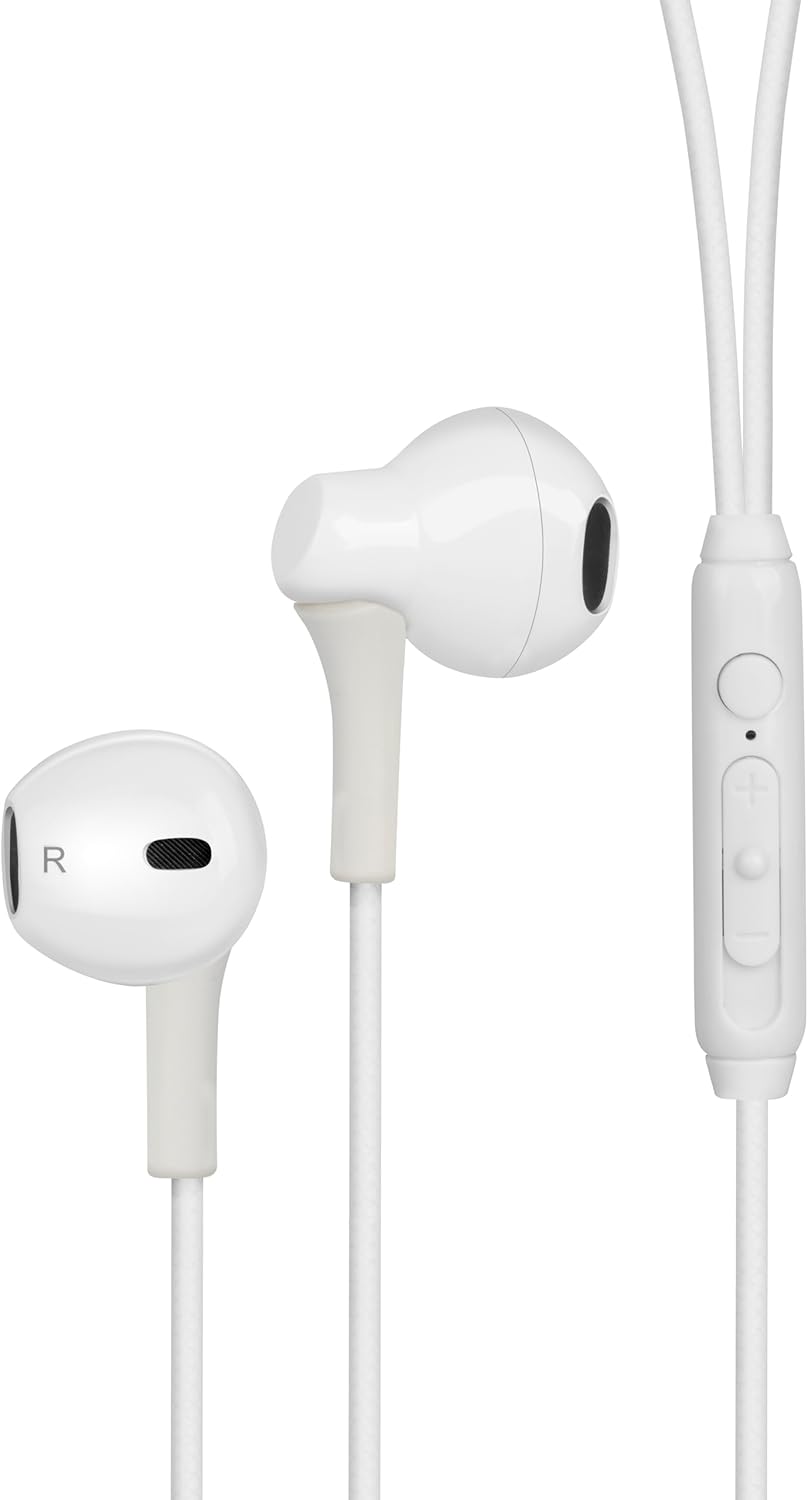
Figure 1: Digital Buds Earphones. This image shows both the left and right earbuds connected by their cable.

Figure 2: In-Line Remote and Microphone. The remote features volume up (+), volume down (-), and a multi-function button for calls and music control. The microphone is integrated into this unit.

Figure 3: USB-C Connector. This connector is used to plug the earphones into compatible devices such as smartphones, tablets, and laptops.
يثبت
- الاتصال بالجهاز: Locate the USB-C port on your smartphone, tablet, or laptop. Insert the USB-C connector of the Digital Buds firmly into the device's USB-C port.
- وضع سماعات الأذن: Gently insert the earbuds into your ears. The earbud marked 'L' is for the left ear, and 'R' is for the right ear. Adjust them for a comfortable and secure fit. If necessary, try the different sized ear tips included to find the best fit for optimal sound quality and comfort.
- التعرف الأولي: Your device should automatically recognize the earphones. You may need to select them as the audio output device in your device's sound settings.
تعليمات التشغيل
The in-line remote provides convenient control over your audio and calls.
تشغيل الموسيقى
- تشغيل/إيقاف مؤقت: اضغط على الزر متعدد الوظائف مرة واحدة.
- المسار التالي: اضغط على الزر متعدد الوظائف مرتين بسرعة.
- المسار السابق: Press the multi-function button three times quickly.
- رفع الصوت: اضغط على زر "+".
- اخفض الصوت: اضغط على زر '-'.
استدعاء إدارة
- الرد/إنهاء المكالمة: اضغط على الزر متعدد الوظائف مرة واحدة أثناء مكالمة واردة أو مكالمة جارية.
- رفض المكالمة: اضغط مع الاستمرار على الزر متعدد الوظائف لمدة ثانيتين تقريبًا أثناء المكالمة الواردة.
مساعد صوتي
- تنشيط مساعد الصوت: Press and hold the multi-function button for approximately 2 seconds when not on a call or playing music. This will activate your device's default voice assistant (e.g., Google Assistant, Siri).
صيانة
Proper care will extend the life of your Digital Buds.
- تنظيف: Use a soft, dry, lint-free cloth to wipe the earbuds and cable. For stubborn dirt, slightly dampاغسل قطعة القماش بالماء. لا تستخدم مواد كيميائية قاسية أو منظفات كاشطة.
- تخزين: When not in use, store the earphones in a clean, dry place, preferably in a small pouch or case to prevent tangling and damage.
- تجنب الرطوبة: Do not expose the earphones to excessive moisture, rain, or liquids.
- التعامل معها بحذر: Avoid pulling on the cable excessively or bending the USB-C connector at sharp angles.
استكشاف الأخطاء وإصلاحها
إذا واجهت أي مشكلات، راجع المشكلات والحلول الشائعة التالية.
| مشكلة | حل |
|---|---|
| لا يوجد صوت من سماعات الأذن. |
|
| الميكروفون لا يعمل أثناء المكالمات. |
|
| أزرار التحكم عن بعد لا تستجيب. |
|
تحديد
| ميزة | التفاصيل |
|---|---|
| ماركة | groov e |
| اسم الموديل | Groove Digital Buds - White |
| رقم موديل العنصر | GVEB16 |
| تكنولوجيا الاتصال | سلكي (USB-C) |
| وضع الأذن | في الأذن |
| عامل الشكل | في الأذن |
| طريقة التحكم | Remote (In-line) |
| المكونات المضمنة | سماعات الأذن |
| مادة | سيليكون، بلاستيك |
| وزن العنصر | 1.06 أونصات |
| أبعاد الحزمة | 6.61 × 2.36 × 1.26 بوصة |
| الأجهزة المتوافقة | Tablets, Mobile phones, Laptops, Desktops |
| استخدامات محددة للمنتج | ترفيه |
الضمان والدعم
groov e products are manufactured to high standards and undergo rigorous quality checks. For information regarding warranty coverage, technical support, or customer service, please refer to the warranty card included with your purchase or visit the official groov e webموقع.
يرجى الاحتفاظ بإثبات الشراء الخاص بك لاستخدامه في أي مطالبات بالضمان.


