1. المقدمة
This manual provides detailed instructions for the installation, operation, and maintenance of your RetroSound RetroRadio LABC-M1-226-08-80F1. This unit is designed for 1967-68 Ford Mustang vehicles and features an AM/FM RDS tuner, Bluetooth connectivity, and auxiliary input.
2. معلومات السلامة
- Always disconnect the vehicle's battery before installation to prevent electrical shorts.
- Ensure all wiring connections are secure and properly insulated to avoid damage to the unit or vehicle.
- لا تقم بتشغيل الجهاز بطريقة تشتت انتباهك عن القيادة.
- استعن بفني تركيب محترف إذا كنت غير متأكد من أي جزء من عملية التركيب.
3. محتويات العبوة
تأكد من وجود جميع العناصر في الحزمة الخاصة بك:
- RetroSound RetroRadio LABC-M1-226-08-80F1 Head Unit
- Wiring Harness (Power/Speakers)
- InfiniMount Brackets
- Knob Shafts
- ميكروفون خارجي
- أجهزة التثبيت

Figure 3.1: Included Knob Shafts

Figure 3.2: External Microphone
4. الإعداد والتثبيت
4.1. أبعاد
Before installation, ensure the unit fits your vehicle's dashboard opening. Refer to the diagram below for precise measurements.

الشكل 4.1: أبعاد الوحدة
4.2. Mounting with InfiniMount Brackets
The patented InfiniMount brackets allow for flexible mounting of the unit's shafts at various angles to accommodate different dashboard configurations.

Figure 4.2: InfiniMount Brackets and Flexible Shaft Mounting
- Attach the InfiniMount brackets to the sides of the head unit using the provided screws.
- Insert the knob shafts into the desired positions on the brackets.
- Adjust the angle of the shafts as needed to align with your vehicle's dashboard openings.
- Secure the unit into the dashboard opening.
4.3. توصيلات الأسلاك
Carefully connect all necessary wires as shown in the diagram below. Ensure all connections are secure.
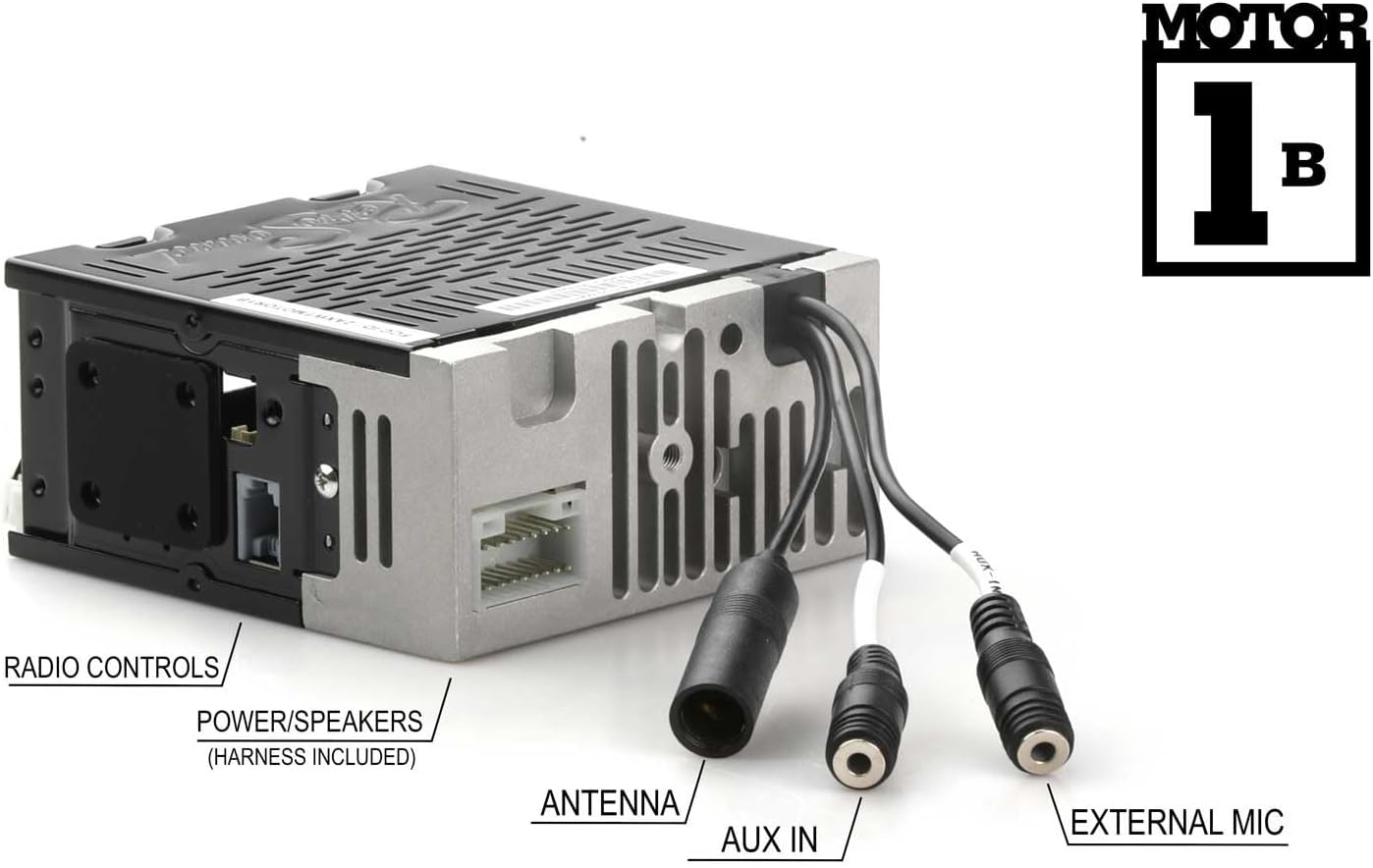
الشكل 4.3: توصيلات اللوحة الخلفية
- Power/Speakers: Connect the included wiring harness to the corresponding port on the unit and then to your vehicle's power and speaker wiring. Refer to your vehicle's wiring diagram for correct connections.
- الهوائي: Connect your vehicle's AM/FM antenna to the antenna input.
- مدخل AUX: Connect external audio devices using a 3.5mm audio cable to this input.
- ميكروفون خارجي: Plug in the provided external microphone for hands-free calling. Position the microphone in a location that allows for clear voice pickup.
- الضوابط الراديو: Connect to compatible vehicle radio controls if available.
5. تعليمات التشغيل
5.1. تشغيل/إيقاف التشغيل
اضغط على زر الطاقة (عادة ما يكون مدمجًا مع زر التحكم في مستوى الصوت) لتشغيل الجهاز أو إيقاف تشغيله.
5.2. AM/FM Tuner
- اختيار فرقة: Press the BAND button to switch between AM and FM bands.
- ضبط: Use the tuning knobs or seek buttons to find radio stations.
- المسبقة: The unit supports 30 presets. To save a station, tune to the desired station, then press and hold a preset button until you hear a confirmation beep. To recall a preset, press the corresponding preset button.
- RDS (نظام بيانات الراديو): When available, RDS will display station information such as station name, song title, or artist.
- Tuner Frequencies: The tuner frequencies can be selected for USA, Europe, Australia, Japan, or Russia. Refer to the settings menu to adjust this if needed.
5.3. Bluetooth Connectivity (Version 5.0)
تتميز الوحدة بتقنية بلوتوث مدمجة لإجراء المكالمات بدون استخدام اليدين وبث الصوت.
- الاقتران:
- تأكد من تمكين Bluetooth على جهازك المحمول.
- On the RetroRadio, navigate to the Bluetooth menu (refer to the display for menu options).
- Select "Pair Device" or similar option. The unit will become discoverable.
- On your mobile device, search for available Bluetooth devices and select "RetroRadio" (or similar name).
- قم بتأكيد رمز الاقتران إذا طُلب منك ذلك.
- الاتصال بدون استخدام اليدين: Once paired, you can make and receive calls through the unit using the external microphone. Use the unit's controls to answer, end, or reject calls.
- تدفق الصوت: Play audio from your paired mobile device directly through the RetroRadio. Use the unit's controls to play, pause, skip tracks, and adjust volume.
5.4. المدخلات الإضافية
Connect any portable audio device (e.g., MP3 player, smartphone) to the rear-mounted auxiliary input using a 3.5mm audio cable. Select the AUX input source on the RetroRadio to listen to audio from the connected device.
6. الصيانة
- تنظيف: Use a soft, dry cloth to clean the unit's display and controls. Do not use abrasive cleaners or solvents.
- تحديثات البرامج الثابتة: Check the RetroSound webقم بتحديث الموقع بشكل دوري للحصول على أي تحديثات متاحة للبرامج الثابتة لضمان الأداء الأمثل.
7. استكشاف الأخطاء وإصلاحها
| مشكلة | السبب المحتمل | حل |
|---|---|---|
| لا يوجد طاقة | اتصال الطاقة غير محكم، المصهر المنفوخ، بطارية السيارة منفصلة. | Check power wiring, inspect vehicle fuses, ensure battery is connected. |
| لا يوجد صوت | أسلاك السماعات مفصولة، مستوى الصوت منخفض جدًا، تم اختيار مصدر غير صحيح. | Verify speaker connections, increase volume, select correct audio source (AM/FM, Bluetooth, AUX). |
| البلوتوث غير مقترن | Bluetooth not enabled on device, unit not in pairing mode, device too far. | Ensure Bluetooth is on, put unit in pairing mode, bring device closer, try re-pairing. |
| استقبال الراديو ضعيف | الهوائي غير متصل، الهوائي تالف، منطقة الإشارة ضعيفة. | Check antenna connection, inspect antenna for damage, try tuning to a stronger station. |
8. المواصفات
- نموذج: LABC-M1-226-08-80F1
- ماركة: ريترو ساوند
- Ampمكبر: Built-in 275-watt (peak power) Mosfet amplifier, 18 watts RMS x 4 channels
- بلوتوث: Version 5.0 (with external microphone for hands-free calls)
- الموالف: AM/FM RDS tuner with 30 presets
- Tuner Frequencies: Selectable (USA/EUR/AUS/JAP/RUS)
- المدخلات: Rear-mounted Auxiliary input (3.5mm), Bluetooth
- ذاكرة غير متطايرة: نعم
- أبعاد الوحدة (الارتفاع × العرض × العمق): Approximately 2" x 4.34" x 4" (51mm x 110mm x 100mm) - Refer to Figure 4.1 for exact measurements.
- وزن السلعة: 3.3 رطل
9. معلومات الضمان
This RetroSound product is covered by a ضمان لمدة سنتين from the date of purchase. This warranty covers defects in materials and workmanship under normal use. Please retain your proof of purchase for warranty claims. For full warranty terms and conditions, please refer to the official RetroSound webالموقع أو الاتصال بدعم العملاء.
10. دعم العملاء
If you encounter any issues not covered in this manual or require further assistance, please contact RetroSound customer support. Contact information can typically be found on the official RetroSound webموقع.
Webموقع: www.retrosound.com


