1. المقدمة
This manual provides essential information for setting up, operating, and maintaining your Beelink SER5 Mini PC. The Beelink SER5 is a compact, high-performance mini computer featuring an AMD Ryzen 5 5500U processor, designed for various tasks including office work, 4K video playback, and light gaming.
For optimal performance and longevity, please read this manual thoroughly before using your device.
2. محتويات العبوة
تأكد من وجود جميع العناصر في الحزمة الخاصة بك:
- 1x Beelink SER5 5500U Mini PC
- 1 × كابل HDMI
- 1 × محول الطاقة
- 1x دليل المستخدم (هذه الوثيقة)
- 1x Wall-mounted bracket

Figure 2.1: Beelink SER5 Mini PC and included accessories.
3. انتهى المنتجview
The Beelink SER5 Mini PC is engineered for efficiency and versatility. It features a compact design with robust connectivity options and an advanced cooling system.
3.1 الميزات الرئيسية
- معالج عالي الأداء: Powered by AMD Ryzen 5 5500U (6 Cores/12 Threads, up to 4.0 GHz) for stable and reliable performance.
- الرسومات: Integrated Radeon Graphics with 7 cores at 1800 MHz, supporting 4K FPS video playback.
- تخزين الذاكرة: Equipped with 16GB DDR4 RAM (expandable up to 64GB) and a 500GB M.2 NVMe 2280 SSD (expandable up to 4TB).
- دعم العرض الثلاثي: Connect up to three monitors simultaneously via HDMI, DisplayPort (DP), and Type-C ports for enhanced productivity.
- الاتصال: Features WiFi 6, RJ45 2.5G LAN, and Bluetooth 5.2 for fast and stable network and peripheral connections.
- التبريد الفعال: A silent and powerful fan with a dual heat pipe system ensures rapid heat dissipation, maintaining optimal operating temperatures.
3.2 المنافذ والواجهات
The Mini PC offers a variety of ports for connecting peripherals and displays:
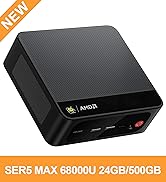
Figure 3.1: Front and Rear Ports of the Beelink SER5 Mini PC.
- أمام: 1x Type-C (Data & Video), 3x USB 3.2 Gen 2, 1x Earphone Jack, Power Button, CLR CMOS button.
- مؤخرة: 1x HDMI, 1x DisplayPort (DP), 1x USB 2.0, 1x RJ45 2.5G LAN, DC Power Input.
3.3 نظام التبريد
The Mini PC incorporates a large fan and dual heat conduction tubes to ensure efficient heat dissipation, maintaining system stability during demanding tasks.
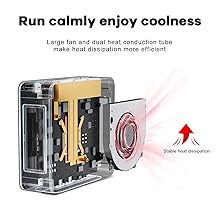
Figure 3.2: Internal Cooling System.
4. دليل الإعداد
4.1 الإعداد الأولي
- توصيل الطاقة: Plug the power adapter into the DC input port on the rear of the Mini PC, then connect it to a power outlet.
- توصيل الشاشة: Use an HDMI, DisplayPort, or Type-C cable to connect your monitor(s) to the corresponding port(s) on the Mini PC.
- توصيل الأجهزة الطرفية: قم بتوصيل لوحة المفاتيح والماوس وأي أجهزة USB أخرى بالمنافذ USB المتاحة.
- تشغيل الطاقة: اضغط على زر التشغيل في مقدمة جهاز الكمبيوتر الصغير. سيضيء مؤشر الطاقة.
- إعداد نظام التشغيل: Follow the on-screen instructions to complete the initial setup of your operating system (e.g., Windows 11).
4.2 التركيب على الحائط
The included wall-mounted bracket allows you to discreetly install the Mini PC behind a monitor or on a wall.
- Attach the bracket to the Mini PC using the provided screws.
- Secure the bracket to the back of your display (if VESA compatible) or to a wall using appropriate mounting hardware (not always included).
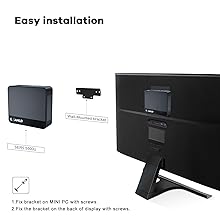
Figure 4.1: Wall Mounting Installation.
5. تعليمات التشغيل
5.1 تشغيل/إيقاف التشغيل
- تشغيل الطاقة: اضغط على زر الطاقة مرة واحدة.
- إيقاف التشغيل: From the operating system, select 'Shut down'. Alternatively, press and hold the power button for 5-7 seconds for a forced shutdown (use only when necessary).
5.2 الاتصال بالشبكة
- واي فاي: The Mini PC supports Wi-Fi 6. To connect, navigate to your operating system's network settings, select your Wi-Fi network, and enter the password.
- إيثرنت (LAN): For a wired connection, plug an Ethernet cable into the RJ45 2.5G LAN port on the rear of the Mini PC.
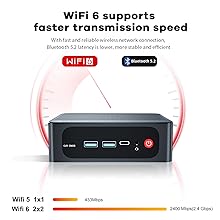
Figure 5.1: WiFi 6 Connectivity.
5.3 بلوتوث
The Mini PC supports Bluetooth 5.2. To pair Bluetooth devices, go to your operating system's Bluetooth settings and follow the pairing instructions for your specific device.
6. الصيانة
6.1 التنظيف
Regularly clean the exterior of the Mini PC with a soft, dry cloth. Ensure ventilation openings are free from dust and debris to maintain optimal cooling performance. Do not use liquid cleaners directly on the device.
6.2 ترقيات التخزين والذاكرة
The Beelink SER5 Mini PC supports upgrades for both RAM and SSD storage.
- كبش: The device has two DDR4 RAM slots, supporting up to 64GB (2x 32GB).
- SSD: The M.2 NVMe 2280 SSD can be upgraded to a maximum of 4TB.
For detailed upgrade instructions, please refer to the official Beelink support resources or consult a qualified technician.
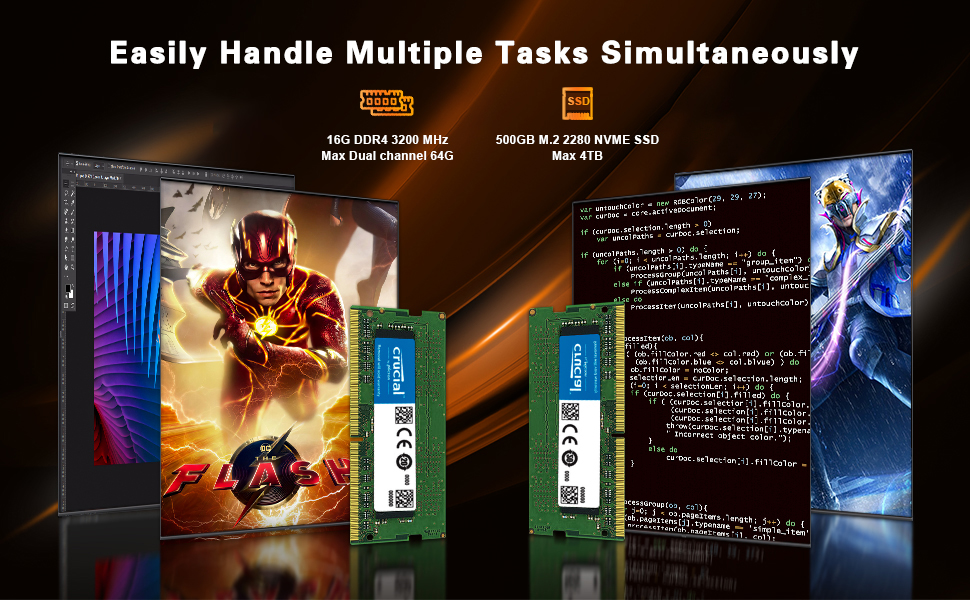
Figure 6.1: RAM Upgrade Capability.

Figure 6.2: SSD Upgrade Capability.
7. استكشاف الأخطاء وإصلاحها
- لا يوجد طاقة: تأكد من توصيل محول الطاقة بإحكام بكل من جهاز الكمبيوتر الصغير ومأخذ كهربائي يعمل. اختبر المأخذ بجهاز آخر.
- لا يوجد عرض: Verify that the monitor is powered on and the display cable (HDMI, DP, or Type-C) is firmly connected to both the Mini PC and the monitor. Try a different cable or monitor if possible.
- لا يوجد اتصال بالإنترنت: For Wi-Fi, check your network settings and ensure you are connected to the correct network. For wired LAN, ensure the Ethernet cable is properly connected and your router is functioning.
- System Slowdown/Overheating: Ensure the Mini PC's ventilation holes are not obstructed. Close unnecessary applications. If issues persist, consider cleaning the internal fan (refer to maintenance section or professional service).
- الوصول إلى نظام الإدخال والإخراج الأساسي (BIOS): To access the BIOS setup, press the F7 key repeatedly during startup.
8. المواصفات
Detailed technical specifications for the Beelink SER5 Mini PC:
| ميزة | مواصفة |
|---|---|
| المعالج | AMD Ryzen 5 5500U (6 Cores/12 Threads, up to 4.0 GHz) |
| الرسومات | AMD Radeon Graphics 7 CUs, 1800 MHz |
| كبش | 16GB DDR4 (2x 8GB), expandable to 64GB |
| تخزين | 500GB M.2 NVMe 2280 SSD, expandable to 4TB |
| نظام التشغيل | OS (e.g., Windows 11) |
| مخرج الفيديو | HDMI (4K HD), DisplayPort (DP 1.4), Type-C (Data & Video) - Triple Display Support |
| منافذ USB | 3x USB 3.2 Gen 2, 1x USB 2.0, 1x Type-C |
| شبكة | WiFi 6 (802.11ax), Bluetooth 5.2, RJ45 2.5G LAN |
| أبعاد | 4.96 × 4.45 × 1.65 بوصة (126 × 113 × 42 مم) |
| وزن | حوالي 1.94 رطل |
Table 8.1: Beelink SER5 Mini PC Specifications.
9. الضمان والدعم
Beelink provides comprehensive support for your Mini PC:
- ضمان: 1-Year Free Warranty.
- الدعم الفني: Lifetime technical issue assistance.
- خدمة العملاء: 7 Days/24 Hours serving.
For technical assistance or warranty claims, please contact the Beelink customer service team. All Beelink Mini PCs have obtained FCC, CE, and ROSH Certifications.
10. فيديو المنتجview
Watch an official introduction video for the Beelink SER5 5500U Mini PC:
Video 10.1: Introduction to Beelink SER5 5500U Mini PC. This video provides a visual overview من ميزات المنتج وتصميمه.


