1. المقدمة
Thank you for choosing the DreamSky DS216 AM/FM Portable Radio. This manual provides essential information for the safe and efficient operation of your new radio. Please read it thoroughly before use and retain it for future reference.
محتويات الحزمة:
- DreamSky AM/FM Radio
- محول الطاقة
- دليل المالك
2. الميزات الرئيسية
- Strong Reception: Pulls in both AM and FM signals effectively.
- Clear Loud Sound: Equipped with a large speaker for crisp audio quality.
- تشغيل سهل: Features a smooth, large analog dial for simple tuning and volume control.
- خيارات الطاقة المزدوجة: Operates via AC plug-in (adapter included) or 4 AA alkaline batteries (not supplied).
- تصميم محمول: Compact and lightweight with a convenient handle for easy transport.
- الاستماع الخاص: Includes a 3.5mm earphone jack.
3. مكونات المنتج
Familiarize yourself with the main components of your DreamSky DS216 radio:
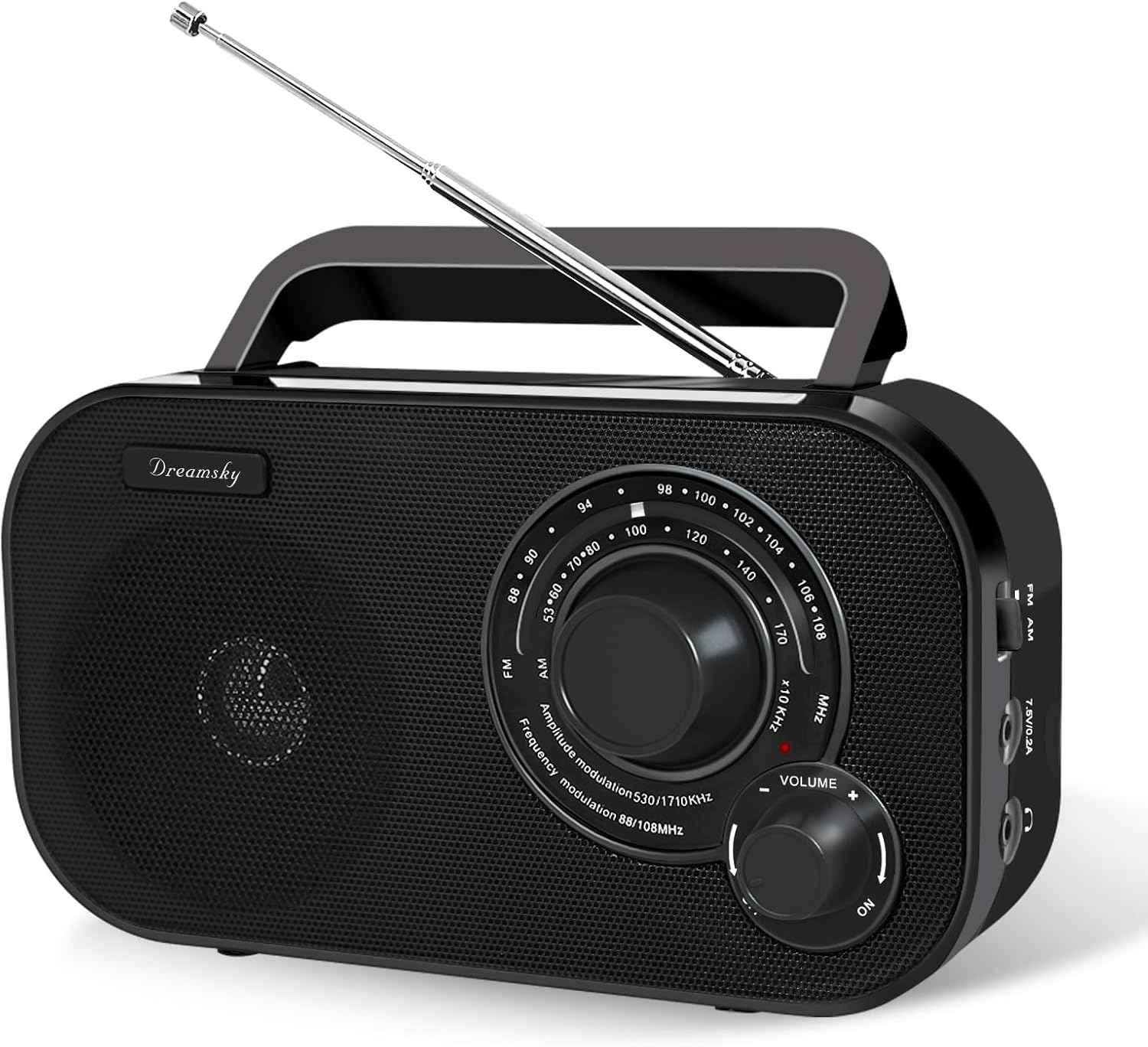
This image displays the front of the radio, highlighting the large tuning dial for station selection, the volume control knob, and the integrated speaker. The "DreamSky" brand name is visible on the left side.

This image shows the side panel of the radio, detailing the slide switch for selecting between AM and FM bands, the power input port for the AC adapter, and the 3.5mm headphone jack for private listening.

توفر هذه الصورة view of the radio's top and rear, highlighting the integrated carrying handle for portability and the extendable telescopic antenna for improved reception.
4. الإعداد
4.1 Powering Your Radio
Your DreamSky DS216 radio offers two power options:
- طاقة التيار المتردد: Connect the included power adapter to the "7.5V/0.2A" port on the side of the radio and plug it into a standard wall outlet.
- طاقة البطارية: For portable use, open the battery compartment on the back of the radio and insert 4 AA alkaline batteries (not supplied), ensuring correct polarity. Close the compartment securely.

This image visually demonstrates how to power the radio using either the provided AC adapter or by inserting four AA batteries into the rear compartment.
4.2 ضبط الهوائي
For optimal FM reception, extend the telescopic antenna located on the back of the radio. Adjust its position and angle to achieve the clearest signal. For AM reception, the internal antenna is generally sufficient, but rotating the radio itself may improve signal strength.
5. تعليمات التشغيل
5.1 تشغيل/إيقاف التشغيل والتحكم في مستوى الصوت
تدوير مقدار knob clockwise to turn the radio ON and increase the volume. Rotate counter-clockwise to decrease the volume and turn the radio OFF.
5.2 Selecting a Band (AM/FM)
استخدم FM/AM slide switch located on the side of the radio to select your desired band.
5.3 ضبط المحطة
قم بتدوير الكبير ضبط dial on the front of the radio to scan for stations. The red indicator light will illuminate when a strong signal is detected.

This image highlights the radio's capability for strong reception and clear audio output, with visual cues representing radio waves and sound quality.
5.4 استخدام سماعات الرأس
For private listening, plug any standard 3.5mm headphones (not included) into the headphone jack on the side of the radio. The internal speaker will automatically mute.

This image focuses on the 3.5mm earphone jack, indicating its location for connecting headphones for personal listening.
6. الصيانة والعناية
- Keep the radio dry and away from moisture.
- نظّف السطح الخارجي بقطعة قماش ناعمة وجافة. لا تستخدم المنظفات الكاشطة أو المذيبات.
- قم بإزالة البطاريات إذا لم يتم استخدام الراديو لفترة طويلة لمنع التسرب.
- تجنب درجات الحرارة القصوى وأشعة الشمس المباشرة.
7. استكشاف الأخطاء وإصلاحها
| مشكلة | السبب المحتمل | حل |
|---|---|---|
| لا يوجد طاقة | البطاريات فارغة أو تم إدخالها بشكل غير صحيح؛ محول التيار المتردد غير موصول أو به عطل. | استبدل البطاريات، وتحقق من القطبية؛ وتأكد من أن محول التيار المتردد موصول بإحكام ويعمل بشكل صحيح. |
| Poor reception/static | Weak signal; antenna not extended or positioned correctly; interference from other electronics. | Extend and adjust the telescopic antenna (FM); rotate the radio (AM); move away from electronic devices. |
| لا يوجد صوت من السماعة | Volume too low; headphones plugged in. | Increase volume; unplug headphones. |
8. المواصفات
- نموذج: دي اس 216
- أبعاد: 8.2 × 2.2 × 4.6 بوصة
- وزن: 1.41 رطل
- مصدر الطاقة: AC 120V/60Hz or DC 6V (4 x AA batteries)
- نطاق تردد FM: 87 - 108 ميجاهرتز
- نطاق التردد AM: 520 - 1710 KHz
- الاتصال: AM/FM Tuner, 3.5mm Headphone Jack
- الشركة المصنعة: ShenZhen litian technology Co.,Ltd
9. الضمان والدعم
For warranty information or customer support, please refer to the contact details provided in your original purchase documentation or visit the official DreamSky website. You may also contact the manufacturer directly at info@dreamskyu.com.
هذا المنتج هو تم التحقق من ذلك بواسطة الشفافية, ensuring authenticity and product information.
10. معلومات السلامة
- لا تعرض الجهاز للمطر أو الرطوبة لتجنب نشوب حريق أو التعرض لصدمة كهربائية.
- لا تفتح الصندوقasinز. إحالة جميع أعمال الصيانة إلى موظفين مؤهلين.
- تخلص من البطاريات بالطريقة الصحيحة وفقًا للوائح المحلية.
11. مقاطع فيديو المنتج
DreamSky Portable AM FM Radio - Overview
يوفر هذا الفيديو شرحًا شاملاًview of the DreamSky Portable AM FM Radio, demonstrating its features, ease of use, and portable design. It highlights the tuning process, power options, and overall functionality of the device.
DreamSky AM FM Radio Portable - Features Showcase
This video showcases various features of the DreamSky AM FM Portable Radio, including its compact size, handle for easy carrying, and the simple controls for tuning and volume. It also briefly touches upon its dual power capabilities.


