1. المقدمة
The GuliKit KK3 PRO Controller is a high-performance gaming controller designed for multi-platform compatibility. It features advanced Hall Effect technology for joysticks and triggers, ensuring precision and durability without drift. With multiple vibration modes and customizable options, the KK3 PRO enhances your gaming experience across various devices.
2. الميزات الرئيسية
- Patented Maglev Vibration Motor: Offers distinct Rotor, HD Rumble, and Maglev Super Haptic vibration modes for immersive feedback.
- عصي التحكم ومشغلات تأثير هول: Provides high precision and eliminates stick drift, ensuring long-term reliability.
- High Precision Joystick: Features 2200 levels of precision for delicate micro-control.
- 1000Hz Wired & Wireless: Achieves super-fast response times with both wired and 2.4G wireless connections via the Hyperlink Adapter.
- 2 Metal Rear Paddles: Detachable, swappable, and remappable for personalized control.
- التوافق مع منصات متعددة: Supports Windows, Switch, Android, iOS, macOS, and Steam Deck.
- Six-Axis Gyroscope: Enables immersive motion control for supported games.
- Adjustable D-Pad: Supports switching between 4-direction and 8-direction modes to prevent ghosting in FPS games.
- Anti-Friction Metal Stick Ring: Ensures smoother joystick control.
- حساسية عصا التحكم القابلة للتعديل: Three modes available to meet different gaming needs.
- الألعاب الآلية (APG): Record and playback up to 10 seconds of operations.
3. الإعداد
3.1. محتويات العبوة
- GuliKit KK3 PRO Controller
- كابل شحن USB-C
- GuliKit Hyperlink Adapter (2.4G Dongle)
- Extra Button Caps (Nintendo Switch layout)
- Protective Case (for controller)
3.2. الشحن الأولي
Before first use, fully charge the controller using the provided USB-C cable. Connect the USB-C end to the controller and the USB-A end to a power source (e.g., computer USB port, wall adapter). The indicator light will show charging status.
3.3. الاقتران والاتصال
The KK3 PRO supports multiple connection methods:
- الاتصال السلكي: Connect the controller directly to your device (PC, Switch dock) using the USB-C cable.
- 2.4G Wireless (Hyperlink Adapter):
- Plug the GuliKit Hyperlink Adapter into a USB port on your PC or other compatible device.
- Turn on the controller. It should automatically connect to the adapter.
- اتصال بلوتوث:
- قم بتشغيل وحدة التحكم.
- Press and hold the pairing button (refer to the controller diagram in the manual for exact location) until the indicator light flashes rapidly.
- On your device (Switch, Android, iOS, macOS), go to Bluetooth settings and select 'GuliKit Controller' to pair.

Image: GuliKit KK3 PRO Controller with the Hyperlink Adapter for 2.4G wireless connectivity.
4. تعليمات التشغيل
4.1. تخطيط الأزرار ووظائفها
The GuliKit KK3 PRO features a standard controller layout with additional customizable elements:
- أزرار الوجه (A، B، X، Y): أزرار الإجراءات القياسية.
- D- الوسادة: Directional input, adjustable between 4-way and 8-way modes.
- عصا التحكم: Left and Right Hall Effect analog joysticks with anti-friction metal rings.
- أزرار الكتف (يسار، يمين): المدخلات الرقمية.
- Triggers (ZL, ZR): Hall Effect analog triggers.
- زر الصفحة الرئيسة: يعود إلى الشاشة الرئيسية للنظام.
- زر التقاط الشاشة: يلتقط لقطات الشاشة.
- زر الإعدادات: Accesses controller settings and customization options.
- المجاذيف الخلفية (G1، G2، G3، G4): Two detachable and remappable metal paddles on the back.

الصورة: الجبهة view of the GuliKit KK3 PRO Controller, showing joysticks, D-pad, and face buttons.
4.2. تخصيص عصا التحكم والزناد
- حساسية قابلة للتعديل: The controller offers three levels of joystick sensitivity. Refer to the in-box manual for specific button combinations to cycle through these settings.
- D-Pad Mode Switch: The D-Pad can be switched between 4-direction and 8-direction modes. This is useful for different game genres, such as fighting games or FPS.
4.3. إعدادات الاهتزاز
The KK3 PRO features a patented Maglev Vibration Motor with three distinct modes and two vibration strengths:
- Rotor Vibration Mode: Standard vibration.
- HD Rumble Mode: More nuanced and precise vibration feedback.
- Maglev Super Haptic Mode: Advanced haptic feedback for enhanced immersion.
You can adjust the vibration strength to your preference. Consult the included manual for instructions on how to switch between modes and strengths.
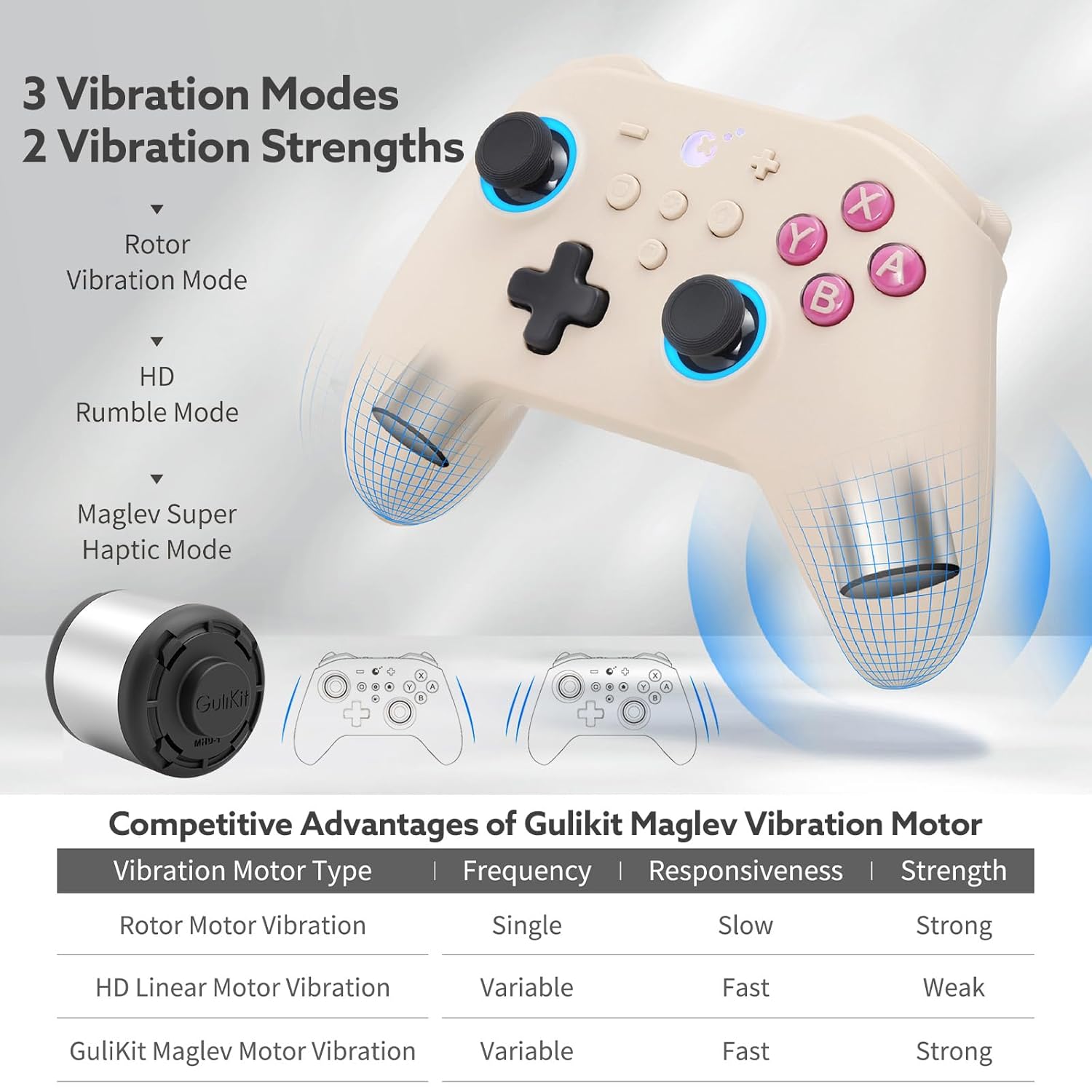
Image: Illustration of the GuliKit KK3 PRO's three vibration modes: Rotor, HD Rumble, and Maglev Super Haptic.
4.4. Rear Paddle Customization
The two metal rear paddles (G1, G2) are detachable and can be remapped to other button functions. This allows for quick access to frequently used commands without moving your thumbs from the joysticks.
4.5. Auto-Pilot Gaming (APG)
The APG feature allows you to record a sequence of up to 10 seconds of button presses and joystick movements. This recorded sequence can then be played back with a single button press, useful for repetitive tasks or complex combos in games.

Image: Visual representation of the Auto-Pilot Gaming (APG) feature, showing recording and playback functionality.
5. الاتصال والتوافق
The GuliKit KK3 PRO Controller is designed for broad compatibility:
- نينتندو سويتش: Fully compatible with Switch 1.0.0 or above, including gyroscope functionality.
- الكمبيوتر الشخصي: Supports Windows 7 or above, and SteamOS. Achieves 1000Hz polling rate with the Hyperlink Adapter for optimal performance.
- الأجهزة المحمولة: Compatible with Android 4.0 or above and iOS 13 or above.
- ماك: Supports macOS 10.10 or above.
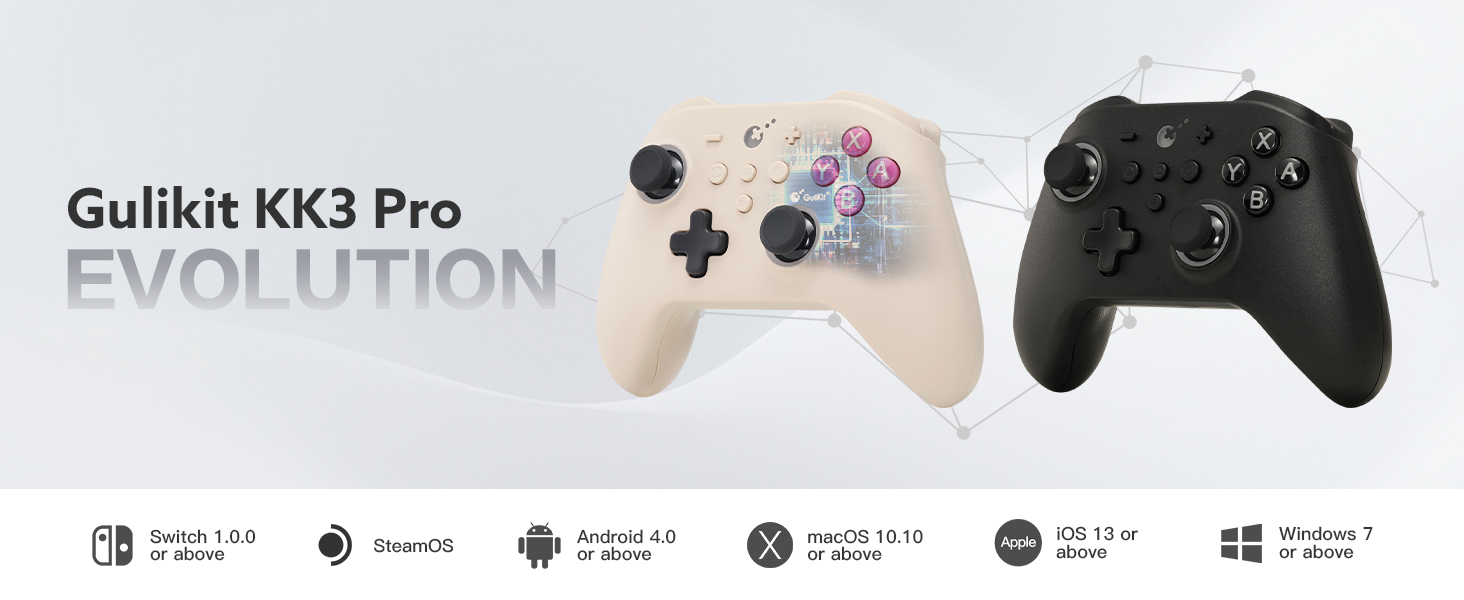
الصورة: أكثر منview of GuliKit KK3 Pro's multi-platform compatibility, including Switch, SteamOS, Android, macOS, iOS, and Windows.
6. الصيانة
Proper maintenance ensures the longevity and optimal performance of your GuliKit KK3 PRO Controller:
- تنظيف: استخدم قطعة قماش ناعمة وجافة لمسح وحدة التحكم. تجنب استخدام المواد الكيميائية القاسية أو المواد الكاشطة.
- تخزين: Store the controller in a cool, dry place away from direct sunlight and extreme temperatures. The included protective case is ideal for storage and travel.
- العناية بالبطارية: To prolong battery life, avoid completely draining the battery frequently. Charge the controller regularly, but avoid leaving it connected to a charger for extended periods after it's fully charged.
- Joystick & Trigger Care: While Hall Effect technology reduces wear, keep the joystick and trigger areas free from dust and debris.
7. استكشاف الأخطاء وإصلاحها
If you encounter issues with your GuliKit KK3 PRO Controller, refer to the following common solutions:
- وحدة التحكم غير متصلة:
- تأكد من شحن وحدة التحكم.
- Verify the correct connection mode (wired, 2.4G, Bluetooth) is selected on the controller and your device.
- For Bluetooth, try unpairing and re-pairing the controller.
- For 2.4G, ensure the Hyperlink Adapter is securely plugged in and recognized by your device.
- تأخر الإدخال:
- For competitive gaming, use the 2.4G Hyperlink Adapter or a wired connection for the lowest latency.
- Ensure there are no obstructions or excessive distance between the controller and the wireless receiver.
- Joystick/Trigger Issues (e.g., unexpected movement):
- Although Hall Effect technology prevents drift, recalibration might be necessary in rare cases. Refer to the official GuliKit website or included manual for calibration steps.
- Ensure the joystick and trigger areas are clean.
- الأزرار غير مستجيبة:
- تأكد من توصيل وحدة التحكم وتشغيلها بشكل صحيح.
- تأكد من عدم وجود أي شوائب عالقة تحت الأزرار.
8. المواصفات
| ميزة | التفاصيل |
|---|---|
| نموذج | KK3 برو |
| ماركة | جوليكيت |
| الاتصال | Wired (USB-C), Bluetooth, 2.4G Wireless (Hyperlink Adapter) |
| المنصات المدعومة | Windows, Switch, Android, iOS, macOS, Steam Deck |
| تقنية عصا التحكم | Hall Effect (2200 levels precision) |
| تقنية الزناد | مشغلات تناظرية بتأثير هول |
| اهتزاز | Patented Maglev Vibration Motor (Rotor, HD Rumble, Maglev Super Haptic) |
| معدل التصويت | 1000 هرتز (سلكي ولاسلكي بتردد 2.4 جيجا هرتز) |
| المجاذيف الخلفية | 2 Metal, Detachable, Swappable, Remappable |
| جيروسكوب | Six-Axis (for Switch) |
| ألعاب الطيار الآلي (APG) | Record up to 10 seconds |
| أبعاد | 6.18 × 5.98 × 2.83 بوصة |
| وزن العنصر | 14.9 أونصات |
9. مقاطع فيديو رسمية للمنتج
9.1. GuliKit KK3 MAX Controller Overview (Relevant Features)
فيديو: أكثر منview of the GuliKit KK3 MAX Controller, showcasing features such as Hall Effect joysticks and triggers, SmartTrigger technology, detachable back buttons, Gpower CPU, and magnetic levitation vibration. While specific to the MAX model, many core technologies and design principles apply to the KK3 PRO.
9.2. GuliKit KK3 Overview
فيديو: شرح مفصلview of the GuliKit KK3 controller, highlighting its design, button feel, connectivity options, and included accessories. This video provides a general unboxing and first impressions of the KK3 series.
10. الضمان والدعم
GuliKit products are typically covered by a manufacturer's warranty against defects in materials and workmanship. For specific warranty details, duration, and terms, please refer to the warranty card included with your product or visit the official GuliKit website. For technical support, troubleshooting assistance, or service inquiries, please contact GuliKit customer support through their official channels.
Extended protection plans may be available for purchase separately from retailers, offering additional coverage beyond the standard manufacturer's warranty.


