المنتج انتهىview
The JTEMAN 360 Rotating Cell Phone Stand with Wireless Bluetooth Speaker with Light is a versatile device designed to enhance your mobile experience. It integrates a rotatable phone stand, a Bluetooth speaker, and an atmosphere light into a single unit. This manual provides detailed instructions for its setup, operation, and maintenance.
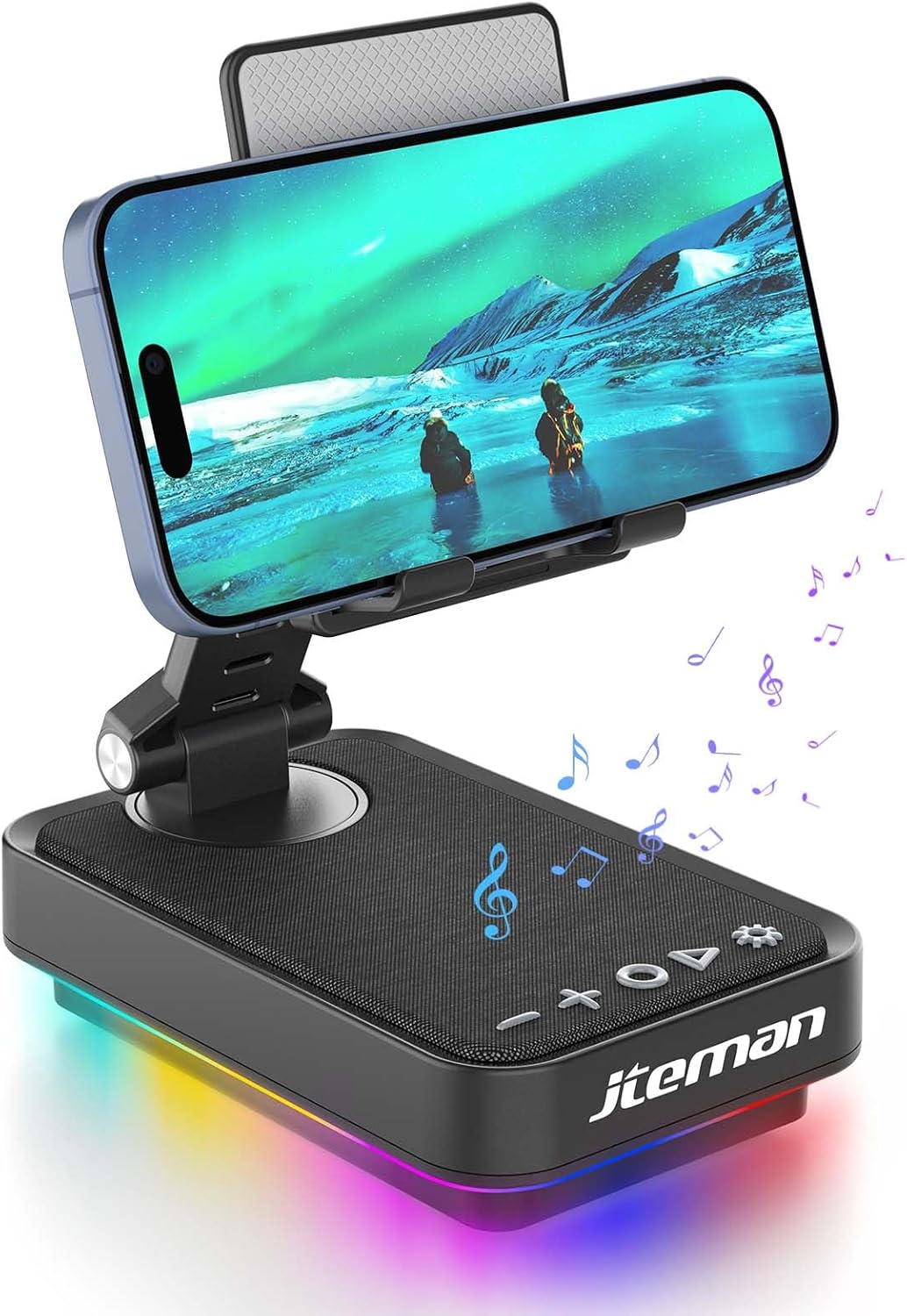
Figure 1: JTEMAN 360 Rotating Cell Phone Stand with Wireless Bluetooth Speaker with Light.
المكونات المتضمنة:
- Bluetooth Speaker (with integrated phone stand and light)
- كابل من النوع C
- دليل التعليمات
دليل الإعداد
1. Unboxing and Initial Inspection:
Carefully remove all components from the packaging. Inspect the device and accessories for any signs of damage. Ensure all listed components are present.
Video 1: Unboxing and initial setup of the JTEMAN phone stand and Bluetooth speaker.
2. Preparing the Phone Stand:
Before first use, locate and remove the silicone protective patch from the device's base. This patch protects the surface during shipping.
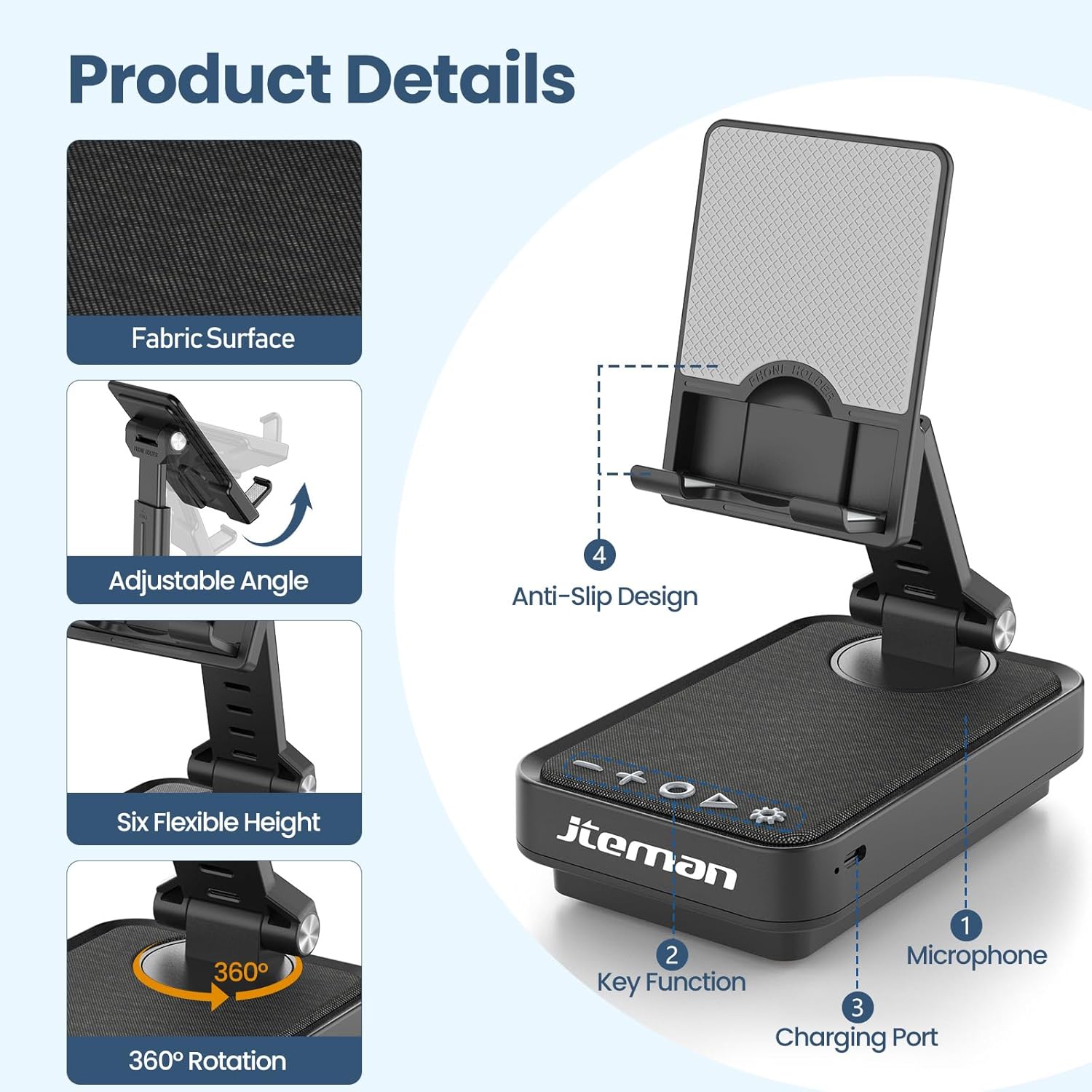
Figure 2: Product details and components. Note the anti-slip design and key functions.
3. شحن الجهاز:
Connect the provided Type-C cable to the charging port on the device and the other end to a compatible USB power adapter (not included). The power indicator light will show red during charging and turn green when fully charged.
- الضوء الأحمر: جاري شحن البطارية.
- الضوء الأخضر: تم شحن البطارية بالكامل.

الشكل 3: سعة البطارية وأوقات الاستخدام المقدرة.
4. الاقتران بالبلوتوث:
- Long press the Power ON/OFF button (3) for 3 seconds to turn on the speaker. The speaker will enter pairing mode, indicated by a flashing blue light.
- On your smartphone or tablet, navigate to Bluetooth settings.
- Select "L39-1" from the list of available devices.
- Once connected, the blue light will become solid.

Figure 4: Bluetooth connection with a laptop, demonstrating wireless audio playback.
تعليمات التشغيل
انتهت لوحة التحكمview:

الشكل 5: مفصل view لوحة التحكم ووظائفها.
- VOL- (1): اضغط لخفض مستوى الصوت.
- VOL+ (2): اضغط لرفع مستوى الصوت.
- Answer/Hang up/Play/Pause/Next (4):
- ضغطة قصيرة لتشغيل / إيقاف الموسيقى مؤقتًا.
- Short press to answer/hang up calls.
- اضغط لفترة طويلة للانتقال إلى المسار التالي.
- Power ON/OFF (3):
- اضغط لفترة طويلة لمدة ثانيتين لتشغيل/إيقاف تشغيل مكبر الصوت.
- Double press to switch between Bluetooth and AUX modes.
- Short press to adjust the brightness of the atmosphere lights (4 levels).
- Atmosphere Light (5):
- Long press for 3 seconds to turn on/off the light.
- Short press to switch lighting mode (11 modes available, 3 modes sync with music).
- ميكروفون (6): لإجراء مكالمات بدون استخدام اليدين.
- منفذ الشحن (7): Type-C input for charging.
- Power Indicator Light (8): Shows charging status and Bluetooth connection status.
Phone Stand Adjustment:
The phone stand features 360° rotation and adjustable height and angle to suit various viewing needs. The anti-slip silicone pads ensure device stability.

Figure 6: The phone stand supports a wide range of devices, including smartphones and tablets (4-13 inches).
The stand is foldable for easy portability.

Figure 7: The foldable design allows for easy storage and transport.
صيانة
تنظيف:
Wipe the device with a soft, dry cloth. Do not use abrasive cleaners, solvents, or harsh chemicals, as these may damage the surface or internal components. Avoid exposing the device to excessive moisture.
تخزين:
When not in use for extended periods, store the device in a cool, dry place away from direct sunlight and extreme temperatures. Ensure the device is fully charged before storing to prolong battery life.
العناية بالبطارية:
To maximize battery lifespan, avoid fully discharging the battery frequently. Charge the device regularly, even if not in constant use. Do not expose the battery to high temperatures.
استكشاف الأخطاء وإصلاحها
| مشكلة | السبب المحتمل | حل |
|---|---|---|
| الجهاز لا يعمل. | بطارية منخفضة. | اشحن الجهاز باستخدام كابل Type-C المرفق. |
| لا يمكن الاتصال عبر البلوتوث. | البلوتوث غير مفعل على الجهاز؛ السماعة ليست في وضع الاقتران؛ المسافة بين السماعة والجهاز بعيدة جدًا. | Ensure Bluetooth is enabled on your phone/tablet. Long press Power ON/OFF button to enter pairing mode (flashing blue light). Move device closer to the speaker. |
| لا يوجد صوت من مكبر الصوت. | Volume too low; device not connected; AUX mode active. | Increase volume on both the speaker and your connected device. Verify Bluetooth connection. Double press Power ON/OFF button to switch to Bluetooth mode if in AUX mode. |
| Atmosphere lights not working. | انطفأت الأنوار؛ البطارية منخفضة. | Long press the Atmosphere Light button (5) to turn on. Charge the device. |
تحديد
| ميزة | التفاصيل |
|---|---|
| اسم الموديل | ل39-1 |
| نوع التركيب | جبل منضدية |
| نوع السماعة | الصوت المحيطي |
| ميزة خاصة | ضوء LED |
| الاستخدامات الموصى بها | للهواتف الذكية أو الأجهزة اللوحية |
| الأجهزة المتوافقة | Smartphone, Tablet (4-13 inches) |
| نوع وحدة التحكم | زر، المس |
| قناة الصوت المحيط | 2.0 |
| أبعاد المنتج | 5.3 بوصة عمق × 3.5 بوصة عرض × 2.3 بوصة ارتفاع |
| مقاوم للماء | خطأ شنيع |
| مصدر الطاقة | تعمل بالبطارية |
| نوع البطارية | 1 ليثيوم أيون (متضمنة) |
| نوع برنامج تشغيل الصوت | سائق ديناميكي |
| الاتصال اللاسلكي | بلوتوث 5.3 |
| الحد الأقصى لقوة خرج السماعة | 5 واط |
| استجابة التردد | 1 كيلو هرتز |
| وزن العنصر | 15.5 أونصات |
معلومات الضمان
This JTEMAN product comes with a ضمان لمدة سنة واحدة from the date of purchase. This warranty covers manufacturing defects and malfunctions under normal use. It does not cover damage caused by misuse, accidents, unauthorized modifications, or normal wear and tear.
Please retain your proof of purchase for warranty claims. For detailed warranty terms and conditions, refer to the official JTEMAN webالموقع أو الاتصال بدعم العملاء.
دعم العملاء
If you encounter any issues or have questions not covered in this manual, please contact JTEMAN customer support. Provide your product model number (L39-1) and a detailed description of the issue to assist our support team.
For the most up-to-date contact information, please visit the official JTEMAN webموقع: JTEMAN Store on Amazon


