1. المقدمة
This manual provides detailed instructions for the setup, operation, and maintenance of your DreamSky Wireless Weather Station. Please read this manual thoroughly before using the device to ensure proper function and longevity. This weather station offers real-time indoor and outdoor temperature and humidity readings, an atomic clock, and a weather forecast function.
2. انتهى المنتجview
The DreamSky Wireless Weather Station is designed to provide essential weather information at a glance. It features a large LCD display for easy readability and includes a wireless outdoor sensor.
2.1 المكونات المضمنة
- DreamSky Weather Station (Main Unit)
- مستشعر لاسلكي خارجي (وحدة واحدة)
- دليل المستخدم
- Mounting Hardware (Ruler, Nails)
2.2 الميزات الرئيسية
- 7.2-inch Large LCD Display for clear visibility.
- Wireless Indoor/Outdoor Temperature and Humidity with MAX/MIN records.
- Atomic Clock with Date and Auto Daylight Saving Time (DST) adjustment.
- Weather Forecast for the next 12-24 hours based on barometric pressure trends.
- High/Low Thermometer Alerts with selectable flash & beep or flash & mute modes.
- Supports up to 3 outdoor sensors (one sensor included).

الشكل 2.1: DreamSky Weather Station main unit and wireless outdoor sensor.
This image displays the main weather station unit with its large digital screen showing time, date, indoor/outdoor temperature, humidity, and weather forecast icons. Beside it is the compact white wireless outdoor sensor.
3. الإعداد
3.1 تركيب البطارية
- الوحدة الرئيسية: Open the battery compartment on the back of the main unit. Insert 3 AAA alkaline batteries, observing the correct polarity (+/-). Close the compartment.
- جهاز استشعار خارجي: Open the battery compartment on the back of the outdoor sensor. Insert 2 AA alkaline batteries, observing the correct polarity (+/-). Close the compartment.
The main unit will power on and begin searching for the outdoor sensor and the atomic clock signal.
3.2 وضع أجهزة الاستشعار الخارجية
For accurate readings and optimal signal transmission, consider the following:
- Place the sensor within 330 feet (100 meters) of the main unit.
- Ensure there are minimal obstructions (thick walls, metal objects, large appliances) between the sensor and the main unit.
- Mount the sensor in a shaded, dry location, protected from direct sunlight and precipitation, to prevent inaccurate temperature readings and water damage.
- Avoid placing the sensor near heat sources (e.g., vents, engines) or sources of extreme cold.
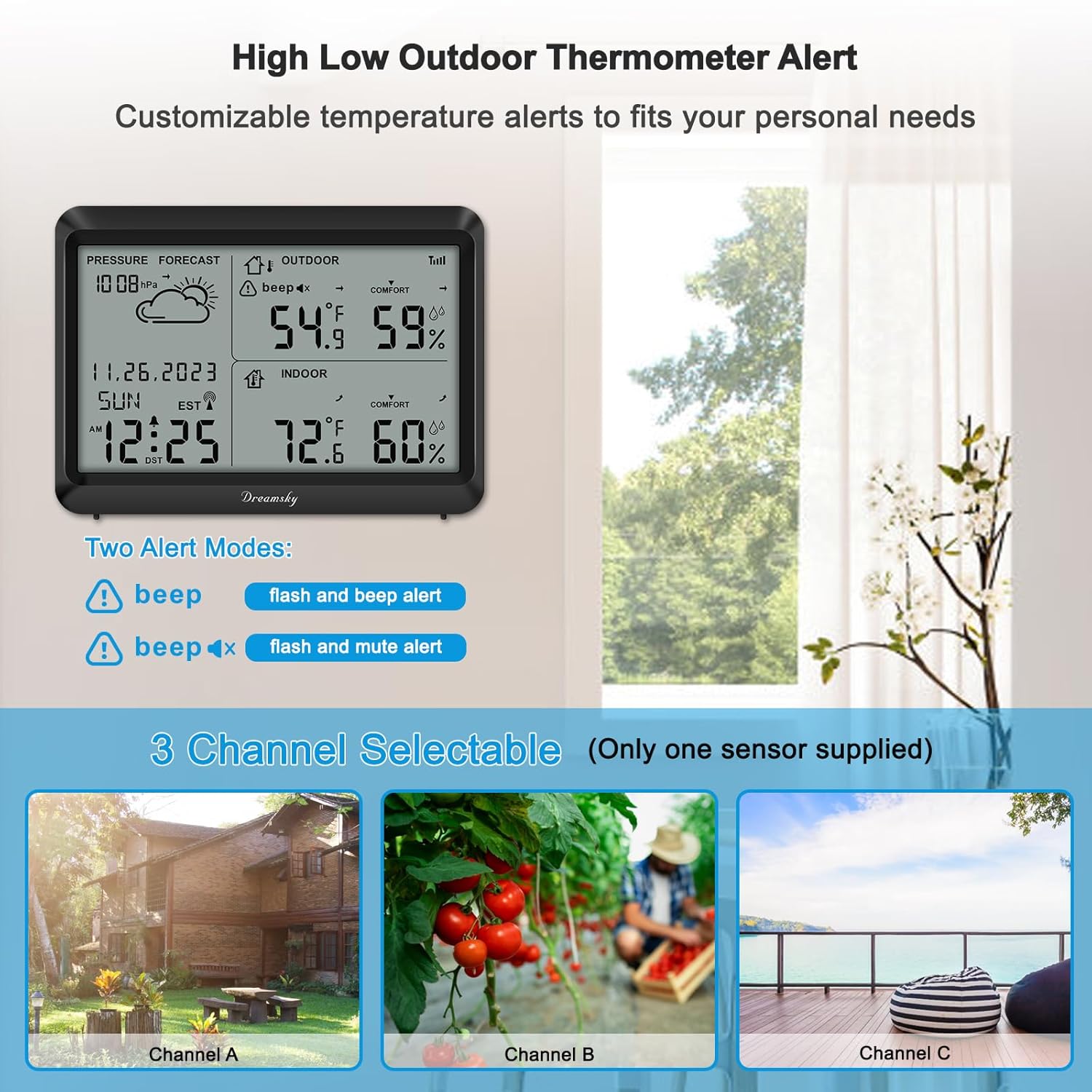
الشكل 3.1: Recommended outdoor sensor placement and channel selection.
This image illustrates the wireless outdoor sensor placed outside a window, indicating a signal range of up to 330 feet (100 meters). It also shows the main unit displaying indoor and outdoor conditions, and a diagram of three selectable channels (A, B, C) for multiple sensors, though only one sensor is included.
3.3 المزامنة الأولية
After installing batteries in both units, the main unit will automatically attempt to connect with the outdoor sensor. This process may take a few minutes. Once connected, the outdoor temperature and humidity will appear on the main unit's display. The main unit will also begin searching for the WWVB atomic clock signal to set the time automatically.

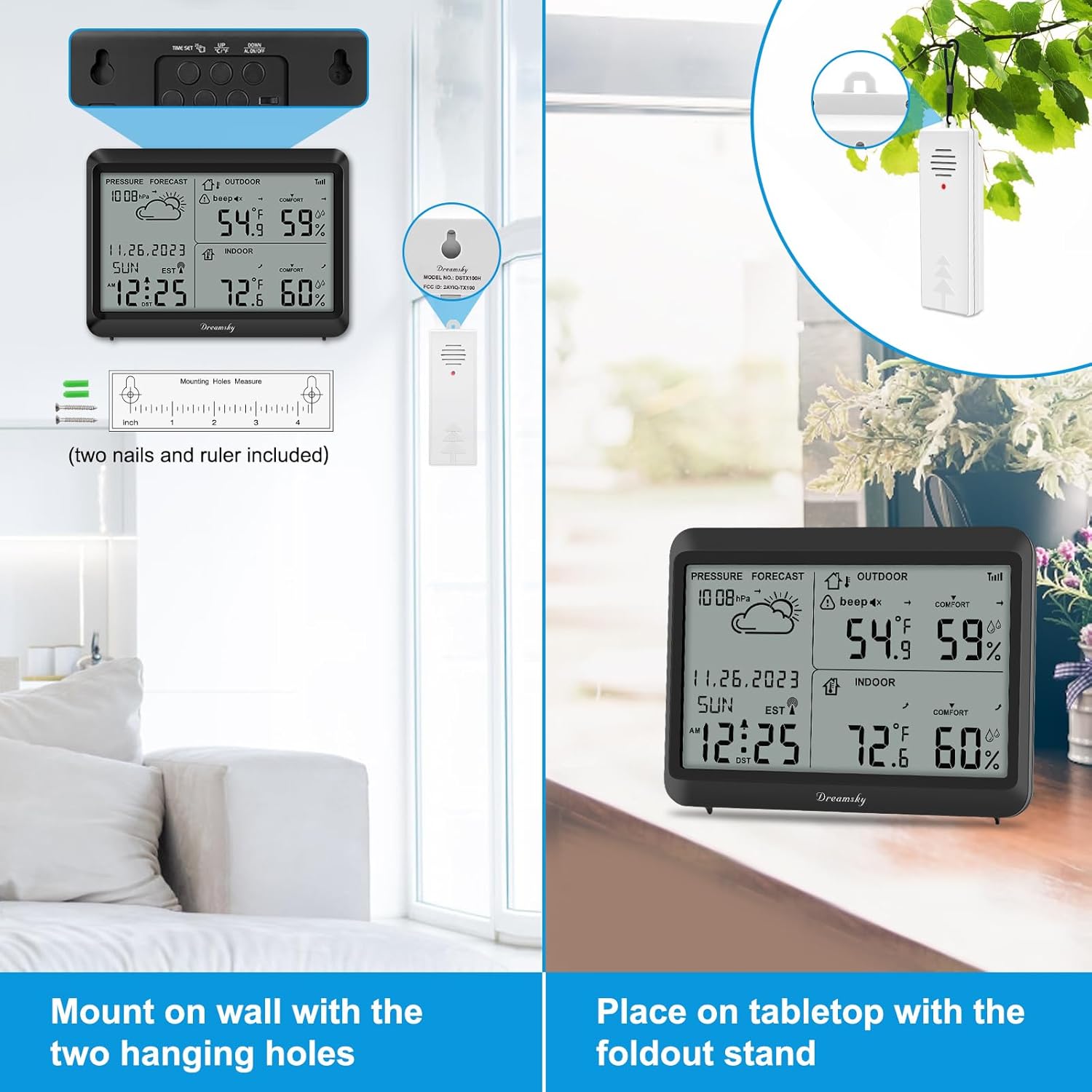
الشكل 3.2: Mounting options for the DreamSky Weather Station.
This image demonstrates two ways to position the main weather station unit: mounted on a wall using its two hanging holes (with included nails) or placed on a tabletop using its foldout stand. The outdoor sensor is shown hanging from a tree branch, emphasizing its wireless capability.
4. تعليمات التشغيل
4.1 Atomic Clock and Time Display
The weather station automatically synchronizes with the WWVB atomic clock signal for precise timekeeping. It also adjusts for Daylight Saving Time (DST) automatically.
- The atomic clock signal icon will appear on the display when synchronization is successful.
- You can manually set the time zone if needed (refer to the full user manual for specific button functions).
الشكل 4.1: Atomic Weather Clock with Auto DST feature.
This image highlights the atomic clock feature of the weather station, showing the date, time, and DST indicator. Icons for Date, Auto DST, and 12/24H format are displayed, along with a graphic representing the atomic time signal reception.
4.2 عرض درجة الحرارة والرطوبة
The main unit displays current indoor and outdoor temperature and humidity. It also records the maximum and minimum values for the day.
- النطاق الداخلي: Temperature 32°F to 122°F (0°C to 50°C), Humidity 10% to 99% RH.
- نطاق في الهواء الطلق: Temperature -40°F to 158°F (-40°C to 70°C), Humidity 10% to 99% RH.
- Press the 'MAX/MIN' button (location varies by model, typically on the back or side) to view recorded maximum and minimum values. Press again to cycle through or clear.

الشكل 4.2: Indoor and Outdoor Temperature Humidity with Max/Min Records.
This image shows the weather station displaying indoor and outdoor temperature and humidity readings, along with their respective MAX/MIN records. A text box clarifies the temperature and humidity ranges for both indoor and outdoor environments.
4.3 توقعات الطقس
The weather station provides a forecast for the next 12-24 hours based on changes in barometric pressure. Icons such as Sunny, Partly Sunny, Cloudy, Rainy, and Snowy will be displayed.

الشكل 4.3: Weather forecast display and interpretation.
This image shows the weather station displaying a cloud icon for the forecast. To the right, a graphic illustrates various weather forecast icons: Sunny, Partly Sunny, Cloudy, Snowy, and Rainy, helping users interpret the station's predictions.
4.4 High/Low Thermometer Alerts
You can set customizable high and low temperature alerts for the outdoor sensor. When the temperature exceeds or falls below your set thresholds, the unit will notify you.
- أوضاع التنبيه: Choose between 'flash & beep alert' (audible and visual) or 'flash & mute alert' (visual only).
- Refer to the full user manual for instructions on setting specific temperature thresholds and alert modes.

الشكل 4.4: Customized alert modes.
This image displays the weather station on a desk, with a focus on the alert settings. It shows two alert mode options: 'flash & beep alert' and 'flash & mute alert', indicating the customization available for notifications.
4.5 اختيار القناة (للمستشعرات المتعددة)
The weather station supports up to three outdoor sensors. If you purchase additional sensors, you can assign each to a different channel (1, 2, or 3) to monitor multiple locations. The included sensor is typically pre-set to Channel 1.
5. الصيانة
5.1 استبدال البطارية
Replace batteries in both the main unit and the outdoor sensor when the low battery indicator appears on the display. Always use new alkaline batteries of the specified type (AAA for main unit, AA for sensor) and ensure correct polarity.
5.2 التنظيف
امسح الوحدة الرئيسية والمستشعر بقطعة قماش ناعمة و...amp لا تستخدم المنظفات الكاشطة أو المذيبات، لأنها قد تتلف الشاشة أوasing. Ensure the outdoor sensor remains free of debris and moisture buildup.
6. استكشاف الأخطاء وإصلاحها
- No outdoor temperature/humidity display or signal loss:
- Check if batteries in both units are correctly installed and not depleted. Replace if necessary.
- Ensure the outdoor sensor is within the 330ft (100m) range and free from major obstructions.
- Try bringing the outdoor sensor closer to the main unit to re-establish connection.
- Verify that the outdoor sensor is set to the correct channel (usually Channel 1 for the included sensor).
- Reset both units by removing batteries, waiting a few minutes, and then reinserting them, starting with the outdoor sensor.
- قراءات درجة حرارة غير دقيقة:
- تأكد من وضع المستشعر الخارجي في منطقة مظللة، بعيدًا عن أشعة الشمس المباشرة ومصادر الحرارة والأسطح العاكسة.
- Allow sufficient time (at least 30 minutes) for the sensor to stabilize after placement or battery change.
- Atomic clock not syncing:
- Ensure the main unit is placed away from electronic devices that may cause interference.
- Position the unit near a window, facing Fort Collins, Colorado (where the WWVB signal originates), if possible.
- Allow up to 24-48 hours for initial synchronization, as signal strength can vary.
- Manually set the time zone if it's incorrect after synchronization.
7. المواصفات
| ماركة | دريم سكاي |
| نموذج | DreamSky Weather Station B0CL4L238R |
| مصدر الطاقة (الوحدة الرئيسية) | 3 بطاريات قلوية AAA (غير متضمنة) |
| مصدر الطاقة (المستشعر) | 2 بطاريات قلوية AA (غير متضمنة) |
| نطاق درجة الحرارة الداخلية | 32 درجة فهرنهايت إلى 122 درجة فهرنهايت (0 درجة مئوية إلى 50 درجة مئوية) |
| نطاق درجة الحرارة الخارجية | -40 درجة فهرنهايت إلى 158 درجة فهرنهايت (-40 درجة مئوية إلى 70 درجة مئوية) |
| نطاق الرطوبة | 10% إلى 99% رطوبة نسبية |
| نطاق الإرسال اللاسلكي | حتى 330 قدم (100 مترًا) في الهواء الطلق |
| ميزة خاصة | Atomic Clock, Auto DST, Weather Forecast, High/Low Alerts |
| مادة | بلاستيك |
| تكنولوجيا الاتصال | موجة تردد الراديو |
| أبعاد الحزمة | 9.69 × 5.98 × 1.46 بوصة |
| وزن | 13.44 أونصات |
8. الضمان والدعم
DreamSky products are manufactured with quality and reliability in mind. For warranty information, technical support, or assistance with your product, please refer to the contact information provided on the product packaging or visit the official DreamSky webيرجى الاحتفاظ بإثبات الشراء الخاص بك للمطالبة بالضمان.


