1. المقدمة
This manual provides instructions for the Varmilo Koi 73 JIS Keyboard with Sakura Switches (Model: VMMA73A039SAKURA). This keyboard features a unique design inspired by traditional Chinese Koi fish and water elements, combined with a modern aesthetic. It is a compact 65% size keyboard with a Japanese Industrial Standard (JIS) layout, designed for both functionality and portability. The keyboard is equipped with Cherry-style stabilizers for a stable typing experience.
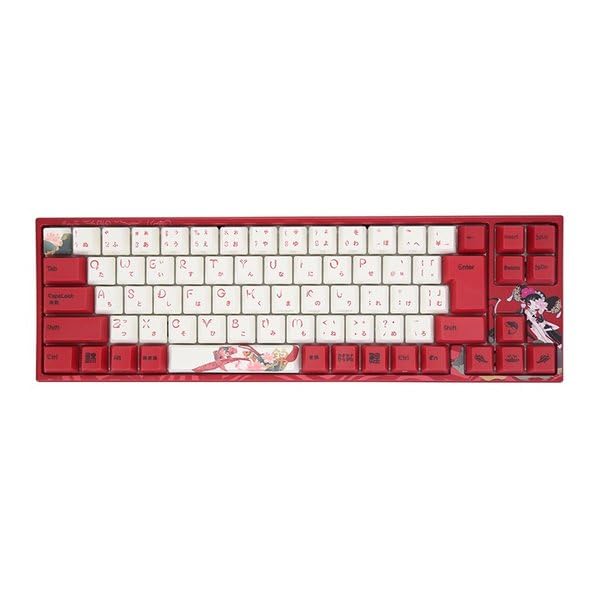
Image: Varmilo Koi 73 JIS Keyboard overview.
2. الميزات الرئيسية
- Unique Koi Design: Features vibrant koi fish illustrations and a red aesthetic, developed in collaboration with illustrator Li Huan.
- JIS Layout: 73-key Japanese Industrial Standard layout for specific regional input needs.
- Compact 65% Size: Optimizes desk space while retaining essential function and arrow keys.
- مفاتيح قابلة للتخصيص: Offers a choice of Varmilo mechanical electrostatic capacity switches to suit individual typing preferences.
- Cherry-Style Stabilizers: Ensures consistent and stable key presses, especially for larger keys.
- اتصال USB: Reliable wired connection for stable performance.
3. دليل الإعداد
3.1 محتويات العبوة
قبل أن تبدأ، يرجى التأكد من وجود جميع العناصر في العبوة:
- Varmilo Koi 73 JIS Keyboard
- كابل يو اس بي
- دليل المستخدم (هذا المستند)
3.2 توصيل لوحة المفاتيح
To connect your Varmilo Koi 73 keyboard to your computer, follow these steps:
- حدد موقع منفذ USB-C الموجود في الجزء الخلفي من لوحة المفاتيح.
- قم بتوصيل أحد طرفي كابل USB المقدم بمنفذ USB-C الموجود على لوحة المفاتيح.
- قم بتوصيل الطرف الآخر من كابل USB بمنفذ USB المتوفر على جهاز الكمبيوتر الخاص بك.
- ينبغي أن يتعرف نظام التشغيل الخاص بك على لوحة المفاتيح تلقائيًا.
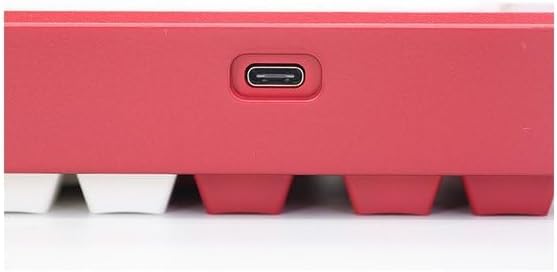
Image: USB-C port for keyboard connection.
3.3 تثبيت برنامج التشغيل (اختياري)
For advanced customization and optimal performance, it is recommended to install the Varmilo driver software. This software allows you to remap keys, adjust performance settings, and customize lighting effects.
Video: This video demonstrates the driver installation process and software usage for Varmilo keyboards. While it features the Muse65 model, the steps for driver installation and basic software navigation are generally applicable to other Varmilo keyboards like the Koi 73.
Please visit the official Varmilo website for the latest driver downloads specific to your keyboard model. Follow the on-screen instructions during installation.
4. تعليمات التشغيل
4.1 الوظائف الأساسية الرئيسية
The Varmilo Koi 73 keyboard features a standard JIS layout. Most keys function as labeled. For special functions, refer to the combination keys below.
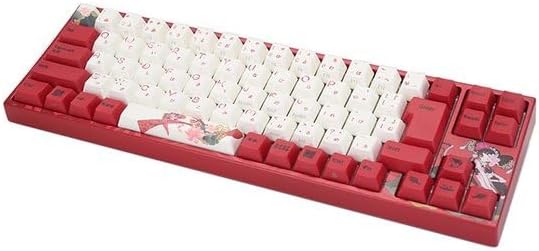
الصورة: أكثر منview of the Varmilo Koi 73 JIS Keyboard layout.
4.2 اختصارات مفاتيح الوظائف (Fn)
Since this is a 73-key layout, some functions are accessed via the Fn key. Hold down the Fn key and press the corresponding key to activate its secondary function. Common Fn combinations include:
- Fn + F1-F12: Multimedia controls (e.g., volume, play/pause).
- Fn + مفاتيح الأسهم: Page Up/Down, Home/End (specific to model, refer to keycap legends).
- Fn + Win Key: قفل/فتح مفتاح ويندوز.

Image: Left side keys, often used with Fn for additional functions.
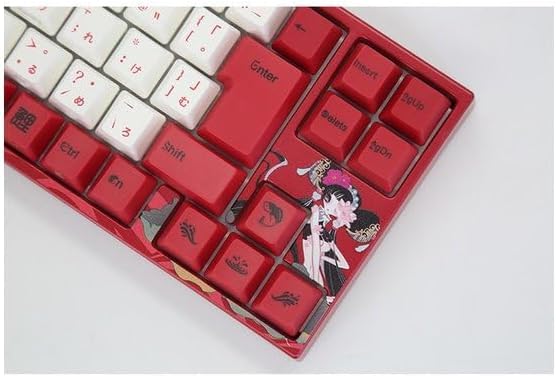
Image: Right side keys, including navigation and utility keys.
4.3 تأثيرات الإضاءة
The Varmilo Koi 73 keyboard supports various RGB lighting effects. You can cycle through different modes and adjust brightness using specific key combinations. Refer to your keyboard's specific keycap legends or the driver software for detailed lighting controls.
Video: This video showcases various RGB lighting effects on a Varmilo keyboard. While the model shown is Muse65, it provides a general idea of the dynamic lighting capabilities available on Varmilo keyboards, including the Koi 73.
5. الصيانة والعناية
Proper maintenance ensures the longevity and optimal performance of your Varmilo Koi 73 keyboard.
- تنظيف أغطية المفاتيح: Gently remove keycaps using a keycap puller. Clean the keycaps with a soft cloth dampاغسلها بالماء والصابون المعتدل. تأكد من جفافها تمامًا قبل إعادة تركيبها.
- تنظيف جسم لوحة المفاتيح: استخدم قطعة قماش ناعمة وجافة لمسح هيكل لوحة المفاتيح. لإزالة الأوساخ العنيدة، امسحها برفق بقطعة قماش جافة.amp cloth with a small amount of isopropyl alcohol can be used. Avoid excessive moisture.
- إزالة الغبار: استخدم الهواء المضغوط لإزالة الغبار والحطام من بين المفاتيح.
- تجنب السوائل: Keep liquids away from the keyboard to prevent damage.
- العناية بالكابلات: لا تقم بثني أو ضغط كابل USB بشكل مفرط.
6. استكشاف الأخطاء وإصلاحها
If you encounter issues with your Varmilo Koi 73 keyboard, try the following solutions:
- لوحة المفاتيح لا تستجيب:
- تأكد من توصيل كابل USB بشكل آمن بكل من لوحة المفاتيح والكمبيوتر.
- حاول توصيل لوحة المفاتيح بمنفذ USB مختلف على جهاز الكمبيوتر الخاص بك.
- أعد تشغيل الكمبيوتر الخاص بك.
- إذا كنت تستخدم موزع USB، فحاول الاتصال مباشرة بالكمبيوتر.
- المفاتيح غير مسجلة:
- Check for any debris or foreign objects under the keycaps.
- If specific keys are not working, consider reinstalling the keyboard driver.
- مشاكل الإضاءة:
- Ensure the keyboard driver is installed and up to date.
- Use the Fn key combinations or driver software to adjust lighting modes and brightness.
- مفتاح ويندوز مقفل:
- يضعط مفتاح Fn + مفتاح ويندوز لتفعيل/إلغاء قفل مفتاح ويندوز.
If the problem persists, please contact Varmilo customer support for further assistance.
7. المواصفات
| ماركة | فارميلو |
| رقم الموديل | VMMA73A039SAKURA |
| تخطيط لوحة المفاتيح | 73-key JIS (Japanese Industrial Standard) |
| الاتصال | USB سلكي |
| نوع المفتاح | Mechanical (Linear) |
| الأجهزة المتوافقة | كمبيوتر محمول |
| أبعاد المنتج | 34.2 سم (الطول) × 34.2 سم (العرض) × 5.1 سم (الارتفاع) |
| المكونات المضمنة | كابل يو اس بي |
8. الضمان والدعم
Varmilo products typically come with a manufacturer's warranty. Please refer to the warranty card included with your product or visit the official Varmilo webالموقع للحصول على شروط وأحكام الضمان التفصيلية.
For technical support, driver downloads, or further inquiries, please visit the official Varmilo support page or contact their customer service.
Official Varmilo Webموقع: www.varmilo.com


