1. المقدمة
Welcome to the Blackview A55 experience. This manual provides essential information to help you get the most out of your new unlocked Android smartphone. The Blackview A55 combines a vibrant display, reliable performance, and essential features for daily communication and entertainment.

الصورة: الأمامية والخلفية view من السودview A55 Unlocked Cell Phone.
2. الإعداد
2.1 محتويات العبوة
Upon unboxing your Blackview A55, please ensure all items are present:
- أسودview A55 Cell Phone
- كابل يو اس بي
- محول الطاقة (إذا كان متوفرًا في منطقتك)
- أداة إخراج SIM
- دليل المستخدم (هذا المستند)
صورة: ذا بلاكview A55 phone, USB cable, and other accessories included in the package.
2.2 تركيب بطاقة SIM ووحدة التخزين
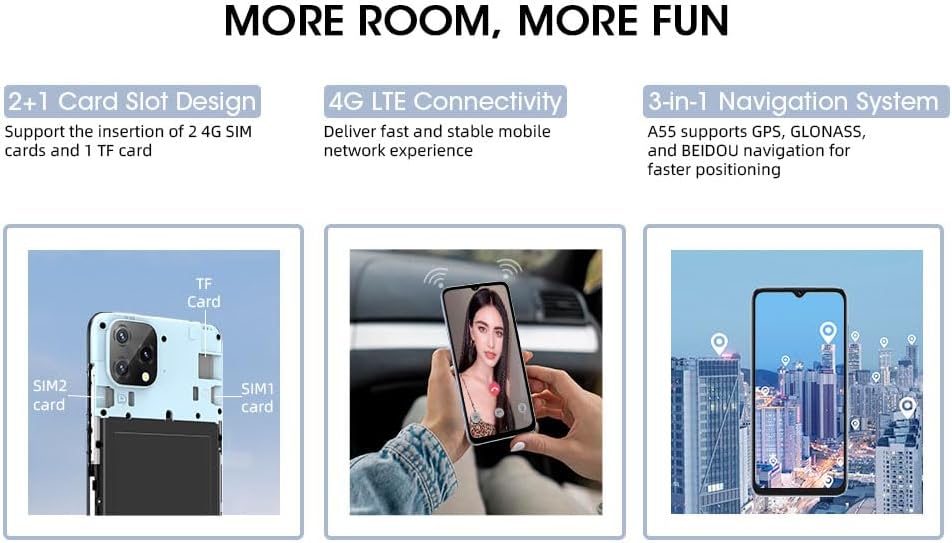
الأسودview A55 features a convenient 2+1 card slot design, allowing for two 4G SIM cards and one TF (microSD) card for expandable storage.
- حدد مكان درج بطاقة SIM على جانب جهازك.
- قم بإدخال أداة إخراج بطاقة SIM في الفتحة الصغيرة الموجودة بجوار الدرج واضغط برفق حتى يخرج الدرج.
- Place your Nano-SIM cards into the designated SIM1 and SIM2 slots.
- If desired, insert a TF (microSD) card into the dedicated storage slot. The device supports up to 1TB of expandable storage.
- قم بإعادة إدخال الدرج داخل الهاتف بعناية حتى يستقر في مكانه.
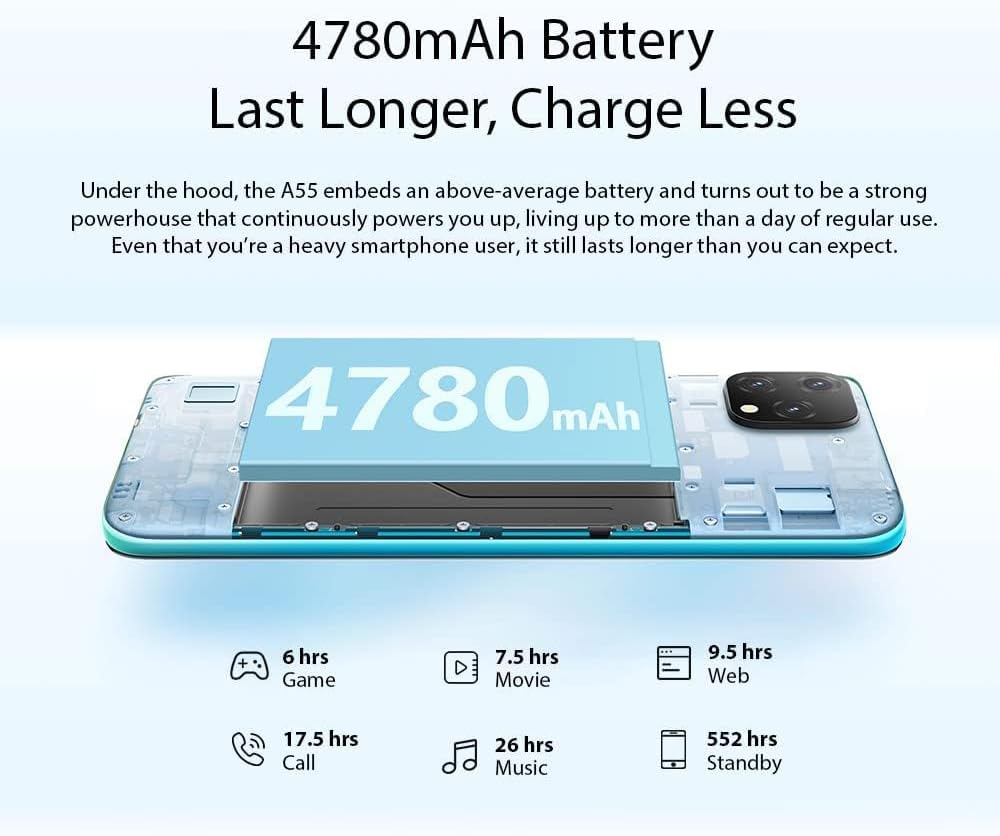
Image: A visual representation of the 2+1 card slot, indicating where to insert SIM1, SIM2, and the TF card.
2.3 التشغيل المبدئي
To power on your device, press and hold the Power Button located on the side until the Blackview logo appears on the screen. Follow the on-screen prompts to complete the initial setup, including language selection, Wi-Fi connection, and Google account setup.
3. Operating Your Blackview أ55
3.1 انتهى الجهازview
تعرّف على المكونات المادية لجهازك الأسودview أ55:

Image: A detailed diagram highlighting the 3.5mm headphone jack, earpiece, screen, speaker, microphone, charger/USB port, 13MP rear camera, flash, fingerprint sensor, volume buttons, and power button.
- زر الطاقة: Located on the right side, used to power on/off and wake/sleep the screen.
- أزرار التحكم في الصوت: Located above the Power Button, used to adjust media and call volume.
- مقبس سماعة رأس مقاس 3.5 ملم: Located on the top edge for wired audio accessories.
- منفذ USB-C: يوجد على الحافة السفلية للشحن ونقل البيانات.
- مكبر الصوت والميكروفون: Located on the bottom edge for audio output and input.
- الكاميرات: Rear and front cameras for photography and video calls.
3.2 ميزات العرض
الأسودview A55 features a 6.528-inch HD+ Incell display with a resolution of 720*1600 pixels and 400 nits brightness, ensuring clear and vibrant visuals even in bright conditions.

صورة: ذا بلاكview A55 display showcasing its 6.528-inch screen size, 720*1600 HD+ resolution, 89% screen-to-body ratio, and 400nit brightness.
3.3 استخدام الكاميرا
Capture memorable moments with the 8MP dual rear camera and 5MP front camera. The device supports features like Face Unlock for quick and secure access.

Image: Illustrates the 8MP rear camera and 5MP front camera capabilities, along with the Face Unlock feature.
3.4 إدارة البطارية
الأسودview A55 is equipped with a 4780mAh battery, providing extended usage. Optimize battery life by managing background apps and adjusting screen brightness.

Image: Details the 4780mAh battery and estimated hours of use for gaming, movies, web browsing, calls, music, and standby.
3.5 الاتصال
Your Blackview A55 supports 4G LTE on AT&T, Cricket, and T-Mobile carriers. It also includes GPS, Beidou, GLONASS, and Galileo for navigation, dual-band 5G Wi-Fi, and Bluetooth 4.1.
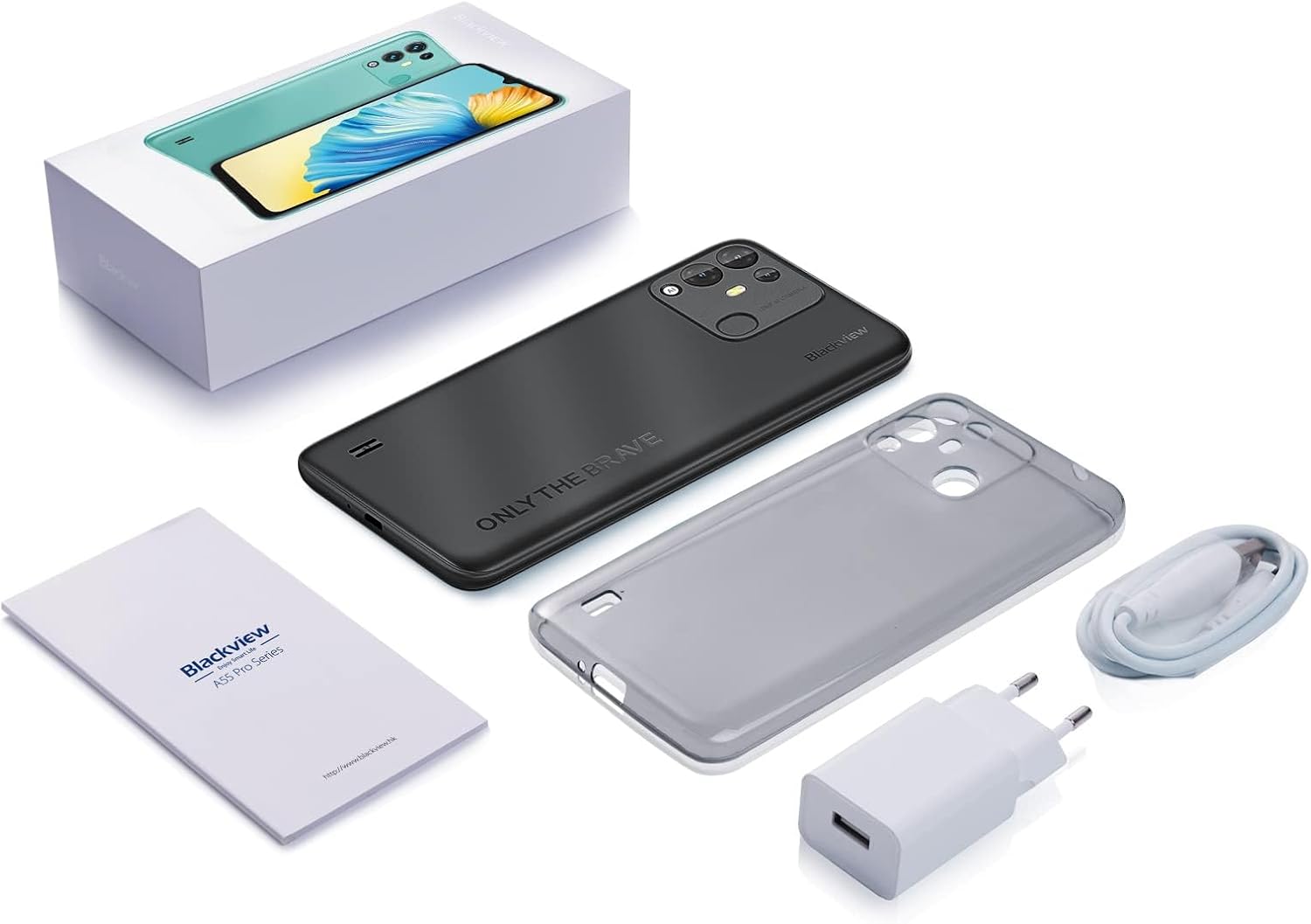
Image: A map illustrating the supported 4G GSM network carriers for the Blackview A55 in North America.
3.6 الأداء والتخزين
Powered by a 2.0GHz quad-core MT6761V processor, the A55 offers smooth performance. It comes with 3GB RAM and 16GB ROM, expandable up to 1TB with a TF card.
برنامج 3.7
الأسودview A55 runs on Android 11 with the self-developed Doke OS 2.1 UI system, providing a user-friendly and intuitive interface.
4. الصيانة
To ensure the longevity and optimal performance of your Blackview A55, follow these maintenance guidelines:
- حافظ على نظافة جهازك عن طريق مسحه بقطعة قماش ناعمة وجافة.
- تجنب تعريض الهاتف لدرجات حرارة عالية أو لأشعة الشمس المباشرة لفترات طويلة.
- Protect the screen with a screen protector and consider a protective case to prevent physical damage.
- قم بتحديث البرنامج بانتظام للاستفادة من أحدث الميزات وتحسينات الأمان.
- Manage storage by deleting unnecessary fileوتطبيقات للحفاظ على الأداء.
5. استكشاف الأخطاء وإصلاحها
إذا واجهت مشاكل مع جهازك الأسودview A55, consider the following common troubleshooting steps:
- الجهاز لا يستجيب: اضغط مع الاستمرار على زر الطاقة لمدة تتراوح بين 10 و 15 ثانية لإجبار الجهاز على إعادة التشغيل.
- تعطل التطبيقات أو تجميدها: Close background applications and restart the device. Consider uninstalling recently installed apps that might be causing conflicts.
- استنزاف البطارية بسرعة: Reduce screen brightness, disable unnecessary features like GPS or Bluetooth when not in use, and check battery usage in settings to identify power-hungry apps.
- مشاكل الاتصال: Toggle Wi-Fi or mobile data off and on. Restart your router for Wi-Fi issues. Ensure your SIM card is properly inserted.
Troubleshooting Video: Device Lagging or Freezing
Video: This video provides general tips for resolving device lagging or freezing issues on Blackview phones. While not specific to the A55, the principles apply.
6. المواصفات
| ميزة | مواصفة |
|---|---|
| أبعاد المنتج | 6.48 × 3.03 × 0.38 بوصة |
| وزن العنصر | 7.2 أونصات |
| رقم موديل العنصر | cell Phone A55 |
| البطاريات | 1 بطارية ليثيوم أيون مطلوبة. (متضمنة) |
| OS | Android 11 (with Doke OS 2.1 UI) |
| تقنيات الاتصالات اللاسلكية | بلوتوث، خلوي، واي فاي |
| تقنيات الاتصال | لاسلكي |
| نظام تحديد المواقع العالمي (جي بي اس) | GPS+GLONASS+BEIDOU+Galileo |
| المميزات الخاصة | 4780mAh, 4G AT&T/Cricket/T-Mobile Carriers, Face Unlocked, Three Cards Slots |
| مدخلات واجهة الإنسان | شاشة تعمل باللمس |
| دقة الماسح الضوئي | 1600*720 بكسل |
| ميزات الكاميرا الأخرى | Front (5MP), Rear (8MP Dual) |
| مقبس الصوت | 3.5 ملم |
| عامل الشكل | الهاتف الذكي |
| لون | أسود |
| تصنيف طاقة البطارية | 4780 مليamp ساعات |
| ماذا يوجد في الصندوق | كابل يو اس بي |
| الشركة المصنعة | أسودview |
| تاريخ أول توفر | 1 أبريل 2024 |
| سعة تخزين الذاكرة | 3 جيجابايت (قابلة للتوسيع حتى 1 تيرابايت) |
| حجم شاشة العرض الدائمة | 6.53 بوصة |
| حجم ذاكرة الوصول العشوائي المثبتة | 3 جيجا بايت |
| سعة البطارية | 4780 مليamp ساعات |
| وزن | 0.45 رطل |
| ماركة | أسودview |
| نظام التشغيل | أندرويد |
| حجم الشاشة | 6.53 بوصة |
| دقة | 1600*720 بكسل |
| اسم الموديل | cell Phone A55 |
| شركة نقل لاسلكية | T-Mobile (also supports AT&T, Cricket) |
| تكنولوجيا الخلوية | 4G |
| تكنولوجيا الاتصال | لاسلكي |
7. الضمان والدعم
Your Blackview A55 comes with a two-year guarantee. If you encounter any issues, please contact our professional customer service team by activating the service card included with your product. We are committed to providing support and resolving any concerns you may have.
Product Video: Blackview A55 Features
Video: An official Blackview عرض فيديوasing the features of the A55 smartphone, including its 4G compatibility with AT&T, Cricket, and T-Mobile carriers.


