1. المقدمة
The LTC GM022 is an ultralight 3-mode wireless gaming mouse designed for precision and versatility. It features a high-performance PAW3395 sensor, multiple connectivity options, and a convenient RGB charging dock. This manual provides instructions for setting up, operating, maintaining, and troubleshooting your GM022 mouse.
محتويات الحزمة
- LTC GM022 Gaming Mouse
- قاعدة شحن RGB
- كابل USB-C
- 2.4G USB Receiver (stored in mouse)

LTC GM022 Wireless Gaming Mouse with RGB Charging Dock and 2.4G USB Receiver.
2. الإعداد والاتصال
The LTC GM022 mouse offers three connectivity modes: 2.4GHz wireless, Bluetooth 5.0, and wired USB-C. Select the mode that best suits your needs.

Diagram illustrating the three connectivity modes: 2.4GHz wireless, Bluetooth 5.1, and USB-C wired connection.
2.1. وضع لاسلكي 2.4 جيجاهرتز
- حدد موقع جهاز استقبال USB بتردد 2.4 جيجا هرتز الموجود في الحجرة الموجودة أسفل الماوس.
- قم بتوصيل مستقبل USB بمنفذ USB متاح على جهاز الكمبيوتر الخاص بك.
- حرك مفتاح الوضع الموجود أسفل الماوس إلى وضع "2.4G".
- يجب أن يتصل الماوس بالكمبيوتر تلقائيًا.
2.2. وضع البلوتوث 5.0
- حرك مفتاح الوضع الموجود أسفل الماوس إلى وضع "BT".
- على جهاز الكمبيوتر الخاص بك أو جهازك، افتح إعدادات البلوتوث وابحث عن أجهزة جديدة.
- Select "LTC GM022" from the list of available devices to pair.
2.3. وضع USB-C السلكي
- قم بتوصيل كابل USB-C المقدم بالمنفذ الأمامي للفأرة.
- قم بتوصيل الطرف الآخر من كابل USB-C بمنفذ USB المتوفر على جهاز الكمبيوتر الخاص بك.
- سيعمل الماوس في الوضع السلكي ويتم شحنه في نفس الوقت.

Underside of the LTC GM022 mouse with labels for mode switch, dongle storage, PTFE feet, and DPI loop button.
3. تعليمات التشغيل
3.1. وظائف الأزرار
The LTC GM022 mouse features 5 programmable buttons:
- الزر الأيسر: الإجراء الأساسي.
- انقر على اليمين: قائمة الإجراءات/السياق الثانوية.
- النقر الأوسط (عجلة التمرير): Scroll up/down, click for universal scroll or other assigned function.
- زر للأمام: يتنقل للأمام في web المتصفحات أو file المستكشفون.
- زر الرجوع: يتنقل للخلف في web المتصفحات أو file المستكشفون.

Illustration of the LTC GM022 mouse highlighting its five programmable buttons and their default assignments.
3.2. ضبط DPI
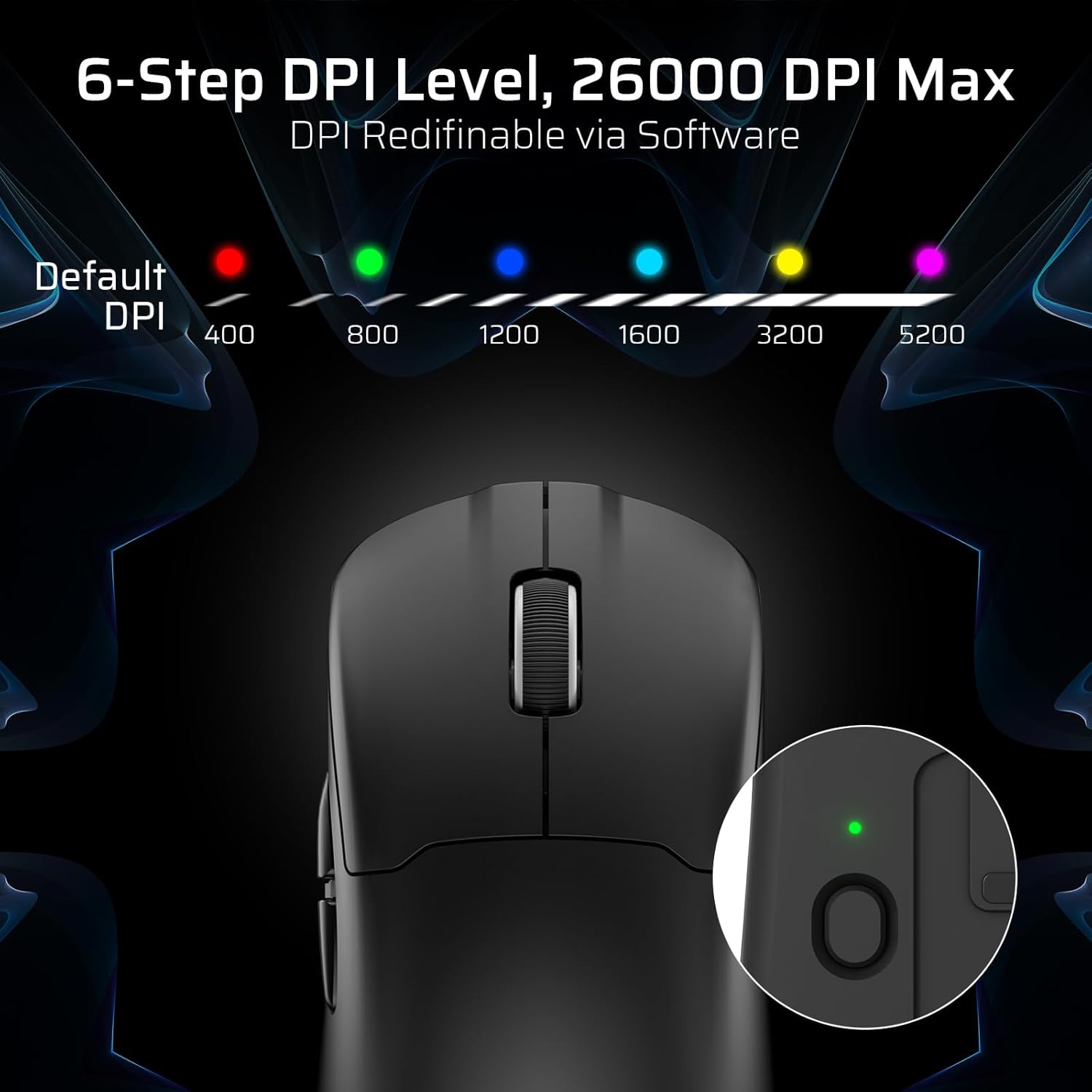
The mouse has a dedicated DPI button on its underside, allowing you to cycle through 6 preset DPI levels. Each level is indicated by a different LED color:
- 400 نقطة في البوصة (أحمر)
- 800 نقطة في البوصة (أخضر)
- 1200 نقطة في البوصة (أزرق)
- 1600 نقطة في البوصة (سماوي)
- 3200 نقطة في البوصة (أصفر)
- 5200 DPI (Magenta)
These DPI levels can be further customized and redefined up to 26000 DPI using the LTC software.

Visual representation of the 6-step DPI levels (400, 800, 1200, 1600, 3200, 5200) and the corresponding LED indicator colors.
3.3. تخصيص البرامج
Download and install the official LTC software from the manufacturer's website to unlock full customization options. The software allows you to:
- Assign macros to buttons.
- أعد تعيين وظائف المفاتيح.
- Redefine 6-step DPI levels up to 26000 DPI.
- Adjust polling rate (up to 1000Hz).
- Modify click and scroll speed.
- راقب حالة البطارية.

Screenshot of the LTC software interface for customizing mouse settings, including key assignments, DPI, polling rate, and battery monitoring.
4. شحن الماوس
The LTC GM022 mouse is equipped with a 400mAh battery and can be charged using the included magnetic RGB charging dock or directly via the USB-C cable.
4.1. Using the Magnetic Charging Dock
- Connect the USB-C cable to the charging dock and then to a power source (e.g., computer USB port, USB wall adapter).
- Place the mouse onto the charging dock. The magnetic connection will secure it in place, and charging will begin automatically.
- The RGB lighting on the dock will indicate charging status.
4.2. Direct USB-C Charging
- Connect the USB-C cable directly to the mouse's front port.
- قم بتوصيل الطرف الآخر من كبل USB-C بمصدر طاقة.
- The mouse can be used in wired mode while charging.

The LTC GM022 mouse magnetically charging on its RGB illuminated dock, indicating a 400mAh battery.
5. الصيانة والعناية
To ensure the longevity and optimal performance of your LTC GM022 mouse, follow these maintenance guidelines:
- تنظيف: استخدم قطعة قماش ناعمة وجافة لمسح سطح الفأرة. لإزالة الأوساخ العنيدة، امسحها برفق.ampامسح بقطعة قماش مبللة بالماء أو بمحلول تنظيف خفيف. تجنب المواد الكيميائية القاسية أو المواد الكاشطة.
- العناية بالمستشعر: حافظ على نظافة المستشعر البصري الموجود أسفل الماوس وخلوه من الغبار أو الحطام للحفاظ على دقة التتبع.
- قدم بتف: The mouse comes with durable PTFE feet for smooth gliding. If they show significant wear, replacement feet may be available from the manufacturer.
- تخزين: عند عدم استخدام الماوس لفترات طويلة، قم بتخزينه في بيئة نظيفة وجافة.
Close-up of the mouse's underside, detailing the PTFE feet for smooth gliding and the inclusion of backup feet.
6. استكشاف الأخطاء وإصلاحها
If you encounter issues with your LTC GM022 mouse, refer to the following common problems and solutions:
| مشكلة | الحل المحتمل |
|---|---|
| Mouse not responding in 2.4G wireless mode | Ensure the USB receiver is securely plugged in. Check if the mouse mode switch is set to "2.4G". Try a different USB port. Ensure the mouse battery is charged. |
| لا يتصل الماوس عبر البلوتوث | Ensure the mouse mode switch is set to "BT". Make sure Bluetooth is enabled on your device. Remove previous pairings and re-pair the mouse. Ensure the mouse battery is charged. |
| لا يتم شحن الماوس | Ensure the USB-C cable is properly connected to both the dock/mouse and the power source. Verify the power source is active. Clean the charging contacts on the mouse and dock. |
| تتبع غير دقيق أو تأخر المؤشر | Clean the optical sensor on the underside of the mouse. Ensure you are using the mouse on a suitable surface (e.g., a mouse pad). Check for interference in wireless modes. Adjust DPI settings. |
| الأزرار لا تستجيب | Ensure the mouse is powered on and connected. If using software, check button assignments. Try restarting your computer. |
If the issue persists after trying these solutions, please contact LTC customer support for further assistance.
7. المواصفات
Key technical specifications for the LTC GM022 Ultralight 3-Mode Wireless Gaming Mouse:
- نموذج: جي ام 022
- الاتصال: 2.4 جيجاهرتز لاسلكي، بلوتوث 5.0، USB-C سلكي
- المستشعر: مستشعر بصري PixArt PAW3395
- ماكس DPI: 26000 DPI (6-step re-definable via software)
- معدل التصويت: 1000 هرتز
- سرعة التتبع: 650 IPS
- تسريع: 50 جيجا
- أزرار: 5 أزرار قابلة للبرمجة
- عمر التبديل: 80 مليون نقرات
- بطارية: 400mAh ليثيوم بوليمر
- وزن: حوالي 55 جرامًا (2.01 أونصة)
- أبعاد: 4.7 × 2.44 × 0.04 بوصة
- المميزات الخاصة: RGB Charging Dock, Ultralight Design, PTFE Feet

مفصل view of the PixArt PAW3395 sensor specifications including 26K DPI Max, 1000Hz Polling Rate, 650 IPS Tracking Speed, and 50G Acceleration.

Illustration highlighting the durable switches with an 80 million click lifespan.
8. الضمان والدعم
LTC products are designed and manufactured to the highest quality standards. For information regarding warranty coverage, technical support, or to download the latest software and drivers, please visit the official LTC webالموقع أو الاتصال بقسم خدمة العملاء.
احتفظ بإيصال الشراء الخاص بك كدليل على الشراء في حالة مطالبات الضمان.