1. المقدمة
This manual provides comprehensive instructions for the installation, operation, and maintenance of your Lloyd's Smart Full HD 1080P Video Intercom System. This system is designed to provide secure access control for your home or office, allowing you to monitor, communicate with, and grant access to visitors remotely.
Please read this manual thoroughly before using the product to ensure proper function and safety. Keep this manual for future reference.
2. معلومات السلامة
To prevent damage to the product or injury to yourself or others, please observe the following safety precautions:
- تأكد من فصل جميع مصادر الطاقة قبل التركيب أو الصيانة.
- ينبغي أن يقوم فني كهربائي مؤهل بعملية التركيب إذا لم تكن على دراية بالأسلاك الكهربائية.
- لا تعرض المنتج لدرجات الحرارة القصوى أو الرطوبة أو أشعة الشمس المباشرة.
- استخدم فقط محول الطاقة والملحقات المرفقة.
- احفظ المنتج بعيدًا عن الماء والسوائل الأخرى.
- لا تحاول تفكيك الجهاز أو إصلاحه بنفسك. اتصل بخدمة دعم العملاء للحصول على المساعدة.
3. محتويات العبوة
تأكد من وجود جميع العناصر في العبوة:
- 1 x Monitor (7'' Color LCD Touchscreen)
- 1 x Outdoor Unit (Doorbell with Camera and Keypad)
- 1 × دليل المستخدم
- شنومكس x الإسكان
- 1 x Rain Cover Bracket
- 1 x Recessed Box
- 1 × محول AC / DC
- شنومكس x تصاعد قوس
- Wall Plugs and Mounting Screws
- 3 × الموصلات
- 1 x Allen Screwdriver
- 4 x Connection Cables

الشكل 3.1: انتهىview of the Lloyd's Smart Video Intercom System components and packaging.
4. انتهى المنتجview
4.1. Monitor (Indoor Unit)
- عرض: 7-inch color LCD touchscreen with 1020 x 600 px resolution.
- الإعدادات القابلة للتعديل: Brightness, contrast, and volume.
- الوظائف: Hands-free intercom, call transfer (requires additional monitor), date, time, and weather display.
- تخزين: Integrated memory for up to 30 photos, supports up to 128 GB memory card (not included).
- الاتصال: 2.4 GHz Wi-Fi for stable connection in large areas.
4.2. Outdoor Unit (Doorbell)
- آلة تصوير: 2MP Full HD (1920x1080) resolution.
- الرؤية الليلية: Yes, with LED numeric panel.
- Viewزاوية جي: 120 درجة.
- كشف الحركة: Detection distance of less than or equal to 3 meters.
- صوتي: 2-way audio with adjustable microphone and speaker volume.
- التحكم في الوصول: Works with a 12 VDC electric lock (not included), supports 4-6 digit password entry.
- Tamper Button: Sends alerts to your smartphone and triggers an alarm if the outdoor unit is forced.
- متانة: IP65 rating for indoor or outdoor use.
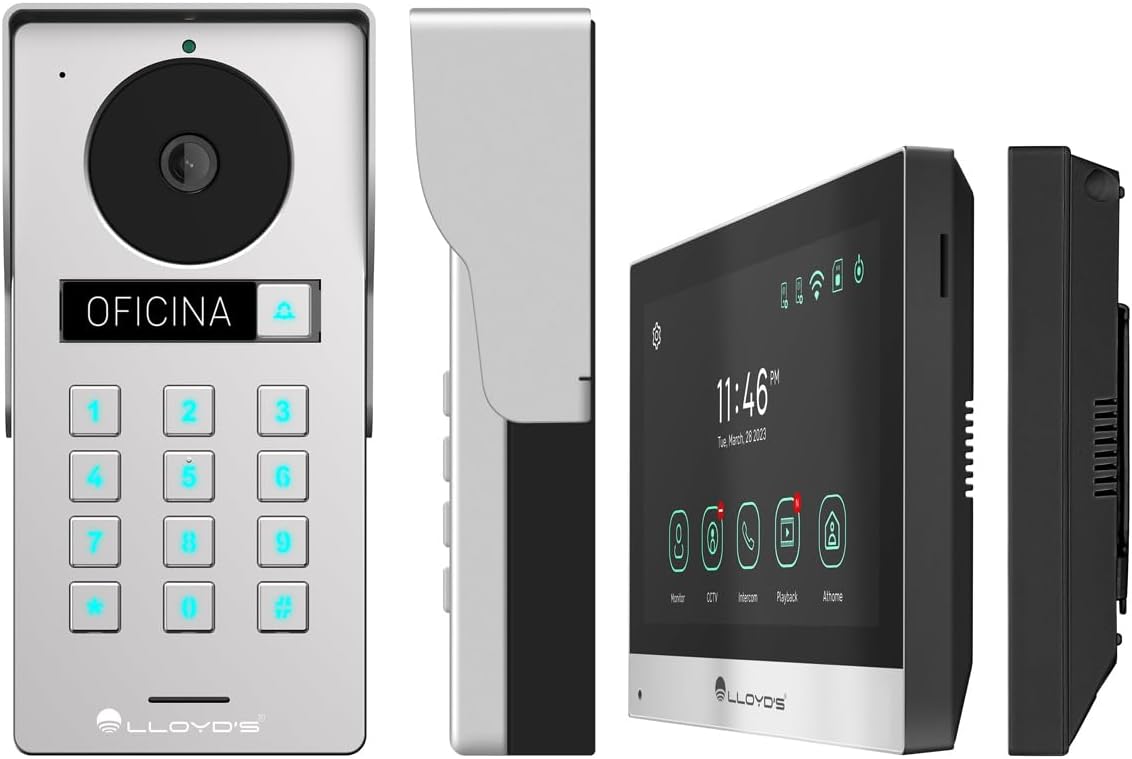
الشكل 4.1: مفصل views of the outdoor unit and monitor.

Figure 4.2: Key features of the Lloyd's Smart Video Intercom System.
5. الإعداد والتثبيت
5.1. التوصيلات والتركيب
The system requires a wired connection between the monitor and the outdoor unit. The maximum operating distance is 50 meters using a 4-wire cable (0.5 mm² not included). Follow the wiring diagram provided in the quick start guide for correct connections.
- Outdoor Unit Mounting: Choose a suitable location near your entrance, ensuring clear camera view and easy access to the keypad. Use the provided mounting bracket, wall plugs, and screws. The unit is IP65 rated for outdoor use.
- تركيب الشاشة: Install the monitor indoors at a convenient height for viewing and interaction. Use the mounting bracket and screws.
- توصيل الطاقة: Connect the AC/DC adapter to the monitor and a power outlet.
- Electric Lock Connection (Optional): If using an electric lock (12 VDC, not included), connect it to the outdoor unit as per the wiring diagram.
5.2. تطبيق واتصال واي فاي
To utilize smart features, download the Lloyd's smart home application on your smartphone (compatible with Android 5.0+ and iOS 11+).
- Power on the monitor and outdoor unit.
- On the monitor, navigate to the Wi-Fi settings and connect to your 2.4 GHz Wi-Fi network.
- Open the Lloyd's app on your smartphone and create an account or log in.
- Follow the in-app instructions to add your new video intercom system. This typically involves scanning a QR code displayed on the monitor or manually entering device details.
- بمجرد الاتصال، ستتلقى إشعارات ويمكنك التحكم في النظام عن بعد عبر التطبيق.
6. تعليمات التشغيل
6.1. Answering Calls and Communication
- When a visitor presses the doorbell button, the monitor will ring, and you will receive a notification on your smartphone.
- On the monitor, tap the "Answer" icon to establish two-way audio and video communication.
- On your smartphone, open the app and tap the incoming call notification to answer.
- The intercom communication time is 60 seconds.

Figure 6.1: Communicate with visitors from anywhere using the app or monitor.

Figure 6.2: Receive instant notifications on your smartphone and monitor.
6.2. Door Opening
- من التطبيق: During a call, tap the "Unlock" icon in the app to open the connected electric lock.
- From the Monitor: During a call, tap the "Unlock" icon on the monitor's touchscreen.
- From the Outdoor Unit: Visitors can enter a pre-set 4-6 digit password on the numeric keypad to open the door.
6.3. كشف الحركة والتسجيل
- The system automatically captures photos and videos when motion is detected within 3 meters of the outdoor unit or when someone rings the doorbell.
- You will receive real-time alerts on your smartphone via the app when motion is detected.
- Review recorded events and snapshots through the app or on the monitor.
- The monitoring time for motion detection is 30 seconds.

Figure 6.3: Receive motion detection alerts directly on your smartphone app.

Figure 6.4: Automatic photo and video capture for events.
6.4. توسيع النظام
The system supports expansion for enhanced security and convenience:
- Up to 2 additional Outdoor Units (Doorbell)
- Up to 3 additional Monitors
- Up to 2 additional Cameras
- Up to 2 additional Sensors
(Additional units and sensors are not included and must be purchased separately.)
You can also integrate the system with other Lloyd's smart home products to create customized routines and share device access with family members.
7. الصيانة
- تنظيف: Use a soft, dry cloth to clean the monitor screen and outdoor unit. Do not use abrasive cleaners or solvents.
- تحديثات البرامج: Periodically check the Lloyd's app for firmware updates to ensure optimal performance and security.
- ادارة التخزين: If using a memory card, regularly back up important recordings and delete old fileلتحرير المساحة.
8. استكشاف الأخطاء وإصلاحها
| مشكلة | السبب المحتمل | حل |
|---|---|---|
| No image or sound from outdoor unit. | Loose wiring, power issue, unit malfunction. | Check all cable connections. Ensure power adapter is properly connected. Restart the system. |
| Wi-Fi connection unstable or disconnected. | Weak Wi-Fi signal, incorrect password, router issues. | تأكد من أن الشاشة ضمن نطاق شبكة الواي فاي. أعد إدخال كلمة مرور الواي فاي. أعد تشغيل جهاز التوجيه (الراوتر). |
| Cannot open door via app/monitor. | Electric lock not connected, lock malfunction, wiring issue. | Verify electric lock connection and functionality. Check wiring between outdoor unit and lock. |
| لا توجد تنبيهات لكشف الحركة. | Motion detection disabled, incorrect sensitivity, app notification settings. | Enable motion detection in app settings. Adjust sensitivity. Check smartphone notification permissions for the app. |
| جودة الفيديو سيئة. | Dirty camera lens, poor lighting, network bandwidth. | نظّف عدسة الكاميرا. تأكد من وجود إضاءة كافية. تحقق من سرعة الإنترنت لديك. |
9. المواصفات
| ميزة | التفاصيل |
|---|---|
| رقم الموديل | ال سي-1373 |
| شاشة العرض | شاشة لمس LCD ملونة مقاس 7 بوصات |
| دقة الشاشة | 1020 × 600 بكسل |
| Outdoor Unit Camera Resolution | 2MP Full HD (1920x1080) |
| Viewزاوية جي | 120 درجة |
| نطاق الرؤية الليلية | حتى 10 أمتار |
| نطاق كشف الحركة | ≤ 3 مترا |
| الاتصال اللاسلكي | 2.4 غيغاهرتز واي فاي |
| تخزين | Integrated (30 photos), supports up to 128 GB MicroSD (not included) |
| مزود الطاقة | 12 VDC (via AC/DC adapter) |
| استهلاك الطاقة (وضع الاستعداد) | 4W |
| استهلاك الطاقة (التشغيل) | 10 واط |
| Operating Distance (Wired) | Up to 50m (with 0.5 mm² 4-wire cable) |
| Ingress Protection (Outdoor Unit) | IP65 |
| Monitor Dimensions (H x W x D) | 12.4 سم × 18 سم × 2.1 سم |
| أبعاد الوحدة الخارجية (الارتفاع × العرض × العمق) | 18 سم × 8.7 سم × 3.2 سم |
| الأجهزة المتوافقة | أندرويد 5.0 أو أعلى، iOS 11 أو أعلى |

Figure 9.1: Dimensions of the Monitor and Outdoor Unit.
10. الضمان والدعم
For warranty information, please refer to the warranty card included with your product or visit the official Lloyd's website. If you encounter any issues or require technical assistance, please contact Lloyd's customer support.
دعم العملاء: Refer to the contact information provided on the product packaging or the official Lloyd's webموقع.
الموارد المتاحة على الإنترنت: يزور Lloyd's Official Store on Amazon لمزيد من المعلومات والدعم حول المنتج.
11. مقاطع فيديو رسمية للمنتج
No official seller videos were provided for this product in the available data.


