1. المقدمة
This manual provides detailed instructions for the proper setup, operation, and maintenance of your Topping A50 III Headphone Amplifier. Please read this manual thoroughly before using the device to ensure optimal performance and safety. The Topping A50 III is a high-performance desktop headphone amplifier designed to deliver clear and powerful audio to a wide range of headphones.
2. انتهى المنتجview
2.1 الميزات الرئيسية
- NFCA Modules: Incorporates Nested Feedback Composite Amplifier (NFCA) modules, utilizing a voltage-current hybrid feedback architecture and Ultra-High Gain Feedback (UHGF) technology for enhanced DC and AC performance. This design supports driving low impedance headphones effectively.
- اتصال متعدد الاستخدامات: Features both 6.35mm single-ended and 4.4mm balanced headphone output jacks. Input options include RCA single-ended and 6.35mm TRS balanced inputs, allowing for various audio source connections.
- توافق سماعة الرأس: Offers three gain selections (High, Medium, Low) to accommodate different headphone sensitivities. A low noise floor of 0.3uVrms ensures minimal interference, particularly for sensitive In-Ear Monitors (IEMs).
- ارتفاع انتاج الطاقة: Delivers a maximum output of 3500mW x 2, capable of driving most headphones to their full potential while maintaining a low distortion rate of less than 0.1% at high power levels.
- مشغل 12 فولت: Equipped with a 12V Trigger input, enabling synchronized power on/off with other compatible audio devices.
- تكامل التصميم: Shares a consistent design aesthetic with the Topping D50 III, allowing for a cohesive setup when paired together. The 12V Trigger functionality facilitates synchronized operation between these units.
2.2 محتويات العبوة

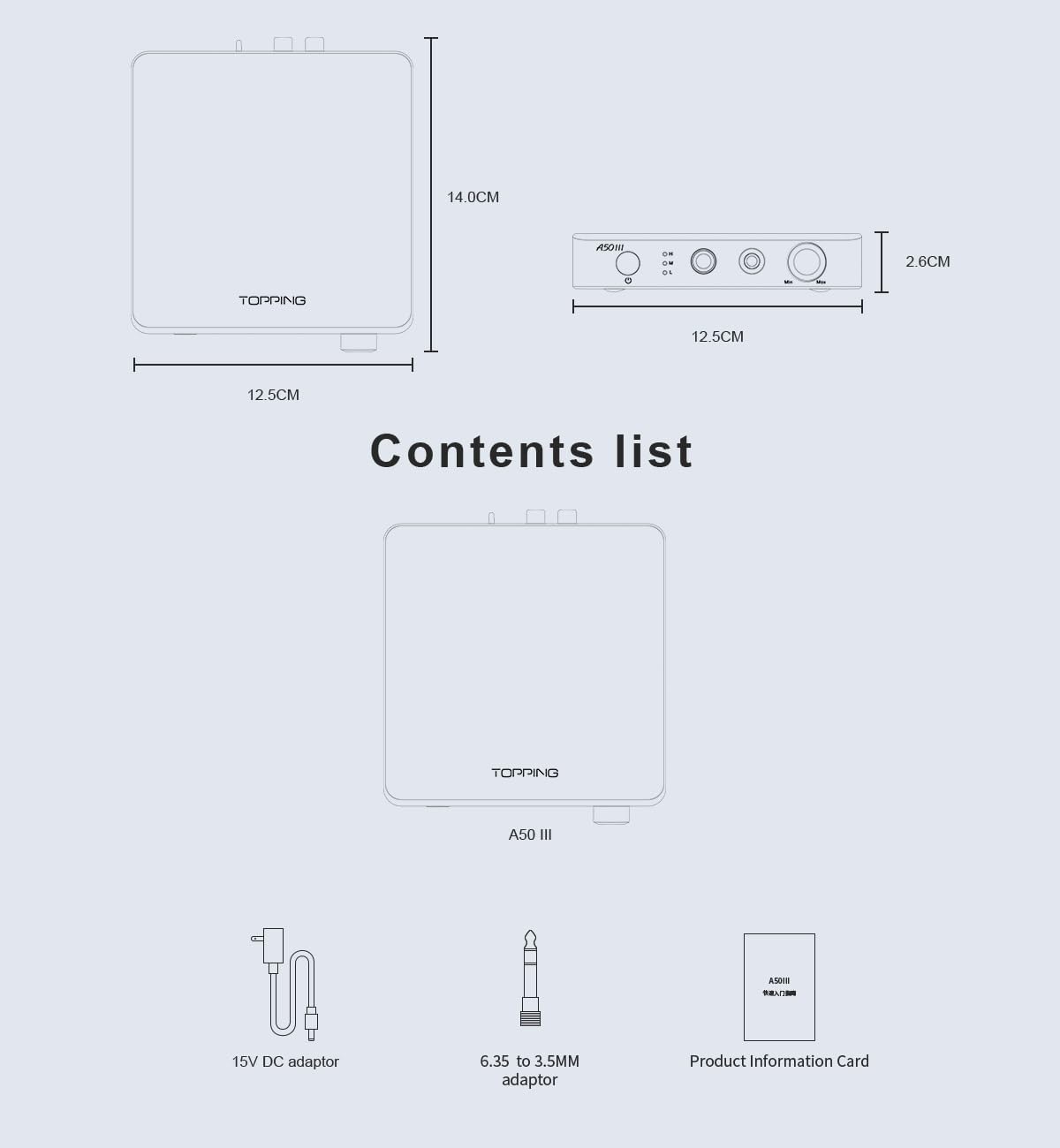
الشكل 1: محتويات العبوة وأبعادها
The Topping A50 III package includes the following items:
- سماعات الرأس Topping A50 III Ampوحدة مكبر
- 15V DC محول الطاقة
- محول 6.35 ملم إلى 3.5 ملم
- بطاقة معلومات المنتج
2.3 تحديد المكون
الشكل 2: تخطيط اللوحة الأمامية والخلفية
This diagram provides a detailed labeling of all controls and ports on the Topping A50 III. The front panel labels include:
- Power switch & Gain switch button: Press to power on/off. Press and hold to cycle through gain settings (H, M, L).
- Gain indicator: LEDs indicating High (H), Medium (M), or Low (L) gain.
- 6.35mm headphone output jack: For single-ended headphone connections.
- 4.4mm headphone output jack: For balanced headphone connections.
- مقبض الصوت: يضبط حجم الإخراج.
The rear panel labels include:
- Balanced 6.35mm TRS input (R, L): For balanced audio input from a source device.
- Single-ended RCA input (R, L): For single-ended audio input from a source device.
- Input channel switching (BAL/SE): Toggle switch to select between balanced (BAL) and single-ended (SE) inputs.
- Firmware upgrade interface (FW): منفذ USB لتحديثات البرامج الثابتة.
- 12V Trigger In: Input for synchronized power control with other compatible devices.
- Power input (DC15V): Connect the provided 15V DC power adaptor here.
3. تعليمات السلامة
- Do not expose this device to rain, moisture, or extreme temperatures.
- تأكد من التهوية المناسبة حول الوحدة لمنع ارتفاع درجة الحرارة.
- Use only the provided 15V DC power adaptor. Using an incorrect adaptor may damage the device.
- Avoid placing the device on unstable surfaces.
- لا تحاول تفكيك الوحدة أو تعديلها. أحل جميع أعمال الصيانة إلى فنيين مؤهلين.
- أبعد الجهاز عن المجالات المغناطيسية القوية.
- Always lower the volume before connecting or disconnecting headphones to prevent sudden loud sounds.
4. الإعداد
4.1 توصيل مصادر الصوت
The A50 III supports both balanced and single-ended audio inputs.
- المدخلات المتوازنة: Connect your audio source (e.g., DAC with balanced outputs) to the 6.35mm TRS (Tip-Ring-Sleeve) input jacks on the rear panel. Ensure the left (L) and right (R) channels are connected correctly.
- Single-Ended Input: Connect your audio source (e.g., DAC with RCA outputs) to the RCA input jacks on the rear panel. Ensure the left (L) and right (R) channels are connected correctly.
4.2 توصيل سماعات الرأس
The A50 III provides both balanced and single-ended headphone outputs.
- إخراج متوازن: For headphones with a 4.4mm balanced connector, plug them into the 4.4mm headphone output jack on the front panel.
- مخرج أحادي الطرف: For headphones with a 6.35mm single-ended connector, plug them into the 6.35mm headphone output jack on the front panel. If your headphones use a 3.5mm connector, use the provided 6.35mm to 3.5mm adaptor.
4.3 توصيل الطاقة
Connect the provided 15V DC power adaptor to the DC15V power input on the rear panel of the A50 III. Then, plug the adaptor into a suitable power outlet.
4.4 12V Trigger Connection (Optional)

Figure 3: 12V Trigger Connection Example
If you have another audio device with a 12V Trigger output, you can connect it to the 12V Trigger In port on the A50 III using a compatible cable. This allows the A50 III to power on and off synchronously with the connected device.
5. تعليمات التشغيل
5.1 تشغيل/إيقاف التشغيل
Press the power switch button on the front panel to turn the A50 III on or off. The gain indicator LEDs will illuminate when the unit is powered on.
5.2 اختيار المدخلات
Use the input channel switching toggle switch on the rear panel to select between Balanced (BAL) and Single-Ended (SE) audio inputs. Ensure the switch matches the type of input you are using.
5.3 التحكم في مستوى الصوت
Rotate the volume knob on the front panel clockwise to increase the volume and counter-clockwise to decrease it. Always start with the volume at a low level before playing audio to prevent hearing damage.
5.4 ضبط الكسب
The A50 III offers three gain levels: High (H), Medium (M), and Low (L). To change the gain setting, press and hold the power switch button on the front panel. The corresponding LED (H, M, or L) will light up to indicate the selected gain. Choose a gain setting appropriate for your headphones:
- منخفض (ل): Recommended for highly sensitive headphones or In-Ear Monitors (IEMs).
- متوسط (م): Suitable for most standard headphones.
- مرتفع (H): For less sensitive or high-impedance headphones that require more power.
6. الصيانة
- تنظيف: استخدم قطعة قماش ناعمة وجافة لتنظيف الجزء الخارجي من الجهاز. لا تستخدم المنظفات السائلة أو المواد الكاشطة.
- تخزين: When not in use for extended periods, store the device in a cool, dry place, away from direct sunlight and dust.
- تهوية: Ensure that the ventilation openings are not blocked to prevent heat buildup.
7. استكشاف الأخطاء وإصلاحها
- لا يوجد صوت:
- Check if the power adaptor is securely connected and the unit is powered on.
- Verify that the audio source is properly connected to the correct input (RCA or TRS).
- Ensure the input channel switch (BAL/SE) on the rear panel matches your audio source.
- Confirm that headphones are securely plugged into the correct output jack (6.35mm or 4.4mm).
- Increase the volume level on the A50 III and your audio source.
- Test with different headphones and audio sources to isolate the issue.
- الصوت المشوه:
- Reduce the volume level on both the A50 III and your audio source.
- Try a lower gain setting (L or M) if using sensitive headphones.
- تأكد من توصيل جميع الكابلات بشكل آمن وعدم تلفها.
- تحقق من مصدر الصوت بحثًا عن أي تشويش.
- الوحدة لا تعمل:
- Verify the power adaptor is correctly connected to the unit and a working power outlet.
- If using the 12V Trigger, ensure the connected device is powered on and the trigger cable is functional.
8. المواصفات

الشكل 4: المواصفات الفنية التفصيلية
The following table outlines the key technical specifications of the Topping A50 III Headphone Ampمكبر:
| مواصفة | قيمة |
|---|---|
| اسم الموديل | أ50III |
| مقبس سماعات الرأس | مقبس 6.35 ملم، مقبس 4.4 ملم |
| تكنولوجيا الاتصال | سلكي |
| تكنولوجيا الاتصالات اللاسلكية | غير مدعوم |
| المكونات المضمنة | Cable (likely power cable and adaptors) |
| الأجهزة المتوافقة | Desktops, Laptops, Headphones, Audio Devices |
| طريقة التحكم | Button, Knob |
| عدد العناصر | 1 (الوحدة الرئيسية) |
| الشركة المصنعة | LEAUDIO CO. |
| وزن العنصر | 2 رطل (حوالي 0.91 كجم) |
| أبعاد الحزمة | 6.8 × 6.5 × 5.8 بوصة (حوالي 17.3 × 16.5 × 14.7 سم) |
| رقم موديل العنصر | LE-TP-A50III |
| لون | أسود |
| التحكم في الضوضاء | لا أحد |
9. الضمان والدعم
For warranty information and technical support, please refer to the documentation included with your product or contact the manufacturer, LEAUDIO CO., or your authorized dealer. Keep your purchase receipt as proof of purchase for warranty claims.


