1. المقدمة
This manual provides essential information for the safe and effective operation of your DALY Smart 13S BMS 48V 60A. Please read these instructions carefully before installation and use to ensure optimal performance and longevity of your battery system. This Battery Management System (BMS) is designed to protect and manage 13-series Li-ion lithium battery packs, offering advanced monitoring and communication capabilities.
2. الميزات الرئيسية
- حماية متعددة: Includes overcharge, overdischarge, overcurrent, short circuit, and temperature protection, along with waterproof protection.
- تصميم محسّن: Features a smaller size, parallel protection, pre-charging function, 100mA passive equalization current, low temperature rise, working condition indicator, and consistent charge/discharge current.
- المراقبة الذكية: Integrated WiFi module allows remote monitoring of lithium batteries via the Internet. The smartphone app provides alerts for any detected abnormalities.
- Versatile Communication: Equipped with CAN, RS485, and dual UART communication interfaces for rich expansion applications.
3. المواصفات
The following table details the key specifications for the DALY Smart 13S BMS 48V 60A.

Image: Detailed specifications for the DALY Smart 13S 60A BMS, including discharge current, overcharge/overdischarge parameters, and physical dimensions.
| مواصفة | قيمة |
|---|---|
| أبعاد المنتج | 4.84 × 2.56 × 0.55 بوصة (123 × 65 × 14 مم) |
| وزن العنصر | 12.3 ounces (170-210g) |
| رقم موديل العنصر | 13S BMS 48V 60A |
| حجم الإدخالtage | 48 فولت |
| حجم الإخراجtage | 12 Volts (for auxiliary functions) |
| تيار التفريغ | 60 أمبير |
| Overdischarge Current | 90 ± 1.8 أمبير |
| تيار الشحن | 60 أمبير |
| Overcharge Current | 90 ± 1.8 أمبير |
| زيادة حجم المجلدtage | 4.25 ± 0.05V (Can be set) |
| Overdischarge Voltage | 2.7 ± 0.05V (Can be set) |
| حجم الشحنtage | 54.6 فولت |
| سلك الإخراج | 10AWG / 100 مم |
| كابل | 24AWG / 450 مم |
4 التركيب والأسلاك
Proper installation and wiring are crucial for the safe and correct operation of the BMS. The following steps outline the process, using the K series 60A BMS as an exampليه.

Image: A detailed wiring diagram illustrating the connection points for the DALY Smart BMS to a battery pack, load, and charger.
- Step 1: Solder Sampling Cables. The first black cable in the sampling cable set connects to the negative terminal of the battery (B-). Subsequent red cables connect to the positive terminal of the first string, then the second string, and so on, until all cell positive terminals are connected.
- Step 2: Check Cables. After connecting the cables, use a multimeter to measure the voltage between two adjacent cells, starting from the header. Ensure there are no wrong connections or missing connections.
- Step 3: Connect Output Wires. Connect the B- wire of the BMS to the total negative terminal of the battery pack. Then, plug the sampling cable to the BMS. After activating the BMS, verify that the voltagه (حجم البطاريةtage) between B+ & B- and the voltage between P+ & P- are consistent.
Important: Incorrect wiring can damage the BMS and/or the battery pack. If you are unsure, seek professional assistance.
5. Smart APP Usage
The DALY Smart BMS features a dedicated mobile application for convenient monitoring and parameter adjustment. With the WiFi module, you can remotely access your battery's data.
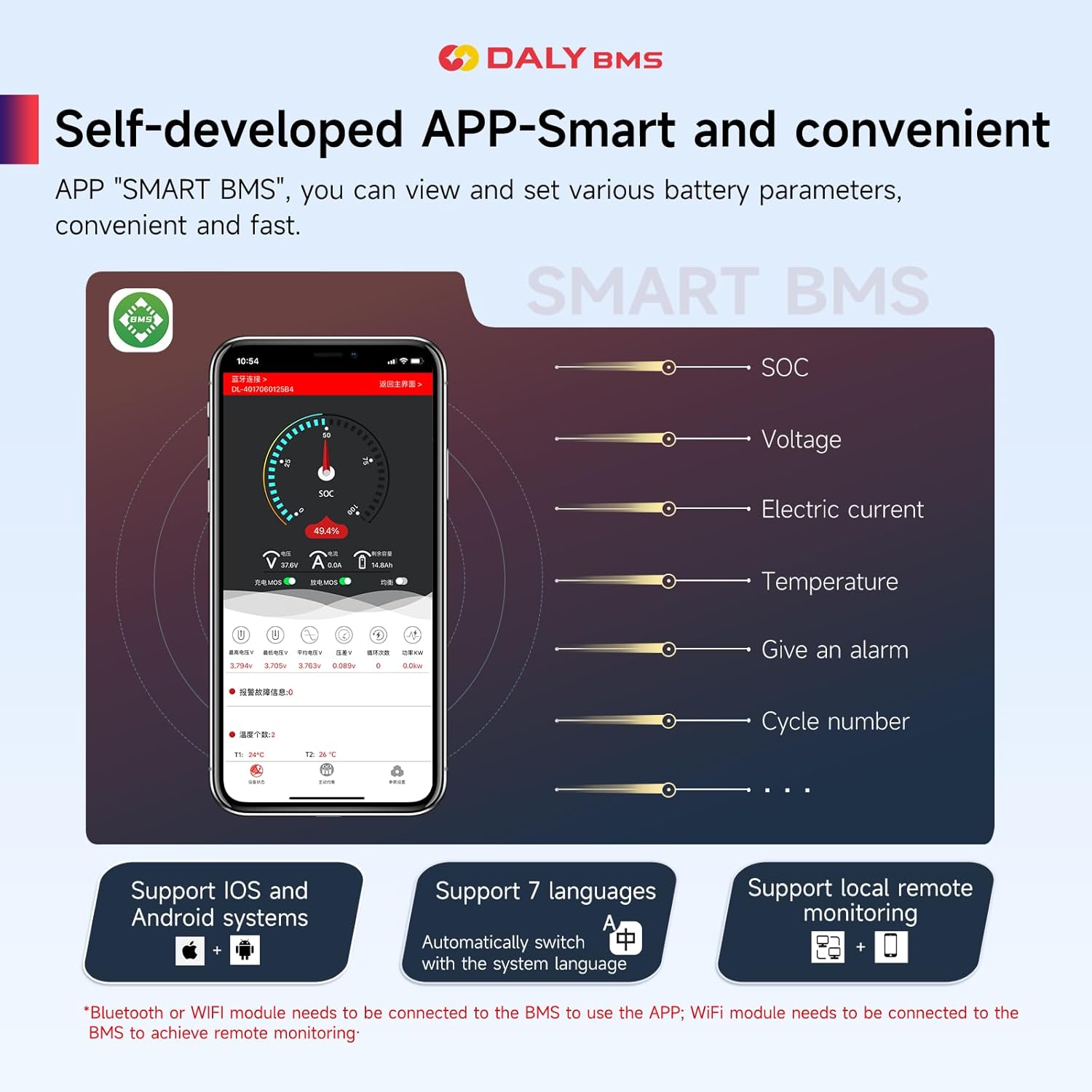
Image: A screenshot of the DALY Smart BMS mobile application, displaying battery State of Charge (SOC), voltage, current, temperature, alarm status, and cycle number. The app supports iOS and Android, multiple languages, and remote monitoring via WiFi.
The "SMART BMS" app allows you to view and set various battery parameters quickly and easily. When the BMS detects any abnormality in the battery pack, it will send an alert directly to your smartphone app, enabling proactive management of your battery system.
- المراقبة عن بعد: Monitor your lithium batteries from anywhere via the Internet using the WiFi module.
- البيانات في الوقت الحقيقي: View المعايير الأساسية مثل حالة الشحن (SOC) والحجمtagهـ، التيار الكهربائي، ودرجة الحرارة.
- التنبيهات: Receive immediate notifications on your smartphone if any abnormalities are detected.
- التوافق: Supports both iOS and Android operating systems.
6. سيناريوهات التطبيق
The DALY Smart BMS is suitable for various lithium battery applications, providing reliable protection and management.

Image: An illustration showing the DALY BMS integrated into different battery pack configurations, including large cell, cylindrical cell, and soft-packed cell battery systems, highlighting its versatility.
This BMS can be integrated into diverse battery systems, including those for electric vehicles, energy storage, and other high-power applications requiring precise battery management.
7. محتويات العبوة
Upon receiving your DALY Smart 13S BMS, please verify that all items listed below are included in the package.

Image: A visual representation of the DALY BMS package contents, including the BMS unit, manual, output line, WiFi module, cables, NTC temperature sensor, and CAN/485 5-pin connector.
| غرض | كمية |
|---|---|
| K series BMS | 1 |
| يدوي | 1 |
| B-P- Output line | 1 |
| واي فاي وحدة | 1 |
| الكابلات | مجموعة واحدة |
| مستشعر درجة الحرارة إن تي سي | 1 |
| CAN/485 5pin Connector | 1 |
8. معلومات السلامة
Always adhere to safety precautions when working with battery management systems and high-voltagحزم البطاريات ه.
- Ensure all connections are secure and correctly polarized before applying power.
- لا تقم بتوصيل أطراف البطارية أو وصلات نظام إدارة البطارية (BMS) بدائرة قصر.
- تجنب تعريض نظام إدارة المباني لدرجات حرارة قصوى أو رطوبة أو بيئات أكالة.
- Only use the BMS with compatible battery chemistries and cell counts as specified.
- In case of smoke, unusual odors, or excessive heat, immediately disconnect the power source and consult a professional.
- يحفظ بعيدًا عن متناول الأطفال.
9. إرشادات التشغيل
To ensure proper operation of your DALY Smart BMS, follow these guidelines:
- الطاقة الأولية: After wiring, connect the main battery terminals. The BMS should power on automatically. If not, check all connections.
- يراقب: Regularly check battery parameters via the smartphone app or connected display. Pay attention to cell voltages, temperatures, and overall pack voltage.
- الشحن: Use a charger compatible with your Li-ion battery pack's voltage and current requirements. The BMS will manage overcharge protection.
- التفريغ: Ensure your load does not exceed the continuous discharge current rating of the BMS. The BMS will provide overcurrent and overdischarge protection.
- المعادلة: The BMS performs passive equalization to balance cell voltages. Allow sufficient time for balancing, especially after deep cycles.
10. الصيانة
Minimal maintenance is required for the DALY Smart BMS. However, periodic checks are recommended:
- التفتيش البصري: قم بفحص نظام إدارة المباني (BMS) وجميع الأسلاك بشكل دوري بحثًا عن أي علامات تلف أو تآكل أو وصلات مفكوكة.
- تحديثات البرامج: Keep the smartphone app updated to the latest version to benefit from new features and bug fixes.
- تنظيف: If necessary, gently clean the exterior of the BMS with a dry, soft cloth. Do not use liquids or abrasive cleaners.
- درجة حرارة: Ensure the BMS operates within its specified temperature range to prevent overheating.
11. استكشاف الأخطاء وإصلاحها
If you encounter issues with your DALY Smart BMS, consider the following common troubleshooting steps:
- نظام إدارة المباني لا يعمل: Check all main power connections (B- and P-) and the balance lead connections. Ensure the battery pack voltagيقع ضمن نطاق تشغيل نظام إدارة المباني (BMS).
- مشكلات اتصال التطبيق: Verify the WiFi module is correctly installed and powered. Ensure your smartphone's WiFi is enabled and connected to the correct network, or that Bluetooth is active if using a Bluetooth module. Restart the app and/or the BMS.
- تم تفعيل نظام الحماية من الشحن الزائد/التفريغ الزائد: This indicates that a cell or the entire pack has reached its voltage limit. Check individual cell voltages. Ensure your charger/load settings are appropriate for your battery type.
- حماية من التيار الزائد تم تشغيلها: The load current exceeded the BMS's limit. Reduce the load or ensure the BMS current rating matches your application.
- Temperature Protection Triggered: The battery or BMS temperature is outside the safe operating range. Allow the system to cool down and ensure adequate ventilation.
- خلايا غير متوازنة: إذا كان حجم الخليةtages are significantly different, ensure the balance leads are correctly connected. The passive balancing function will work to equalize cells over time, especially during charging.
For persistent issues, refer to the detailed troubleshooting section in the full product manual or contact DALY customer support.
12. فيديو المنتج الرسمي
شاهد هذا الفيديو لمدة أكثرview of the DALY K-series Smart BMS features and capabilities.
Video: An official DALY BMS video showcasing the K-series Smart BMS, highlighting its smart features, comprehensive protection, and various applications.
13. الضمان والدعم
DALY provides a quality guarantee for its products. We offer 24-hour one-on-one customer service and technical support. All products are ISO/FCC/RoHS/PSE/CE approved.
If you have any questions or require assistance, please do not hesitate to contact DALY customer service. Please have your product model number (13S BMS 48V 60A) and purchase details ready when contacting support.


