مقدمة
The Discovery Bright Doodles LCD Art Tablet provides a mess-free and engaging platform for creative expression. Designed for children aged 3 and up, this portable drawing pad allows users to draw, write, and doodle without the need for paper or ink. Its intuitive design and durable construction make it suitable for various environments, from home to travel.
This manual provides essential information on setting up, operating, and maintaining your LCD Art Tablet to ensure optimal performance and longevity.
معلومات السلامة
- This product is intended for children aged 3 years and older. Adult supervision is recommended.
- لا تعرض الجهاز اللوحي لدرجات حرارة قصوى أو لأشعة الشمس المباشرة أو للرطوبة.
- Avoid dropping the tablet or subjecting it to strong impacts, as this may damage the LCD screen.
- Only use the provided stylus or a similar non-abrasive, blunt instrument to draw on the screen. Sharp objects can permanently damage the display.
- أبقِ البطاريات بعيدًا عن متناول الأطفال الصغار. في حال ابتلاعها، استشر طبيبًا فورًا.
محتويات الحزمة
يرجى التحقق من الحزمة للتأكد من وجود جميع العناصر:
- 1 x Discovery Bright Doodles LCD Art Tablet
- 1 x Tethered Stylus
- 1 × دليل التعليمات (هذه الوثيقة)

Image: The Discovery Bright Doodles LCD Art Tablet shown alongside its retail packaging. The tablet is blue with a black screen displaying colorful doodles, and a green tethered stylus is visible.
يثبت
تركيب البطارية
The Discovery Bright Doodles LCD Art Tablet requires 2 AAA batteries (not included) for operation. Follow these steps to install them:
- حدد مكان حجرة البطارية في الجزء الخلفي من الجهاز اللوحي.
- باستخدام مفك براغي صغير (غير مرفق)، افتح غطاء حجرة البطارية بحرص.
- أدخل 2 بطاريات AAA، مع التأكد من القطبية الصحيحة (+/-) كما هو موضح داخل الحجرة.
- استبدل غطاء حجرة البطارية وثبته بالمسمار.
ملحوظة: Always use fresh batteries and dispose of old batteries responsibly. Do not mix old and new batteries, or different types of batteries.
تعليمات التشغيل
Drawing on the Tablet
Use the included tethered stylus to draw or write on the LCD screen. You can also use your fingertip. The screen will display colorful lines as you draw.

Image: A child's hand holding the green stylus and drawing colorful lines on the black screen of the blue Discovery Bright Doodles LCD Art Tablet.
Erasing the Screen
To clear the entire screen and start a new drawing, press the erase button located on the bottom edge of the tablet. The screen will instantly clear.
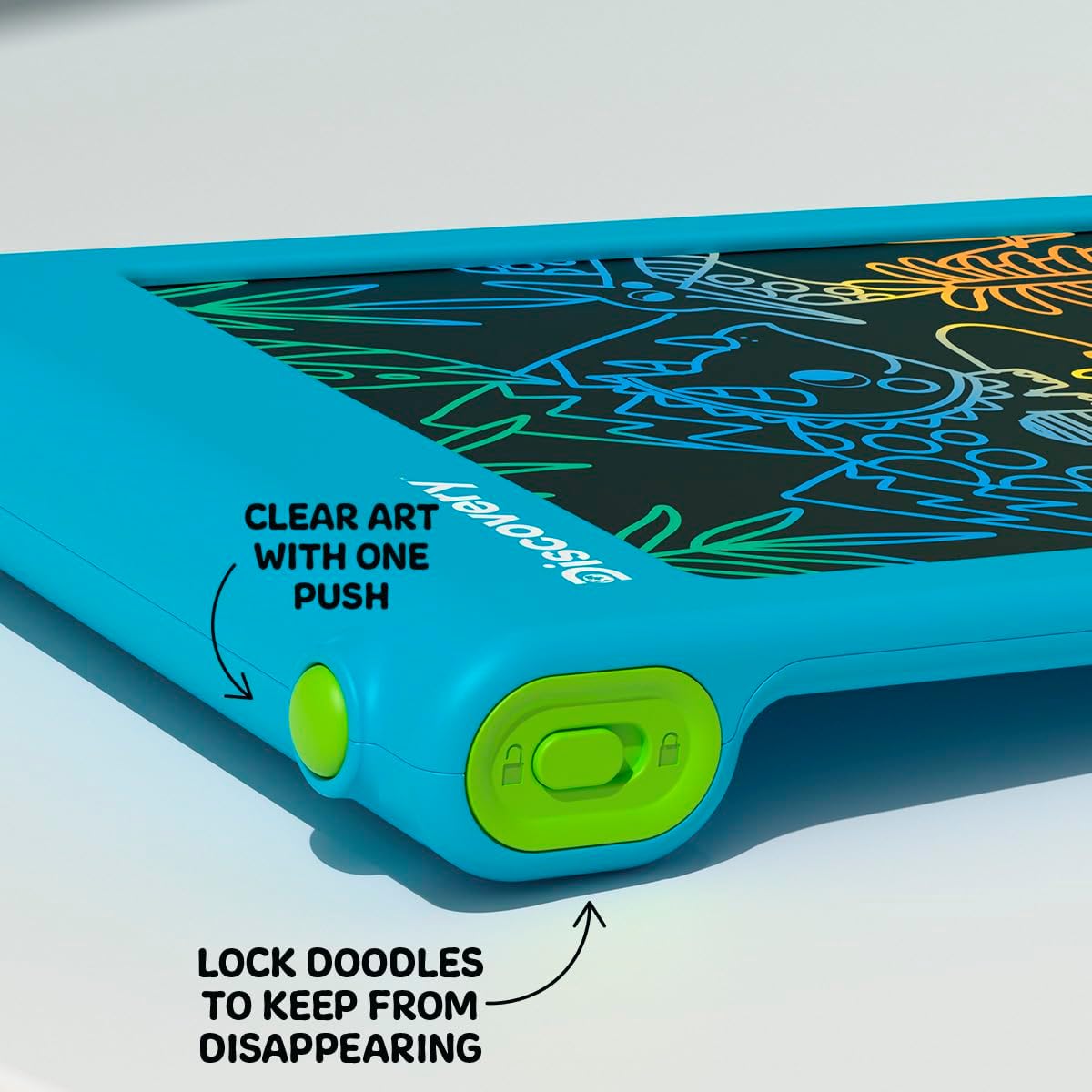
الصورة: لقطة مقربة view of the bottom edge of the tablet, showing the round green erase button and the rectangular green screen lock switch with an open and closed padlock icon.
وظيفة قفل الشاشة
The tablet features a screen lock switch to prevent accidental erasing. This is useful for preserving artwork or notes.
- ل قفل the screen: Slide the screen lock switch (located next to the erase button) to the position showing a closed padlock icon. While locked, pressing the erase button will not clear the screen.
- ل فتح the screen: Slide the screen lock switch to the position showing an open padlock icon. The erase button will now function normally.
نصيحة: Always ensure the screen is unlocked before attempting to erase your drawing.
مكان تخزين قلم اللمس
The included stylus is tethered to the tablet to prevent loss. When not in use, the stylus can be neatly stored in the designated slot on the side of the tablet.

الصورة: لقطة مقربة view of the side of the tablet, showing the green tethered stylus inserted into its storage slot.
صيانة
تنظيف
To clean the tablet, gently wipe the screen and casing with a soft, dry, lint-free cloth. Do not use abrasive cleaners, solvents, or chemical sprays, as these can damage the screen or casing.
استبدال البطارية
If the erase function stops working or the screen becomes dim, it may be time to replace the batteries. Refer to the "Battery Installation" section under Setup for instructions.
استكشاف الأخطاء وإصلاحها
- Screen does not clear when erase button is pressed:
- Check if the screen lock switch is in the "locked" position. Slide it to the "unlocked" position.
- Ensure batteries are correctly installed and not depleted. Replace batteries if necessary.
- Drawing lines are faint or inconsistent:
- قد يشير هذا إلى انخفاض مستوى شحن البطارية. استبدل البطاريات.
- Ensure you are using the stylus or a suitable blunt object with appropriate pressure.
- Stylus is lost:
- The stylus is tethered to the tablet to prevent loss. If it becomes detached, a replacement stylus may be available from the manufacturer or a compatible alternative can be used.
تحديد
| رقم الموديل | 1017870 |
| ماركة | اكتشاف |
| أبعاد المنتج | 9.7 × 6.2 × 0.1 بوصة |
| وزن العنصر | 1.12 رطل |
| العمر الموصى به | 3 سنوات وما فوق |
| مصدر الطاقة | 2 بطاريات AAA (غير مدرجة) |
| ميزة خاصة | شاشة LCD مضاءة |
| الشركة المصنعة | ميرشسورس |
الضمان والدعم
For warranty information or technical support, please refer to the contact details provided on the product packaging or visit the official Discovery brand webيرجى الاحتفاظ بإثبات الشراء الخاص بك لأي مطالبات بالضمان.


