مقدمة
This manual provides detailed instructions for the setup, operation, maintenance, and troubleshooting of your Rapoo E9310M Multi-Device Wireless Keyboard. This keyboard is designed for versatile use across multiple operating systems and devices, offering a seamless typing experience.

Image: The Rapoo E9310M Multi-Device Wireless Keyboard, showcasinتصميمها الأنيق.
ماذا يوجد في الصندوق
- 1 x Rapoo E9310M Wireless Keyboard
- 1 × دليل المستخدم
- 2 بطاريات AAA (مثبتة مسبقًا أو مرفقة بشكل منفصل)
يثبت
1. تركيب البطارية
The Rapoo E9310M keyboard operates on 2 AAA batteries. Ensure batteries are correctly inserted according to polarity markings. The keyboard is designed for extended battery life, lasting up to 12 months with upgraded low-energy Bluetooth technology.

Image: The Rapoo E9310M keyboard on a desk, highlighting its extended battery life feature.
2. خيارات الاتصال
The keyboard supports multi-device connectivity via two methods:
- بلوتوث 5.0/4.0: For wireless connection to up to three devices.
- 2.4GHz USB Receiver: For a stable wireless connection to one device.

Image: Diagram illustrating multi-device and multi-OS connectivity options for the keyboard.
3. الاقتران بالأجهزة
- For 2.4GHz USB Receiver: Insert the USB receiver into an available USB port on your computer. The keyboard should connect automatically.
- For Bluetooth Pairing (up to 3 devices):
- اضغط مع الاستمرار على Fn + 1, Fn + 2، أو Fn + 3 key combination for 3 seconds to enter Bluetooth pairing mode for the desired channel. The indicator light above the '1', '2', or '3' key will flash rapidly.
- On your device (PC, tablet, smartphone), navigate to Bluetooth settings and search for new devices.
- Select "Rapoo E9310M" from the list of available devices to complete the pairing process. The indicator light will stop flashing once connected.

الصورة: لقطة مقربة view of the USB receiver being inserted into a laptop, demonstrating 2.4GHz connectivity.
4. التبديل بين الأجهزة المتصلة
To switch between paired Bluetooth devices or the 2.4GHz connection, simply press the corresponding key:
- يضعط Fn + 1, Fn + 2، أو Fn + 3 to switch to a Bluetooth-connected device.
- يضعط Fn + 4 to switch to the device connected via the 2.4GHz USB receiver.
5. تبديل النظام (ويندوز/ماك)
The keyboard layout is optimized for both Windows and Mac OS. To switch between operating system modes:
- يضعط Fn + Q for Mac OS mode.
- يضعط Fn + W for Windows OS mode.
This ensures that function keys and modifier keys (like Command/Alt) operate correctly for your specific operating system.
تعليمات التشغيل
1. 99-Key Compact Layout
The E9310M features a compact 99-key layout that includes a full number pad, providing essential functionality without occupying excessive desk space.

الصورة: علوية view of the Rapoo E9310M keyboard, illustrating its compact 99-key layout with integrated number pad.
2. منخفض الارتفاعfile أغطية مفاتيح شيكلي
The keyboard is equipped with low-profile chiclet keycaps and an incurve rounded design, offering a quiet, precise, and comfortable typing experience similar to a laptop keyboard.

Image: A close-up detail of the low-profile chiclet keycaps, showing their design and spacing.
3. Multimedia Keys
Access 12 widely used function keys for multimedia control (e.g., play/pause, volume up/down, mute) by pressing the Fn key in combination with the corresponding F1-F12 keys. These shortcuts are supported on both Windows and Mac OS.
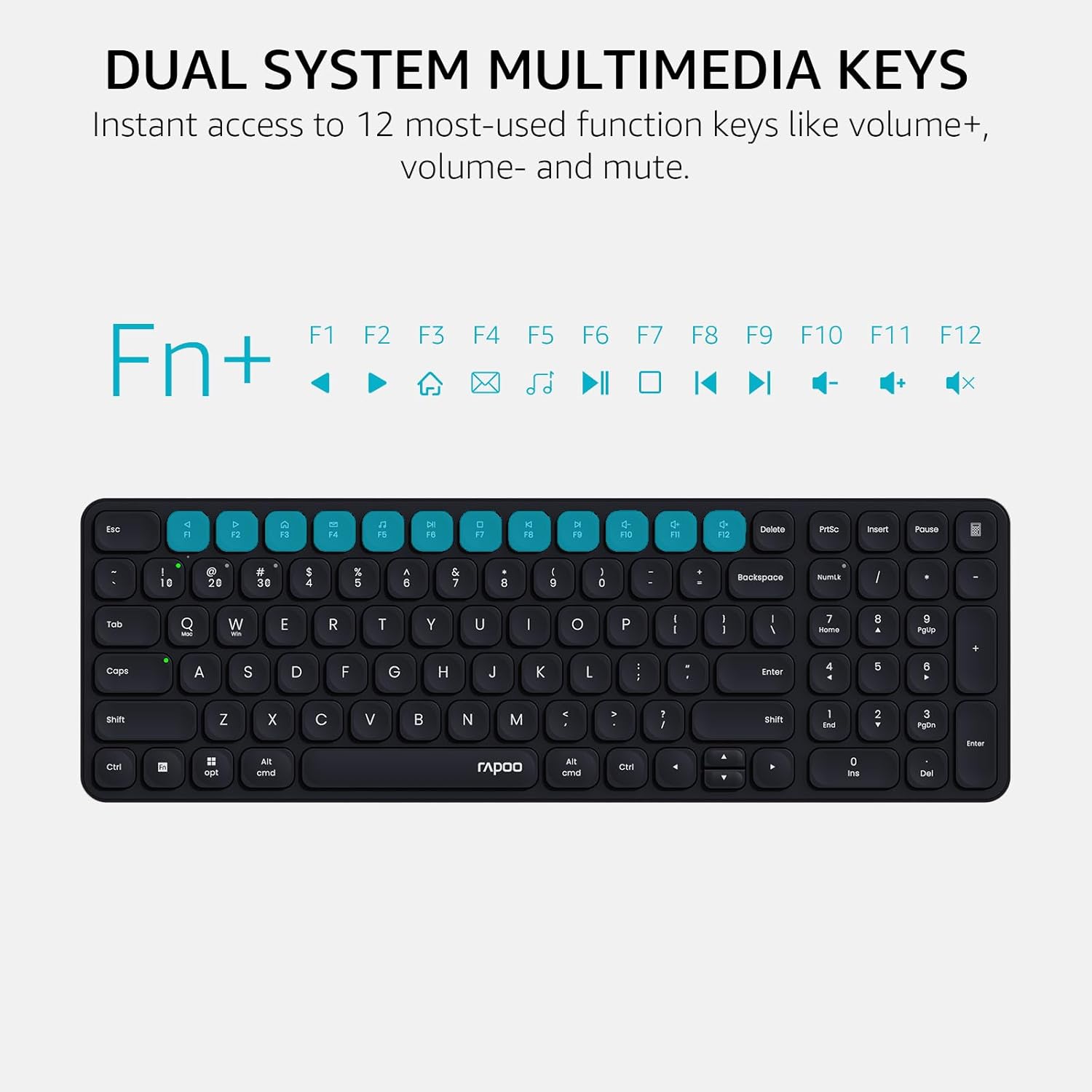
Image: A visual guide highlighting the multimedia functions accessible via the Fn key combinations.
4. Device and Capitalization Indicator Lights
The keyboard includes indicator lights to show which device channel is currently active and whether Caps Lock is engaged. This provides immediate visual feedback on the keyboard's status.

الصورة: عن قرب view of the keyboard's indicator lights for device connection and Caps Lock status.
صيانة
- تنظيف: Use a soft, dry cloth to clean the keyboard surface. For deeper cleaning, a slightly damp يمكن استخدام قطعة قماش مبللة بصابون خفيف، مع التأكد من عدم دخول أي سائل إلى مفاتيح التشغيل أو المكونات الداخلية.
- استبدال البطارية: Replace AAA batteries when the low battery indicator appears or when connectivity issues arise due to power.
- تخزين: قم بتخزين لوحة المفاتيح في مكان بارد وجاف بعيدًا عن أشعة الشمس المباشرة ودرجات الحرارة القصوى عندما لا تكون قيد الاستخدام لفترات طويلة.
استكشاف الأخطاء وإصلاحها
| مشكلة | السبب المحتمل | حل |
|---|---|---|
| لوحة المفاتيح غير متصلة عبر البلوتوث. | Keyboard not in pairing mode; device Bluetooth off; interference; low battery. | Ensure keyboard is in pairing mode (Fn + 1/2/3 for 3s). Check device Bluetooth settings. Move closer to the device. Replace batteries. |
| 2.4GHz connection not working. | USB receiver not properly inserted; driver issue; low battery. | Re-insert USB receiver into a different port. Ensure keyboard is switched to 2.4GHz mode (Fn + 4). Replace batteries. |
| Keys not responding or typing incorrectly. | Low battery; incorrect operating system mode; physical obstruction. | Replace batteries. Switch to correct OS mode (Fn + Q for Mac, Fn + W for Windows). Clean under keycaps. |
| Multimedia keys not functioning. | Incorrect operating system mode; software conflict. | Ensure correct OS mode is selected. Check if any software on your device is overriding keyboard functions. |
تحديد
| ميزة | التفاصيل |
|---|---|
| نموذج | E9310M |
| الاتصال | Bluetooth 5.0/4.0, 2.4GHz RF (USB Receiver) |
| دعم متعدد الأجهزة | Up to 4 devices (3 via Bluetooth, 1 via 2.4GHz) |
| أنظمة التشغيل المتوافقة | Windows, Mac OS, Linux, Chrome OS, iOS, Android |
| تخطيط المفتاح | 99-Key Compact with Number Pad |
| نوع المفتاح | منخفض بروfile أغطية مفاتيح شيكلي |
| المميزات الخاصة | Multimedia Hotkeys, Device & Caps Lock Indicators, Portable |
| مصدر الطاقة | 2 × بطاريات AAA (مضمنة) |
| عمر البطارية | مدة تصل إلى 12 شهرًا (تقديرية) |
| مادة | الألومنيوم |
| الأبعاد (الطول × العرض × الارتفاع) | 11.18 × 4.69 × 0.79 بوصة (28.39 × 11.91 × 2.01 سم) |
| وزن | 10.9 أونصة (309 جرام) |
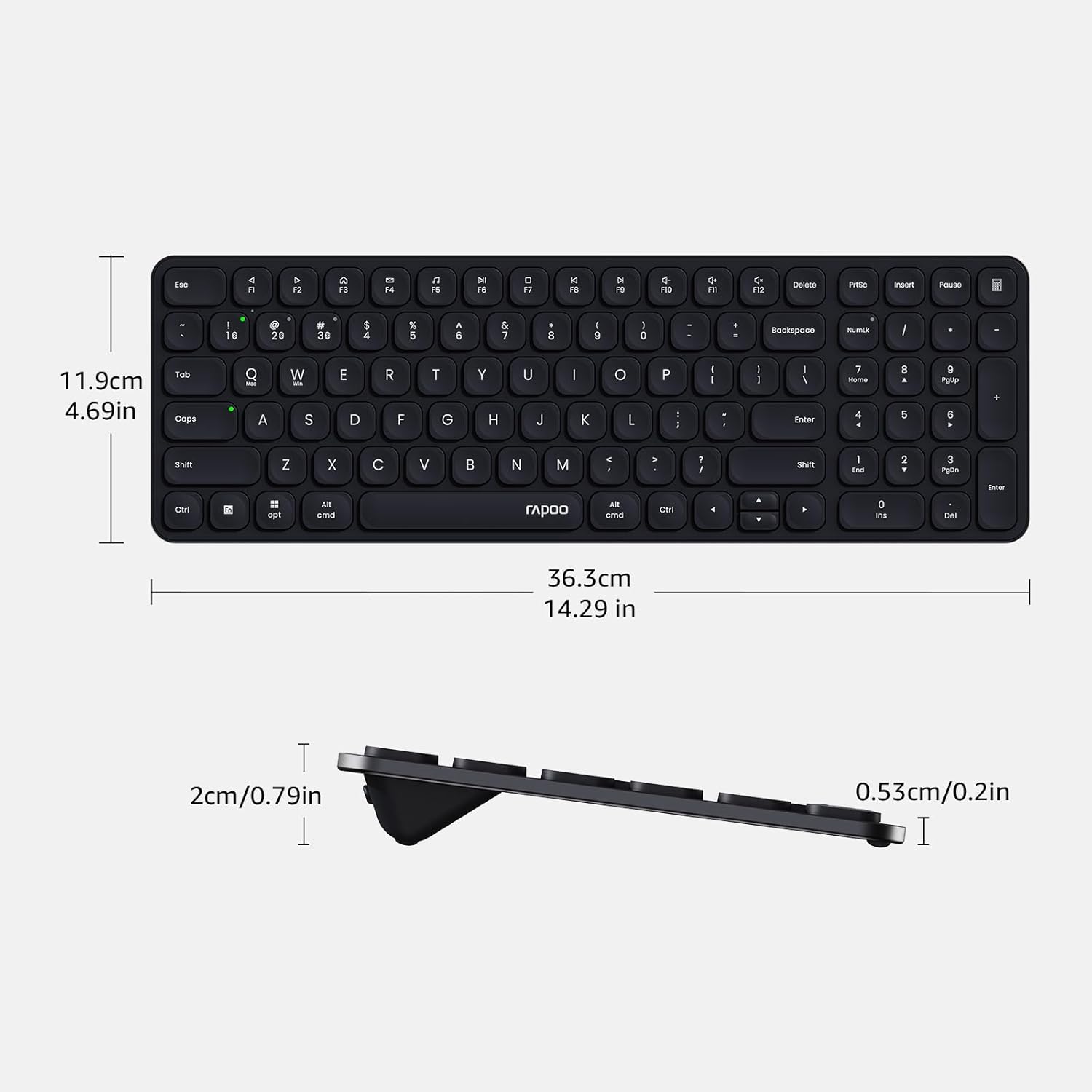
Image: Diagram showing the precise dimensions of the Rapoo E9310M keyboard in both centimeters and inches.
الضمان والدعم
Rapoo products are designed for reliability and performance. For any issues or inquiries, please refer to the following:
- Return Window: A 30-day return window is typically offered for product returns. Please check your purchase details for specific terms.
- دعم العملاء: For technical assistance or product support, please contact Rapoo customer service. Refer to the official Rapoo webللحصول على معلومات الاتصال، يرجى زيارة الموقع الإلكتروني أو الاطلاع على وثائق الشراء الخاصة بك.
معلومات السلامة
- لا تعرض لوحة المفاتيح للسوائل أو الرطوبة الزائدة.
- Avoid extreme temperatures or direct sunlight.
- Do not attempt to disassemble or modify the keyboard.
- يحفظ بعيدًا عن متناول الأطفال.


