1. المقدمة
Thank you for choosing the Mecer 23.8 Inch Full HD LED Monitor. This manual provides essential information for setting up, operating, and maintaining your monitor. Please read it thoroughly before use to ensure proper functionality and longevity of your device.
This monitor features a 23.8-inch Full HD (1920 x 1080) display, offering crisp and clear visuals. It incorporates TFT LED panel technology for energy efficiency and vibrant colors, with a 16:9 aspect ratio suitable for widescreen viewing. Connectivity options include VGA and HDMI, making it compatible with various devices. Built-in speakers provide basic audio, and wide 178° viewing angles ensure comfortable use. With a 2ms response time, it is suitable for general computing and multimedia consumption.
2. معلومات السلامة
- مصدر الطاقة: استخدم فقط محول الطاقة المرفق مع الشاشة. تأكد من تأريض مقبس الطاقة جيدًا.
- تهوية: Do not block ventilation openings. Allow adequate space around the monitor for proper airflow to prevent overheating.
- الموقع: Place the monitor on a stable, flat surface. Avoid placing it in direct sunlight, near heat sources, or in environments with excessive dust or humidity.
- تنظيف: Disconnect the power cord before cleaning. Use a soft, dry cloth for the screen and a slightly damp cloth for the casinز. تجنب استخدام المنظفات أو المذيبات الكاشطة.
- التعرض السائل: Keep liquids away from the monitor. If liquid enters the monitor, disconnect power immediately and contact qualified service personnel.
- التفكيك: لا تحاول تفكيك أو إصلاح الشاشة بنفسك. أحل جميع أعمال الصيانة إلى فني صيانة مؤهل.
3. محتويات العبوة
يرجى التحقق من محتويات الحزمة للتأكد من وجود جميع العناصر:
- Mecer 23.8 Inch LED Monitor
- حامل الشاشة (القاعدة والرقبة)
- محول الطاقة والكابل
- كابل HDMI
- كابل فغا
- دليل المستخدم (هذا المستند)
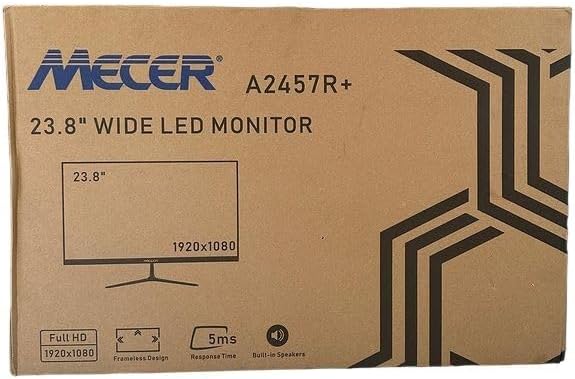
الصورة 3.1: The monitor packaging box, indicating the model A2457R+ and key features like 23.8" display, Full HD 1920x1080 resolution, frameless design, 5ms response time, and built-in speakers.
4. الإعداد
4.1. تجميع حامل الشاشة
- قم بإزالة مكونات الشاشة والحامل من العبوة بعناية.
- قم بتثبيت رقبة الحامل على لوحة الشاشة عن طريق محاذاة الألسنة والضغط بقوة حتى تستقر في مكانها.
- Attach the stand base to the stand neck, securing it with the provided screw (usually hand-tightened).
- ضع الشاشة المجمعة على سطح ثابت ومستوٍ.

الصورة 4.1: أمام view of the Mecer 23.8 Inch LED Monitor with its stand assembled, ready for connection.
4.2. الاتصال بالكمبيوتر
تدعم الشاشة منفذي HDMI وVGA. اختر الكابل المناسب لجهاز الكمبيوتر الخاص بك.
- اتصال HDMI: Connect one end of the HDMI cable to the HDMI port on your computer's graphics card and the other end to the HDMI port on the monitor. HDMI transmits both video and audio signals.
- اتصال VGA: Connect one end of the VGA cable to the VGA port on your computer's graphics card and the other end to the VGA port on the monitor. VGA transmits only video signals.

الصورة 4.2: مؤخرة view of the Mecer 23.8 Inch LED Monitor, showing the input ports including HDMI and VGA, as well as the power input.
4.3. توصيل الطاقة
- Connect the power adapter cable to the DC IN port on the back of the monitor.
- قم بتوصيل محول الطاقة بمأخذ الحائط.
5. تعليمات التشغيل
5.1. تشغيل / إيقاف التشغيل
Press the power button, typically located on the bottom right side or rear of the monitor, to turn the monitor on or off. The power indicator light will illuminate when the monitor is on.
5.2. اختيار مصدر الإدخال
If you have multiple devices connected, you may need to manually select the input source. Use the monitor's control buttons (usually located near the power button) to navigate to the input selection menu and choose between HDMI or VGA.
5.3. قائمة العرض على الشاشة (OSD)
The OSD menu allows you to adjust various display settings. Use the monitor's control buttons to:
- قم بالوصول إلى قائمة OSD.
- Navigate through menu options (e.g., Brightness, Contrast, Color Settings, Input Source).
- Adjust values or select options.
- الخروج من قائمة OSD.
تتضمن الإعدادات القابلة للتعديل الشائعة ما يلي:
- السطوع / التباين: اضبط مستوى الإضاءة الكلي والفرق بين المناطق المضيئة والمظلمة.
- إعدادات الألوان: Adjust color temperature, RGB values, or select preset color modes.
- نسبة العرض إلى الارتفاع: Change between 16:9, 4:3, or other available options.
- صوتي: Adjust volume for the built-in speakers.
5.4. مكبرات الصوت المدمجة
The monitor includes built-in speakers for basic audio output. If using an HDMI connection, audio will be transmitted automatically. For VGA connections, ensure your computer's audio output is configured correctly. Adjust the volume through the OSD menu or your computer's operating system.
6. الصيانة
6.1. تنظيف الشاشة
- افصل الشاشة دائمًا عن مأخذ الطاقة قبل التنظيف.
- شاشة: امسح الشاشة برفق بقطعة قماش ناعمة وخالية من الوبر. لإزالة البقع الصعبة، امسح برفقampen the cloth with water or a specialized screen cleaner (ensure it's alcohol-free and ammonia-free) and wipe carefully. Do not spray liquid directly onto the screen.
- Casing: استخدم قطعة قماش ناعمة وجافة لمسح الشاشة.asinز. إذا لزم الأمر، د قليلاًamp يمكن استخدام قطعة قماش، ثم قطعة قماش جافة.
6.2. التخزين
في حالة تخزين الشاشة لفترة طويلة، افصل جميع الكابلات، وقم بتعبئتها في عبوتها الأصلية (إن وجدت)، وخزنها في مكان بارد وجاف بعيدًا عن أشعة الشمس المباشرة ودرجات الحرارة القصوى.
7. استكشاف الأخطاء وإصلاحها
إذا واجهت مشكلات مع شاشتك، فراجع المشكلات والحلول الشائعة التالية:
- لا يوجد طاقة:
- Ensure the power cable is securely connected to the monitor and the wall outlet.
- تأكد من أن منفذ الطاقة يعمل عن طريق توصيل جهاز آخر.
- تأكد من أن محول الطاقة يعمل بشكل صحيح.
- لا توجد تغطية:
- Ensure the video cable (HDMI or VGA) is securely connected to both the monitor and the computer.
- Verify that the correct input source is selected on the monitor (via the OSD menu).
- Check if your computer is powered on and outputting a video signal.
- Try a different video cable if available.
- الصورة ضبابية أو مشوهة:
- تأكد من ضبط دقة الشاشة على دقتها الأصلية (1920 × 1080) في إعدادات العرض الخاصة بالكمبيوتر.
- Adjust the monitor's OSD settings for brightness, contrast, and sharpness.
- For VGA connections, use the 'Auto Adjust' function in the OSD menu if available.
- لا يوجد صوت من مكبرات الصوت المدمجة:
- تأكد من عدم كتم صوت الشاشة أو ضبطه على مستوى منخفض للغاية في قائمة OSD.
- تحقق من إعدادات إخراج الصوت في جهاز الكمبيوتر الخاص بك للتأكد من تحديد الشاشة كجهاز التشغيل.
- If using VGA, ensure your computer's audio is routed to an external speaker system, as VGA does not carry audio.
8. المواصفات
| ميزة | مواصفة |
|---|---|
| ماركة | Mecer |
| رقم الموديل | أ2457ر+ |
| حجم العرض | 23.8 بوصة |
| دقة | 1920 × 1080 بكسل (Full HD) |
| نوع العرض | LED (TFT LED Panel) |
| نسبة العرض إلى الارتفاع | 16:9 |
| وقت الاستجابة | 2 ميلي ثانية |
| معدل التحديث | 75 هرتز |
| Viewزوايا جي | 178 درجة أفقيًا / 178 درجة رأسيًا |
| الاتصال | عدد 1 منفذ HDMI و 1 منفذ VGA |
| مكبرات صوت مدمجة | نعم |
| لون | أسود |
| أبعاد المنتج (العمق × العرض × الارتفاع) | 560D x 42W x 410H millimetres |
| المميزات الخاصة | High performance intelligent multi-frequency scanning, Micro Computer digital technology control, no radiation, no glare, Comply with VESA DPMS international power saving regulation, Support DDC 1/2B and Windows PNP Plug and Play |
9. الضمان والدعم
This Mecer monitor comes with a ضمان محدود لمدة عامين من تاريخ الشراء. يُرجى الاحتفاظ بإيصال الشراء للمطالبة بالضمان.
For technical support, service, or warranty inquiries, please contact your retailer or the authorized Mecer service center in your region. Do not attempt to repair the product yourself, as this may void your warranty.


