مقدمة
This manual provides detailed instructions for the setup, operation, and maintenance of your BUFFBEE RS11 Radio Alarm Clock. Please read this manual thoroughly before using the device to ensure proper function and to maximize your user experience. Keep this manual for future reference.
محتويات الحزمة
عند تفريغ العبوة، يرجى التأكد من أن جميع العناصر المدرجة أدناه موجودة وفي حالة جيدة:
- 1 x BUFFBEE RS11 Radio Alarm Clock
- 1 × محول طاقة تيار مستمر
- 1 × دليل المستخدم (هذه الوثيقة)
- 1 x CR2032 Battery (pre-installed or included separately for backup)
المنتج انتهىview
The BUFFBEE RS11 is a compact device combining an alarm clock, FM radio, and a 7-color night light. It features a clear digital display and intuitive controls.

الشكل 1: أمام view of the BUFFBEE RS11 Radio Alarm Clock, displaying the digital time and accessible control buttons on top.

الشكل 2: Internal structure highlighting the 5W Hi-Fi speaker, designed for clear and authentic sound reproduction.
يثبت
1. توصيل الطاقة
- Connect the provided DC power adapter to the 'DC 5V' port on the back of the alarm clock.
- Plug the adapter into a standard wall outlet. The display will illuminate, and the clock will be ready for initial setup.
2. Backup Battery Installation
The BUFFBEE RS11 includes a CR2032 battery for backup, which preserves time and alarm settings during a power outage.
- حدد مكان حجرة البطارية في الجزء السفلي من الوحدة.
- قم بإدخال بطارية CR2032 مع توجيه الجانب الموجب (+) لأعلى.
- أغلق حجرة البطارية بشكل محكم.
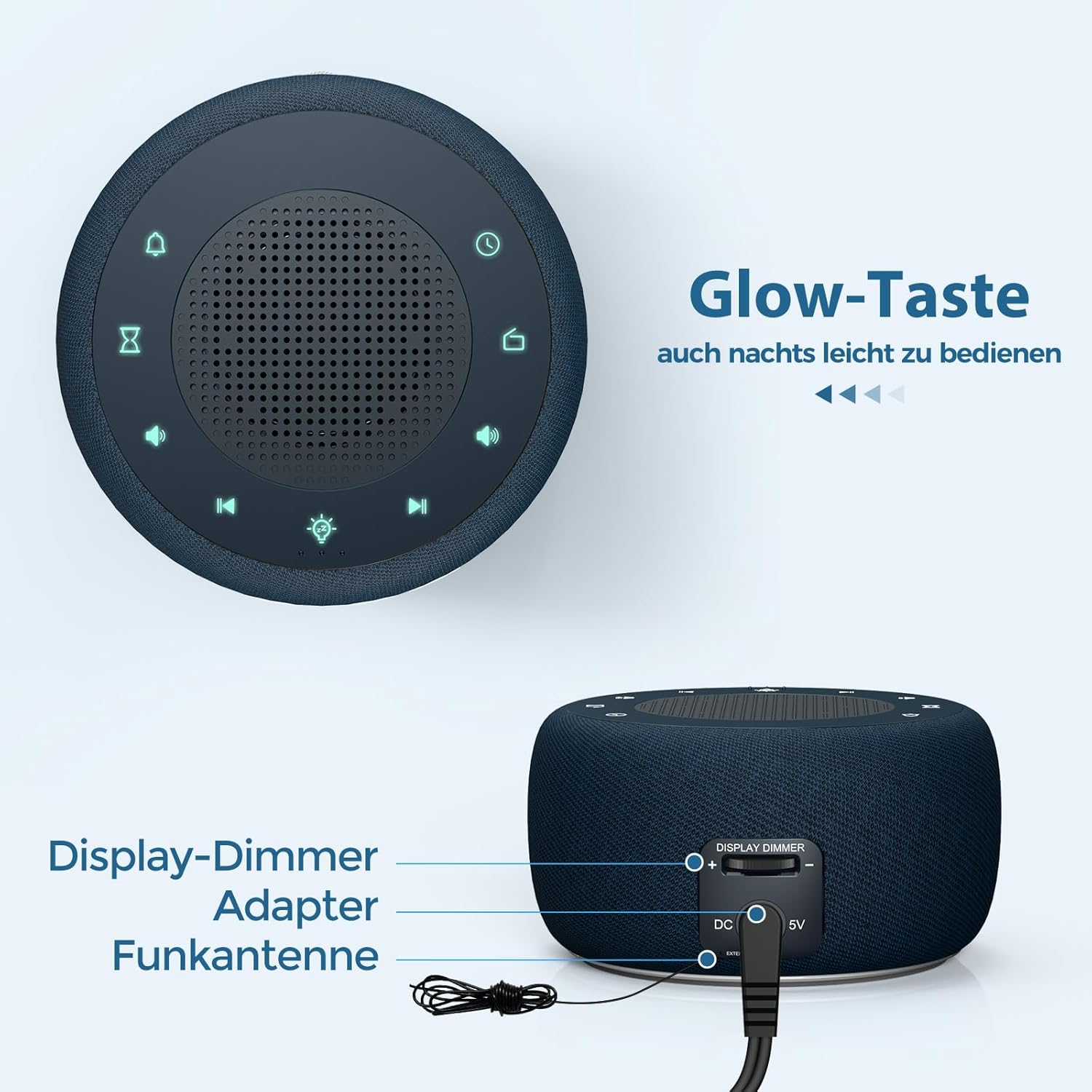
الشكل 3: Rear panel connections, showing the display dimmer control, DC 5V power input, and FM antenna port.
تعليمات التشغيل
1. ضبط الوقت
- Press and hold the 'Time Set' button (often indicated by a clock icon) until the hour digits begin to flash.
- استخدم زري "+" و "-" لضبط الساعة.
- Press the 'Time Set' button again to switch to minute adjustment. Use '+' and '-' to set the minutes.
- Press 'Time Set' once more to confirm and exit time setting mode.
2. ضبط المنبه
- Press and hold the 'Alarm Set' button (often indicated by an alarm clock icon) until the alarm hour digits flash.
- Use the '+' and '-' buttons to adjust the alarm hour.
- Press 'Alarm Set' again to switch to alarm minute adjustment. Use '+' and '-' to set the alarm minutes.
- Press 'Alarm Set' to select the alarm tone. Options include: Bird sounds, Piano, Beep, or FM Radio.
- Press 'Alarm Set' once more to confirm and exit alarm setting mode.
- To activate/deactivate the alarm, briefly press the 'Alarm Set' button. An alarm icon will appear/disappear on the display.

الشكل 4: Wake-up options with four distinct alarm tones, including the option to wake to your favorite radio station.
3. Radio Operation (FM)
- Press the 'Radio' button (often indicated by a radio icon) to turn the FM radio on or off.
- Use the 'Previous Track' and 'Next Track' buttons (often indicated by ◀◀ and ▶▶ icons) to tune to different FM stations.
- Press and hold the 'Previous Track' or 'Next Track' buttons to automatically scan for the next available station.
- Adjust the volume using the 'Volume Up' and 'Volume Down' buttons (often indicated by '+' and '-' speaker icons). The volume can be adjusted in 16 levels.

الشكل 5: Enjoying the radio alarm clock, featuring a 0-120 minute sleep timer and 0-30 levels of adjustable volume.
4. وظيفة الإضاءة الليلية
- Press the 'Night Light' button (often indicated by a light bulb icon) to turn the night light on or off.
- Press the 'Night Light' button repeatedly to cycle through the 7 available colors.
- To activate the sleep timer for the night light (or radio), press the 'Sleep Timer' button (often indicated by an hourglass icon).
- Use the '+' and '-' buttons to set the desired duration (0-120 minutes). The night light/radio will automatically turn off after the set time.

الشكل 6: The 7-color night light feature, with options to turn on/off and change colors.
5. Display Brightness Adjustment (Dimmer)
The display brightness can be adjusted from 0% to 100% to suit your preference.
- Locate the 'Display Dimmer' control on the back of the unit (refer to Figure 3).
- Slide the control to increase or decrease the display brightness.
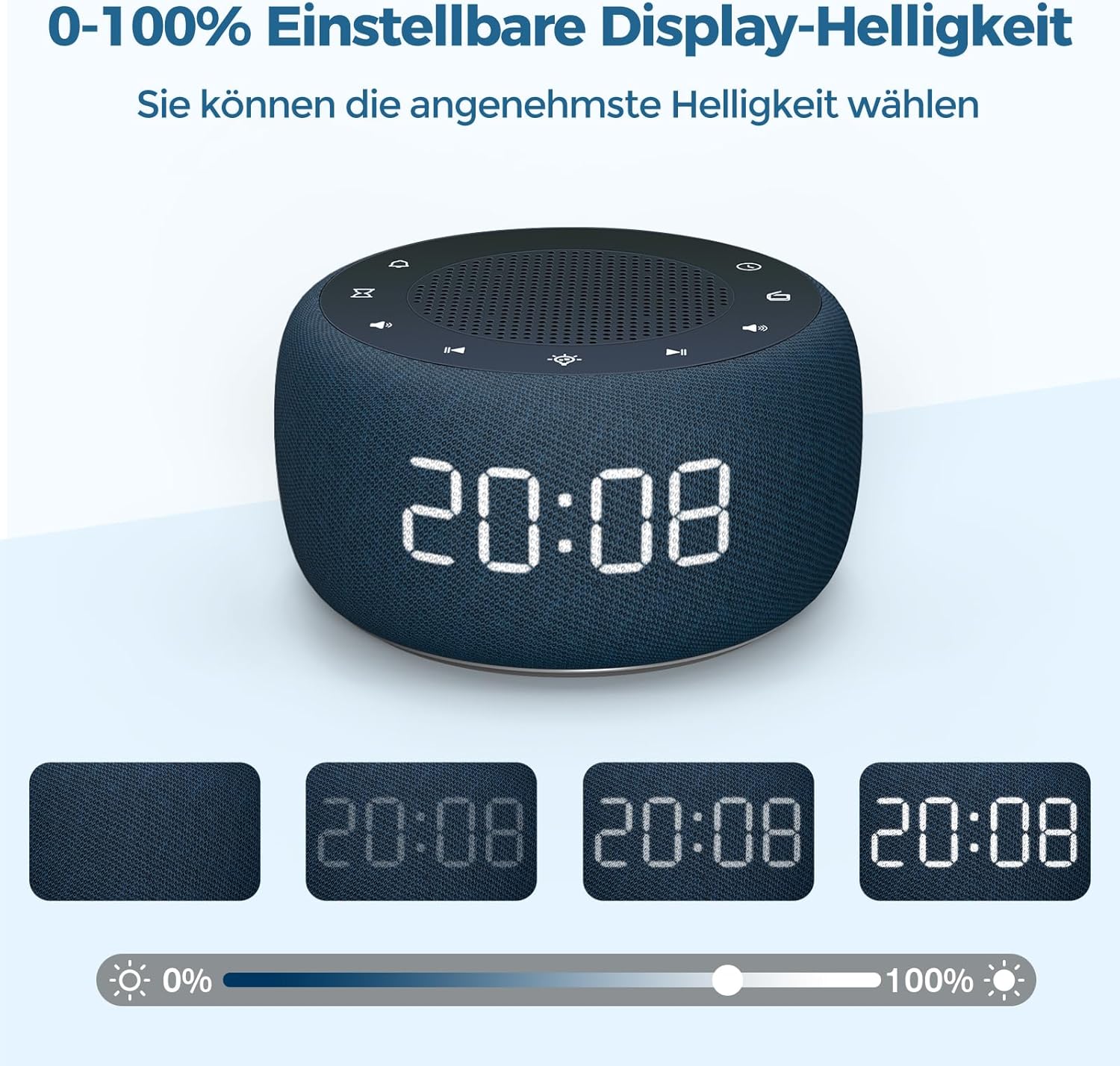
الشكل 7: Demonstrating the 0-100% adjustable display brightness, allowing users to select their preferred comfort level.
6. Luminous Buttons
The control buttons on the top of the unit are designed to illuminate for 5 seconds when pressed, making operation easier in low-light conditions.
7. تنسيق 12/24 ساعة
To switch between 12-hour and 24-hour time formats, briefly press the '12/24H' button (if available, or often combined with the 'Time Set' button by a quick press after setting time).
صيانة
- تنظيف: Use a soft, dry cloth to clean the surface of the alarm clock. Do not use liquid cleaners or abrasive materials.
- تخزين: If storing the device for an extended period, disconnect it from power and remove the backup battery. Store in a cool, dry place.
- استبدال البطارية: The CR2032 backup battery should be replaced periodically (e.g., every 1-2 years) to ensure settings are retained during power outagإِسْ
استكشاف الأخطاء وإصلاحها
| مشكلة | السبب المحتمل | حل |
|---|---|---|
| العرض فارغ. | لا يوجد اتصال طاقة. | Ensure the DC power adapter is securely plugged into the unit and a working wall outlet. |
| لا يصدر صوت الإنذار. | لم يتم تفعيل المنبه أو أن مستوى الصوت منخفض للغاية. | Check if the alarm icon is visible on the display. Increase alarm volume. |
| استقبال راديو ضعيف. | هوائي FM غير ممتد أو منطقة إشارة ضعيفة. | قم بتمديد هوائي الراديو FM بالكامل. أعد وضع الجهاز لتحسين الاستقبال. |
| الوقت/الإعدادات المفقودة بعد انقطاع الطاقةtage. | البطارية الاحتياطية ميتة أو غير مثبتة. | Install or replace the CR2032 backup battery. |
تحديد
- نموذج: RS11
- ماركة: بوفبي
- الأبعاد (الطول × العرض × الارتفاع): 9.5 × 3.81 × 6 سم (حوالي 3.74 × 1.5 × 2.36 بوصة)
- وزن: 340 جرام (حوالي 0.75 رطل)
- انتاج الطاقة: 5 واط
- نطاق تردد FM: 87.5-108 ميجا هرتز
- نوع العرض: رقمي
- ألوان الإضاءة الليلية: 7
- بطارية احتياطية: CR2032 (مضمنة)
- مصدر الطاقة: Cable Electric (DC Adapter)
الضمان والدعم
This product comes with a standard manufacturer's warranty. For specific warranty details, please refer to the documentation provided at the time of purchase or contact BUFFBEE customer support. If you encounter any issues not covered in this manual, please contact our customer service for assistance.


