1. المقدمة
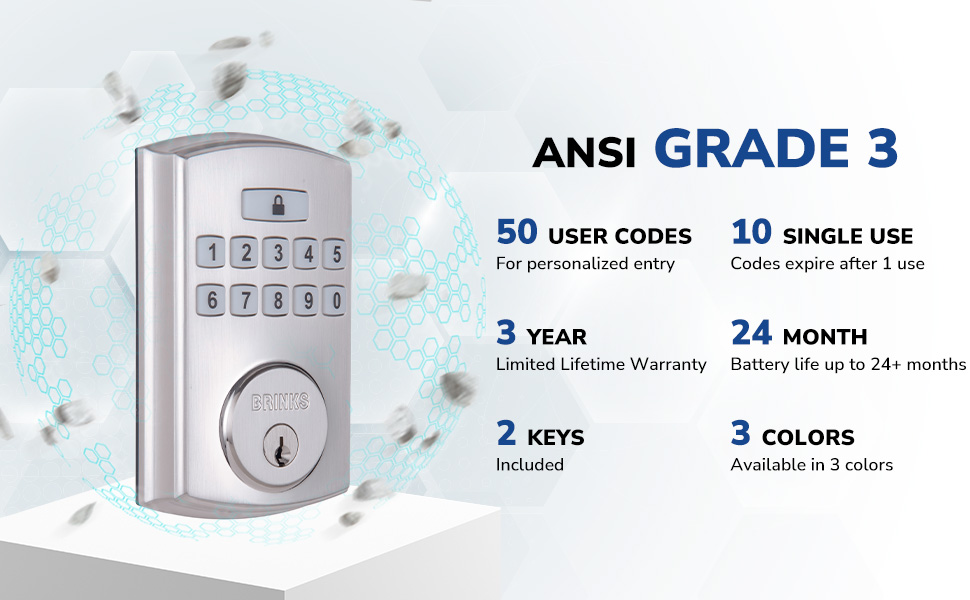
The BRINKS Keyless Entry Electronic Deadbolt Lock provides enhanced security and convenient keyless access for your home or office. This deadbolt features a programmable keypad, allowing for multiple user codes, and includes traditional key access as a backup. Designed for durability and ease of use, it integrates advanced security features to protect against common entry methods.

تتضمن الميزات الرئيسية ما يلي:
- Up to 50 customizable user codes.
- Optional auto-locking functionality.
- One-touch locking for quick security.
- PRO-GUARD security features: anti-tamper alarm, anti-pry shield, pick/bump/drill resistant keyway.
- Hardened steel anti-saw pin in the deadbolt latch.

2. معلومات السلامة
Please read and understand all instructions before installing and using this product. Failure to follow these instructions may result in product malfunction, property damage, or injury.
- لا تحاول تفكيك القفل أو تعديله بما يتجاوز الإرشادات المقدمة.
- استخدم فقط نوع البطارية المحدد (4 بطاريات قلوية AA). لا تخلط البطاريات القديمة والجديدة أو أنواع البطاريات المختلفة.
- قم بإبقاء المفاتيح في مكان آمن بعيدًا عن القفل.
- Ensure all components are securely fastened during installation.
- Avoid exposing the lock to excessive moisture or extreme temperatures.
3. محتويات العبوة
Verify that all parts are present before beginning installation. If any parts are missing or damaged, contact BRINKS customer support.
- مجموعة لوحة المفاتيح الخارجية
- التجميع الداخلي
- ديدبولت مزلاج
- لوحة التركيب
- لوحة الإضراب
- صفيحة الدعم
- مسامير التثبيت
- 2 Traditional Keys
- أجهزة التثبيت

4. التثبيت
Installation of the BRINKS Electronic Deadbolt Lock is designed to be straightforward, requiring only a Phillips head screwdriver. No additional wiring is necessary.
4.1 فحوصات ما قبل التثبيت
- سمك الباب: Ensure your door thickness is between 1.375 inches (35mm) and 1.75 inches (44mm).
- انتكاسة: The deadbolt is compatible with both 2-3/8 inches (60mm) and 2-3/4 inches (70mm) backsets. Adjust the latch as needed.
- تسليم الباب: The lock is universally compatible with both right-handed and left-handed doors.

4.2 خطوات التثبيت
- تثبيت مزلاج ديدبولت: Insert the deadbolt latch into the door edge. Ensure the 'UP' arrow on the latch is pointing upwards. Secure with screws.
- تثبيت لوحة المفاتيح الخارجية: Feed the cable from the exterior keypad through the hole in the door. Position the keypad flush against the door.
- تثبيت لوحة التركيب: Route the cable through the mounting plate. Secure the mounting plate to the door using the provided screws, ensuring it is aligned correctly.
- توصيل الكابلات: قم بتوصيل الكابل من لوحة المفاتيح الخارجية إلى الوحدة الداخلية.
- تثبيت التجميع الداخلي: Mount the interior assembly onto the mounting plate, ensuring the thumb turn operates smoothly. Secure with screws.
- تثبيت لوحة الإضراب: Install the strike plate and reinforcement plate on the door frame, aligning them with the deadbolt latch.
- أدخل البطاريات: Open the battery cover on the interior assembly and insert 4 AA alkaline batteries. Close the cover.

5. الإعداد والبرمجة
After installation, you will need to program your lock with a Master Code and user codes.
5.1 ضبط الكود الرئيسي
The Master Code is used to program the lock and should be kept confidential. It cannot be used to unlock the door.
- Press the 'Program' button on the interior assembly.
- أدخل رمزًا رئيسيًا جديدًا يتكون من 4 إلى 8 أرقام.
- اضغط على زر "القفل".
- أعد إدخال الرمز الرئيسي الجديد.
- Press the 'Lock' button to confirm.
5.2 Adding User Codes
You can program up to 50 unique user codes for regular entry.
- Press the 'Program' button.
- أدخل الرمز الرئيسي الخاص بك.
- اضغط على زر "القفل".
- أدخل رمز مستخدم جديد مكون من 4 إلى 8 أرقام.
- Press the 'Lock' button to confirm.
5.3 Adding Single-Use Codes
Up to 10 single-use codes can be created, which expire after one use.
- Press the 'Program' button.
- أدخل الرمز الرئيسي الخاص بك.
- Press the 'Lock' button twice.
- Enter a new 4-8 digit Single-Use Code.
- Press the 'Lock' button to confirm.
5.4 Setting Auto-Locking Feature
The auto-locking feature automatically locks the deadbolt after a set period (1-99 seconds) once unlocked.
- Press the 'Program' button.
- أدخل الرمز الرئيسي الخاص بك.
- Press the 'Lock' button three times.
- Enter the desired auto-lock delay in seconds (e.g., '10' for 10 seconds).
- Press the 'Lock' button to confirm.

6. تعليمات التشغيل
6.1 فتح الباب
- استخدام رمز المستخدم: Enter your 4-8 digit user code on the keypad. The deadbolt will retract, and the door can be opened.
- استخدام مفتاح: Insert the traditional key into the keyway and turn to unlock.
6.2 قفل الباب
- القفل بلمسة واحدة: Press the 'Lock' button on the keypad. The deadbolt will extend.
- القفل التلقائي: If enabled, the deadbolt will automatically extend after the set delay once the door is closed and unlocked.
- استخدام مفتاح: Insert the traditional key into the keyway and turn to lock.
The keypad is illuminated for visibility in low-light conditions.
7. الصيانة
7.1 استبدال البطارية
The lock is powered by 4 AA alkaline batteries. A low battery indicator will alert you when batteries need replacement. Battery life is approximately 24 months or longer.
- قم بإزالة غطاء البطارية الموجود على التجميع الداخلي.
- قم بإزالة البطاريات القديمة.
- أدخل 4 بطاريات قلوية جديدة من نوع AA، مع التأكد من صحة القطبية.
- استبدال غطاء البطارية.
7.2 التنظيف
قم بتنظيف الجزء الخارجي من القفل باستخدام قطعة قماش ناعمة.amp قطعة قماش. تجنب استخدام المنظفات الكاشطة أو المذيبات، لأنها قد تتلف الطلاء أو المكونات الإلكترونية.
8. استكشاف الأخطاء وإصلاحها
- القفل لا يستجيب: Check battery levels. Replace batteries if necessary. Ensure the cable connection between the exterior and interior assemblies is secure.
- الرموز لا تعمل: Verify that the correct Master Code is being used for programming. Re-enter user codes carefully. Ensure the lock is not in programming mode when attempting to unlock.
- قفل الباب لا يمتد/ينكمش بالكامل: Check for obstructions in the door frame or latch area. Ensure the deadbolt latch is installed correctly and aligned with the strike plate.
- Keypad not illuminating: التحقق من مستويات البطارية.
9. المواصفات
| ميزة | مواصفة |
|---|---|
| اسم الموديل | 4390-122 |
| نوع القفل | ديدبولت |
| مادة | النيكل |
| لون | Satin Nickel (other finishes available) |
| الأبعاد (الطول × العرض × الارتفاع) | 7.87 × 3.54 × 5.51 بوصة |
| وزن العنصر | 2.94 رطل |
| رموز المستخدم | حتى 50 |
| Single-Use Codes | حتى 10 |
| Auto-Locking Delay | 1-99 seconds (customizable) |
| مصدر الطاقة | 4 بطاريات قلوية AA (غير متضمنة) |
| عمر البطارية | 24 شهرًا أو أكثر |
| تصنيف الأمان | ANSI الصف 3 |
| المميزات الخاصة | Anti-Bump, Anti-Tamper Alarm, Anti-Pry Shield, Illuminated Keypad |
10. الضمان والدعم
10.1 معلومات الضمان
This BRINKS Electronic Deadbolt Lock comes with a ضمان محدود لمدة 3 سنوات مدى الحياة. Please refer to the warranty card included with your product for full terms and conditions. The warranty covers defects in material and workmanship under normal use.
10.2 دعم العملاء
For technical assistance, troubleshooting, or warranty claims, please contact BRINKS customer support. Contact information can typically be found on the BRINKS official webالموقع أو على عبوة المنتج.


