1. المقدمة
The Pronomic DX-50 USB MKII is a professional 4-channel DJ mixer designed for a wide range of applications, including discos, parties, restaurants, and presentations. Its user-friendly design ensures that both experienced and less experienced users can fully utilize its features. This manual provides detailed instructions for setting up, operating, and maintaining your mixer.
Key features include a recording function, integrated Bluetooth interface, USB player with transport controls, and multiple input channels.
2. تعليمات السلامة الهامة
- اقرأ التعليمات: اقرأ جميع تعليمات السلامة والتشغيل قبل استخدام المنتج.
- الاحتفاظ بالتعليمات: احتفظ بإرشادات السلامة والتشغيل للرجوع إليها في المستقبل.
- إنتبه للتحذيرات: التزم بجميع التحذيرات الموجودة على المنتج وفي تعليمات التشغيل.
- اتبع التعليمات: اتبع جميع تعليمات التشغيل والاستخدام.
- الماء والرطوبة: Do not use this apparatus near water (e.g., bathtub, washbowl, kitchen sink, laundry tub, wet basement, or swimming pool).
- تهوية: لا تسد أي فتحات تهوية. ثبّت المنتج وفقًا لتعليمات الشركة المصنعة.
- حرارة: لا تقم بالتثبيت بالقرب من أي مصادر للحرارة مثل المشعات أو فتحات التدفئة أو المواقد أو أي أجهزة أخرى (بما في ذلك ampالمُضخِّمات) التي تنتج الحرارة.
- مصادر الطاقة: Use only power sources specified by the manufacturer.
- حماية سلك الطاقة: احمِ سلك الطاقة من أن يدوس عليه أحد أو يضغط عليه، وخاصةً عند المقابس ومنافذ التوصيل الكهربائية ونقطة خروجها من الجهاز.
- تنظيف: نظف فقط بقطعة قماش جافة.
- الخدمة: لا تحاول صيانة هذا المنتج بنفسك، حيث إن فتح الأغطية أو إزالتها قد يعرضك لخطر التلف.tagأو أي مخاطر أخرى. قم بإحالة جميع أعمال الصيانة إلى موظفي الخدمة المؤهلين.
3. محتويات العبوة
Please check that all items listed below are included in your package. If any items are missing or damaged, contact your dealer immediately.
- Pronomic DX-50 USB MKII DJ Mixer
- محول طاقة (تيار متردد 12 فولت)
- USB Stick (32 GB, if included in your specific bundle)
- دليل المستخدم (هذا المستند)
4. انتهى المنتجview
Familiarize yourself with the various controls and connections on your DX-50 USB MKII mixer.
4.1 ضوابط اللوحة الأمامية
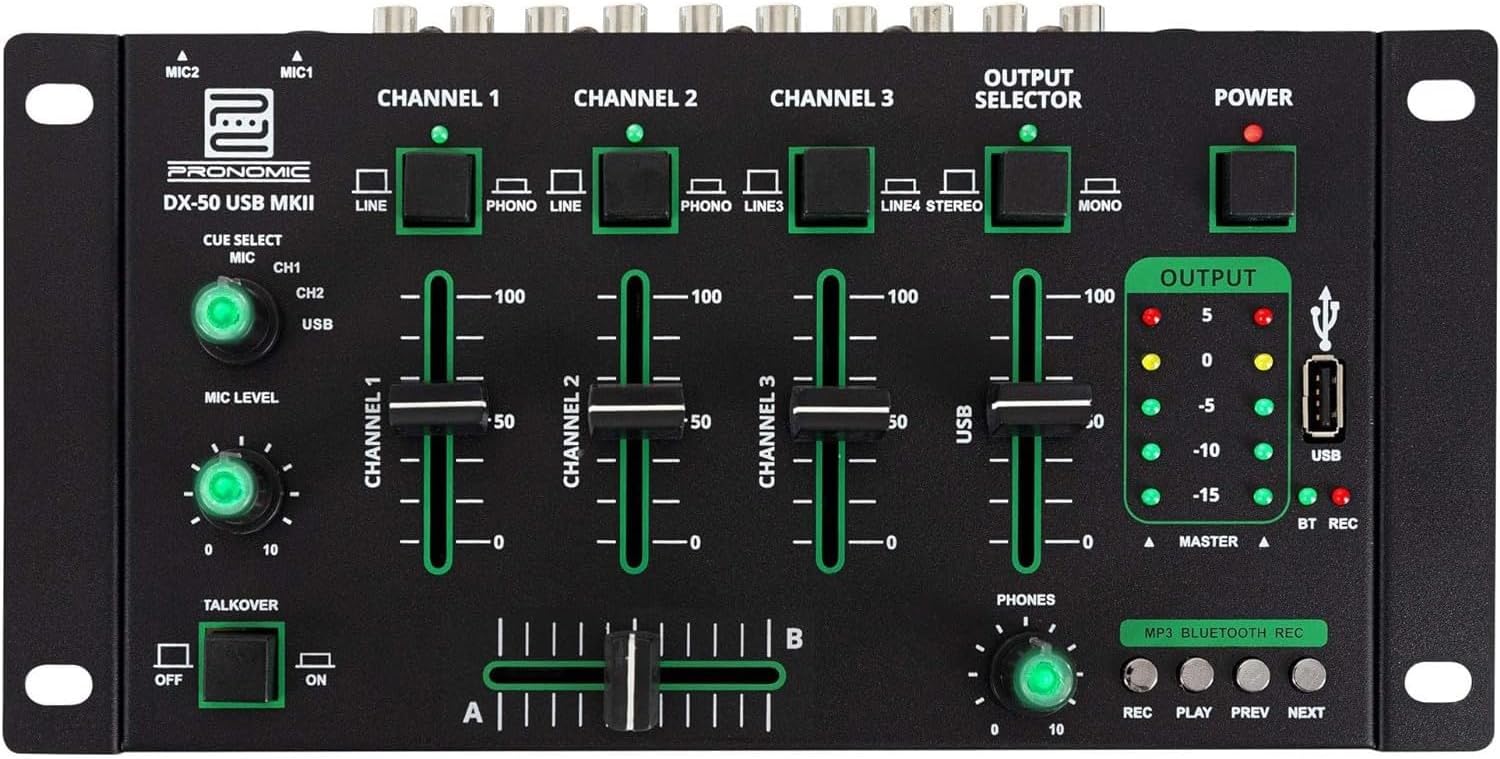
- مدخلات الميكروفون 1/2: قم بتوصيل الميكروفونات.
- Channel 1-4 Input Selectors: Switch between LINE, PHONO, or USB/Bluetooth inputs for each channel.
- تلاشي القناة: Adjust the volume level for each channel.
- CUE Select Buttons: Route specific channels to the headphone output for monitoring.
- مقبض مستوى الميكروفون: Adjust the volume of the microphone inputs.
- مفتاح التحكم في المحادثة: Activates the talkover function, which automatically lowers music volume when speaking into the microphone.
- محدد الإخراج: Choose between Stereo or Mono master output.
- مفتاح التشغيل: يقوم بتشغيل/إيقاف الخلاط.
- عدادات مستوى الإخراج: LED indicators showing the master output level.
- منفذ USB: Connect a USB drive for MP3 playback and recording.
- MP3/Bluetooth/REC Player Controls: Buttons for Play/Pause, Previous, Next, and Record functions for the integrated player.
- Phones Level Knob: يضبط مستوى صوت مخرج سماعة الرأس.
- Crossfader (A/B): Blends between channels assigned to A and B.
4.2 اتصالات اللوحة الخلفية

- AC 12V Power Input: قم بتوصيل محول الطاقة المرفق هنا.
- مخرجات الهواتف: مقبس مقاس 6.3 ملم لتوصيل سماعات الرأس.
- MASTER OUT L/R (RCA): Connect to your main ampمكبر صوت أو مكبرات صوت تعمل بالطاقة.
- Channel 1 & 2 Inputs (RCA Line/Phono): Connect turntables (Phono) or other line-level devices (CD players, media players). Use the front panel selector to switch.
- Channel 3 & 4 Inputs (RCA Line): Connect line-level devices.
- MIC 1 & 2 Inputs (6.3mm Jack): قم بتوصيل الميكروفونات.
5. الإعداد
Follow these steps to set up your Pronomic DX-50 USB MKII mixer:
- توصيل الطاقة: Ensure the mixer's power switch is in the OFF position. Connect the supplied AC 12V power adapter to the "AC 12V" input on the rear panel of the mixer. Plug the adapter into a suitable power outlet.
- Master Output Connection: Connect the "MASTER OUT L/R" RCA outputs on the rear panel to the inputs of your ampمكبر صوت أو مكبرات صوت تعمل بالطاقة.
- اتصال جهاز الإدخال:
- مشغلات الأقراص الدوارة: Connect turntables to the "CHANNEL 1" or "CHANNEL 2" RCA inputs. Set the corresponding input selector on the front panel to "PHONO".
- CD Players/Line Devices: Connect CD players, media players, or other line-level devices to "CHANNEL 1", "CHANNEL 2", "CHANNEL 3", or "CHANNEL 4" RCA inputs. Set the corresponding input selector on the front panel to "LINE".
- الميكروفونات: Connect microphones to the "MIC 1" or "MIC 2" 6.3mm jack inputs on the rear panel.
- اتصال سماعة الرأس: Connect your headphones to the "PHONES" 6.3mm jack on the rear panel.
- USB Drive (Optional): If using a USB drive for playback or recording, insert it into the "USB" port on the front panel.
- تشغيل الطاقة: Once all connections are made, switch the mixer's power switch to the ON position. The power indicator LED will illuminate.
6. تعليمات التشغيل
6.1 الخلط الأساسي
- حدد الإدخال: For each channel, use the input selector switch (LINE/PHONO/USB/BT) to choose the desired audio source.
- ضبط مستوى صوت القناة: Use the vertical faders for each channel to adjust its individual volume level.
- إخراج ماجستير: Monitor the "OUTPUT" LED meters and adjust the master volume knob (if present, otherwise rely on channel faders and amplifier volume) to achieve a suitable overall output level without clipping.
- كروس فايدر: Use the crossfader to smoothly transition between channels assigned to A and B. Channels 1 and 2 are typically assigned to the crossfader.
6.2 استخدام الميكروفون
- Connect your microphone to one of the MIC inputs on the rear panel.
- Adjust the "MIC LEVEL" knob on the front panel to control the microphone's volume.
- خاصية التعليق الصوتي: Activate the "TALKOVER" switch to automatically reduce the volume of the music when you speak into the microphone. This is useful for announcements.
6.3 تشغيل وتسجيل الملفات عبر منفذ USB
- تشغيل USB: أدخل محرك أقراص USB يحتوي على ملفات MP3 files into the "USB" port. Select "USB" as the input source for the dedicated USB channel. Use the "PLAY/PAUSE", "PREV", and "NEXT" buttons to control playback.
- تسجيل يو اس بي: Press the "REC" button to start recording the master output to the connected USB drive. Press "REC" again to stop recording. Ensure your USB drive has sufficient free space and is formatted correctly (FAT32 is commonly supported).
6.4 اتصال البلوتوث
- تفعيل البلوتوث: Select "BT" as the input source for the dedicated Bluetooth channel. The mixer will enter pairing mode.
- إقران الجهاز: On your Bluetooth-enabled device (smartphone, tablet, etc.), search for available Bluetooth devices. Select "Pronomic DX-50 USB MKII" (or similar name) from the list to pair.
- تشغيل الصوت: Once paired, you can play audio from your device through the mixer. Control playback from your device or using the mixer's transport controls (if supported by your device).
6.5 المراقبة باستخدام سماعات الرأس
- Connect headphones to the "PHONES" output.
- Use the "CUE SELECT" buttons to choose which channels you want to monitor in your headphones without affecting the main output.
- Adjust the "PHONES" level knob to set your desired headphone volume.
7. الصيانة
- تنظيف: Disconnect the power before cleaning. Use a soft, dry cloth to wipe the surface of the mixer. Do not use liquid cleaners, aerosols, or solvents.
- تخزين: قم بتخزين الخلاط في مكان بارد وجاف بعيدًا عن أشعة الشمس المباشرة ودرجات الحرارة القصوى.
- Fader and Knob Care: Avoid excessive force when operating faders and knobs. Periodically check for dust or debris accumulation around moving parts.
- إدارة الكابلات: Ensure cables are not kinked or strained, which can lead to damage.
8. استكشاف الأخطاء وإصلاحها
| مشكلة | السبب المحتمل | حل |
|---|---|---|
| لا يوجد طاقة | Power adapter not connected; Power switch off; Faulty power outlet. | Check power adapter connection; Ensure power switch is ON; Try a different power outlet. |
| لا يوجد صوت من المخرج الرئيسي | Master volume too low; Amplifier/speakers off or disconnected; Incorrect input selection; Channel faders down. | Increase master volume; Check amplifier/speaker connections and power; Verify correct input selected for channels; Raise channel faders. |
| لا يوجد صوت من سماعات الرأس | Headphone volume too low; Headphones not connected; No CUE selected. | Increase PHONES level; Connect headphones properly; Press CUE button for desired channel. |
| البلوتوث غير مقترن | Mixer not in pairing mode; Device too far; Interference. | Ensure BT input is selected; Bring device closer; Restart mixer and device. |
| تشغيل USB لا يعمل | لم يتم إدخال محرك أقراص USB بشكل صحيح؛ غير صحيح file format; USB drive not formatted correctly. | أعد إدخال محرك أقراص USB؛ تأكد من files are MP3; Format USB drive to FAT32. |
9. المواصفات
| نموذج | Pronomic DX-50 USB MKII |
| عدد القنوات | 4 |
| تكنولوجيا الاتصال | بلوتوث، يو اس بي |
| مدخل الصوت | RCA (line/phono), 6.3mm microphone, Bluetooth, USB |
| نوع موصل الإخراج | RCA (Master Out), 6.3mm (Phones) |
| مصدر الطاقة | Electric Cable (AC 12V adapter) |
| Dimensions (without corner brackets and controls) | 222 × 129 × 28 ملم (العرض × العمق × الارتفاع) |
| Total Dimensions (with corner brackets and controls) | 267 × 136 × 51 ملم (العرض × العمق × الارتفاع) |
| وزن | 790 جرام |
10. الضمان والدعم
للحصول على معلومات الضمان والدعم الفني، يرجى الرجوع إلى الوثائق المرفقة مع عملية الشراء أو الاتصال بالبائع. احتفظ بإثبات الشراء لتقديم أي مطالبات ضمان.
For further assistance, you may also visit the official Pronomic webالموقع أو الاتصال بقسم خدمة العملاء.


