AVMATRIX SHARK S4
Multi Camera Video Switcher Mixer for Live Streaming
1. المقدمة
The AVMATRIX SHARK S4 is a compact and versatile multi-camera video switcher and mixer designed for live streaming applications. It integrates 4-channel video inputs (2x HDMI, 2x 3G-SDI), a 6-channel audio mixer, and multiple output options including HDMI PGM, HDMI Multiview, USB Type-C, and LAN for streaming. This device supports various professional features such as Chroma Key, Luma Key, Logo overlay, DSK, and a range of transition effects, making it suitable for broadcast, education, conference, live sports, church, concert, and wedding productions.
2. معلومات السلامة
Please read and understand all safety instructions before operating the device. Failure to follow these instructions may result in electric shock, fire, or damage to the equipment.
- مزود الطاقة: Use only the provided power adapter. Ensure the power source matches the device's requirements (DC 12V).
- تهوية: لا تسد فتحات التهوية. تأكد من تدفق الهواء الكافي حول الجهاز لمنع ارتفاع درجة حرارته.
- رُطُوبَة: Keep the device away from water, rain, and excessive humidity. Do not operate with wet hands.
- تنظيف: Disconnect power before cleaning. Use a dry, soft cloth. Do not use liquid or aerosol cleaners.
- الخدمة: لا تحاول خدمة هذا المنتج بنفسك. قم بإحالة جميع أعمال الصيانة إلى أفراد الخدمة المؤهلين.
- الموقع: Place the device on a stable, flat surface. Avoid placing it in direct sunlight or near heat sources.
3. محتويات العبوة
تأكد من وجود جميع العناصر في العبوة:
- AVMATRIX SHARK S4 Video Switcher
- محول الطاقة (12 فولت 2 أمبير)
- كابل USB-A إلى USB-C
- موصل تالي
- دليل المستخدم (هذا المستند)
4. انتهى المنتجview
The SHARK S4 features a robust design with clearly labeled controls and a comprehensive set of input/output ports. Understanding the layout is crucial for effective operation.
4.1 ضوابط اللوحة الأمامية
The front panel provides access to input selection buttons, transition controls (T-bar, Auto, Cut), audio controls, and various effect buttons.

الشكل 4.1: الجزء العلوي والخلفي View of the AVMATRIX SHARK S4. The top view displays the control surface with input selection buttons, T-bar, and effect controls. The rear view shows all connectivity ports.
4.2 اتصالات اللوحة الخلفية
The rear panel houses all essential input and output ports for video, audio, data, and power.

Figure 4.2: Detailed Rear Panel Connections. This diagram highlights the location and function of each port, including SD Card Slot, SDI IN (1, 2), HDMI IN (3, 4), PGM OUT, Multiview OUT, USB REC, USB OUT, LAN, TALLY, and DC 12V IN.
- فتحة بطاقة SD: For recording PGM output to an SD card.
- SDI IN (1, 2): Two 3G-SDI inputs for professional video sources.
- HDMI IN (3, 4): Two HDMI inputs for various video sources.
- PGM OUT (HDMI): Program output for the main switched video feed.
- متعددVIEW OUT (HDMI): Output for monitoring all inputs, program, and preview on a single screen.
- USB REC (USB-A): For recording PGM output to a USB disk.
- USB OUT (USB Type-C): For USB video capture to a computer for streaming.
- LAN: Ethernet port for IP streaming (RTMP/SRT) and PC remote control.
- النتيجة: Connector for Tally light system.
- تيار مستمر 12 فولت في: مدخلات الطاقة.
- MIC/LINE IN (1, 2): Two 3.5mm audio inputs.
- مخرج سماعة الأذن: مخرج صوت 3.5 ملم للمراقبة.
5. الإعداد
Follow these steps to set up your AVMATRIX SHARK S4 for operation.
5.1 توصيل الطاقة
- Connect the provided 12V power adapter to the "DC 12V IN" port on the rear panel.
- قم بتوصيل محول الطاقة بمأخذ كهربائي مناسب.
- سيتم تشغيل الجهاز تلقائيًا.
5.2 توصيلات إدخال الفيديو
The SHARK S4 supports up to four video inputs.
- Connect your SDI cameras or video sources to the "SDI IN 1" and "SDI IN 2" ports.
- Connect your HDMI cameras, computers, or other video sources to the "HDMI IN 3" and "HDMI IN 4" ports.
- Ensure all video sources are set to compatible resolutions and frame rates. The switcher supports up to 1080p 60Hz.
5.3 توصيلات إدخال الصوت
The switcher features a 6-channel audio mixer, including embedded audio from HDMI/SDI inputs and external analog inputs.
- Connect microphones or line-level audio devices to the "MIC/LINE IN 1" and "MIC/LINE IN 2" 3.5mm ports.
- Embedded audio from connected HDMI and SDI sources will be automatically detected.
5.4 اتصالات الإخراج
- Program Output: Connect a display or recording device to the "PGM OUT" HDMI port for the main switched video feed.
- متعددview الإخراج: Connect a monitor to the "MULTIVIEW OUT" HDMI port to view all inputs, preview, and program simultaneously.

Figure 5.1: Configurable Multiview Output. The multiview display allows monitoring of all active video inputs, the program output, and audio levels on a single screen.
- التقاط USB: Connect the "USB OUT" (USB Type-C) port to a computer for direct video and audio capture using software like OBS, vMIX, ZOOM, Teams, Skype, or VLC.

Figure 5.2: USB Capture for Streaming. The USB Type-C output enables the SHARK S4 to function as a webcam, allowing direct streaming to popular software and platforms.
- LAN Output: Connect an Ethernet cable from the "LAN" port to your network for RTMP(S) and SRT protocol streaming.
- إخراج سماعة الأذن: Connect headphones to the "EARPHONE OUT" port for audio monitoring.
5.5 PC Remote Control Setup
The SHARK S4 can be controlled remotely via PC software.
- Connect the "LAN" port of the switcher to your computer's network port or a network switch.
- Download and install the latest PC control software from the official AVMATRIX webموقع.
- Launch the software and follow the on-screen instructions to connect to the SHARK S4.
6. تعليمات التشغيل
This section details the primary functions and operations of the AVMATRIX SHARK S4.
6.1 التبديل الأساسي
- اختيار الإدخال: Press the numbered buttons (1-4) on the program row to select the input currently live on the program output. Use the preview row buttons to select the next input to be transitioned to.
- شريط على شكل حرف T: Smoothly transition between the preview and program sources by moving the T-bar fader.
- زر تلقائي: Initiates an automatic transition between the preview and program sources using the selected transition effect and duration.
- CUT Button: Performs an instant, hard cut between the preview ومصادر البرنامج.
6.2 تأثيرات الانتقال
The SHARK S4 offers various transition effects to enhance your live production.
- WIPE: Select from 9x2 patterns of wipe transitions.
- مزج: A smooth dissolve transition.
- تراجع: A transition that dips to a color before revealing the new source.
- Adjust transition speed using the dedicated controls.
6.3 Audio Mixing and Monitoring
Control audio levels for all 6 channels (2x HDMI embedded, 2x SDI embedded, 2x MIC/Line in).
- Use the audio mixer controls on the device or via PC software to adjust individual channel volumes.
- The "EARPHONE OUT" allows for real-time audio monitoring.
- Audio delay is available for synchronization.
6.4 Keying Effects (Chroma Key, Luma Key, DSK)
The switcher supports up to 6 layers of effects, including advanced keying.
- مفتاح الكروما: Used to remove a specific color (e.g., green screen) from a video source, allowing another background to be inserted. Access settings to fine-tune color range, spill suppression, and edge adjustments.

Figure 6.1: Chroma Key Functionality. This image demonstrates the ability to remove a background color (like green) and replace it with another video source or image, enabling virtual sets and layered compositions.
- مفتاح لوما: Used to key out areas based on brightness levels.
- DSK (Downstream Key): For overlaying graphics, titles, or logos over the program output.
6.5 PIP/POP Mode and Logo Overlay
Enhance your production with picture-in-picture, picture-out-picture, and custom logo overlays.
- PIP/POP: Display multiple video sources simultaneously on the screen. PIP (Picture-in-Picture) places a smaller video feed within the main program. POP (Picture-out-Picture) displays multiple sources side-by-side.
- Logo Overlay: Import and overlay your custom logo or graphic onto the program output.

Figure 6.2: Functional Diversity. This image illustrates various advanced features including Picture-in-Picture (PIP) and Picture-out-Picture (POP) modes, custom logo overlay, dynamic transition effects, and the PC control interface for remote operation.
6.6 Media Library
The built-in media library stores patterns, imported images, and captured images.
- Access 49 default patterns, 16 imported images, and 16 captured images.
- Import custom images via USB for use as backgrounds or overlays.
6.7 التسجيل
Record your program output directly to a USB disk or SD card.
- Insert a formatted USB disk into the "USB REC" port or an SD card into the "SD Card Slot".
- Navigate to the recording settings (via device menu or PC software) to start/stop recording.
- مدعوم file formats: MP4/TS. Bitrate up to 32Mbps.
6.8 البث المباشر
The SHARK S4 offers multiple ways to stream your content.
- LAN Streaming (RTMP/SRT): Configure streaming parameters (RTMP/SRT server URL, stream key) via the device menu or PC software. Connect the LAN port to your network and initiate streaming.
- USB Capture Streaming: Connect the USB Type-C port to a computer. The switcher will appear as a webcam. Use streaming software (OBS, vMIX, etc.) on your computer to stream the video and audio.
7. الصيانة
Proper maintenance ensures the longevity and optimal performance of your SHARK S4.
- تنظيف: Regularly wipe the exterior with a soft, dry, lint-free cloth. Do not use abrasive cleaners or solvents.
- تهوية: Ensure the ventilation slots are clear of dust and debris. Use compressed air to gently clear any blockages.
- تخزين: عند عدم استخدام الجهاز لفترات طويلة، قم بتخزينه في مكان بارد وجاف، بعيدًا عن أشعة الشمس المباشرة ودرجات الحرارة القصوى.
- تحديثات البرامج الثابتة: Periodically check the AVMATRIX official webموقع لتحديثات البرامج الثابتة. يمكن أن يؤدي تحديث البرامج الثابتة إلى تحسين الأداء وإضافة ميزات جديدة.
8. استكشاف الأخطاء وإصلاحها
يوفر هذا القسم حلولاً للمشكلات الشائعة التي قد تواجهها.
| مشكلة | السبب المحتمل | حل |
|---|---|---|
| لا يوجد إخراج فيديو على PGM أو Multiview. | Incorrect cable connection; input source not active; output display not powered on or set to correct input. | Check all HDMI/SDI cable connections. Ensure input sources are active and output displays are correctly configured. Verify input selection on the switcher. |
| SDI inputs not recognized. | Incompatible SDI signal; faulty cable; switcher settings. | Ensure SDI sources are 3G-SDI compatible. Try different SDI cables. Check switcher settings for input detection. (Note: Some users have reported issues with SDI input recognition; ensure firmware is up to date and contact support if issue persists.) |
| No audio output or distorted audio. | Audio levels too low/high; incorrect audio input selected; faulty cables. | Adjust audio levels on the mixer. Verify correct audio input is enabled. Check audio cables and connections. Ensure audio delay is not excessively set. |
| Chroma Key not working effectively. | Poor lighting on green screen; incorrect color selection; fine-tuning needed. | Ensure even, bright lighting on your green/blue screen. Adjust the chroma key settings (color, tolerance, spill) carefully within the switcher's menu or PC software. |
| USB streaming not detected by computer. | Incorrect USB cable; driver issue; software not configured. | Use the provided USB Type-C cable. Ensure your computer's operating system (Windows, Linux, Mac) recognizes the device. Check settings in your streaming software (OBS, vMIX) to select the SHARK S4 as the video/audio input device. |
| Recording to USB/SD card fails. | Unsupported format; insufficient storage; card/disk error. | Ensure USB disk/SD card is formatted to FAT32/exFAT/NTFS. Check available storage space. Try a different USB disk or SD card. |
9. المواصفات
Detailed technical specifications for the AVMATRIX SHARK S4.
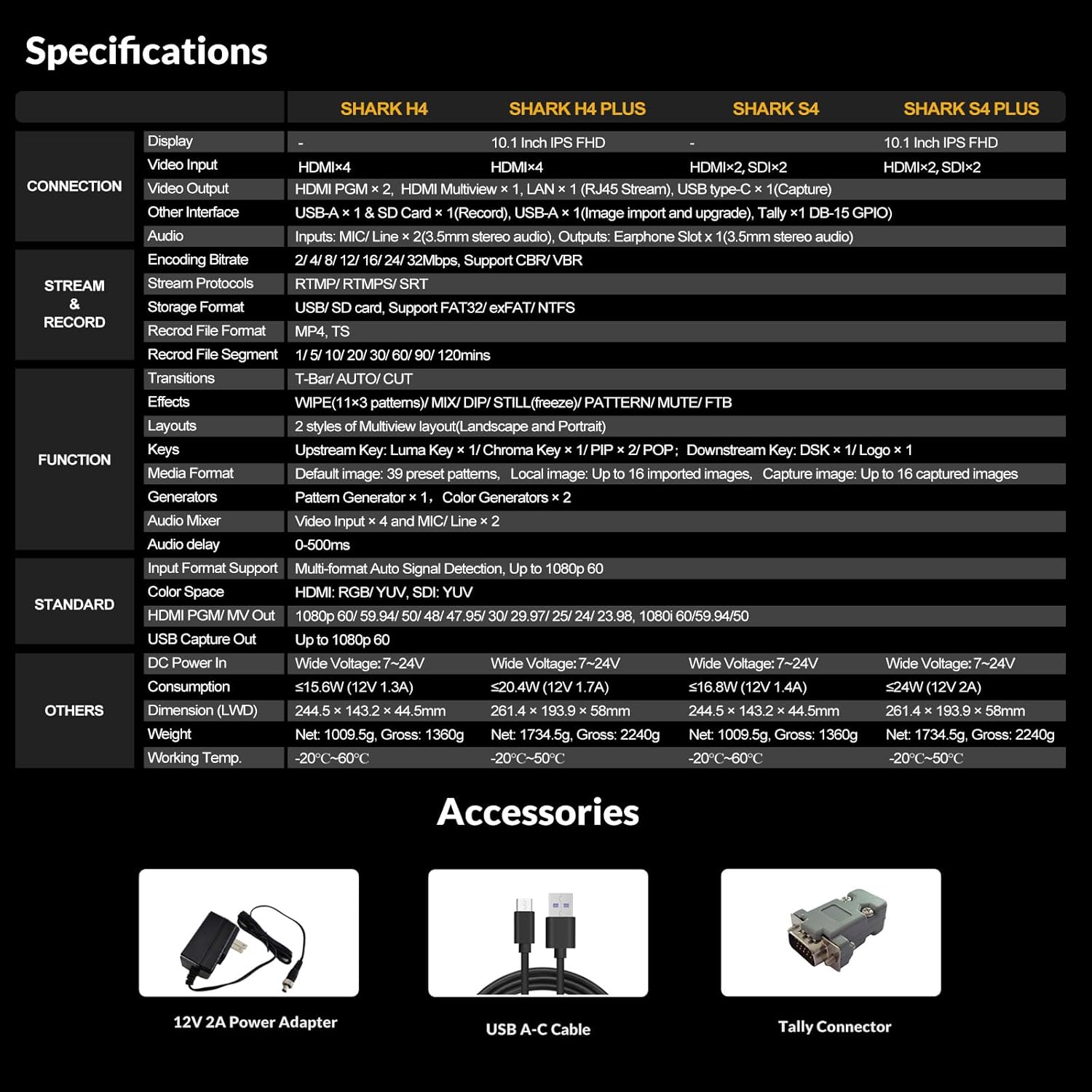
Figure 9.1: Comprehensive Specifications Table. This table provides detailed technical specifications for the SHARK S4, including display, connections, streaming, recording, functions, and physical characteristics, alongside other SHARK series models for comparison.
| ميزة | Detail (SHARK S4) |
|---|---|
| أبعاد المنتج | 9.6 × 5.6 × 1.7 بوصة |
| وزن العنصر | 3.34 رطل |
| رقم موديل العنصر | القرش S4 |
| الشركة المصنعة | أفماتريكس |
| بلد المنشأ | الصين |
| لون | أسود |
| نوع الموصل | HDMI، USB-C |
| الأجهزة المتوافقة | كمبيوتر شخصي |
| نوع الكابل | Ethernet, USB, HDMI |
| مدخلات الفيديو | 2x HDMI, 2x 3G-SDI |
| مخرجات الفيديو | 2x HDMI PGM, 1x HDMI Multiview, 1x USB Type-C, 1x LAN |
| المدخلات الصوتية | 2x MIC/Line In (3.5mm), Embedded HDMI/SDI audio |
| تنسيق التسجيل | MP4/TS (USB Disk & SD Card) |
| بروتوكولات التدفق | RTMP(S), SRT |
| التأثيرات | WIPE (9x2 patterns), MIX, DIP, Chroma Key, Luma Key, Logo, DSK, PIP/POP |
10. الضمان والدعم
AVMATRIX products are designed for reliability and performance. For warranty information and technical support, please refer to the official AVMATRIX webالموقع أو اتصل بخدمة العملاء الخاصة بهم مباشرة.
- رسمي Webموقع: www.avmatrix.net (يرجى التحقق من أحدث معلومات الاتصال وموارد الدعم.)
- خدمة العملاء: يرجى الرجوع إلى قسم الاتصال على الموقع الرسمي webموقع للدعم عبر البريد الإلكتروني أو الهاتف.
- تحديثات البرامج الثابتة: Regularly check the support section of the AVMATRIX website for the latest firmware and software updates.
ملاحظة: قد تختلف شروط وأحكام الضمان باختلاف المنطقة. يرجى الاحتفاظ بإثبات الشراء لتقديم مطالبات الضمان.


