1. المقدمة
This manual provides essential information for the safe and efficient operation of your DALTON KS10Pro Portable Karaoke Machine. Please read this manual thoroughly before using the product and retain it for future reference.
The DALTON KS10Pro is an all-in-one portable karaoke system designed for versatile audio entertainment. It features Bluetooth connectivity, dual wireless microphones, and various input options for music playback and vocal performance.
2. ماذا يوجد في الصندوق
عند تفريغ العبوة، يرجى التأكد من أن جميع العناصر المدرجة أدناه موجودة وفي حالة جيدة:
- 2 ميكروفونات لاسلكية UHF
- 4 AA Batteries (for microphones)
- 1 كابل الطاقة
- 1 Storage Box (for microphones)
- 1. دليل التعليمات (هذه الوثيقة)
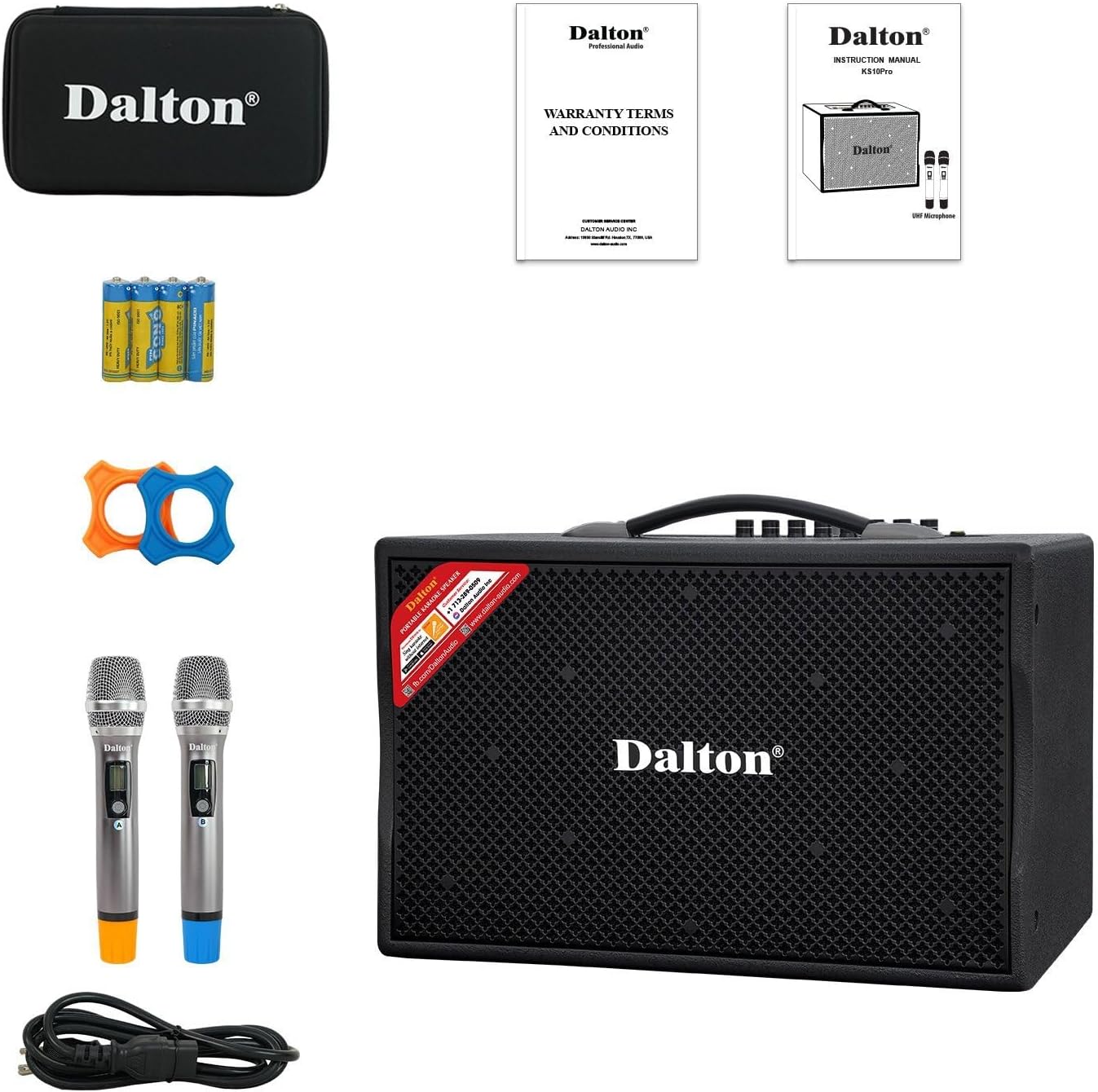
Image: The complete package contents of the DALTON KS10Pro Portable Karaoke Machine, showing the main speaker unit, two wireless microphones, power cable, AA batteries, and a storage case.
3. دليل الإعداد
3.1 الشحن الأولي
Before first use, fully charge the karaoke machine. Connect the provided power cable to the AC120V/60Hz input on the rear panel of the speaker and plug it into a power outlet. The 'CHARGE' indicator light will illuminate. Charging is complete when the 'CHARGE' light turns off or changes color (refer to specific model indicators if different).
Video: A demonstration of the DALTON KS10Pro Portable Bluetooth Speaker, highlighting its features and portability. This video shows the speaker being moved and its control panel.
3.2 إعداد الميكروفون
- Insert the 4 AA batteries into the wireless microphones.
- Turn on each microphone using its power switch. The microphones should automatically pair with the speaker.
- Place the non-roll rings on the microphones for added protection and stability.
3.3 Connecting to a Music Source
The KS10Pro offers multiple connectivity options:
- بلوتوث:
- Turn on the karaoke machine.
- قم بتفعيل البلوتوث على هاتفك الذكي أو جهازك اللوحي أو أي جهاز آخر.
- بحث عن "Dalton BT03" (or similar, refer to your device's Bluetooth list) and pair.
- Once connected, you can play music wirelessly from your device.
- USB: أدخل محرك أقراص USB يحتوي على ملفات MP3 files into the USB port on the control panel. The speaker will automatically detect and play the music.
- مدخل AUX: Connect an external audio device (e.g., TV, MP3 player) using an AUX cable to the AUX IN ports on the rear panel.

Image: The DALTON KS10Pro Portable Karaoke Machine highlighting its connectivity options: Bluetooth, AUX, and USB, indicating versatile music playback.
Video: A demonstration of a karaoke machine playing songs from YouTube, showing the screen interface and song selection. This video illustrates how to select and play music for karaoke.
4. تعليمات التشغيل
4.1 تشغيل/إيقاف التشغيل
Locate the 'POWER' switch on the control panel. Flip it to 'ON' to power on the device. Flip it to 'OFF' to power off.
4.2 ضبط مستوى الصوت والمؤثرات
The control panel features various knobs for fine-tuning your audio experience:
- مجلد الموسيقى: يضبط مستوى صوت الموسيقى الإجمالي.
- MUSIC TREBLE/BASS: Controls the treble and bass levels of the music.
- ميكروفون VOL: يضبط مستوى صوت الميكروفون.
- MIC TREBLE/BASS: Controls the treble and bass levels of the microphones.
- صدى: Adds an echo effect to the microphone vocals.
- تأخير: Adjusts the delay of the echo effect.

الصورة: تفصيلية view of the DALTON KS10Pro control panel, showing all knobs and inputs for adjusting music and microphone settings, including volume, treble, bass, echo, and delay.
4.3 الاستخدام المحمول
The KS10Pro is designed for portability with 360-degree wheels and a sturdy handle, allowing you to easily move it to any location for indoor or outdoor events.

Image: A woman demonstrating the portability of the DALTON KS10Pro karaoke speaker, easily moving it across a floor using its built-in wheels and handle.
5. الصيانة
- تنظيف: Use a soft, dry cloth to clean the exterior of the speaker and microphones. Avoid using harsh chemicals or abrasive materials.
- تخزين: قم بتخزين الوحدة في مكان بارد وجاف بعيدًا عن أشعة الشمس المباشرة ودرجات الحرارة القصوى.
- العناية بالبطارية: For optimal battery life, fully charge the unit before long periods of storage and recharge it every 3 months.
6. استكشاف الأخطاء وإصلاحها
| مشكلة | السبب المحتمل | حل |
|---|---|---|
| لا يوجد طاقة | Battery is depleted; Power cable not connected. | اشحن الجهاز؛ تأكد من توصيل كابل الطاقة بإحكام. |
| لا يوجد صوت من السماعة | Volume too low; Incorrect input mode selected; Device not paired (Bluetooth). | Increase MUSIC VOL; Select correct input mode (Bluetooth/USB/AUX); Re-pair Bluetooth device. |
| لا يوجد صوت من الميكروفون | Microphone off; Batteries depleted; MIC VOL too low. | قم بتشغيل الميكروفون؛ استبدل البطاريات؛ ارفع مستوى صوت الميكروفون. |
| جودة الصوت سيئة | Interference; Incorrect TREBLE/BASS settings. | Move away from other electronic devices; Adjust MUSIC/MIC TREBLE/BASS knobs. |
Video: Instructions on how to connect a karaoke machine to a TV using an optical cable. This video demonstrates the process of setting up audio output from a TV to an external speaker.
7. المواصفات
| ميزة | التفاصيل |
|---|---|
| ماركة | DALTON |
| رقم الموديل | KS10Pro |
| انتاج واتtage | 300 واط |
| حجم مكبر الصوت | 10 بوصة |
| حجم مكبر الصوت | 1 بوصة |
| تكنولوجيا الاتصال | مدخل AUX، بلوتوث، منفذ USB |
| مصدر الطاقة | تعمل بالبطارية |
| وزن العنصر | 33.9 رطل |
| أبعاد المنتج | 21.3 × 12.6 × 17.6 بوصة |
| مادة | Steel, Wooden Cabinet |
| عدد القنوات | 2 |
| الأجهزة المتوافقة | TV, Guitar, USB, AUX IN, Wireless Microphone |

Image: An exploded diagram of the DALTON KS10Pro speaker, illustrating its internal components including the 300W power output, 10-inch woofer, and 1-inch tweeter for harmonizing sounds.
8. الضمان والدعم
For warranty information and customer support, please refer to the documentation included in your product packaging or visit the official DALTON webالموقع. احتفظ بإيصال الشراء الخاص بك كإثبات للشراء في حالة مطالبات الضمان.
تتوفر خطط الحماية للشراء بشكل منفصل:
- خطة الحماية لمدة عامين
- خطة الحماية لمدة عامين
- حماية كاملة: خطة واحدة تغطي جميع المشتريات السابقة والمستقبلية المؤهلة


