مقدمة
This user manual provides essential information for setting up, operating, maintaining, and troubleshooting your VIBOX I-45 Gaming PC. Please read this manual thoroughly before using your new computer to ensure optimal performance and longevity.
1. الإعداد
1.1 فك الصندوق ومحتويات العبوة
Carefully remove all components from the packaging. Ensure all items listed below are present. Retain the packaging for future transport or service needs.
- VIBOX I-45 Gaming PC (VTX-4 Black Tower)
- كابل الطاقة
- Wi-Fi Network Adapter (300 Mbps)
- التوثيق (هذا الدليل)
1.2 توصيل الأجهزة الطرفية
Before powering on your PC, connect all necessary peripherals.
- شاشة: Connect your monitor to the graphics output port (HDMI or DisplayPort) on the rear of the PC. Ensure the monitor is also connected to a power source.
- لوحة المفاتيح والفأرة: قم بتوصيل لوحة المفاتيح والماوس بمنافذ USB المتاحة.
- شبكة: For wired internet, connect an Ethernet cable to the LAN port. For wireless internet, ensure the included Wi-Fi adapter is installed or connected.
- صوتي: Connect speakers or a headset to the audio output jacks.
- قوة: Connect the power cable to the PC's power input and then to a wall outlet.

Figure 1.2.1: Rear I/O Ports for connecting peripherals.
1.3 بدء التشغيل الأولي وإعداد نظام التشغيل Windows 11
After connecting all peripherals, press the power button on the front of the PC. The system will boot into Windows 11 Home. Follow the on-screen instructions to complete the initial setup, including language selection, network connection, and user account creation.

Figure 1.3.1: Windows 11 Home Operating System.
2. تعليمات التشغيل
2.1 تشغيل/إيقاف التشغيل وإعادة التشغيل
- تشغيل الطاقة: اضغط على زر الطاقة الموجود على اللوحة الأمامية.
- اغلق: انقر فوق زر البدء في نظام التشغيل Windows، ثم حدد الطاقة > إيقاف التشغيل.
- إعادة تشغيل: انقر فوق زر البدء في نظام التشغيل Windows، ثم حدد الطاقة > إعادة التشغيل.
2.2 Windows 11 Home Features
Your VIBOX I-45 comes pre-installed with Windows 11 Home, offering several features designed to enhance your computing experience:
- التخزين المباشر: Enables faster game loading times.
- AutoHDR: Automatically enhances visuals for improved graphics.
- Xbox Game Pass Integration: Seamless access to a library of games.
- Optimized CPU Performance: Enhanced performance for various tasks.
2.3 التحكم في إضاءة RGB
The VTX-4 case features Hex RGB Infinity 120mm fans. You can customize the lighting effects and colors using the dedicated RGB change button on the top panel or through compatible software if available.

Figure 2.3.1: Customizable RGB Fans.
3. الصيانة
3.1 Cleaning Your PC
Regular cleaning helps maintain performance and extends the lifespan of your computer.
- الخارج: استخدمي قطعة قماش ناعمةamp cloth to wipe down the exterior surfaces. Avoid harsh chemicals.
- إزالة الغبار: استخدم الهواء المضغوط بشكل دوري لإزالة الغبار من فتحات التهوية والمكونات الداخلية. تأكد من إيقاف تشغيل الكمبيوتر وفصله عن مصدر الطاقة قبل التنظيف.
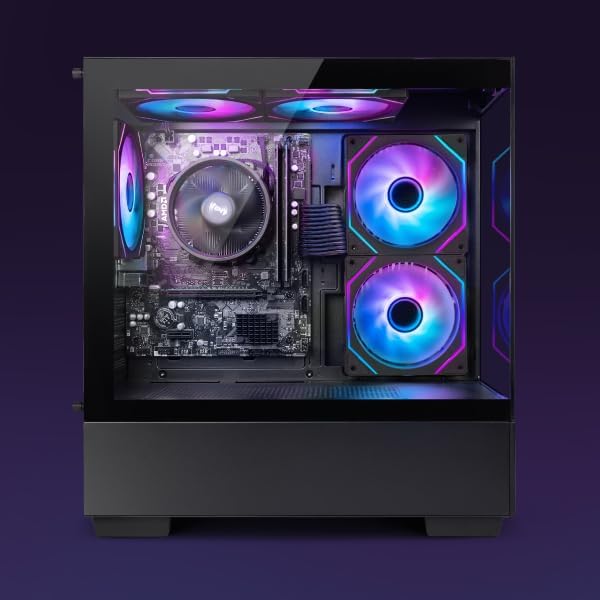
Figure 3.1.1: Internal components of the VIBOX I-45 PC.
3.2 تحديثات البرامج
احرص على تحديث نظام التشغيل وبرامج التشغيل لديك لضمان الأمان والاستقرار والأداء الأمثل.
- تحديثات الويندوز: Windows 11 automatically checks for updates. You can manually check by going to Settings > Windows Update.
- تحديثات برنامج التشغيل: Regularly check the VIBOX support website or component manufacturers' websites (AMD for CPU/GPU) for the latest drivers.
3.3 النسخ الاحتياطي للنظام
قم بعمل نسخة احتياطية لبياناتك المهمة بشكل منتظم على محرك أقراص خارجي أو تخزين سحابي لمنع فقدان البيانات.
4. استكشاف الأخطاء وإصلاحها
This section addresses common issues you might encounter. For more complex problems, please contact VIBOX support.
4.1 لا يوجد طاقة
- تأكد من توصيل كابل الطاقة بشكل آمن بكل من جهاز الكمبيوتر ومأخذ الحائط.
- تأكد من أن مقبس الحائط يعمل عن طريق توصيل جهاز آخر.
- Check the power supply switch on the rear of the PC (if present) is in the 'On' position.
4.2 لا يوجد عرض على الشاشة
- Confirm the monitor is powered on and correctly connected to the PC's graphics output port.
- تأكد من تحديد مصدر الإدخال الصحيح على شاشتك.
- Try a different display cable if available.
4.3 الأداء البطيء
- أغلق التطبيقات غير الضرورية التي تعمل في الخلفية.
- تحقق من وجود أي تحديثات معلقة لنظام التشغيل Windows أو برامج التشغيل وقم بتثبيتها.
- قم بتشغيل عملية تنظيف القرص وإلغاء تجزئته (بالنسبة لمحركات الأقراص الصلبة HDD، لا يلزم ذلك عادةً لمحركات الأقراص الصلبة SSD).
- فحص بحثًا عن البرامج الضارة أو الفيروسات.
4.4 مشاكل الاتصال بالشبكة
- واي فاي: Ensure the Wi-Fi adapter is properly installed and drivers are up to date. Check your router and internet connection.
- إيثرنت: Verify the Ethernet cable is securely connected to both the PC and the router/modem. Check router status.
- Restart your router/modem and PC.
5. المواصفات
| ميزة | مواصفة |
|---|---|
| ماركة | VIBOX |
| رقم الموديل | الطريق رقم 45 |
| لون | VTX-4 Black |
| نظام التشغيل | ويندوز 11 هوم |
| المعالج | AMD Ryzen 3 3200G (4 Cores, 3.6 GHz Base, up to 4.0 GHz Max) |
| الرسومات | Integrated Radeon Vega 8 Graphics (2GB Shared Memory) |
| كبش | 16 GB DDR4 (3200 MHz Dual Channel) |
| تخزين | 480 جيجا بايت SSD |
| دعم الذاكرة القصوى | 128 جيجا بايت |
| واي فاي | 802.11n (300 Mbps adapter included) |
| منافذ HDMI | 1 |
| منافذ USB 2.0 | 3 |
| منافذ USB 3.0 | 3 |
| الأبعاد (الطول × العرض × الارتفاع) | 36 × 20 × 41 سم |
| الأجهزة المتوافقة | Headset, Keyboard, Printer, Monitor, Mouse |
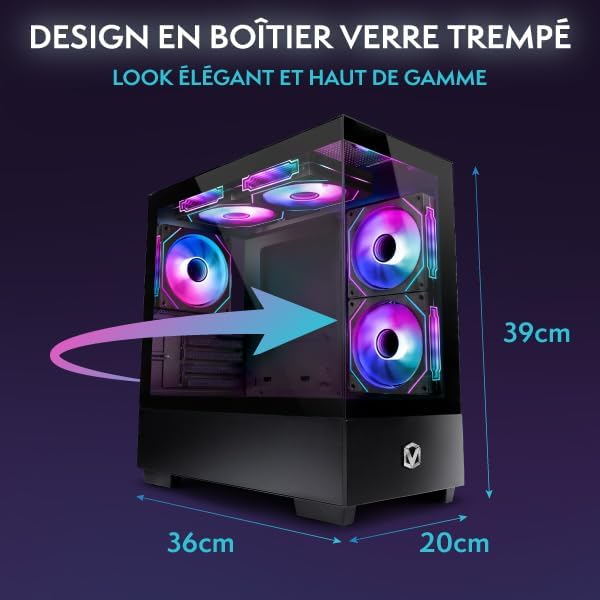
Figure 5.1.1: VIBOX I-45 PC Dimensions.
6. معلومات الضمان
Your VIBOX I-45 Gaming PC comes with a manufacturer's warranty covering:
- أجزاء: 2 سنة
- تَعَب: حياة
Please retain your proof of purchase for warranty claims. For detailed terms and conditions, refer to the warranty card included with your product or visit the official VIBOX webموقع.
7. الدعم
For technical assistance, troubleshooting beyond this manual, or warranty inquiries, please contact VIBOX customer support. You can find contact information on the official VIBOX Gaming webالموقع أو من خلال بائع التجزئة الخاص بك.
الموارد المتاحة على الإنترنت:
- قم بزيارة VIBOX Gaming Store on Amazon للحصول على معلومات وتحديثات عن المنتج.


