مقدمة
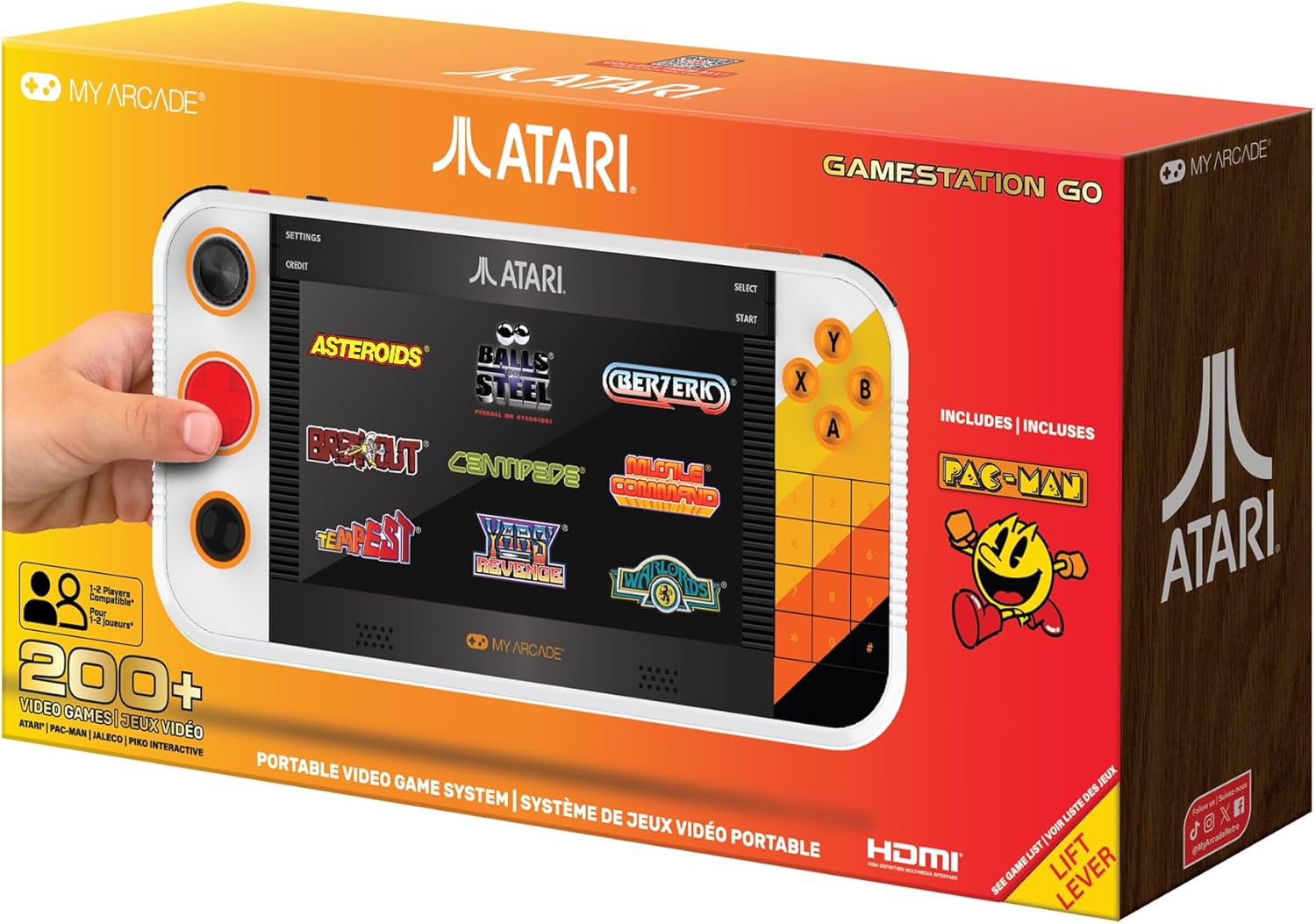
Welcome to the My Arcade Atari Gamestation Go user manual. This portable video game system offers a vast collection of over 200 classic Atari and licensed retro games, providing an immersive gaming experience on its 7-inch full-color display. Designed for both portability and home use, the Gamestation Go features a rechargeable battery, Wi-Fi connectivity for updates, and HDMI output for connecting to a television. Its intuitive controls, including a paddle, d-pad, trak-ball, and numeric keypad, are enhanced by SmartGlow technology, which illuminates the relevant controls for each game.
معلومات السلامة
- غير مناسب للأطفال أقل من 3 سنوات. Small parts may present a choking hazard.
- Always use the provided AC adapter and charge cable for charging.
- تجنب تعريض الجهاز لدرجات حرارة عالية، أو أشعة الشمس المباشرة، أو الرطوبة.
- لا تحاول تفكيك الجهاز أو تعديله. قد يؤدي ذلك إلى إلغاء الضمان والتسبب في تلفه.
- Take regular breaks during gameplay to prevent eye strain and fatigue.
محتويات الحزمة
تأكد من وجود جميع العناصر في العبوة:
- My Arcade Atari Gamestation Go Console
- كابل HDMI
- محول التيار المتردد
- Charge Cable (USB)
- دليل المستخدم (هذا المستند)
يثبت
1. شحن الجهاز
Before first use, fully charge your Gamestation Go. Connect the provided charge cable to the device's charging port and the AC adapter. Plug the AC adapter into a standard wall outlet. The charging indicator light will show the charging status. A full charge typically takes several hours.
2. تشغيل / إيقاف التشغيل
To power on the device, press and hold the Power button located on the side/top of the console until the screen illuminates. To power off, press and hold the Power button again until the shutdown prompt appears, then confirm.
3. Wi-Fi Connection (Optional for Updates)
The Gamestation Go includes built-in Wi-Fi for easy software updates. To connect to Wi-Fi, navigate to the "Settings" menu on the device. Select "Wi-Fi" and choose your network from the list. Enter your Wi-Fi password if prompted. Ensure a stable internet connection for successful updates.
4. Connecting to a Television via HDMI
For a larger display experience, connect your Gamestation Go to a TV using the included HDMI cable. Insert one end of the HDMI cable into the HDMI output port on the Gamestation Go and the other end into an available HDMI input port on your television. Select the corresponding HDMI input on your TV using its remote control. The device's display will automatically switch to the TV output.

Image: The My Arcade Atari Gamestation Go connected to a television via an HDMI cable, displaying gameplay on the larger screen.
تعليمات التشغيل
1. انتهت الضوابطview
The Gamestation Go features a comprehensive set of controls designed to replicate the authentic feel of classic games:
- Integrated Paddle: For games requiring precise rotational input.
- D- الوسادة: Standard directional control for many games.
- Trak-Ball: For games that originally used a trackball for movement.
- المفاتيح العددية: Essential for certain Atari 5200 and other titles.
- مصدات: Additional input buttons.
- Classic Gamepad Buttons (A, B, X, Y): For action and menu selections.
SmartGlow Technology: This feature illuminates only the controls relevant to the game currently being played, simplifying the user experience and ensuring you use the correct inputs.

الصورة: لقطة مقربة view of the My Arcade Atari Gamestation Go, highlighting the various control inputs including the paddle, D-pad, and action buttons.
2. التنقل بين القوائم
Use the D-Pad or Trak-Ball to navigate through the main menu and game selection screens. The A button typically confirms selections, while the B button acts as a back or cancel function. The "Settings" and "Credit" options are accessible from the top bar of the main menu.
3. لعب الألعاب
From the game selection menu, highlight your desired game and press the A button to start. Follow any on-screen prompts. The SmartGlow feature will guide you to the appropriate controls for that specific game.
4. Game Save Options
The Gamestation Go supports game save options for many titles. Consult the in-game menu or the device's system menu for specific instructions on how to save and load game progress.
Preloaded Game List
The My Arcade Atari Gamestation Go comes preloaded with over 200 classic games across various Atari platforms and other licensed titles. Below is a detailed list:
Atari 2600 Titles:
- 3-D Tic-Tac-Toe
- مفامرة
- Adventure II
- Air-Sea Battle
- Aquaventure
- الكويكبات
- Atari Video Cube
- الرياضيات الأساسية
- كرة السلة
- بيرزرك
- البولينج
- انطلق
- Canyon Bomber
- حريش
- Championship Soccer
- Circus Atari
- القتال
- Combat Two
- Crystal Castles
- Dark Chambers
- Demons to Diamonds
- Desert Falcon
- Dodge 'Em
- Double Dunk
- Flag Capture
- كرة القدم
- Frog Pond
- الجولف
- Gravitar
- جلاد
- Haunted House
- ضربة منزلية
- Human Cannonball
- Indy 500
- Maze Craze
- ألفية
- Miniature Golf
- Missile Command
- MotoRodeo
- Night Driver
- Off the Wall
- Quadrun
- Radar Lock
- RealSports Baseball
- RealSports Basketball
- RealSports Boxing
- RealSports Football
- RealSports Soccer
- RealSports Tennis
- RealSports Volleyball
- Saboteur
- Save Mary!
- Secret Quest
- Sky Diver
- Slot Racers
- سولاريس
- حرب الفضاء
- Sprint Master
- سباق الحواجز
- Stunt Cycle
- Submarine Commander
- Super Baseball
- Super Breakout
- Super Football
- محيط
- Swordquest: Earthworld
- Swordquest: Fireworld
- Swordquest: Waterworld
- Video Checkers
- Video Olympics
- Video Pinball
- Warlords
- Yars' Revenge
Atari 5200 Titles:
- حريش
- Meebzork
- ألفية
- Missile Command
- RealSports Baseball
- RealSports Basketball
- RealSports Soccer
- RealSports Tennis
Atari 7800 Titles:
- الكويكبات
- BasketBrawl
- حريش
- Dark Chambers
- Desert Falcon
- Fatal Run
- Food Fight
- MotorPsycho
- Ninja Golf
- RealSports Baseball
- Scrapyard Dog
Atari Arcade Titles:
- Agent X
- الكويكبات
- Asteroids Deluxe
- Atari Baseball
- Atari Football
- Atari Soccer
- كرة السلة
- بيرزرك
- الأرملة السوداء
- Canyon Bomber
- حريش
- سحابة 9
- Crystal Castles
- Dominos
- سباق السحب
- Food Fight
- نوبة
- Gravitar
- I Robot
- محرر
- Lunar Lander
- دمار كبير
- ألفية
- Missile Command
- مونت كارلو
- Night Driver
- Pool Shark
- Red Baron
- اهرب
- Skydiver
- Sky Raider
- Space Duel
- Super Breakout
- سوبر بق
- العاصفة
- Warlords
Atari Recharged Series:
- Asteroids: Recharged
- Berzerk: Recharged
- Breakout: Recharged
- Centipede: Recharged
- Missile Command: Recharged
M-Network Titles:
- Air Raiders
- International Soccer
- Sea Battle
- Space Attack
- Super Challenge Baseball
- Super Challenge Football
Balls of Steel:
- 7 Pinball tables
Additionally, the system includes باك مان and other licensed games from Jaleco & PIKO Interactive.
صيانة
1. تنظيف الجهاز
To clean the exterior of your Gamestation Go, use a soft, dry, lint-free cloth. For stubborn marks, slightly dampen the cloth with water. Avoid using harsh chemicals, abrasive cleaners, or solvents, as these can damage the finish and internal components. Do not spray liquids directly onto the device.
2. العناية بالبطارية
The Gamestation Go is powered by a built-in Lithium Ion battery. To maximize battery life:
- تجنب تفريغ البطارية بالكامل بشكل متكرر.
- قم بتخزين الجهاز في مكان بارد وجاف عندما لا يكون قيد الاستخدام لفترات طويلة.
- في حالة التخزين لفترة طويلة، اشحن البطارية إلى حوالي 50% كل بضعة أشهر.
- لا تعرض البطارية للحرارة أو البرودة الشديدة.
استكشاف الأخطاء وإصلاحها
| مشكلة | السبب المحتمل / الحل |
|---|---|
| الجهاز لا يعمل. | Battery may be depleted. Connect the device to the AC adapter and charge for at least 30 minutes before attempting to power on again. |
| الشاشة فارغة أو متجمدة. | Perform a soft reset by holding the Power button for 10-15 seconds until the device powers off. Then, power on normally. If the issue persists, ensure the device is charged. |
| No display on TV via HDMI. |
|
| Games are slow or skipping frames. | Ensure the device's software is up to date via Wi-Fi. If the issue persists, try restarting the device. |
| Controls are unresponsive or inaccurate. |
|
| لا يمكن الاتصال بشبكة Wi-Fi. |
|
تحديد
| رقم الموديل | دجونل-7065 |
| ماركة | صالة الألعاب الخاصة بي |
| عرض | 7-inch Full Color Display |
| Preloaded Games | Over 200+ (Atari 2600, 5200, 7800, Arcade, Recharged, M-Network, Balls of Steel, Pac-Man, Jaleco, PIKO Interactive) |
| الاتصال | HDMI Output, Built-in Wi-Fi |
| بطارية | 1 Lithium Ion battery (included), Rechargeable |
| عناصر التحكم | Integrated Paddle, D-Pad, Trak-Ball, Numeric Keypad, Bumpers, A/B/X/Y Buttons, SmartGlow Technology |
| أبعاد المنتج | 1 × 1 × 1 بوصة |
| وزن العنصر | 3.74 رطل |
| العمر الموصى به | 14 سنوات وما فوق |
| لغة | English (User Guide supports multiple languages) |
معلومات الضمان
Specific warranty details for the My Arcade Atari Gamestation Go are not provided within this manual. For information regarding warranty coverage, terms, and conditions, please refer to the warranty card included with your product or visit the official My Arcade webالموقع. احتفظ بإثبات الشراء الخاص بك لتقديم مطالبات الضمان.
دعم العملاء
If you encounter any issues not covered in the troubleshooting section or require further assistance, please contact My Arcade customer support. You can typically find contact information, including phone numbers, email addresses, or support portals, on the official My Arcade webالموقع أو على عبوة المنتج.
لمزيد من المعلومات، قم بزيارة My Arcade Store on Amazon.


