1. المقدمة
شكرا لك على الشراءasing the Edifier QR65 Active Monitor Speakers. This manual provides detailed instructions for setting up, operating, and maintaining your speakers. Please read this manual thoroughly before use to ensure proper function and to maximize your listening experience.
The Edifier QR65 speakers feature 70W RMS output, Hi-Res 24bit wireless audio, a subwoofer output, and integrated 65W GaN fast charging capabilities. They are designed to deliver high-quality sound for various applications.
معلومات هامة حول السلامة: اتبع دائمًا احتياطات السلامة الأساسية عند استخدام هذا المنتج للحد من خطر الحريق والصدمات الكهربائية والإصابات. احتفظ بهذا الدليل للرجوع إليه مستقبلًا.
2. محتويات العبوة
يرجى التحقق من محتويات الصندوق للتأكد من وجود جميع العناصر:
- Edifier QR65 Active Monitor Speakers (1 pair)
- Speaker stands (1 pair)
- كابل الطاقة
- كابل توصيل مكبر الصوت
- كابل USB-A إلى USB-C
- كابل صوت RCA إلى RCA
- دليل المستخدم
3. انتهى المنتجview
The Edifier QR65 speakers are equipped with advanced audio components and user-friendly controls.
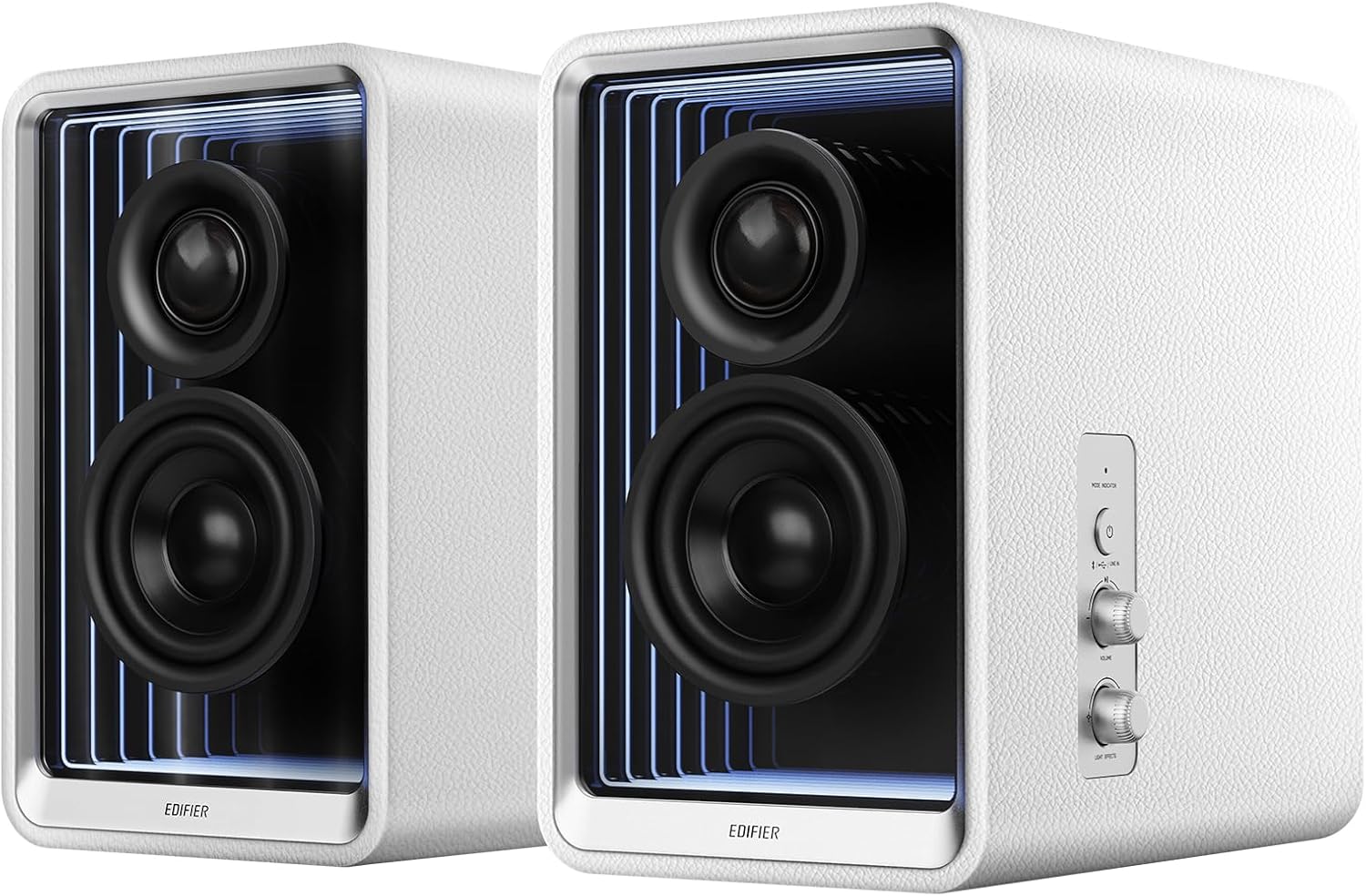
الشكل 3.1: الجبهة view of Edifier QR65 speakers, highlighting the drivers and side controls.
3.1 Front and Side Panel Controls
- زر الطاقة / الوضع: Press to power on/off. Short press to cycle through input modes (Bluetooth, USB, Line In).
- مقبض الصوت: قم بالتدوير لضبط مستوى الصوت الرئيسي.
- Light Effects Button: Press to cycle through various lighting modes.
3.2 اتصالات اللوحة الخلفية

Figure 3.2: Rear panel connections of the Edifier QR65 speaker.
- مدخل الخط (RCA): لتوصيل مصادر الصوت الخارجية عبر كابلات RCA.
- مدخل USB: For connecting to a computer for digital audio playback.
- فرعي: مخرج لتوصيل مضخم صوت خارجي نشط.
- مكبر صوت: يتصل بالمتحدث السلبي.
- مفتاح التشغيل: مفتاح الطاقة الرئيسي.
- مدخلات الطاقة: Connects to the AC power cable.
- USB-C 1, USB-C 2, USB-A: GaN fast charging ports.
4. الإعداد
4.1 وضع السماعات
Place the active speaker (with controls) and the passive speaker on a stable, flat surface. For optimal sound, position them at ear level and equidistant from your listening position. The included speaker stands are designed to angle the speakers at 10 degrees, which helps to reduce sound coloration and improve soundstagدقة البريد.

Figure 4.1: Optimal speaker placement with included stands for improved soundstage.
4.2 توصيل مكبرات الصوت
- Connect the speaker connection cable from the 'SPEAKER OUT' port on the active speaker to the corresponding input on the passive speaker. Ensure a secure connection.
4.3 توصيل الطاقة
- Connect the power cable to the 'Power Input' port on the active speaker.
- قم بتوصيل الطرف الآخر من كابل الطاقة بمأخذ الحائط.
- Toggle the 'Power Switch' to the ON position.
5. تعليمات التشغيل
5.1 تشغيل/إيقاف التشغيل
To power on the speakers, ensure the rear power switch is ON, then press the 'Power/Mode' button on the side panel. Press and hold the 'Power/Mode' button to power off.
5.2 اختيار المدخلات
Short press the 'Power/Mode' button to cycle through available input modes: Bluetooth, USB, and Line In. The indicator light will change color to indicate the selected mode.
5.3 اقتران بلوتوث
- Select Bluetooth mode using the 'Power/Mode' button. The indicator light will flash rapidly.
- On your device (smartphone, tablet, computer), enable Bluetooth and search for 'EDIFIER QR65'.
- Select 'EDIFIER QR65' to pair. Once connected, the indicator light will glow steadily.
- The QR65 supports Bluetooth V5.3 with LDAC for high-resolution wireless audio streaming.
5.4 USB Audio Playback
Connect the active speaker to your computer using a USB cable. Select USB input mode on the speakers. Your computer should recognize the speakers as an audio output device. The USB input supports 24bit/96kHz resolution signals.
5.5 Line In Connection
Connect your audio source (e.g., CD player, TV) to the 'LINE IN' (RCA) ports on the rear panel using an RCA audio cable. Select Line In mode on the speakers. The Line In input also supports 24bit/96kHz resolution signals.
5.6 خرج مضخم الصوت
To enhance bass performance, connect an external active subwoofer to the 'SUB OUT' port on the rear panel. The speakers will automatically adjust their frequency response when a subwoofer is detected.
5.7 Light Effects (TempoAbyss)
The QR65 speakers feature customizable light effects. Press the 'Light Effects' button on the side panel to cycle through various preset lighting modes. For advanced customization and access to over 16 million colors, use the Edifier ConneX App.

Figure 5.1: Edifier QR65 light effects and app control.
5.8 تطبيق Edifier ConneX
Download the Edifier ConneX App from your device's app store or by scanning the QR code below. The app allows for seamless customization of sound effects, light effects, and playback control.

الشكل 5.2: واجهة تطبيق Edifier ConneX للتخصيص.
Download the Edifier ConneX App: https://foreign-app.edifier.com/index.php/edifier_provider/public/appDownload.html?appTag=EdifierConneX
6. GaN Fast Charging Function
The Edifier QR65 speakers integrate TurboGaN fast charging technology, providing convenient power delivery for your devices.

Figure 6.1: GaN fast charging ports and power distribution.
- USB Type-C Ports (USB-C 1 & USB-C 2): Offer up to 65W charging power individually.
- منفذ USB من النوع A: Offers up to 60W charging power.
- Supports various fast charging protocols.
- Total combined output for multiple devices will be distributed across the ports. Refer to the diagram on the speaker's rear panel for specific power distribution scenarios.
7. الرعاية والصيانة
- تنظيف: Use a soft, dry cloth to clean the speaker surfaces. Do not use abrasive cleaners, waxes, or solvents.
- بيئة: Avoid placing the speakers in direct sunlight, near heat sources, or in areas with high humidity or dust.
- التعامل: Handle the speakers with care. Do not drop them or expose them to strong impacts.
- قوة: افصل كابل الطاقة من مقبس الحائط إذا لم يتم استخدام مكبرات الصوت لفترة طويلة.
8. استكشاف الأخطاء وإصلاحها
If you encounter any issues with your Edifier QR65 speakers, please refer to the following table for common problems and solutions:
| مشكلة | السبب المحتمل | حل |
|---|---|---|
| لا يوجد طاقة | Power cable not connected; Rear power switch off; Wall outlet not working. | Ensure power cable is securely connected. Turn on the rear power switch. Test the wall outlet with another device. |
| لا يوجد صوت | Incorrect input mode selected; Volume too low; Audio cable not connected; Device not playing audio. | Press 'Power/Mode' to select correct input. Increase volume. Check audio cable connections. Ensure source device is playing audio. |
| فشل اقتران البلوتوث | السماعات ليست في وضع الاقتران؛ الجهاز بعيد جدًا؛ تداخل. | Ensure speakers are in Bluetooth pairing mode (flashing indicator). Move device closer. Restart speakers and device. |
| Light effects not working or flickering | Incorrect setting; Speaker connection cable issue. | Check light effect settings via the side button or Edifier ConneX App. Ensure the speaker connection cable between active and passive speakers is fully inserted and undamaged. |
| GaN charging not working | Cable issue; Device not compatible; Overload. | Try a different charging cable. Ensure your device supports fast charging. Disconnect other devices if multiple are charging. |
9. المواصفات الفنية
Below are the key technical specifications for the Edifier QR65 Active Monitor Speakers:
| ميزة | مواصفة |
|---|---|
| نوع السماعة | Active Monitor / Bookshelf |
| إجمالي الطاقة الناتجة | 70 وات جذر متوسط التربيع |
| تويتر | قبة حرير 1.25 بوصة |
| Mid-low Driver | 2.75 inch Aluminum Diaphragm |
| الاتصال | Bluetooth V5.3 (LDAC), USB, LINE IN (RCA) |
| USB Audio Resolution | حتى 24 بت/96 كيلو هرتز |
| مدى البلوتوث | 10 أمتار (33 قدم) |
| الشحن السريع بتقنية GaN | USB-C (up to 65W), USB-A (up to 60W) |
| أبعاد المنتج (كل مكبر صوت) | 14 بوصة عمق × 10.5 بوصة عرض × 11.3 بوصة ارتفاع (تقريبًا) |
| وزن العنصر | 11.68 رطل (تقريبًا) |
| مصدر الطاقة | Corded Electric (AC 1.2E+2 Volts) |
| المكونات المضمنة | يقف المتحدث |
10. الضمان والدعم
10.1 معلومات الضمان
Edifier products are manufactured with high-quality standards. This product comes with a limited warranty. Please refer to the warranty card included in your package or visit the official Edifier webالموقع للحصول على شروط وأحكام الضمان التفصيلية الخاصة بمنطقتك.
10.2 دعم العملاء
For technical assistance, product inquiries, or warranty claims, please contact Edifier customer support through their official website or the contact information provided in your product documentation. Please have your product model (QR65) and serial number ready when contacting support.


