مقدمة
Thank you for choosing the YoYoFit Smartwatch. This manual provides essential information for setting up, operating, and maintaining your device. Please read it carefully to ensure optimal performance and longevity of your smartwatch.
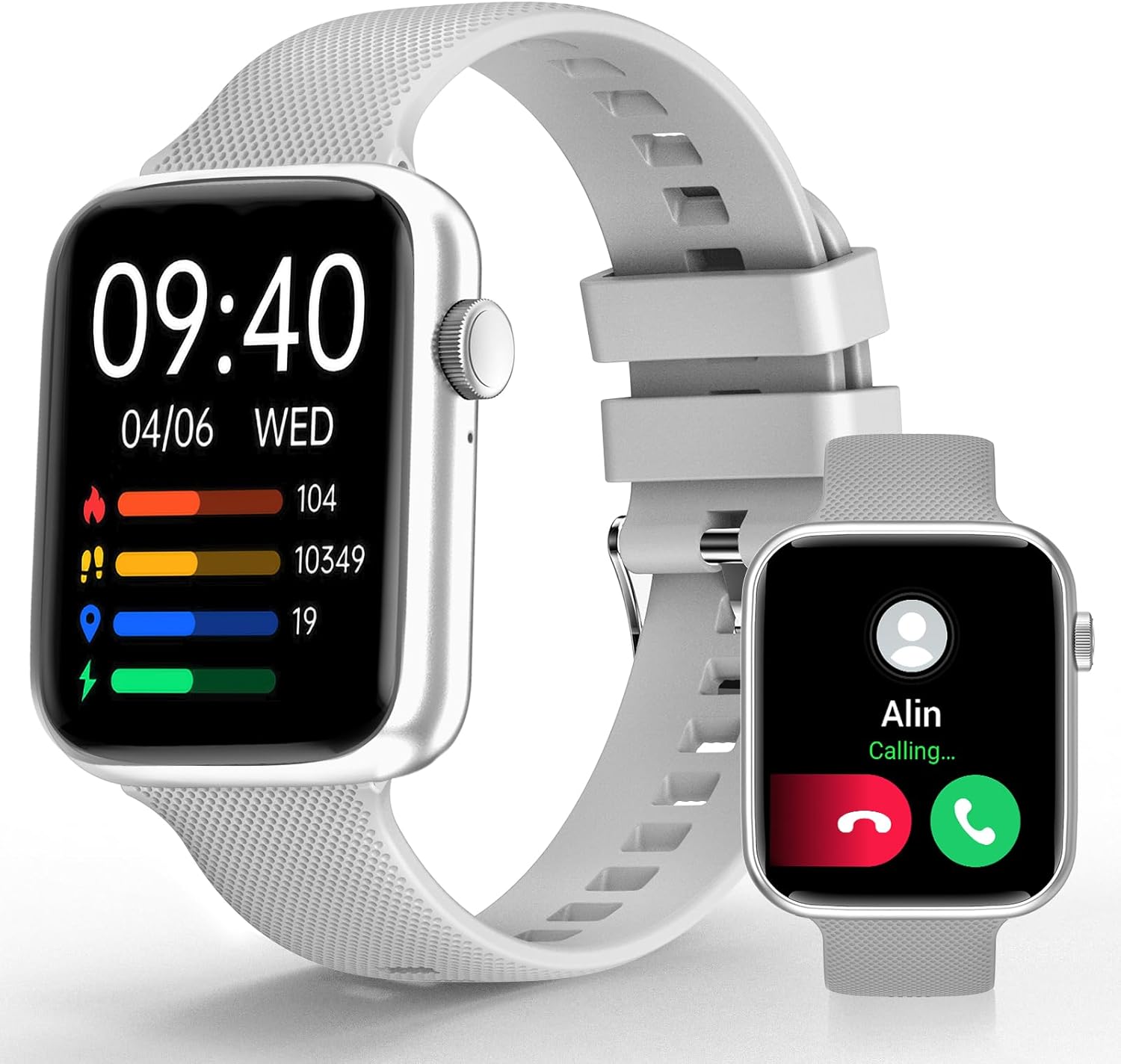
Image: YoYoFit Smartwatch, showcasinيتميز بتصميمه الأنيق وشاشته.
Getting Started: Setup and Connection
To begin using your YoYoFit Smartwatch, follow these steps to pair it with your smartphone.
1. تنزيل التطبيق وإقرانه
- Download the "FitCloudPro" App: بحث عن "FitCloudPro" in your smartphone's app store (compatible with Android 5.1 & iOS 8.5 and above).
- تمكين البلوتوث: قم بتشغيل البلوتوث على هاتفك الذكي.
- Open App and Search: Open the "FitCloudPro" app and navigate to the device pairing section to search for your smartwatch (Model HT15).
- تأكيد الاقتران: Follow the on-screen prompts in the app and on your smartwatch to confirm the pairing request.

Image: Visual guide for downloading the FitCloudPro app and initial Bluetooth pairing.
2. Bluetooth Connection Settings for Calls
To enable call functionality directly from your smartwatch:
- Access Audio Mode: On your smartwatch, slide the screen left to find the "Audio mode" icon.
- Phone Bluetooth Settings: على هاتفك الذكي، انتقل إلى الإعدادات > Bluetooth.
- Pair "HT15 Call": بحث عن and pair with "HT15 Call" in your Bluetooth device list.
- الرد على المكالمات: Once connected, you can answer calls directly from your smartwatch.

Image: Steps to enable Bluetooth calling feature on your smartwatch.
تشغيل ساعتك الذكية
Your YoYoFit Smartwatch features a 1.85" HD color display with a full touch screen interface, providing a clear and responsive user experience.

Image: Details on the smartwatch's 1.85-inch HD display and touch capabilities.
تخصيص وجوه الساعة
Personalize your smartwatch by choosing from over 100 cloud watch faces available in the FitCloudPro app, or upload your own personal photos to create a DIY watch face.

Image: Options for customizing your smartwatch's display with various watch faces.
ميزات مراقبة الصحة
The YoYoFit Smartwatch is designed to help you monitor your health with continuous tracking capabilities.
- مراقبة ضغط الدم: Continuously monitor your blood pressure throughout the day.
- تتبع معدل ضربات القلب: Automatically monitors your heart rate every 5 minutes, with data charts available in the FitCloudPro app.
- قياس الأكسجين في الدم: Track your blood oxygen level at any time.
- تحليل جودة النوم: Automatically tracks your sleep at night, providing comprehensive analysis of deep sleep, light sleep, and awake time.
- تتبع الدورة الشهرية: Record your current menstrual period and receive daily reminders.

الصورة: أكثر منview of the smartwatch's health tracking capabilities including heart rate, blood pressure, and blood oxygen.

Image: Detailed sleep tracking analysis and smart wake alarm feature.
Note: The smartwatch is not a medical device. Health data is for reference only and cannot replace professional medical equipment.
ميزات الاتصال والذكاء
Stay connected and informed with your smartwatch's communication and smart functionalities.
- مكالمات بلوتوث: Answer or make calls directly from your wrist after pairing with your phone's Bluetooth.
- إخطارات الرسائل: Receive notifications for messages and social media apps directly on your wrist, accompanied by vibration alerts.
- مساعد صوتي بالذكاء الاصطناعي: Utilize the built-in speaker and mic to interact with your voice assistant for setting reminders, playing music, getting weather updates, and more.
- تذكيرات عملية: Set reminders for drinking water, moving, and calendar events.

Image: Features for staying connected, including call handling and message notifications.

Image: Demonstrating the intelligent voice assistant for various commands.
Fitness Tracking and Other Functions
The YoYoFit Smartwatch is your ideal companion for an active and organized lifestyle.
- 18 وضعًا رياضيًا: Accurately track your steps, distance, calories burned, and other metrics across 18 different sports modes. Workout data is displayed separately for easy viewing and comparison.
- النشرة الجوية: Check real-time weather updates directly on your wrist.
- التحكم بالموسيقى: Control your smartphone's music playback from your smartwatch.
- Remote Camera Shooting: استخدم ساعتك الذكية كزر تحكم عن بعد لكاميرا هاتفك.
- مؤقت وساعة توقيت: Convenient timing functions for various activities.
- ميزة البحث عن الهاتف: Easily locate your misplaced smartphone.
- إنذارات قابلة للتخصيص: Set up to 5 alarms with customizable names and repeat options.
- وضع عدم الإزعاج: Turn on DND to enjoy uninterrupted time.

Image: Visual representation of the 18 sports modes and all-day activity tracking.

Image: Features like weather reports, music control, and remote camera shooting.

Image: Additional tools including stopwatch, timer, and find phone function.
عمر البطارية
The YoYoFit Smartwatch is equipped with a large-capacity polymer lithium battery for extended use.
- وقت الشحن: حوالي ساعتين للشحن الكامل.
- الاستخدام العادي: Up to 7-10 days of continuous use.
- وقت الاستعداد: Over 15 days on low power setting.

Image: Information on the smartwatch's long-lasting battery performance.
تحديد
| ميزة | التفاصيل |
|---|---|
| أبعاد المنتج | 10 × 1.52 × 0.43 بوصة |
| وزن العنصر | 3.68 أونصات |
| رقم موديل العنصر | إتش تي 15 |
| البطاريات | 1 بطاريات ليثيوم بوليمر مطلوبة (مضمنة) |
| حجم شاشة العرض الدائمة | 1.85 بوصة |
| سعة تخزين الذاكرة | 128 ميجا بايت |
| نظام التشغيل | أندرويد |
| ميزة خاصة | Heart rate watch, activity tracker, Bluetooth call watch |
| سعة البطارية | 0.18 Amp ساعات |
| تكنولوجيا الاتصال | بلوتوث |
| معيار الاتصال اللاسلكي | بلوتوث |
| تكوين خلية البطارية | بوليمر الليثيوم |
| نظام تحديد المواقع العالمي (جي بي اس) | GPS عبر الهاتف الذكي |
| شكل | مستطيل |
| حجم الشاشة | 1.85 بوصة |

Image: Detailed dimensions and wrist size compatibility of the smartwatch.
الصيانة والعناية
To ensure the longevity and optimal performance of your YoYoFit Smartwatch, follow these maintenance guidelines:
- تنظيف: Regularly wipe the watch screen and strap with a soft, dry cloth. For stubborn stains, a slightly damp cloth can be used, but ensure the watch is completely dry before wearing or charging.
- الشحن: Use only the provided magnetic charging cable. Ensure the charging contacts on the watch and cable are clean and dry before charging. Avoid overcharging the battery.
- مقاومة الماء: While the watch is designed for daily wear and may withstand splashes, avoid prolonged submersion in water, hot water, or steam. Do not wear it during swimming or showering unless explicitly stated in product specifications.
- تخزين: عند عدم استخدام الساعة الذكية لفترات طويلة، قم بتخزينها في مكان بارد وجاف بعيدًا عن أشعة الشمس المباشرة ودرجات الحرارة القصوى.
- تجنب المواد الكيميائية: Do not expose the watch to strong chemicals, detergents, or solvents, as these can damage the materials and finish.
استكشاف الأخطاء وإصلاحها
If you encounter any issues with your YoYoFit Smartwatch, try the following troubleshooting steps:
- الساعة لا تعمل: تأكد من شحن الساعة بالكامل. وصلها بالشاحن لمدة 30 دقيقة على الأقل.
- لا يمكن الاقتران بالهاتف:
- تأكد من تمكين البلوتوث على هاتفك والساعة.
- تأكد من أن الساعة ضمن نطاق البلوتوث الخاص بهاتفك.
- أعد تشغيل هاتفك والساعة الذكية.
- قم بحذف الجهاز من إعدادات البلوتوث في هاتفك وحاول الاقتران مرة أخرى من خلال تطبيق FitCloudPro.
- البيانات الصحية غير الدقيقة:
- تأكد من ارتداء الساعة بشكل مريح على معصمك، وليس بشكل فضفاض للغاية أو ضيق للغاية.
- قم بتنظيف المستشعر الموجود على الجزء الخلفي من الساعة.
- Remember that data is for reference and not for medical diagnosis.
- الإشعارات لا تظهر:
- Check app notification settings in the FitCloudPro app and your phone's system settings.
- تأكد من أن الساعة متصلة عبر البلوتوث.
- Disable "Do Not Disturb" mode on the watch if it's active.
- عمر البطارية قصير:
- تقليل سطوع الشاشة.
- قم بتحديد مراقبة معدل ضربات القلب المستمرة أو الميزات المكثفة الأخرى.
- قم بإيقاف تشغيل الإشعارات غير الضرورية.
إذا استمرت المشكلة، يرجى الرجوع إلى قسم الدعم أو الاتصال بخدمة العملاء.
الضمان والدعم
Your YoYoFit Smartwatch comes with a standard manufacturer's warranty. Please refer to the warranty card included in your product packaging for specific terms and conditions.
دعم العملاء
For technical assistance, warranty claims, or any other inquiries, please contact YoYoFit customer support through the following channels:
- الشركة المصنعة Webموقع: Visit the official YoYoFit webالموقع الخاص بالأسئلة الشائعة وموارد الدعم ومعلومات الاتصال.
- صفحة المنتج على أمازون: For common questions and community support, you can also refer to the product's detail page on Amazon.
Please have your product model (HT15) and purchase details ready when contacting support.


