1. انتهى المنتجview
The YoYoFit Smartwatch HT15 is a versatile wearable device designed to enhance your daily life with communication, health monitoring, and fitness tracking features. It connects seamlessly with your smartphone to keep you informed and active.
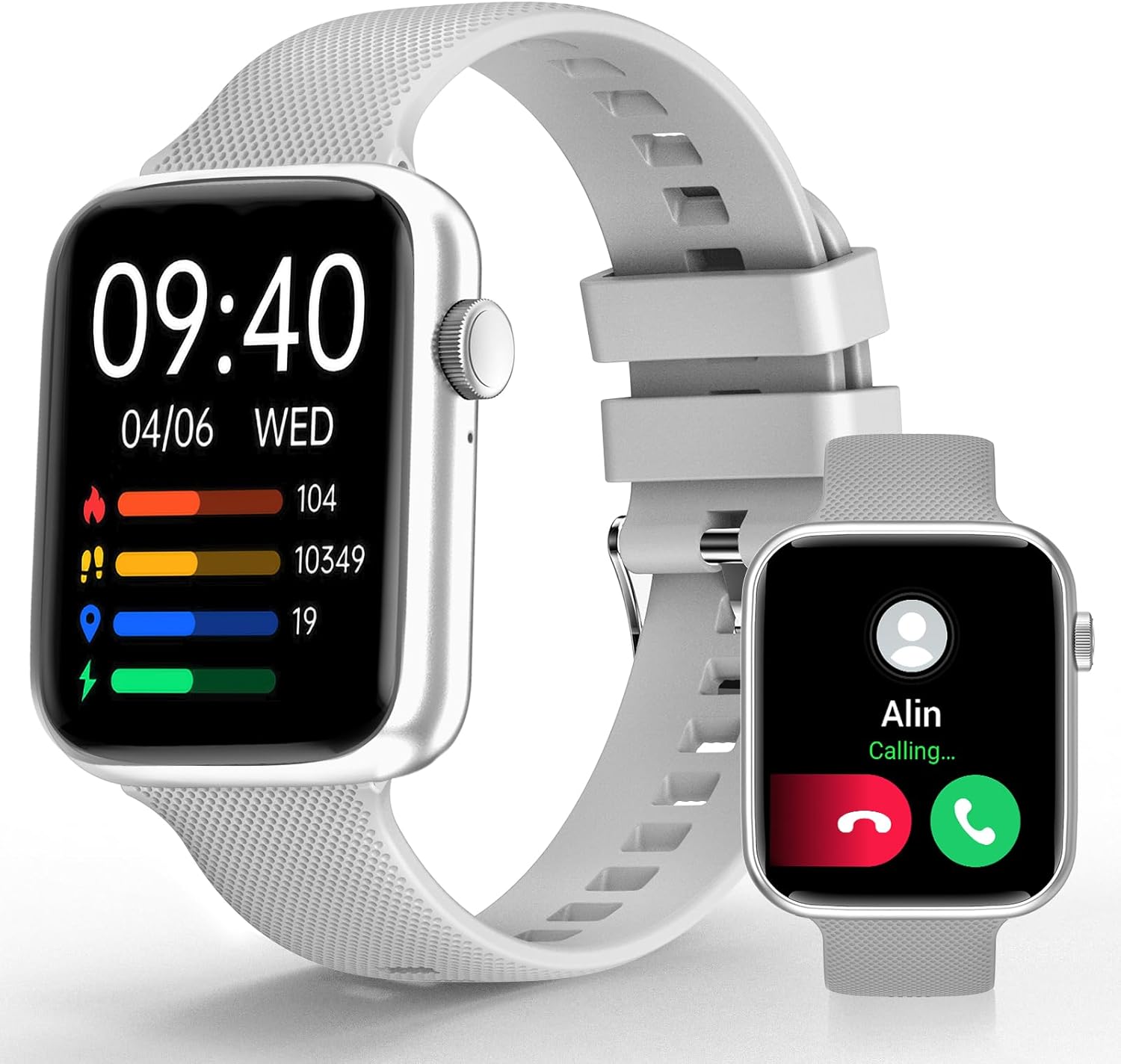
Image 1: YoYoFit Smartwatch HT15. This image displays the smartwatch in grey, showing the time, date, and various activity metrics like heart rate, steps, and calories. An inset image shows an incoming call notification.
2. محتويات العبوة
تأكد من وجود جميع العناصر في العبوة:
- YoYoFit Smartwatch HT15 (Grey)
- مشاهدة الفرقة
- كابل الشحن المغناطيسي
- دليل المستخدم (هذا المستند)
3. دليل الإعداد
3.1 شحن الساعة الذكية
Before initial use, fully charge your smartwatch. Connect the magnetic charging cable to the charging points on the back of the watch and plug the USB end into a power adapter (not included) or a computer's USB port.
- وقت الشحن: حوالي 2 ساعة.
- Battery Life: Up to 7-10 days of normal use, 15+ days on standby.

Image 2: Smartwatch charging. The image illustrates the magnetic charging cable connected to the smartwatch, with text indicating "Up to 7 days+ for normal use" and "Up to 15 days+ on low power setting."
3.2 تنزيل التطبيق وإقرانه
To unlock all features, download and connect your smartwatch to the "FitCloudPro" app.
- Scan the QR code in the manual or search for "FitCloudPro" in the App Store (iOS) or Google Play Store (Android).
- قم بتثبيت التطبيق على هاتفك الذكي.
- تأكد من تمكين البلوتوث على هاتفك.
- Open the "FitCloudPro" app and follow the on-screen instructions to add your device.
- Select "HT15" from the list of available devices.
- قم بتأكيد طلب الاقتران على كل من هاتفك وساعتك الذكية.

Image 3: App download and pairing steps. This image shows a sequence of smartphone screens demonstrating how to download the "FitCloudPro" app, enable Bluetooth, search for the device, and confirm the pairing request.
3.3 التوافق
The YoYoFit Smartwatch HT15 is compatible with:
- أندرويد 5.1 وما فوق
- iOS 8.5 وما فوق
- Requires Bluetooth 5.0 for connection.
4. تعليمات التشغيل
4.1 الملاحة الأساسية
The smartwatch features a 1.85-inch HD color full touch screen. Swipe across the screen to navigate through menus and functions. The side button typically serves as a power button or a return-to-home function.

Image 4: Smartwatch screen details. This image focuses on the 1.85-inch HD touch screen, emphasizing its full-color display and touch functionality.
4.2 وظيفة الاتصال
Once paired via Bluetooth, you can manage calls directly from your wrist:
- الرد/إجراء المكالمات: Use the built-in speaker and microphone to answer incoming calls or dial out from your watch.
- رسائل: Read incoming messages and social media notifications.
- جهات الاتصال: Store frequently used contacts for quick dialing.
- سجل المكالمات: View your recent call logs.

Image 5: Stay Connected On-wrist. This image shows a woman using the smartwatch to answer a call, alongside visual representations of message notifications, built-in mic & speaker, and reminder functions.
4.3 مراقبة الصحة
The smartwatch provides comprehensive health tracking:
- معدل ضربات القلب: مراقبة مستمرة طوال اليوم.
- أكسجين الدم (SpO2): قياس مستويات الأكسجين في الدم.
- ضغط الدم: مراقبة مستويات ضغط الدم.
- تتبع النوم: Automatically tracks sleep patterns (deep sleep, light sleep, awake time) and provides quality analysis.
- تتبع الدورة الشهرية: Records and reminds you of your menstrual period.
ملاحظة: هذا الجهاز ليس جهازاً طبياً. البيانات الصحية المعروضة هي لأغراض مرجعية فقط، ولا ينبغي استخدامها للتشخيص الطبي أو العلاج.

Image 6: Keep Track of Your Health. This image shows the smartwatch displaying heart rate, blood pressure, and blood oxygen measurements, with a person wearing the watch.

Image 7: Tools for Better ZZZs. This image illustrates the smartwatch's sleep tracking capabilities, showing deep sleep, light sleep, and awake times, along with smart alarm and Do Not Disturb settings.
4.4 تتبع النشاط
The HT15 tracks your daily activity and supports 18 sports modes:
- Daily Metrics: Accurately tracks steps, distance, and calories burned.
- الأوضاع الرياضية: Includes walking, running, cycling, hiking, yoga, basketball, football, and more. Exercise data is recorded and displayed separately for each workout.

Image 8: Sweat the Smart Way. This image features a woman exercising, with the smartwatch displaying various sports modes (e.g., walking, running, cycling) and all-day activity tracking metrics like steps, calories, and distance.
4.5 مساعد صوتي بالذكاء الاصطناعي
Utilize the built-in AI voice assistant for hands-free control:
- Set reminders and alarms.
- التحكم في تشغيل الموسيقى.
- احصل على آخر تحديثات الطقس.
- Ask questions and receive translations.
4.6 Other Practical Features
- وجوه الساعة القابلة للتخصيص: Choose from 100+ cloud watch faces or upload personal photos via the FitCloudPro app.
- النشرة الجوية: Check current weather conditions directly on your wrist.
- المؤقت وساعة الإيقاف: Useful for workouts or daily tasks.
- التحكم بالموسيقى: تشغيل، إيقاف مؤقت، تخطي المقاطع الصوتية على هاتفك المتصل.
- البحث عن الهاتف: حدد موقع هاتفك الذكي المفقود عن طريق تشغيل صوت تنبيه.
- الانذارات: Set multiple customizable alarms.
- Sedentary & Drink Water Reminders: نصائح للحفاظ على النشاط وشرب الماء بكثرة.
- التحكم عن بعد بالكاميرا: استخدم ساعتك لتشغيل كاميرا هاتفك عن بعد.

Image 9: More Practical Features. This image highlights the smartwatch's diverse functionalities, including customizable watch faces, weather display, music control, timer, stopwatch, and the "Find Phone" feature.
5. الصيانة
5.1 تنظيف ساعتك الذكية
Regularly clean your smartwatch and watch band to ensure optimal performance and hygiene.
- Wipe the screen and watch body with a soft, damp، قطعة قماش خالية من الوبر.
- بالنسبة لحزام السيليكون، يمكنك استخدام الصابون الخفيف والماء، ثم شطفه جيداً وتجفيفه تماماً.
- تجنب استخدام المواد الكيميائية القاسية أو المواد الكاشطة.
5.2 مقاومة الماء
The smartwatch is designed to withstand daily activities like hand washing and sweating. However, it is not recommended for swimming or showering, as prolonged exposure to water or hot steam may damage the device.
6. استكشاف الأخطاء وإصلاحها
6.1 الجهاز لا يعمل
- تأكد من شحن الساعة بالكامل. وصلها بالشاحن المغناطيسي لمدة 30 دقيقة على الأقل.
- Press and hold the side button for several seconds to power on.
6.2 مشاكل الاقتران
- تأكد من تمكين Bluetooth على هاتفك الذكي.
- تأكد من أن الساعة الذكية ضمن نطاق هاتفك.
- أعد تشغيل هاتفك والساعة الذكية.
- Forget the device in your phone's Bluetooth settings and try pairing again through the "FitCloudPro" app.
- Check if the "FitCloudPro" app has necessary permissions enabled on your phone.
6.3 قراءات صحية غير دقيقة
- تأكد من ارتداء الساعة بشكل مريح على معصمك، وليس ضيقًا جدًا أو فضفاضًا جدًا.
- قم بتنظيف المستشعرات الموجودة على الجزء الخلفي من الساعة.
- تجنب الحركة المفرطة أثناء القياسات.
- Remember that readings are for reference and not for medical use.
6.4 عدم ظهور الإشعارات
- Verify that the smartwatch is connected to your phone via Bluetooth.
- Check notification settings within the "FitCloudPro" app to ensure desired apps are enabled.
- Confirm that your phone's notification settings allow the "FitCloudPro" app to display alerts.
7. المواصفات
| ميزة | التفاصيل |
|---|---|
| رقم الموديل | إتش تي 15 |
| حجم الشاشة | 1.85 Inches HD Color Display |
| أبعاد المنتج | 10 × 1.52 × 0.43 بوصة |
| وزن العنصر | 3.68 أونصات |
| نوع البطارية | بوليمر الليثيوم (1 مطلوبان، متضمنان) |
| سعة البطارية | 0.18 Amp ساعات |
| الاتصال | بلوتوث 5.0 |
| نظام التشغيل | أندرويد (متوافق مع أندرويد 5.1+)، iOS (متوافق مع iOS 8.5+) |
| المميزات الخاصة | Heart Rate Monitor, Activity Tracker, Bluetooth Call Function, Blood Oxygen Monitor, Sleep Monitor, AI Voice Assistant |

Image 10: Smartwatch dimensions. This diagram provides detailed measurements of the smartwatch (1.8" x 1.52" x 0.43") and indicates the suitable wrist size range (4.9" ~ 8.3").
8. فيديو المنتج
Video 1: YoYoFit Smart Watch for Men and Women. This video provides a visual overview of the smartwatch's features and functionalities, including its design, health tracking, and connectivity options.


