مقدمة
شكرا لك على الشراءasing the ZEBRONICS Transformer PRO Gaming Wireless Keyboard & Mouse Combo. This manual provides essential information for setting up, operating, and maintaining your new device. Please read it thoroughly before use to ensure optimal performance and longevity.
المنتج انتهىview
The ZEBRONICS Transformer PRO is a high-performance wireless keyboard and mouse combo designed for gaming and productivity. It features a durable aluminum body, multi-color LED lighting, and a reliable 2.4GHz wireless connection.

Figure 1: ZEBRONICS Transformer PRO Gaming Wireless Keyboard and Mouse Combo.

Figure 2: The ZEB-Transformer Pro keyboard features a durable aluminum body and 104 keys.

Figure 3: The ZEB-Transformer Pro mouse with an ergonomic design and high precision optical sensor.
المميزات الرئيسية:
- اتصال لاسلكي بتردد 2.4 جيجاهرتز: Ensures a stable and reliable connection for both keyboard and mouse.
- Aluminum Body Keyboard: يوفر المتانة والملمس الفاخر.
- تخطيط 104 مفتاحًا: Full-sized keyboard with a dedicated Rupee key for efficient typing.
- Multi-Color LED Modes: Customizable lighting with 3 brightness levels.
- بطارية قابلة لإعادة الشحن مدمجة: For both keyboard and mouse, with power-saver mode.
- تصميم الماوس المريح: Comfortable for extended usage with a matte finish.
- مستشعر بصري عالي الدقة: Mouse supports adjustable DPI settings (1600 / 2400 / 4000 DPI).
- التوصيل والتشغيل: Easy setup without the need for additional drivers.
دليل الإعداد
- فك محتويات العبوة: Carefully remove the keyboard, mouse, and USB Nano Receiver from the packaging.
- Locate the USB Nano Receiver: The receiver is typically stored in a compartment on the mouse or keyboard for safe transport.
- توصيل جهاز الاستقبال: Insert the USB Nano Receiver into an available USB port on your computer (Laptop or Personal Computer).
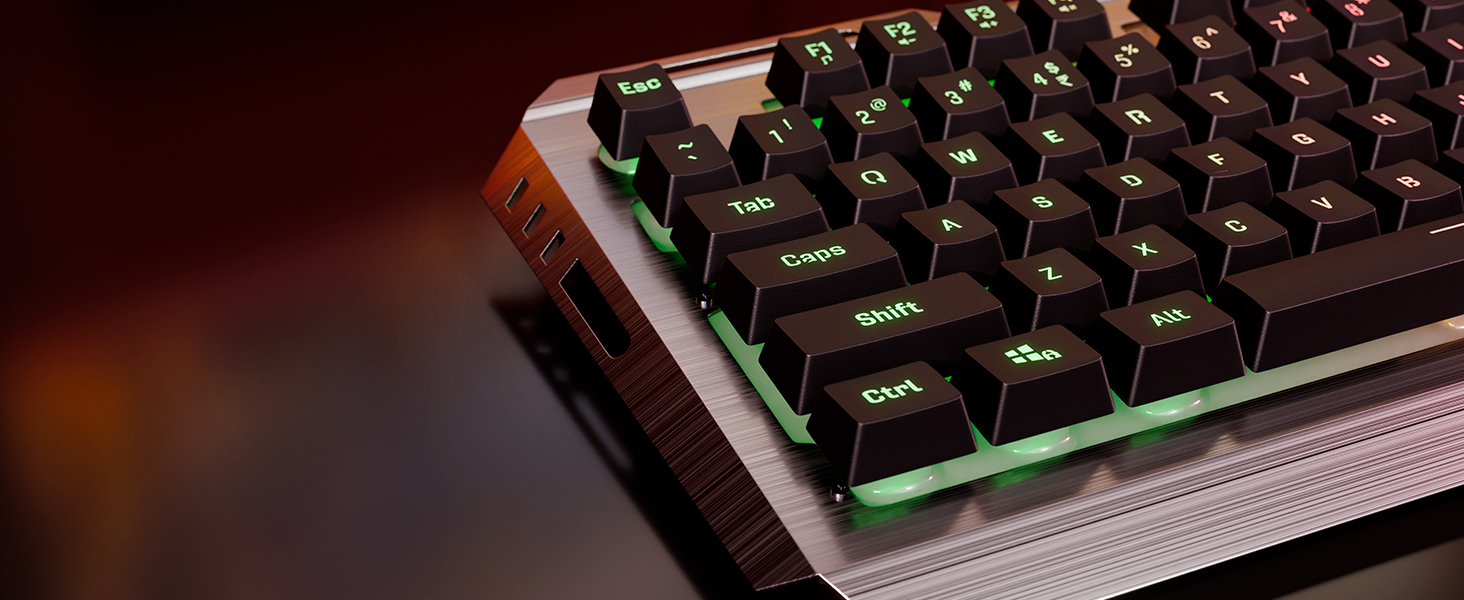
Figure 4: The compact USB Nano Receiver for wireless connectivity.
- تشغيل الأجهزة:
- For the keyboard, ensure the power switch (if present) is in the 'ON' position.
- For the mouse, locate the power switch on the underside and slide it to the 'ON' position.
- الاتصال التلقائي: The keyboard and mouse should automatically connect to your computer. No additional drivers are typically required for Windows operating systems.
- الشحن الأولي: It is recommended to fully charge both the keyboard and mouse before first use. Use the provided Type-C cable to connect them to a USB power source.

Figure 5: Both the keyboard and mouse feature built-in rechargeable batteries for convenience.
تعليمات التشغيل
وظائف لوحة المفاتيح:
- التحكم في إضاءة LED:
- اضغط على الجبهة الوطنية + قفل التمرير keys to cycle through different multi-color LED modes.
- يضعط Fn + Page Up/Page Down to adjust LED brightness levels (3 levels available).
- يضعط الجبهة الوطنية + الصفحة الرئيسية to turn LED lighting On/Off.

Figure 6: The keyboard offers multi-color LED modes and adjustable brightness levels.
- قفل مفتاح Windows: يضعط مفتاح Fn + Windows to enable or disable the Windows key, preventing accidental presses during gaming.

Figure 7: Use Fn + Windows key to lock/unlock the Windows key.
- مفاتيح الوسائط المتعددة: Utilize the Fn key in combination with F1-F12 for various multimedia functions (e.g., volume control, media playback).
- الوقوف بخطوتين: Adjust the keyboard's angle for comfortable typing using the integrated 2-step stand.
وظائف الماوس:
- تعديل DPI: اضغط على زر DPI located on the top of the mouse to cycle through DPI settings: 1600, 2400, and 4000 DPI. This allows you to adjust cursor sensitivity.

Figure 8: The mouse features a dedicated DPI button for on-the-fly sensitivity adjustments.
- أزرار التقدم/التراجع: استخدم الأزرار الجانبية للتنقل السريع في web المتصفحات أو file المستكشفون.
- Power-Saver Mode: The mouse automatically enters a power-saver mode after a period of inactivity to conserve battery. Move the mouse or click a button to wake it up.
صيانة
- تنظيف:
- استخدم قطعة قماش ناعمة وجافة لمسح لوحة المفاتيح والماوس.
- بالنسبة للأوساخ العنيدة، قم بإزالة الأوساخ برفق.ampانقع قطعة القماش في الماء أو محلول تنظيف خفيف. تجنب الرطوبة الزائدة.
- استخدم الهواء المضغوط لإزالة الغبار والحطام من بين مفاتيح لوحة المفاتيح.
- العناية بالبطارية:
- اشحن الأجهزة بانتظام للحفاظ على صحة البطارية.
- تجنب تفريغ البطارية بالكامل بشكل متكرر.
- If storing for a long period, charge the devices to about 50% before storage.
- تخزين: Store the combo in a cool, dry place away from direct sunlight and extreme temperatures.
استكشاف الأخطاء وإصلاحها
| مشكلة | السبب المحتمل | حل |
|---|---|---|
| لوحة المفاتيح/الماوس لا يستجيب | Low battery; USB receiver disconnected; Device not powered on; Interference. | Charge devices; Reinsert USB receiver; Ensure power switch is ON; Move closer to receiver; Try a different USB port. |
| تأخر أو انقطاع في الاتصال | المسافة من جهاز الاستقبال؛ التداخل من الأجهزة اللاسلكية الأخرى. | Reduce distance between devices and receiver; Move away from other 2.4GHz devices (e.g., Wi-Fi routers). |
| أضواء LED لا تعمل | انطفأت مصابيح LED؛ انخفاض مستوى البطارية. | Press Fn + Home to toggle LEDs; Charge keyboard. |
| مؤشر الماوس يتحرك بشكل غير منتظم أو لا يتحرك بسلاسة | مستشعر بصري متسخ؛ سطح غير مناسب؛ بطارية ضعيفة. | Clean optical sensor; Use on a clean, non-reflective mouse pad; Charge mouse. |
تحديد
| ميزة | التفاصيل |
|---|---|
| ماركة | الزبرونيك |
| رقم الموديل | Zeb-Transformer Pro |
| الاتصال | 2.4GHz اللاسلكية |
| مفاتيح لوحة المفاتيح | 104 مفتاحا |
| Keyboard Body Material | الألومنيوم |
| مؤشر الماوس DPI | 1600 / 2400 / 4000 نقطة في البوصة (قابلة للتعديل) |
| بطارية | Built-in Rechargeable Battery (for both keyboard and mouse) |
| منفذ الشحن | النوع-C |
| أنظمة التشغيل المتوافقة | All Windows versions |
| الأجهزة المتوافقة | كمبيوتر محمول ، كمبيوتر شخصي |
| أبعاد المنتج (لوحة المفاتيح) | تقريبا. 13.3 × 7.2 × 4.2 سم (الطول × العرض × الارتفاع) |
| وزن العنصر | 1 kg (total combo) |
الضمان والدعم
The ZEBRONICS Transformer PRO Gaming Wireless Keyboard & Mouse Combo comes with a ضمان لمدة سنة واحدة من تاريخ الشراء. يُرجى الاحتفاظ بإيصال الشراء للمطالبة بالضمان.
For technical support, service, or warranty inquiries, please visit the official ZEBRONICS website or contact their customer service department. Refer to the product packaging or the ZEBRONICS webالموقع للحصول على أحدث معلومات الاتصال.
ملحوظة: لا يغطي الضمان الأضرار الناجمة عن سوء الاستخدام أو الحوادث أو التعديل غير المصرح به أو التآكل الطبيعي.


