1. المقدمة
This manual provides essential information for the safe and efficient operation of your TELLUR Obia PRO 60W Bluetooth Speaker. Please read this manual thoroughly before using the product and retain it for future reference.
2. معلومات السلامة
- لا تعرض مكبر الصوت لدرجات حرارة عالية أو لأشعة الشمس المباشرة لفترات طويلة.
- تجنب إسقاط السماعة أو تعريضها لصدمات قوية.
- لا تحاول تفكيك السماعة أو تعديلها. سيؤدي ذلك إلى إلغاء الضمان.
- أبقِ السماعة بعيدة عن الأجهزة الطبية.
- تأكد من إغلاق غطاء منفذ الشحن بشكل آمن عند وجودك بالقرب من الماء للحفاظ على مقاومة الماء IPX6.
- استخدم فقط كابل الشحن ومحول الطاقة المحددين.
3. محتويات العبوة
تأكد من وجود جميع العناصر في العبوة:
- TELLUR Obia PRO 60W Bluetooth Speaker
- كابل شحن USB
- 3.5 مللي متر كابل صوت AUX
- دليل المستخدم (هذا المستند)
4. انتهى المنتجview والضوابط
تعرّف على مكونات السماعة وأزرار التحكم الخاصة بها.

الشكل 4.1: أمام view of the TELLUR Obia PRO speaker, showcasing the main grille, control panel, and integrated LED lights on the handle and side woofers.
4.1 لوحة التحكم

الشكل 4.2: مفصل view of the control buttons located on the top panel of the speaker.
- خفض مستوى الصوت (-) / المقطع السابق: اضغط لفترة وجيزة لخفض مستوى الصوت. اضغط مع الاستمرار للانتقال إلى المقطع السابق.
- رفع مستوى الصوت (+) / المقطع التالي: اضغط لفترة وجيزة لزيادة مستوى الصوت. اضغط مع الاستمرار للانتقال إلى المقطع التالي.
- زر وضع إضاءة LED: Press to cycle through different LED light modes.
- زر الطاقة: Press and hold to power on/off. Briefly press to play/pause music.
- TWS (True Wireless Stereo) Button: Press to activate TWS pairing mode.
- زر الوضع (M): Press to switch between Bluetooth, USB, and AUX input modes.
4.2 منافذ الإدخال/الإخراج
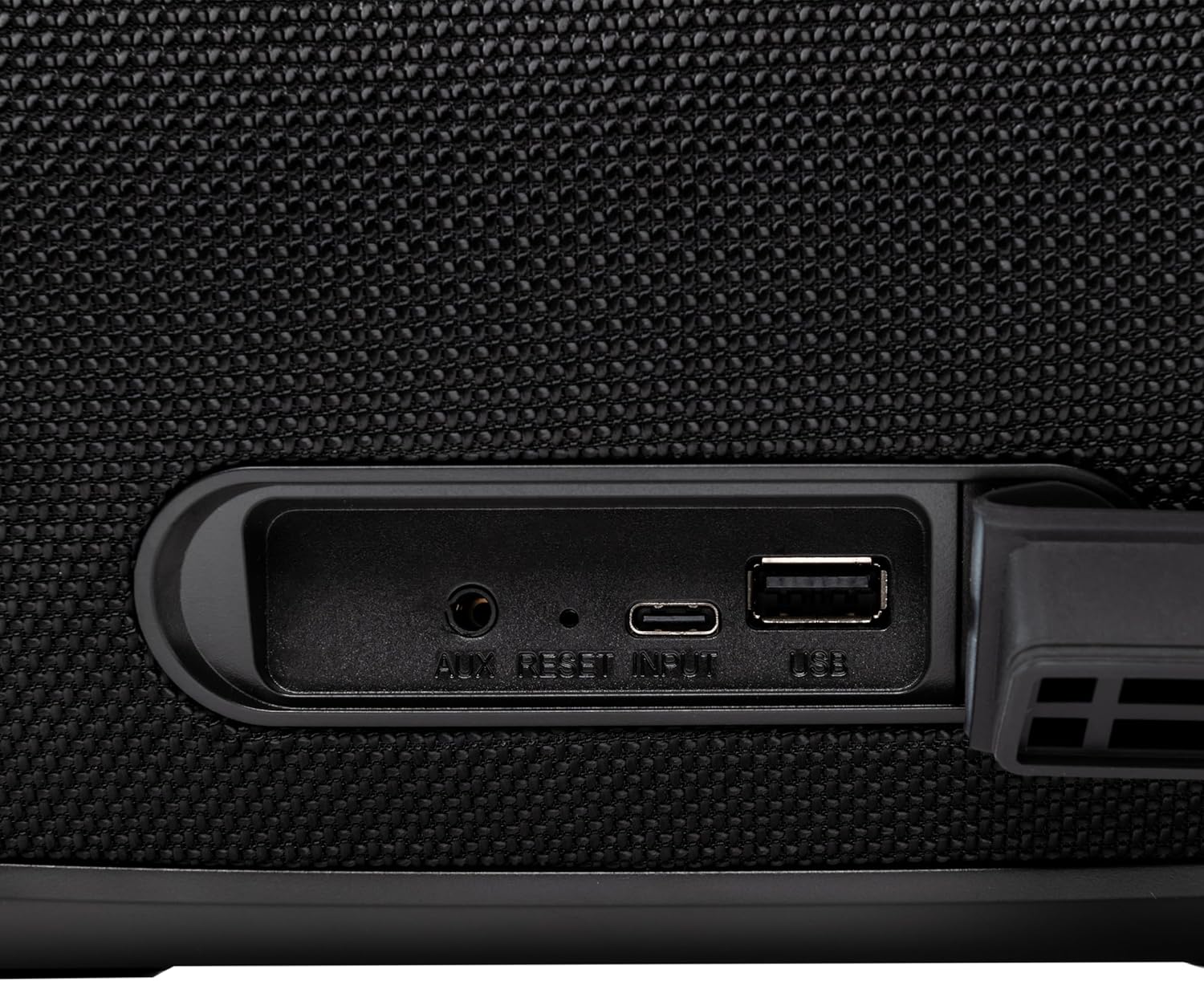
الشكل 4.3: Close-up of the protected input/output ports on the rear of the speaker.
- منفذ AUX-IN: لتوصيل أجهزة الصوت الخارجية عبر كابل صوت مقاس 3.5 ملم.
- زر إعادة الضبط: Use a thin object to press and reset the speaker if necessary.
- مدخل USB-C: لشحن مكبر الصوت.
- منفذ USB-A: For playing MP3 audio files from a USB drive or for power bank functionality.
5. الإعداد
5.1 شحن السماعة
Before initial use, fully charge the speaker. The speaker also functions as a power bank to charge other devices via its USB-A port.
- Connect the USB charging cable to the USB-C input port on the speaker.
- قم بتوصيل الطرف الآخر من الكابل بمحول طاقة USB متوافق (غير متضمن).
- The charging indicator light will illuminate. It will turn off once charging is complete.
- The battery level can be displayed on your connected phone when paired via Bluetooth.
5.2 تشغيل/إيقاف التشغيل
- لتشغيل: اضغط مع الاستمرار على زر الطاقة for approximately 3 seconds until you hear an audible prompt and the LED lights activate.
- لإيقاف التشغيل: اضغط مع الاستمرار على زر الطاقة for approximately 3 seconds until you hear an audible prompt and the LED lights turn off.
6. تعليمات التشغيل
6.1 اقتران بلوتوث
The speaker uses Bluetooth v5.3 for stable wireless connection up to 10 meters.
- تأكد من تشغيل السماعة ووضع البلوتوث (يُشار إلى ذلك بمؤشر LED أزرق وامض). إذا لم يكن كذلك، فاضغط على زر الوضع (م) للتبديل إلى وضع Bluetooth.
- قم بتمكين البلوتوث على جهازك المحمول (الهاتف الذكي، والكمبيوتر اللوحي، وما إلى ذلك).
- بحث عن الأجهزة المتاحة بتقنية البلوتوث، ثم حدد "TELLUR Obia PRO" من القائمة.
- Once paired, the speaker will emit an audible confirmation, and the blue LED will stop flashing.
- ستتصل السماعة تلقائيًا بآخر جهاز مقترن بها عند تشغيلها، إن وجد.

الشكل 6.1: The TELLUR Obia PRO speaker wirelessly connected to a smartphone, ready for audio playback.
6.2 وظيفة الاستريو اللاسلكي الحقيقي (TWS)
TWS allows you to pair two Obia PRO speakers for a stereo sound experience.
- Ensure both Obia PRO speakers are powered on and in Bluetooth mode, but not yet paired with any device.
- على مكبر صوت واحد (سيكون هذا هو مكبر الصوت الأساسي)، اضغط على زر TWS. The speaker will enter TWS pairing mode, indicated by a flashing light.
- The two speakers will automatically connect to each other. Once connected, you will hear an audible confirmation, and the TWS indicator light on both speakers will become solid.
- Now, connect your mobile device to the primary speaker via Bluetooth as described in Section 6.1. The audio will play in stereo across both speakers.
6.3 Multiple Link Technology
This technology allows connecting an unlimited number of Obia PRO speakers wirelessly for a synchronized audio experience. Refer to the manufacturer's website or specific instructions for detailed setup of Multiple Link.
6.4 USB Playback (MP3)
تشغيل صوت MP3 fileمباشرة من محرك أقراص فلاش USB (حتى 128 جيجابايت).
- أدخل محرك أقراص فلاش USB يحتوي على MP3 fileفي منفذ USB-A.
- اضغط على زر الوضع (م) to switch to USB mode. The speaker will automatically begin playing music from the USB drive.
- استخدم رفع/خفض الصوت و زر الطاقة (for play/pause) to control playback.
وصلة AUX-IN 6.5
Connect non-Bluetooth devices using the 3.5mm AUX audio cable.
- Connect one end of the 3.5mm AUX audio cable to the AUX-IN port on the speaker.
- قم بتوصيل الطرف الآخر بمقبس إخراج الصوت الخاص بجهازك الخارجي (مثل مشغل MP3 أو الكمبيوتر المحمول).
- اضغط على زر الوضع (م) للتبديل إلى وضع AUX.
- التحكم في التشغيل ومستوى الصوت من جهازك الخارجي.
6.6 الاتصال بدون استخدام اليدين
When connected to a smartphone via Bluetooth, the speaker's built-in microphone allows for hands-free calls.
- الرد/إنهاء المكالمة: اضغط لفترة وجيزة على زر الطاقة.
- رفض المكالمة: اضغط مع الاستمرار على زر الطاقة لمدة 2 ثواني.
6.7 وضع ليد
The speaker features integrated LED lights with multiple display modes.
- اضغط على زر وضع ضوء LED to cycle through available light patterns and colors.
- اضغط مع الاستمرار على زر وضع ضوء LED to turn the lights off or on.

الشكل 6.2: A user interacting with the LED light mode button to change the speaker's lighting effects.
6.8 Equalizer Settings (Indoor/Outdoor)
The speaker allows for equalizer customization for different environments. Specific controls for this are not detailed in the provided data, but typically involve a dedicated button or a combination of existing buttons. Refer to the product's quick start guide or manufacturer's website for precise instructions on adjusting the equalizer.
7. الصيانة
7.1 التنظيف
- امسح السماعة بقطعة قماش ناعمة وجافة.
- لا تستخدم المنظفات الكاشطة أو الكحول أو المذيبات الكيميائية.
7.2 مقاومة الماء (IPX6)
The Obia PRO speaker is rated IPX6, meaning it is protected against high-pressure water jets from any direction. This makes it suitable for outdoor use and environments where it might be exposed to splashes or rain.
- Ensure the rubber cover for the charging and AUX ports is securely closed before exposing the speaker to water.
- لا تغمر السماعة في الماء.
- After exposure to water, wipe the speaker dry before charging.
7.3 العناية بالبطارية
- لإطالة عمر البطارية، تجنب تفريغ البطارية بالكامل بشكل متكرر.
- اشحن السماعة بانتظام، حتى لو لم تكن قيد الاستخدام، للحفاظ على صحة البطارية.
- قم بتخزين مكبر الصوت في مكان بارد وجاف عند عدم استخدامه لفترات طويلة.
8. استكشاف الأخطاء وإصلاحها
| مشكلة | السبب المحتمل | حل |
|---|---|---|
| لا يتم تشغيل مكبر الصوت. | بطارية منخفضة. | اشحن السماعة بالكامل. |
| لا يمكن الاقتران عبر البلوتوث. | مكبر الصوت ليس في وضع الاقتران؛ البلوتوث في الجهاز مغلق؛ بعيد جدًا عن مكبر الصوت. | Ensure speaker is in Bluetooth mode (flashing LED). Turn on Bluetooth on your device. Move device closer to speaker (within 10m). |
| لا يوجد صوت. | Volume too low; incorrect mode selected; device not playing. | ارفع مستوى صوت السماعات والجهاز. اضغط زر الوضع (م) to select correct input. Ensure audio is playing on the connected device. |
| فشل اقتران TWS. | Speakers already paired to a device; not both Obia PRO models. | Disconnect both speakers from any Bluetooth devices. Ensure both speakers are Obia PRO models. Try TWS pairing again. |
| تشغيل الملفات عبر منفذ USB لا يعمل. | محرك أقراص USB غير مُهيأ بشكل صحيح؛ غير مدعوم file type; drive capacity too large. | Ensure USB drive is formatted to FAT32. Only MP3 files are supported. Max capacity 128GB. |
9. المواصفات
| اسم الموديل | Obia PRO |
| ماركة | تيلور |
| طاقة الإخراج | 60W (2x 20W RMS subwoofers, 2x 10W RMS tweeters) |
| نسخة البلوتوث | الإصدار 5.3 |
| لاسلكي المدى | حتى 10 أمتار |
| استجابة التردد | 80 ميجا هرتز (Note: This value is unusual for speaker frequency response and may be a typo in source data. Typically measured in Hz-kHz.) |
| مقاومة | 4 أوم |
| أوضاع الصوت | Bluetooth, USB (MP3), AUX-IN |
| دعم USB | USB 2.0/3.0, up to 128GB (MP3 format) |
| مقاومة الماء | IPX6 |
| سعة البطارية | 5400 مللي أمبير |
| وقت التشغيل | يدوم حتى 12 ساعات (بصوت متوسط) |
| وظيفة بنك الطاقة | Yes, via USB-A port |
| الأبعاد (الطول × العرض × الارتفاع) | 37.7 × 17 × 18 سم |
| وزن | 3.48 كجم |
| مادة | بلاستيك |
| لون | أسود |
ملاحظة: المواصفات عرضة للتغيير دون إشعار مسبق.
10. الضمان والدعم
TELLUR products are manufactured to the highest quality standards. For information regarding warranty terms, technical support, or service, please refer to the warranty card included with your product or visit the official TELLUR webموقع.
معلومات الاتصال: يرجى الزيارة www.tellur.com للحصول على أحدث معلومات الدعم.


