مقدمة
The ALOGIC Clarity Fold Stand (Model ACFS) is designed to enhance the versatility and ergonomics of your ALOGIC Clarity Pro Touch monitor. This stand allows for seamless transformation of your monitor into various configurations, including a traditional display, a drafting board, or an almost-flat tablet, catering to diverse creative and professional needs. Its robust design ensures stability and security, while the 360-degree rotation feature facilitates easy screen sharing and positioning.
محتويات الحزمة
- ALOGIC Clarity Fold Stand (ACFS)
- Mounting Hardware (screws, tools if applicable)
- دليل المستخدم (هذا المستند)
تعليمات الإعداد
Follow these steps to set up your ALOGIC Clarity Fold Stand and attach your compatible monitor.
1. Unpacking the Stand
Carefully remove all components from the packaging. Ensure all parts listed in the package contents are present.

Image: The ALOGIC Clarity Fold Stand in its initial configuration, ready for monitor attachment.
2. تركيب الشاشة
- Ensure your ALOGIC Clarity Pro Touch monitor is powered off and disconnected from all cables.
- Carefully align the VESA mounting holes on the back of your monitor with the mounting plate on the Clarity Fold Stand.
- Secure the monitor to the stand using the provided screws. Tighten them firmly but do not overtighten.
- Once secured, place the assembled stand and monitor on a stable, flat surface.

Image: A Clarity Pro Touch monitor securely attached to the ALOGIC Clarity Fold Stand, demonstrating its use in an angled position.
تعليمات التشغيل
The Clarity Fold Stand offers multiple adjustment options to optimize your viewing and interaction experience.
Adjusting the Monitor Angle (Folding Mechanism)
The stand's unique folding mechanism allows for quick transitions between different modes:
- Traditional Display Mode: Position the monitor upright for standard viewعمل.
- Drafting Board Mode: Gently fold the monitor down to an ergonomic angle, ideal for sketching or detailed work.
- Almost-Flat Tablet Mode: Continue folding until the monitor is nearly flat against the table surface, suitable for touch-intensive tasks.
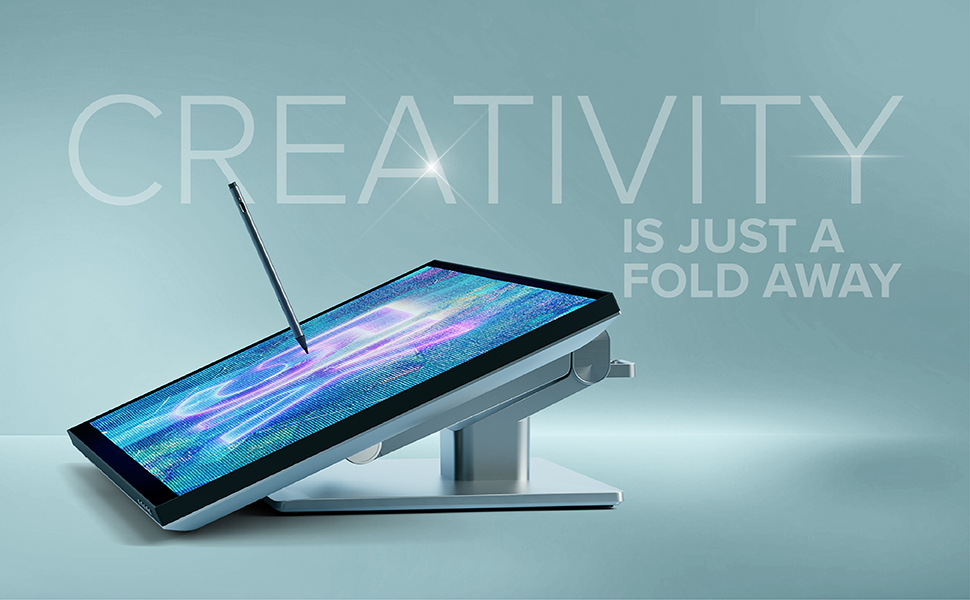
Image: A Clarity Pro Touch monitor on the Fold Stand, angled low for use as a creative tablet with a stylus.
دوران 360 درجة
The base of the Clarity Fold Stand features a 360-degree rotation capability. To rotate the monitor, gently turn the entire stand base. This allows for easy screen sharing with colleagues or repositioning within your workspace without lifting the stand.

Image: An overhead diagram illustrating the 360-degree rotational capability of the stand's base.
صيانة
To ensure the longevity and optimal performance of your ALOGIC Clarity Fold Stand, follow these simple maintenance guidelines:
- تنظيف: Use a soft, dry, lint-free cloth to wipe down the stand. For stubborn marks, a slightly damp يمكن استخدام قطعة قماش مبللة بصابون لطيف، ثم قطعة قماش جافة. تجنب استخدام المنظفات الكاشطة أو المذيبات.
- تقتيش: Periodically check all screws and connections to ensure they remain secure. Do not overtighten.
- حركة: When adjusting the stand, do so smoothly and avoid sudden, forceful movements to prevent undue stress on the joints.
استكشاف الأخطاء وإصلاحها
If you encounter any issues with your Clarity Fold Stand, refer to the following common solutions:
| مشكلة | السبب المحتمل | حل |
|---|---|---|
| يبدو الحامل غير مستقر أو متذبذب. | Loose mounting screws or uneven surface. | Ensure all monitor mounting screws are securely tightened. Place the stand on a flat, stable desk or table. |
| Difficulty adjusting the angle or rotation. | Resistance in the joints. | Apply gentle, even pressure when adjusting. Avoid forcing the mechanism. If resistance persists, contact support. |
| Monitor not fitting the stand. | طراز الشاشة غير متوافق. | The Clarity Fold Stand is designed for ALOGIC Clarity Pro Touch monitors (27" and 32" models). Verify your monitor's compatibility. |
تحديد
| ميزة | التفاصيل |
|---|---|
| رقم الموديل | ACFS |
| ماركة | ألوجيك |
| لون | أسود |
| عامل الشكل | Tripod (Base design) |
| الأجهزة المتوافقة | Desktop monitors, specifically ALOGIC Clarity Pro Touch 27" and 32" |
| وزن العنصر | 8.8 رطل |
| أبعاد الحزمة | 21.06 × 15.16 × 6.85 بوصة |
| تناوب | 360-degree base rotation |
| قابلية التعديل | Multi-angle folding for traditional, drafting, and flat modes |
الضمان والدعم
للحصول على معلومات الضمان والدعم الفني، يرجى الرجوع إلى موقع ALOGIC الرسمي. webالموقع أو تواصل مع خدمة العملاء مباشرةً. احتفظ بإيصال الشراء لطلبات الضمان.
الدعم عبر الإنترنت: www.alogic.co


