مقدمة
يُقدّم هذا الدليل تعليماتٍ مُفصّلة لمحطة الإرساء OWC Gemini Thunderbolt (USB-C) وحلّ التخزين الخارجي بتقنية RAID. ويشمل الإعداد والتشغيل والصيانة واستكشاف الأخطاء وإصلاحها والمواصفات الفنية لضمان الأداء الأمثل وطول عمر جهازك.
معلومات السلامة
- اقرأ جميع التعليمات بعناية قبل استخدام الجهاز.
- لا تعرض الجهاز للرطوبة أو درجات الحرارة القصوى.
- استخدم فقط محول الطاقة المرفق مع الجهاز.
- لا تحاول فتح أو إصلاح الجهاز بنفسك. أحل جميع أعمال الصيانة إلى فنيين مؤهلين.
- تأكد من التهوية المناسبة حول الجهاز لمنع ارتفاع درجة الحرارة.
محتويات الحزمة
تأكد من وجود جميع العناصر في الحزمة الخاصة بك:
- محطة إرساء OWC Gemini Thunderbolt (USB-C)
- محول الطاقة
- كابل ثندربولت (USB-C)
- دليل المستخدم (هذا المستند)
- محركات الأقراص (مثبتة مسبقًا لطراز 32 تيرابايت)
المنتج انتهىview
تُعد محطة الإرساء OWC Gemini حلاً متعدد الاستخدامات للتخزين الخارجي، وهي مصممة لإدارة البيانات عالية الأداء وتوسيع نطاق الاتصال.

الصورة: الجبهة view من محطة الإرساء OWC Gemini Thunderbolt، المعروضةasinبفضل تصميمه الأسود الأنيق وعلامة OWC التجارية.
الميزات الرئيسية
- فتحتان لمحركات الأقراص: يدعم محركات أقراص SATA مقاس 2.5 بوصة و 3.5 بوصة لتكوينات تخزين مرنة.
- RAID للأجهزة: يوفر أوضاع RAID 0 و RAID 1 و SPAN و JBOD لتحسين الأداء أو تكرار البيانات.
- اتصال Thunderbolt (USB-C): منفذان Thunderbolt 3 (USB-C) لتوصيل المضيف، والتوصيل المتسلسل، وتوصيل الطاقة (حتى 27 واط).
- الاتصال الموسع: يحتوي على منفذي USB 3.2 Gen 2 Type-A، ومنفذ HDMI واحد، ومنفذ إيثرنت 2.5 جيجابت واحد، وفتحة وسائط SD 4.0/UHS-II واحدة.
- دعم شاشات العرض عالية الدقة: يدعم HDMI 2.1 دقة تصل إلى 8K بمعدل 120 هرتز، ويدعم Thunderbolt 3 دقة تصل إلى 8K بمعدل 60 هرتز أو 4K بمعدل 120 هرتز.
تخطيط المنفذ
يوفر جهاز OWC Gemini مجموعة شاملة من المنافذ لتلبية احتياجات الاتصال المختلفة.

الصورة: الخلفية view من محطة الإرساء OWC Gemini، مع تسليط الضوء على منافذ الاتصال السبعة بما في ذلك Thunderbolt و USB و HDMI و Ethernet.
- منفذ Thunderbolt 3 (USB-C) المضيف: يتصل بجهاز الكمبيوتر الخاص بك.
- منفذ Thunderbolt 3 (USB-C) السفلي: لتوصيل الأجهزة بالتسلسل، أو شاشات إضافية، أو لشحن أجهزة USB-C.
- منافذ USB 3.2 Gen 2 Type-A (x2): لتوصيل الأجهزة الطرفية عبر منفذ USB.
- منفذ HDMI 2.1: لتوصيل شاشة خارجية.
- منفذ إيثرنت 2.5 جيجابت: للاتصال بشبكة عالية السرعة.
- فتحة وسائط SD 4.0/UHS-II: يوجد على اللوحة الأمامية لسهولة الوصول إليه.
- مدخلات الطاقة DC 12V: يتصل بمحول الطاقة.

صورة: لقطة مقرّبة للوحة الأمامية لجهاز OWC Gemini، تُظهر فتحة بطاقة SD التي يسهل الوصول إليها.
يثبت
1. تركيب محرك الأقراص (إن وجد)
بالنسبة للطرازات التي لا تحتوي على محركات أقراص مثبتة مسبقًا، اتبع هذه الخطوات لتثبيت محركات أقراص SATA مقاس 2.5 بوصة أو 3.5 بوصة.

صورة: وحدة OWC Gemini توضح فتحتي محرك الأقراص المرنة، المتوافقة مع محركات الأقراص مقاس 2.5 بوصة و 3.5 بوصة.
- تأكد من إيقاف تشغيل الجهاز وفصله عن جهاز الكمبيوتر الخاص بك.
- افتح باب (أبواب) فتحة محرك الأقراص وفقًا للتصميم المادي للمنتج.
- أدخل محركات الأقراص SATA مقاس 2.5 بوصة أو 3.5 بوصة في الفتحات، مع التأكد من تثبيتها بإحكام.
- أغلق باب (أبواب) حجرة محرك الأقراص.
2. تكوين RAID
يدعم جهاز OWC Gemini تقنية RAID المادية. راجع أداة تكوين RAID المحددة أو المفاتيح الفعلية الموجودة على الجهاز (إن وجدت) لضبط مستوى RAID المطلوب (RAID 0 أو RAID 1 أو SPAN أو JBOD).
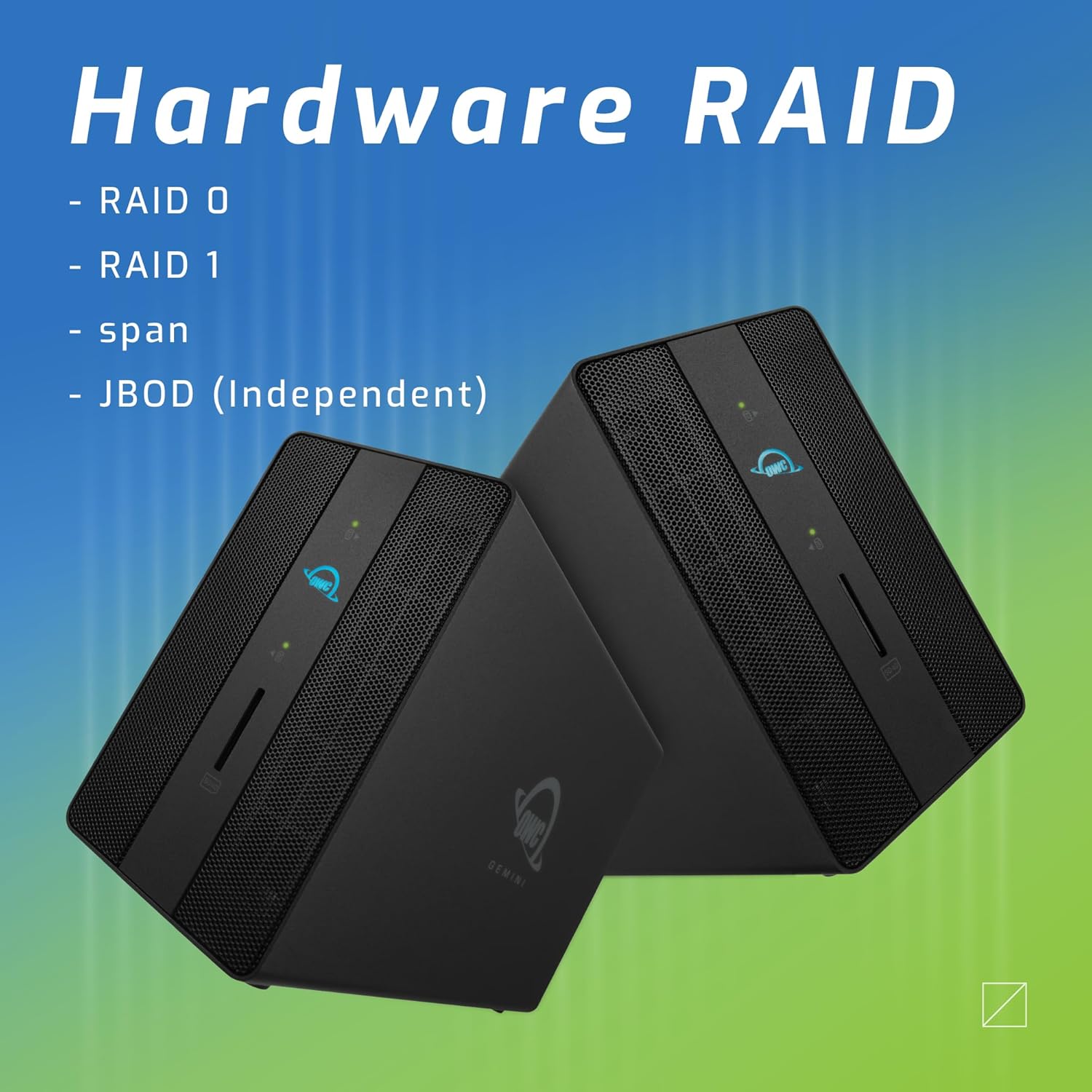
الصورة: وحدتان من وحدات OWC Gemini، مع التركيز على إمكانيات RAID للأجهزة لتكوينات مثل RAID 0 و RAID 1 و SPAN و JBOD.
شرح مستويات RAID:
- RAID 0 (التوزيع): يجمع بين محركات الأقراص لتحقيق أقصى سرعة وسعة، ولكنه لا يوفر أي تكرار للبيانات.
- ريد 1 (النسخ المتطابق): يقوم بتكرار البيانات عبر محركات الأقراص لتحقيق التكرار، مما يؤدي إلى التضحية بنصف السعة الإجمالية لحماية البيانات.
- SPAN (التسلسل): يجمع محركات الأقراص في وحدة تخزين واحدة كبيرة دون تقسيم أو عكس.
- JBOD (مجموعة من الأقراص فقط): يتعامل مع كل محرك أقراص كوحدة تخزين مستقلة.
3. الاتصال بجهاز الكمبيوتر الخاص بك
- قم بتوصيل محول الطاقة بمدخل الطاقة DC 12V الموجود على جهاز OWC Gemini ثم بمأخذ الطاقة.
- قم بتوصيل أحد طرفي كابل Thunderbolt (USB-C) بمنفذ المضيف الموجود على جهاز OWC Gemini.
- قم بتوصيل الطرف الآخر من كابل Thunderbolt (USB-C) بمنفذ Thunderbolt (USB-C) الموجود على جهاز الكمبيوتر الخاص بك.
- ينبغي أن يتم تشغيل الجهاز تلقائياً.
4. تهيئة محركات الأقراص
بعد التوصيل، قد يطلب منك نظام التشغيل تهيئة محركات الأقراص الجديدة. اتبع التعليمات التي تظهر على الشاشة. في نظام macOS، استخدم أداة القرص. في نظام Windows، استخدم إدارة الأقراص.
تعليمات التشغيل
نقل البيانات
بمجرد تهيئة محركات الأقراص وتنسيقها، ستظهر كوحدات تخزين يمكن الوصول إليها على جهاز الكمبيوتر الخاص بك. يمكنك سحبها وإفلاتها. fileيتم نقل البيانات من وإلى هذه المجلدات كما تفعل مع أي جهاز تخزين آخر.
باستخدام منافذ USB
قم بتوصيل الأجهزة الطرفية USB مثل محركات الأقراص الخارجية أو لوحات المفاتيح أو الفأرات بمنفذي USB 3.2 Gen 2 Type-A. تدعم هذه المنافذ سرعات نقل بيانات تصل إلى 10 جيجابت/ثانية.
توصيل شاشة خارجية
استخدم منفذ HDMI 2.1 لتوصيل شاشة خارجية. يدعم جهاز Gemini دقة عرض تصل إلى 8K بمعدل 120 هرتز عبر منفذ HDMI.
الاتصال بالشبكة
قم بتوصيل كابل إيثرنت من جهاز توجيه الشبكة الخاص بك أو قم بالتبديل إلى منفذ إيثرنت 2.5 جيجابت الموجود على جهاز Gemini للوصول إلى الشبكة السلكية عالية السرعة.
استخدام فتحة بطاقة الذاكرة SD
أدخل بطاقة SD متوافقة مع SD 4.0/UHS-II في الفتحة الأمامية لنقل البيانات بسرعة من الكاميرات أو الأجهزة الأخرى.
التوصيل المتسلسل وتوصيل الطاقة

صورة: لقطة مقرّبة لمنافذ Thunderbolt الخاصة بجهاز OWC Gemini، توضح استخدامها في التوصيل المتسلسل، وتوصيل شاشات إضافية، وشحن أجهزة USB-C.
يتيح لك منفذ Thunderbolt 3 (USB-C) الثاني ما يلي:
- سلسلة ديزي أجهزة Thunderbolt إضافية.
- قم بتوصيل شاشة عرض إضافية (حتى 8K @ 60Hz أو 4K @ 120Hz).
- شحن الأجهزة المزودة بمنفذ USB-C بقوة تصل إلى 27 واط.
صيانة
- تنظيف: استخدم قطعة قماش ناعمة وجافة لتنظيف الجزء الخارجي من الجهاز. لا تستخدم المنظفات السائلة أو البخاخات.
- تهوية: تأكد من عدم انسداد فتحات التهوية لمنع ارتفاع درجة الحرارة.
- تحديثات البرامج الثابتة: قم بفحص OWC بشكل دوري webموقع لتحديثات البرامج الثابتة لضمان الأداء الأمثل والتوافق.
- الطرد الآمن: قم دائمًا بإخراج جهاز OWC Gemini من نظام التشغيل الخاص بك بأمان قبل فصله أو إيقاف تشغيله لمنع تلف البيانات.
استكشاف الأخطاء وإصلاحها
لم يتم التعرف على الجهاز
- تأكد من توصيل جميع الكابلات بشكل آمن، وخاصة كابل Thunderbolt لكل من جهاز Gemini وجهاز الكمبيوتر الخاص بك.
- تأكد من توصيل محول الطاقة بشكل صحيح وأن الجهاز يتلقى الطاقة.
- حاول توصيل جهاز Gemini بمنفذ Thunderbolt مختلف على جهاز الكمبيوتر الخاص بك.
- أعد تشغيل الكمبيوتر الخاص بك.
- تحقق من أداة القرص (macOS) أو إدارة الأقراص (Windows) في نظام التشغيل الخاص بك لمعرفة ما إذا تم اكتشاف محركات الأقراص ولكنها غير مهيأة أو غير منسقة.
سرعات نقل البيانات البطيئة
- تأكد من استخدام كابل ومنفذ متوافقين مع تقنية Thunderbolt 3.
- تحقق من إعدادات RAID. ستكون سرعات الكتابة في RAID 1 (النسخ المتطابق) أبطأ من سرعات الكتابة في RAID 0 (التوزيع).
- أغلق أي تطبيقات غير ضرورية قد تستهلك موارد النظام.
- تأكد من أن برامج التشغيل الخاصة بالكمبيوتر لديك محدثة.
مشاكل العرض
- تأكد من توصيل كابل HDMI بشكل آمن بكل من جهاز Gemini وشاشتك.
- تحقق من إعدادات العرض في نظام التشغيل الخاص بك.
- تأكد من أن شاشتك تدعم الدقة ومعدل التحديث اللذين تحاول استخدامهما.
- حاول استخدام كابل HDMI أو شاشة أخرى إذا كانت متاحة.
مشاكل اتصال الشبكة
- تأكد من توصيل كابل الإيثرنت بشكل آمن بكل من جهاز Gemini وجهاز الشبكة الخاص بك.
- تحقق من إعدادات الشبكة الخاصة بجهاز الكمبيوتر الخاص بك.
- أعد تشغيل جهاز التوجيه/المودم الخاص بك.
تحديد
| ميزة | التفاصيل |
|---|---|
| ماركة | أو دبليو سي |
| رقم الموديل | OWCTB3GM000H32 |
| سعة التخزين | 32.0 تيرابايت (حسب التكوين) |
| حجرات القيادة | 2 (يدعم محركات أقراص SATA مقاس 2.5 بوصة و 3.5 بوصة) |
| مستويات RAID | SPAN، RAID 0، RAID 1، JBOD (RAID الأجهزة) |
| واجهة المضيف | ثندربولت 3 (USB-C) |
| معدل نقل البيانات | سرعة تصل إلى 40 جيجابت/ثانية (Thunderbolt 3)، وسرعة تصل إلى 10 جيجابت/ثانية (USB 3.2 Gen 2) |
| الموانئ | (1) منفذ Thunderbolt 3 (USB-C) مضيف، (1) منفذ Thunderbolt 3 (USB-C) طرفي، (2) منفذ USB 3.2 من الجيل الثاني من النوع A، (1) منفذ HDMI 2.1، (1) منفذ إيثرنت بسرعة 2.5 جيجابت، (1) منفذ SD 4.0/UHS-II |
| دعم العرض | HDMI 2.1: دقة تصل إلى 8K بمعدل 120 هرتز؛ Thunderbolt 3: دقة تصل إلى 8K بمعدل 60 هرتز أو 4K بمعدل 120 هرتز |
| توصيل الطاقة | تصل الطاقة إلى 27 واط عبر منفذ Thunderbolt 3 |
| الأجهزة المتوافقة | أجهزة الكمبيوتر المكتبية، وأجهزة الكمبيوتر المحمولة، والأجهزة اللوحية (مع منفذ Thunderbolt/USB-C) |
| لون | أسود |
| وزن | 9.35 رطل (تقريبًا) |
| رمز المنتج الموحد | 810100983697 |
الضمان والدعم
معلومات الضمان
منتجات OWC مشمولة بضمان محدود. يرجى الرجوع إلى دليل OWC الرسمي. webراجع الموقع الإلكتروني أو وثائق الشراء للاطلاع على شروط وأحكام الضمان المحددة. احتفظ بإثبات الشراء لتقديم مطالبات الضمان.
الدعم الفني
للحصول على المساعدة التقنية، أو حل المشكلات، أو لمزيد من الاستفسارات، يرجى زيارة موقع دعم OWC الرسمي. webالموقع أو الاتصال بخدمة العملاء الخاصة بهم.


