مقدمة
The ttec AirBeat Snap True Wireless Bluetooth Earphones are designed to provide a superior audio experience for music and calls. Featuring advanced Bluetooth 5.3 connectivity, touch controls, and a lightweight, sweat-resistant design, these earbuds offer comfort and performance for daily use, gaming, and more.
This manual provides detailed instructions on setting up, operating, maintaining, and troubleshooting your ttec AirBeat Snap earphones. Please read it carefully before use to ensure optimal performance and longevity of your device.
محتويات الحزمة
يرجى تحديد المربع للعناصر التالية:
- 1 x ttec AirBeat Snap True Wireless TWS Bluetooth Earphones (Left and Right Earbuds)
- 1 x Earphone Charging and Storage Case
- 3 x Sets of Earbud Tips (Sizes: S, M, L)
- 1 × كابل شحن USB-A إلى USB-C
- 1 × دليل المستخدم (هذه الوثيقة)
يثبت
1. الشحن الأولي
قبل الاستخدام الأول، قم بشحن سماعات الأذن وعلبة الشحن بالكامل.
- Place both earbuds into the charging case. Ensure they are correctly seated; the indicator lights on the earbuds should illuminate.
- قم بتوصيل كابل الشحن USB-C بمنفذ الشحن الموجود على العلبة والطرف الآخر بمصدر طاقة USB (على سبيل المثال، منفذ USB في الكمبيوتر، أو محول الحائط).
- The charging indicator on the case will show charging status. A full charge typically takes approximately 1.5 hours.
- بمجرد الشحن بالكامل ، افصل كابل الشحن.

Image: ttec AirBeat Snap earbuds placed inside their white charging case, ready for charging or storage.
2. Pairing with a Device (Bluetooth 5.3)
The ttec AirBeat Snap uses Bluetooth 5.3 for a stable and fast wireless connection.
- Open the charging case. The earbuds will automatically enter pairing mode, indicated by flashing lights (if applicable, refer to specific light indicators in product documentation).
- على جهازك (الهاتف الذكي، الجهاز اللوحي، الكمبيوتر المحمول)، انتقل إلى إعدادات البلوتوث.
- قم بتشغيل البلوتوث والبحث عن الأجهزة المتاحة.
- Select "ttec AirBeat Snap" from the list of found devices.
- Once connected, you will hear a confirmation tone, and the earbud indicator lights will change (e.g., turn off or solid).
MonoSmart Technology: Both earbuds can be used independently. Simply take one earbud out of the case, and it will automatically connect to your paired device. If both are out, they will connect as a stereo pair.

Image: Illustration showing the ttec AirBeat Snap earbuds next to a smartphone with Bluetooth settings open, highlighting Bluetooth 5.3 and MonoSmart Technology for fast and easy connection.
تعليمات التشغيل
عناصر التحكم باللمس
The ttec AirBeat Snap features intuitive touch sensors on each earbud for easy control of music, calls, and voice assistants.
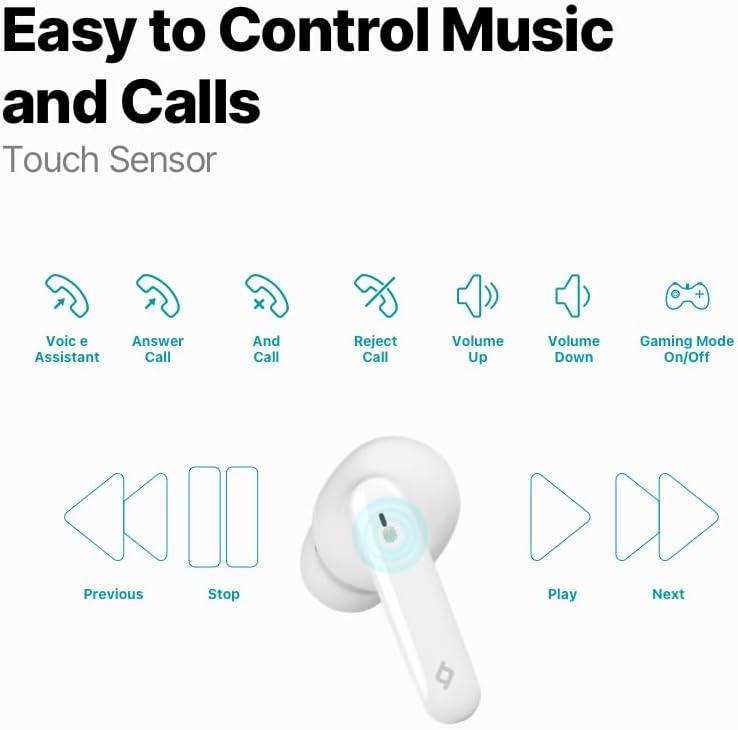
Image: Diagram illustrating the touch control functions for the earbuds, including voice assistant, answer/end/reject call, volume up/down, gaming mode on/off, previous/next track, play/stop.
| فعل | وظيفة |
|---|---|
| نقرة واحدة (يسار/يمين) | تشغيل/إيقاف الموسيقى مؤقتًا، الرد على المكالمة/إنهائها |
| انقر مرتين (يسارًا) | المسار السابق |
| انقر مرتين (يمينًا) | المسار التالي |
| الحنفية الثلاثية (يسار) | خفض الصوت |
| الحنفية الثلاثية (يمين) | رفع الصوت |
| الضغط لفترة طويلة (2 ثوان) | رفض المكالمة، تفعيل المساعد الصوتي |
| Quadruple Tap (Left/Right) | تشغيل/إيقاف وضع الألعاب |
تجربة موسيقية
Enjoy superior sound and deep bass for an impressive music experience.

Image: The ttec AirBeat Snap earbuds floating above their open charging case, with sound waves emanating, illustrating superior sound and deep bass.
وضع الألعاب (زمن استجابة منخفض 60 مللي ثانية)
Activate Gaming Mode for an outstanding gaming and video experience with ultra-low latency of 60ms, ensuring synchronized audio and visuals.

Image: The ttec AirBeat Snap earbuds positioned next to a smartphone displaying a mobile game, emphasizing the 60ms low latency feature for an enhanced gaming experience.
عمر البطارية والشحن
The earbuds provide up to 5 hours of battery life on a single charge. The ultra-compact USB-C charging case extends the total usage time up to 28 hours.
Charge&Go Feature: A quick 15-minute charge provides approximately 1.5 hours of usage.
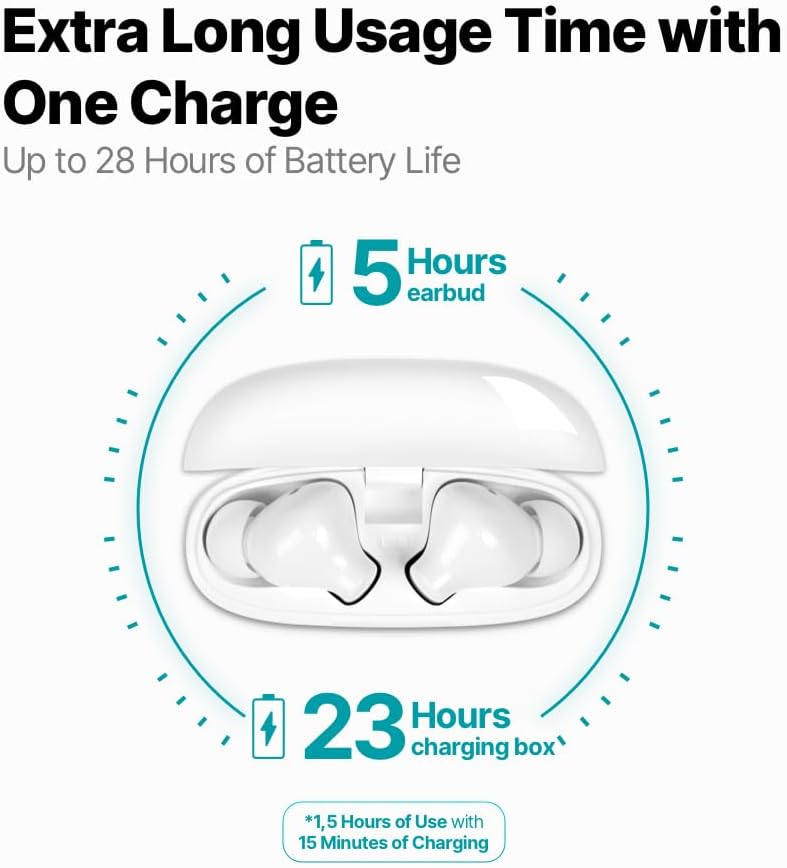
Image: An infographic showing the ttec AirBeat Snap earbuds in their charging case, indicating 5 hours of battery life for the earbuds and an additional 23 hours from the charging case, totaling 28 hours. It also highlights the Charge&Go feature.
صيانة
تنظيف
- قم بتنظيف سماعات الأذن وعلبة الشحن بانتظام باستخدام قطعة قماش ناعمة وجافة وخالية من الوبر.
- لا تستخدم المنظفات الكاشطة أو الكحول أو المذيبات الكيميائية.
- قم بإزالة أي شمع أذن أو حطام من أطراف سماعات الأذن وشبكة مكبر الصوت بلطف باستخدام فرشاة ناعمة صغيرة أو قطعة قطن.
- Ensure charging contacts on both earbuds and the case are clean and free of dust.
تخزين
- عندما لا تكون قيد الاستخدام، قم دائمًا بتخزين سماعات الأذن في علبة الشحن الخاصة بها لحمايتها والحفاظ عليها مشحونة.
- قم بتخزين الجهاز في مكان بارد وجاف، بعيدًا عن أشعة الشمس المباشرة ودرجات الحرارة القصوى.
Water and Sweat Resistance (IPX6 Rated)
The ttec AirBeat Snap earbuds are IPX6 rated, meaning they are resistant to strong jets of water and sweat. This makes them suitable for workouts and outdoor activities.
- لا تغمر سماعات الأذن في الماء.
- Do not expose the charging case to water, as it is not water-resistant.
- After exposure to sweat or water, wipe the earbuds dry before placing them back into the charging case to prevent damage to the charging contacts.

Image: A person wearing the ttec AirBeat Snap earbuds, demonstrating their sweat and water-resistant design with an IPX6 rating, suitable for active use.
استكشاف الأخطاء وإصلاحها
| مشكلة | السبب المحتمل / الحل |
|---|---|
| سماعات الأذن غير مقترنة بالجهاز. |
|
| تعمل سماعة أذن واحدة فقط. |
|
| مستوى الصوت منخفض أو جودة الصوت رديئة. |
|
| سماعات الأذن لا يتم شحنها. |
|
| الضوابط التي تعمل باللمس لا تستجيب. |
|
تحديد
| ميزة | التفاصيل |
|---|---|
| اسم الموديل | AirBeat Snap |
| رقم موديل المنتج | 2KM147 |
| ماركة | TTEC |
| تكنولوجيا الاتصال | لاسلكي (بلوتوث 5.3) |
| عمر بطارية سماعة الأذن | تصل إلى 5 ساعة |
| عمر بطارية علبة الشحن | Up to 23 hours (total 28 hours with earbuds) |
| وقت الشحن | حوالي 1.5 ساعة (للشحن الكامل) |
| Charge&Go Feature | 15 min charge for 1.5 hours use |
| وزن ياربود | 3.5 جرام (كل واحد) |
| وزن علبة الشحن | 30 جرام |
| Earbud Dimensions (L x W x H) | 32 × 21 × 2.3 ملم |
| أبعاد علبة الشحن (الطول × العرض × الارتفاع) | 57 × 23 × 44 ملم |
| مسافة التشغيل | حتى 10 أمتار |
| مستوى مقاومة الماء | IPX6 (سماعات الأذن فقط) |
| وضع الألعاب منخفض الكمون | 60 مللي ثانية |
| الميزات الرئيسية | Touch Control, Lightweight, Microphone Included, Volume Control, Sweat Resistant, MonoSmart Technology |
| الأجهزة المتوافقة | Mobile Phone, Laptop, Desktop Computer, Tablet |
| لون | أبيض |
| ASIN | B0CQ7YZPFG |
الضمان والدعم
For warranty information and customer support, please refer to the official TTEC webالموقع أو تواصل مع التاجر المحلي. احتفظ بإيصال الشراء للمطالبة بالضمان.
ملاحظة هامة: As per health and hygiene regulations, products that come into direct contact with the human body, such as earphones, can only be returned if their packaging has not been opened, the product has not been tried, damaged, or used.


