1. المقدمة
Thank you for choosing the CrossBeats Spark Bluetooth In-Earbuds. This manual provides essential information for setting up, operating, maintaining, and troubleshooting your new wireless earphones. Please read it carefully to ensure optimal performance and longevity of your device.

Image 1.1: CrossBeats Spark In-Earbuds and Charging Case.
2. محتويات العبوة
تأكد من وجود جميع العناصر في الحزمة الخاصة بك:
- CrossBeats Spark In-Earbuds (Left and Right)
- حافظة الشحن
- كابل شحن USB من النوع C (غير مدرج صراحةً ولكنه قياسي)
- وسائد الأذن (أحجام مختلفة)
- بطاقة الضمان
- دليل المستخدم (هذا المستند)
3. انتهى المنتجview
The CrossBeats Spark In-Earbuds feature a compact design with advanced audio technology. Each earbud is equipped with a 13mm dynamic driver for clear sound and quad microphones for enhanced call quality with Environmental Noise Cancellation (ENC).
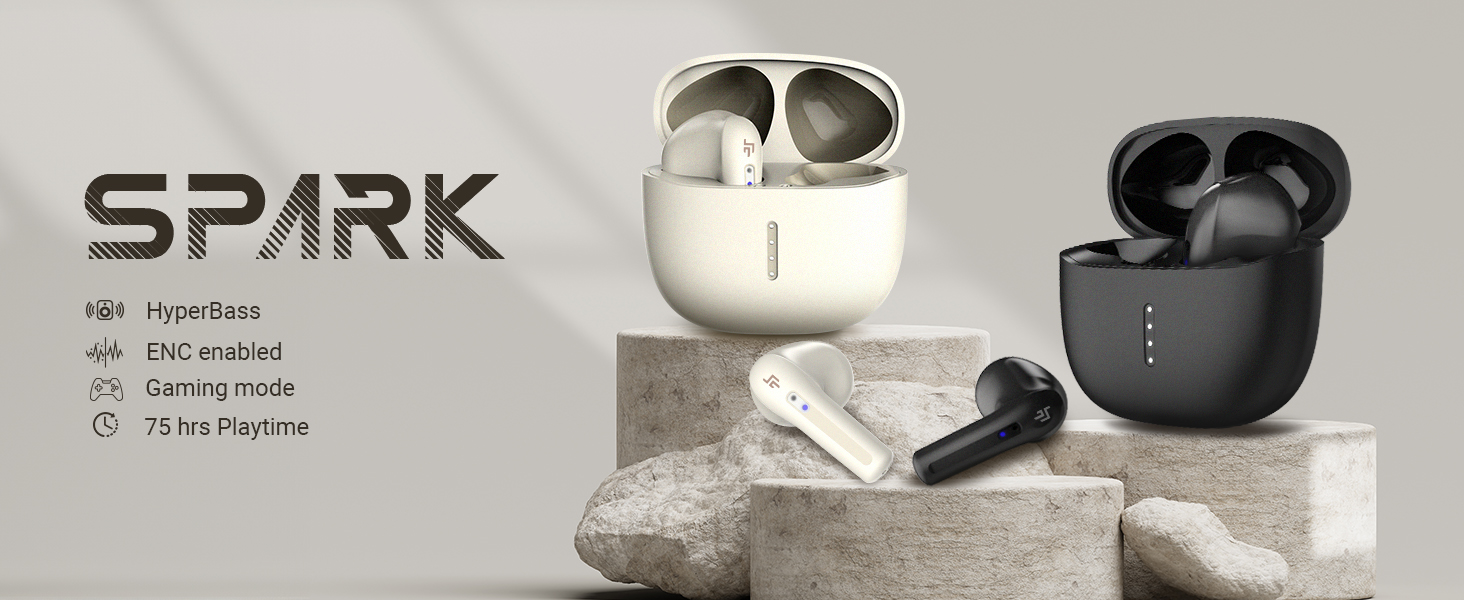
Image 3.1: Key features of CrossBeats Spark In-Earbuds.
The charging case provides additional battery life and protects the earbuds when not in use. LED indicators on the case show charging status.
4. الإعداد
4.1. شحن سماعات الأذن والعلبة
- ضع سماعات الأذن في علبة الشحن. تأكد من تثبيتها بشكل صحيح.
- قم بتوصيل كابل الشحن من النوع C USB بمنفذ الشحن الموجود على العلبة وبمصدر طاقة USB متوافق.
- The LED indicators on the case will illuminate to show charging status. A full charge for the case and earbuds takes approximately 50 minutes.
- بمجرد الشحن بالكامل ، افصل كابل الشحن.
4.2. الاقتران بجهاز
The CrossBeats Spark earbuds utilize Hall Switch technology for quick connection.
- الاقتران الأولي: افتح علبة الشحن. ستدخل سماعات الأذن تلقائيًا في وضع الاقتران، ويُشار إلى ذلك بأضواء LED الوامضة على سماعات الأذن.
- على جهازك (الهاتف الذكي، الجهاز اللوحي، الكمبيوتر المحمول)، قم بتمكين البلوتوث.
- بحث عن available Bluetooth devices and select "CrossBeats Spark" from the list.
- Once connected, the earbud LEDs will stop flashing.

Image 4.2: Bluetooth 5.3 Insta Connect for quick pairing.
4.3. ارتداء سماعات الأذن
For optimal sound quality and comfort, choose the correct size of ear cushions and insert the earbuds gently into your ear canal. Adjust them until they feel secure and comfortable.
5. تعليمات التشغيل
The CrossBeats Spark earbuds feature intuitive touch controls.
5.1. أدوات التحكم التي تعمل باللمس
| وظيفة | فعل |
|---|---|
| تشغيل/إيقاف مؤقت | نقرة واحدة على أي من سماعات الأذن |
| المسار التالي | انقر مرتين على سماعة الأذن اليمنى |
| المسار السابق | انقر مرتين على سماعة الأذن اليسرى |
| رفع الصوت | اضغط ثلاث مرات على سماعة الأذن اليمنى |
| خفض الصوت | اضغط ثلاث مرات على سماعة الأذن اليسرى |
| الرد على المكالمة/إنهائها | نقرة واحدة على أي من سماعات الأذن |
| رفض المكالمة | اضغط مع الاستمرار على إحدى سماعات الأذن لمدة ثانيتين |
| تفعيل المساعد الصوتي | اضغط مع الاستمرار على إحدى سماعات الأذن لمدة ثانيتين |
| تبديل وضع الألعاب | Quadruple tap on either earbud (refer to product for exact gesture) |
5.2. إدارة المكالمات
The built-in quad microphones with ENC (Environmental Noise Cancellation) ensure clear communication during calls. Use the touch controls as described above to manage incoming and outgoing calls.
5.3. وضع الألعاب
Activate the low latency gaming mode (40ms) for a synchronized audio-visual experience during gaming. Refer to the touch control table for activation.

Image 5.3: Low latency for gaming.
6. الصيانة
6.1. التنظيف
- قم بتنظيف سماعات الأذن وعلبة الشحن بانتظام باستخدام قطعة قماش ناعمة وجافة وخالية من الوبر.
- قم بإزالة وسادات الأذن ونظفها بشكل منفصل بالماء والصابون الخفيف إذا لزم الأمر، مع التأكد من جفافها تمامًا قبل إعادة تركيبها.
- لا تستخدم مواد كيميائية قاسية أو مواد كاشطة.
6.2. مقاومة الماء
The CrossBeats Spark earbuds are IPX5 rated, meaning they are resistant to splashes and sweat. They are not designed for submersion in water. Avoid exposing them to heavy rain or direct water jets.

Image 6.2: IPX5 water and dust resistance.
6.3. التخزين
عندما لا تكون قيد الاستخدام، قم بتخزين سماعات الأذن في علبة الشحن الخاصة بها لحمايتها من الغبار والتلف والحفاظ على شحنها.
7. استكشاف الأخطاء وإصلاحها
If you encounter issues with your CrossBeats Spark earbuds, try the following solutions:
- سماعات الأذن غير مقترنة:
- تأكد من شحن كلا سماعات الأذن.
- قم بإيقاف تشغيل البلوتوث على جهازك ثم قم بتشغيله مرة أخرى.
- Forget "CrossBeats Spark" from your device's Bluetooth list and attempt to pair again.
- أعد وضع سماعات الأذن في العلبة، وأغلق الغطاء، وانتظر بضع ثوانٍ، ثم افتحه لإعادة بدء وضع الاقتران.
- لا يوجد صوت من سماعة أذن واحدة:
- تأكد من شحن كلتا السماعتين وتوصيلهما.
- Try resetting the earbuds (refer to the product's specific reset procedure if available, usually involves holding touch sensors for a duration while in the case).
- قضايا الشحن:
- افحص كابل الشحن ومحول الطاقة بحثًا عن أي تلف.
- تأكد من أن نقاط اتصال الشحن الموجودة على سماعات الأذن وداخل العلبة نظيفة وخالية من الحطام.
- ضعف جودة المكالمة:
- تأكد من عدم وجود عوائق أمام الميكروفونات.
- اقترب من جهازك المتصل لتجنب تداخل الإشارة.
8. المواصفات
| ميزة | التفاصيل |
|---|---|
| اسم الموديل | شرارة |
| تكنولوجيا الاتصال | لاسلكي (بلوتوث 5.3) |
| نوع برنامج تشغيل الصوت | محرك ديناميكي 13 مم |
| التحكم في الضوضاء | Passive Noise Cancellation, ENC (Environmental Noise Cancellation) for calls |
| تنسيق الميكروفون | Built-In Quad Microphones |
| زمن انتقال منخفض | 40 مللي ثانية |
| عمر البطارية | ما يصل إلى 42 ساعة (مع علبة الشحن) |
| وقت الشحن | حوالي 50 دقيقة |
| واجهة الشحن | النوع-C |
| مستوى مقاومة الماء | IPX5 (مقاوم للماء) |
| نوع التحكم | التحكم باللمس، التحكم في مستوى الصوت |
| المميزات الخاصة | ENC, Fast Charging, Hall Switch Mode |
| وزن العنصر | 10 جرام |
| أبعاد المنتج | 5 × 2 × 2 سم |
9. الضمان والدعم
Your CrossBeats Spark In-Earbuds come with a warranty. Please refer to the included Warranty Card for detailed terms and conditions, including the warranty period and coverage.
For technical support, troubleshooting assistance beyond this manual, or warranty claims, please contact CrossBeats customer service through their official webالموقع الإلكتروني أو معلومات الاتصال الموجودة على بطاقة الضمان الخاصة بك.


