1. المقدمة
This manual provides detailed instructions for the setup, operation, and maintenance of your FREEWOLF RK-K8 Wireless Mechanical Gaming Keyboard. The RK-K8 features a 96% layout with 100 keys, triple-mode connectivity (Type-C wired, 2.4GHz wireless, Bluetooth 5.0), hot-swappable switches, gasket-mounted design, and customizable rainbow backlighting. It is designed for compatibility with Windows and Mac operating systems.

Image 1.1: The FREEWOLF RK-K8 keyboard shown with its included accessories, including a coiled cable, USB receiver, keycap puller, switch puller, and extra switches.
2. محتويات العبوة
تأكد من وجود جميع العناصر في الحزمة الخاصة بك:
- 1x FREEWOLF RK-K8 Mechanical Keyboard
- 1x USB Receiver (2.4GHz)
- 1x Type-C to USB-A Braided Coiled Cable
- 1x Keycap بولير
- 1x تبديل مجتذب
- 2x Original Switches (Linear Red)
- 1 × دليل المستخدم

Image 2.1: Visual representation of the RK-K8 keyboard and its complete set of accessories.
3. الإعداد
The RK-K8 keyboard supports three connection modes: wired, 2.4GHz wireless, and Bluetooth 5.0. You can switch between these modes using the toggle switch located on the keyboard.

Image 3.1: The RK-K8 keyboard connected to multiple devices via wired, 2.4GHz, and Bluetooth modes, highlighting the connection switch and USB receiver storage.
3.1 اتصال سلكي
- حدد موقع منفذ Type-C على لوحة المفاتيح.
- Connect the provided Type-C to USB-A coiled cable to the keyboard and your computer's USB-A port.
- Ensure the mode switch on the keyboard is set to "USB" or wired mode.
- سيتم التعرف على لوحة المفاتيح تلقائيًا بواسطة نظامك.
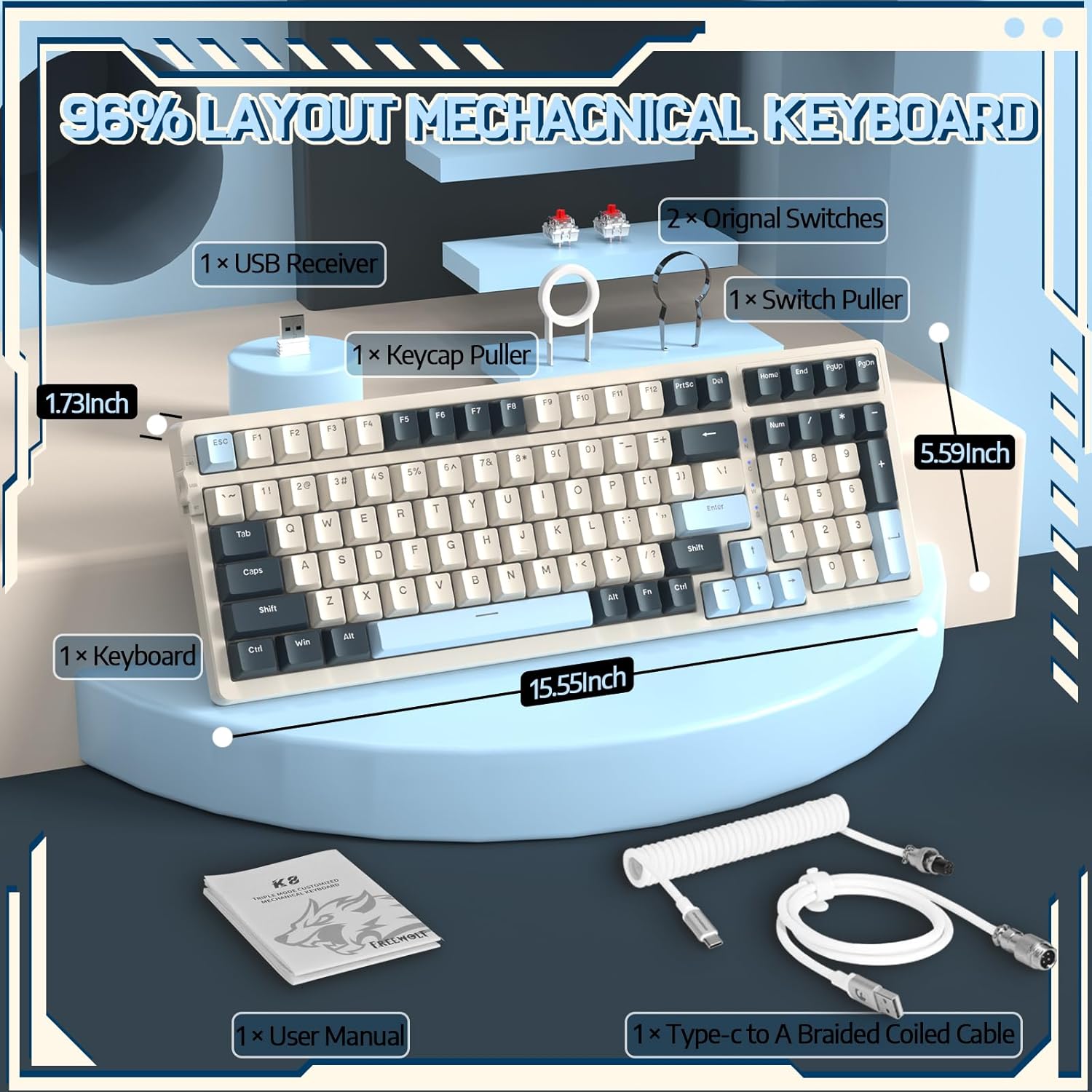
Image 3.2: The braided coiled cable with its Type-C connector for the keyboard and USB-A for the computer, featuring a metal aviation connector.
اتصال لاسلكي 3.2 2.4 جيجاهرتز
- Locate the 2.4GHz USB receiver, typically stored in a slot on the keyboard's side or bottom.
- قم بتوصيل جهاز استقبال USB بمنفذ USB-A متاح على جهاز الكمبيوتر الخاص بك.
- Toggle the mode switch on the keyboard to the "2.4G" position.
- ينبغي أن تتصل لوحة المفاتيح تلقائيًا.
3.3 اتصال بلوتوث 5.0
The RK-K8 supports connecting to up to three Bluetooth devices.
- Toggle the mode switch on the keyboard to the "BT" position.
- اضغط مع الاستمرار الجبهة الوطنية + س, الجبهة الوطنية + دبليو، أو الجبهة الوطنية + إي for 3-5 seconds to enter pairing mode for the desired Bluetooth channel. The indicator light will flash.
- On your device (PC, Mac, PS4, etc.), go to Bluetooth settings and search for "RK-K8" or a similar device name.
- اختر لوحة المفاتيح المُراد إقرانها. سيتوقف مؤشر الضوء عن الوميض بعد التوصيل.
- للتبديل بين أجهزة البلوتوث المقترنة، اضغط على الجبهة الوطنية + س, الجبهة الوطنية + دبليو، أو الجبهة الوطنية + إي باختصار.
4. التشغيل
4.1 Key Functions (FN Combinations)
The RK-K8 utilizes FN key combinations for various functions, including multimedia control, backlight adjustments, and system switching.
| مزيج | وظيفة |
|---|---|
| FN + F1-F12 | Multimedia and system functions (specifics may vary, refer to keycap legends) |
| FN + Q/W/E | Switch between Bluetooth devices (short press) or enter pairing mode (long press) |
| FN + Backlight Key | Cycle through backlight effects |
| FN + مفاتيح الأسهم | Adjust backlight brightness and speed |
| FN + فوز | قفل/فتح مفتاح Windows |
| الجبهة الوطنية + أ | Switch to Mac OS mode |
| الجبهة الوطنية + S. | Switch to Windows OS mode |
4.2 التحكم في الإضاءة الخلفية
The RK-K8 features rainbow backlighting with 18 different effects. You can customize or turn off the backlight.
- تأثير التغيير: يضعط FN + [Backlight Key] للتنقل بين 18 تأثيرات للإضاءة الخلفية.
- ضبط السطوع: يضعط الجبهة الوطنية + سهم لأعلى لزيادة السطوع، الجبهة الوطنية + سهم لأسفل لتقليل السطوع.
- ضبط السرعة: يضعط FN + Left Arrow to decrease effect speed, FN + Right Arrow لزيادة سرعة التأثير.
- تشغيل/إيقاف: يضعط FN + [Backlight Key] (or specific key indicated on keycap) to toggle backlight on/off.

Image 4.1: Two RK-K8 keyboards showcasing various customizable rainbow backlight patterns.
4.3 مفاتيح التبديل السريع
The RK-K8 features a hot-swappable PCB, allowing you to change mechanical switches without soldering. It is compatible with most 3-pin mechanical switches.
- إزالة غطاء المفتاح: استخدم أداة سحب غطاء المفتاح المتوفرة لإزالة غطاء المفتاح المطلوب بلطف.
- إزالة المفتاح: Use the provided switch puller to carefully grip the switch from its top and bottom clips, then pull it straight up.
- تثبيت مفتاح جديد: Align the pins of the new 3-pin mechanical switch with the holes on the PCB. Gently press the switch down until it clicks into place. Ensure pins are not bent.
- إعادة تثبيت Keycap: أعد وضع غطاء المفتاح على ساق المفتاح الجديد.

الصورة 4.2: تفصيلية view of the hot-swappable PCB, showing an empty switch socket and a linear red switch, illustrating the ease of switch replacement.
4.4 إدارة البطارية
The keyboard is equipped with a 4000mAh battery. To charge, connect the keyboard via the Type-C cable to a USB power source. The keyboard features an auto-sleep function after 5 minutes of inactivity to conserve battery.
- عمر البطارية: Approximately 120 hours with backlight, 280 hours without backlight (actual usage may vary).
- مؤشر الشحن: Refer to the keyboard's indicator light for charging status.
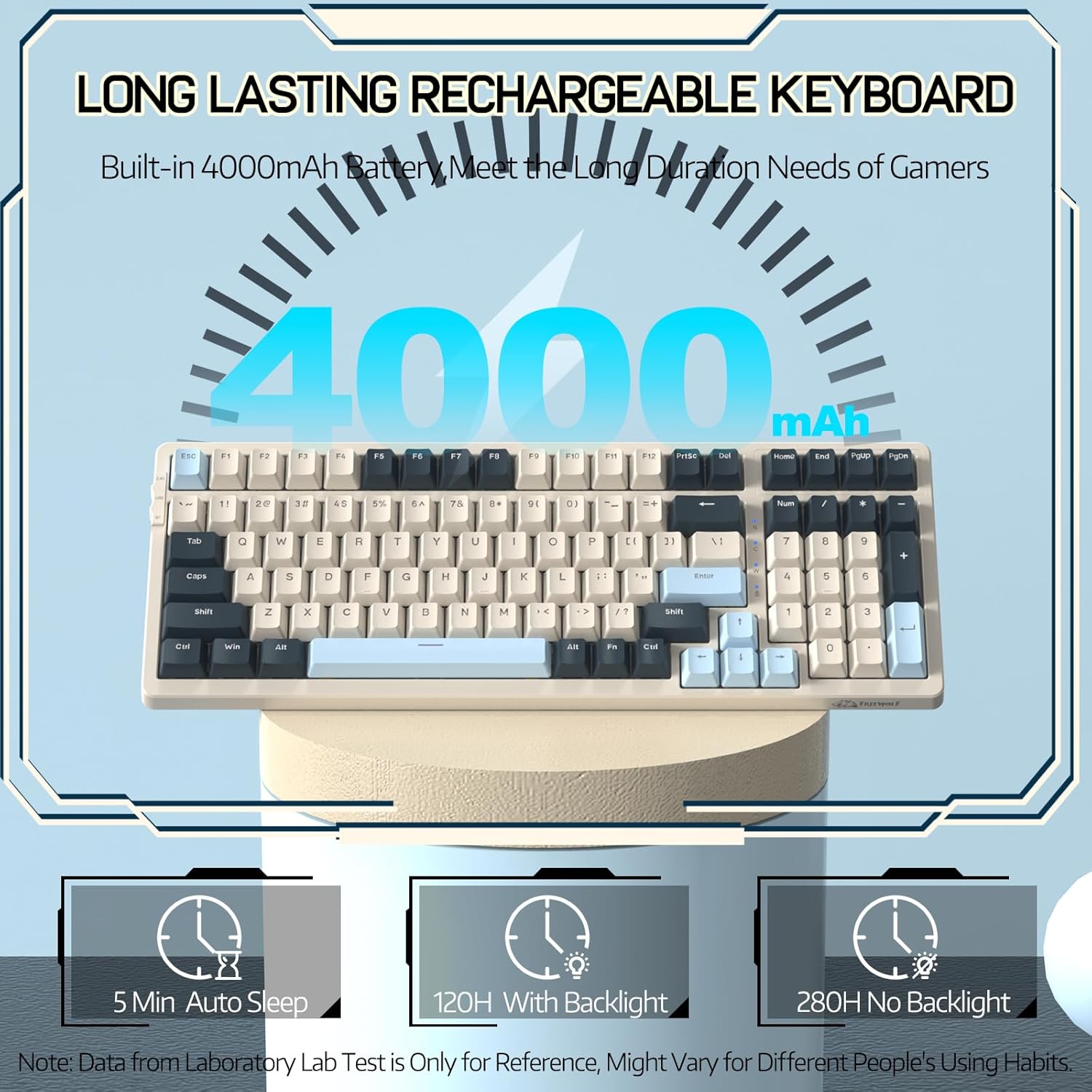
Image 4.3: An illustration highlighting the 4000mAh battery and its estimated duration with and without backlighting, along with the 5-minute auto-sleep feature.
4.5 توافق النظام
The RK-K8 supports dual system switching for Windows and Mac operating systems.
- وضع الويندوز: يضعط الجبهة الوطنية + S..
- وضع ماك: يضعط الجبهة الوطنية + أ.
5. الصيانة
تضمن الصيانة المناسبة طول عمر لوحة المفاتيح لديك وأدائها.
- تنظيف أغطية المفاتيح: Use the keycap puller to remove keycaps. Clean them with a soft cloth and mild soap solution, then dry thoroughly before reattaching.
- تنظيف جسم لوحة المفاتيح: Use a soft, dry cloth to wipe the keyboard surface. For stubborn dirt, a slightly damp يمكن استخدام القماش، مما يضمن عدم دخول الرطوبة إلى المكونات الداخلية.
- تبديل الرعاية: Avoid spilling liquids on the keyboard. If a switch feels inconsistent, it can be hot-swapped as described in Section 4.3.
- تخزين: عند عدم الاستخدام لفترات طويلة، قم بتخزين لوحة المفاتيح في بيئة جافة وخالية من الغبار.

Image 5.1: An exploded diagram illustrating the internal components and gasket mount structure of the RK-K8 keyboard, including ABS keycaps, mechanical switches, soundproofing materials, and the lower cover.
6. استكشاف الأخطاء وإصلاحها
If you encounter issues with your RK-K8 keyboard, refer to the following common solutions:
- لوحة المفاتيح لا تستجيب (سلكية):
- تأكد من توصيل كابل Type-C بشكل آمن بكل من لوحة المفاتيح والكمبيوتر.
- Verify the mode switch is set to wired (USB) mode.
- جرب منفذ USB مختلفًا على جهاز الكمبيوتر الخاص بك.
- اختبر لوحة المفاتيح على جهاز كمبيوتر آخر إن أمكن.
- Keyboard Not Responding (2.4GHz Wireless):
- تأكد من توصيل جهاز استقبال USB بمنفذ USB بشكل آمن.
- Verify the mode switch is set to 2.4G wireless mode.
- تحقق من مستوى شحن بطارية لوحة المفاتيح.
- Move the keyboard closer to the receiver to rule out interference.
- لوحة المفاتيح لا تستجيب (بلوتوث):
- Ensure the mode switch is set to Bluetooth (BT) mode.
- Verify the keyboard is paired to the correct channel (FN+Q/W/E).
- Check your device's Bluetooth settings to ensure the keyboard is connected.
- If previously paired, try unpairing and re-pairing the keyboard.
- تحقق من مستوى شحن بطارية لوحة المفاتيح.
- Keys Repeating or Not Registering:
- This could indicate a faulty switch. Use the switch puller to remove the problematic switch and replace it with one of the spare switches or a new compatible switch.
- Ensure the switch pins are straight and fully inserted into the PCB.
- الإضاءة الخلفية لا تعمل:
- Ensure the backlight is not turned off (FN + Backlight Key).
- Check the brightness level (FN + Up/Down Arrow).
- تأكد من أن لوحة المفاتيح بها شحنة كافية للبطارية.
7. المواصفات
| ميزة | التفاصيل |
|---|---|
| نموذج | RK-K8 |
| الاتصال | Type-C Wired, 2.4GHz Wireless, Bluetooth 5.0 |
| تَخطِيط | 96٪ (100 مفتاحًا) |
| المفاتيح | Hot-swappable 3-pin mechanical (Linear Red Switch included) |
| أسلوب التركيب | مثبتة بالحشية |
| الإضاءة الخلفية | Rainbow Backlit (18 effects) |
| سعة البطارية | 4000 مللي أمبير |
| الأجهزة المتوافقة | PC, Mac, PS4 |
| أبعاد | 15.55 × 5.59 × 1.73 بوصة (تقريبًا) |
| وزن العنصر | 2.23 رطل |
| مادة | Plastic (with metal components in cable) |
8. الضمان والدعم
FREEWOLF products are designed for reliability and performance. For warranty information, technical support, or customer service inquiries, please refer to the contact information provided on the product packaging or the official FREEWOLF webيرجى الاحتفاظ بإثبات الشراء الخاص بك للمطالبة بالضمان.


