مقدمة
Thank you for choosing the Rohnson Genius 16 Dehumidifier. This appliance is designed to efficiently remove excess moisture from your indoor environment, improve air quality, and create a healthier living space. With its advanced features, including Wi-Fi control, a powerful dehumidification capacity of up to 16 liters per day, and an ultra-quiet operation, the Genius 16 is an ideal solution for rooms up to 100 square meters. Please read this manual thoroughly before operating the unit to ensure safe and optimal performance.
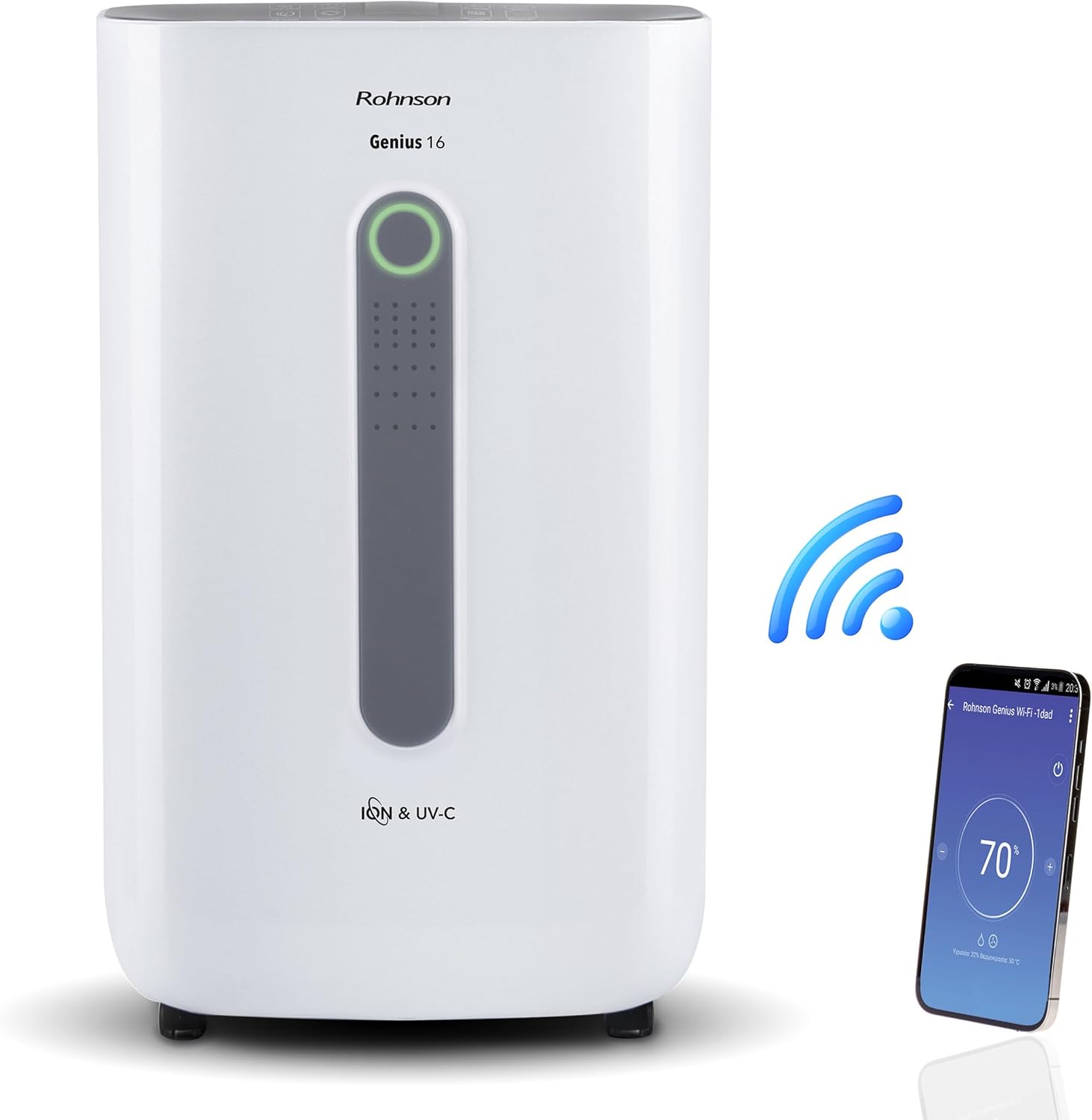
Image: The Rohnson Genius 16 Dehumidifier, a white rectangular unit with a central display, shown alongside a Wi-Fi symbol and a smartphone displaying the control app. This illustrates the unit's smart connectivity.
تعليمات السلامة
اتبع دائمًا احتياطات السلامة الأساسية عند استخدام الأجهزة الكهربائية لتقليل خطر الحريق والصدمة الكهربائية والإصابة.
- تأكد من أن مصدر الطاقة يطابق المجلدtage كما هو موضح على ملصق تصنيف الوحدة.
- لا تقم بتشغيل الوحدة بسلك أو قابس تالف.
- احتفظ بالوحدة بعيدًا عن مصادر الحرارة وأشعة الشمس المباشرة.
- لا تقم بسد مداخل أو منافذ الهواء.
- قم دائمًا بفصل الوحدة قبل التنظيف أو إجراء الصيانة.
- يحفظ بعيدًا عن متناول الأطفال.
المنتج انتهىview
The Rohnson Genius 16 Dehumidifier is equipped with several features to enhance your indoor air quality and comfort.
- إزالة الرطوبة بكفاءة: Removes up to 16 liters of moisture per day, suitable for areas up to 100 m².
- Advanced Air Purification: Features UV-C light and a dual ionizer to eliminate bacteria and odors. An optional HEPA 13 + Activated Carbon filter can remove 99.7% of particles, smoke, chemicals, and allergens.
- عملية فائقة الهدوء: Operates at a low noise level of 36 dB(A) in low fan mode, ideal for bedrooms and living areas.
- التحكم الذكي: Wi-Fi enabled for remote control via the Rohnson App (Android and iOS compatible). Includes a touch control panel, 1-24 hour timer, and automatic restart after power failure.
- تصميم توفير الطاقة: Powerful yet energy-efficient with only 240W power consumption. Features a Turbo-Boost mode for fast clothes drying and automatic shut-off when the water tank is full.
- Digital Humidity Display: A color indicator (Blue, Green, Red) shows current humidity levels for easy monitoring.

Image: The Rohnson Genius 16 Dehumidifier positioned in a living room, illustrating its compact size. Key features are overlaid, including its 16L/day dehumidification capacity, anti-frost system, digital humidity display, smart Wi-Fi control, UV-C light and ionizer, silent 36dB operation, and 6.5L water tank.
يثبت
1. فك التعبئة
Carefully remove the dehumidifier from its packaging. Inspect the unit for any signs of damage. Retain the packaging for future storage or transport.
2. تحديد مستوى
Place the dehumidifier on a firm, level surface in the area where dehumidification is desired. For optimal performance, ensure there is at least 20 cm (8 inches) of space around all sides of the unit to allow for proper airflow. The unit is effective for rooms up to 100 m². For best air circulation, consider placing it centrally within the room.

Image: A diagram illustrating the optimal placement of the dehumidifier in different household areas such as a laundry room, bedroom, living room, office, and basement, emphasizing central positioning for maximum effectiveness in rooms up to 100 m².
3. توصيل الطاقة
Plug the power cord into a grounded electrical outlet. Ensure the outlet meets the electrical requirements of the unit (230 Volts AC).
4. Filter Installation (Optional HEPA 13 + Activated Carbon Filter)
The Rohnson Genius 16 comes with an optional HEPA 13 + Activated Carbon filter for enhanced air purification.
- Locate the filter compartment, typically at the back or side of the unit.
- افتح غطاء الفلتر.
- Insert the HEPA 13 + Activated Carbon filter, ensuring it is correctly oriented.
- أغلق غطاء الفلتر بشكل آمن.
5. Water Drainage Options
توفر الوحدة طريقتين للصرف:
- خزان المياه: The unit has a 6.5-liter water tank. When the tank is full, the unit will automatically shut off and an indicator will light up. Empty the tank and reinsert it to resume operation.
- الصرف المستمر: For continuous operation without needing to empty the tank, connect a drainage hose (not included) to the continuous drainage port on the unit. Route the hose to a suitable drain or larger container.
تعليمات التشغيل
1. لوحة التحكم
The Rohnson Genius 16 features an intuitive touch control panel and a digital display.
- زر الطاقة: يقوم بتشغيل الوحدة أو إيقاف تشغيلها.
- اختيار الوضع: Cycle through different operating modes (e.g., Dehumidification, Turbo-Boost, Night Mode).
- سرعة المروحة: Adjust fan speed (low, medium, high).
- ضبط الرطوبة: Set your desired humidity level. The unit will operate until this level is reached.
- زر المؤقت: Set a timer for automatic shut-off (1-24 hours).
- UV-C/Ionizer Button: Activates or deactivates the UV-C light and dual ionizer.
- عرض رقمي: Shows current humidity, temperature, and selected settings.

Image: A visual representation of the digital humidity control feature, showing the dehumidifier and its color-coded humidity indicators. Blue indicates humidity below 55%, Green for 55-70%, and Red for above 70%, providing an easy visual cue for air moisture levels.
2. التحكم عبر تطبيق Wi-Fi
Control your Rohnson Genius 16 from anywhere using the Rohnson App.
- Download the "Rohnson" app from the App Store (iOS) or Google Play Store (Android).
- تسجيل حساب وتسجيل الدخول.
- Follow the in-app instructions to add your Rohnson Genius 16 dehumidifier. This typically involves putting the unit into pairing mode and connecting it to your home Wi-Fi network.
- Once connected, you can remotely monitor humidity, adjust settings, set schedules (hourly, daily, weekly), and control all functions of the dehumidifier.

Image: A banner illustrating the smart connectivity of the dehumidifier, showing the unit and a smartphone displaying the Rohnson app. This highlights the ability to control the room climate remotely, schedule operations, and monitor humidity via a smartphone, compatible with both Android and iOS.
3. الأوضاع الخاصة
- Turbo-Boost Mode (Laundry Drying): This mode provides a powerful airflow to quickly dry clothes indoors. Position the unit near the laundry for efficient drying.
- الوضع الليلي: يقلل من سرعة المروحة ويخفت أضواء الشاشة لتشغيل هادئ أثناء النوم.

Image: The Rohnson Genius 16 Dehumidifier positioned in a room with a clothes drying rack, illustrating its effectiveness in drying laundry indoors, especially useful during rainy weather or in apartments without balconies.
صيانة
Regular maintenance ensures the longevity and efficient operation of your dehumidifier. Always unplug the unit before cleaning.
1. تنظيف الجزء الخارجي
امسح الجزء الخارجي من الوحدة بقطعة قماش ناعمة دamp لا تستخدم مواد كيميائية قاسية أو مواد كاشطة أو مذيبات، لأنها قد تتلف السطح.
2. Cleaning/Replacing Filters
The air filter should be cleaned regularly (e.g., every two weeks or as needed) to maintain optimal performance. If using the optional HEPA 13 + Activated Carbon filter, refer to its specific replacement schedule.
- قم بإيقاف تشغيل جهاز إزالة الرطوبة وفصله.
- Remove the filter cover and carefully take out the filter(s).
- For washable filters, rinse with lukewarm water and mild detergent. Allow to air dry completely before reinserting.
- For HEPA/Activated Carbon filters, these are typically not washable and should be replaced according to manufacturer recommendations or when visibly dirty.
- Reinsert the clean/new filter(s) and close the cover.
3 تفريغ خزان المياه
When the water tank is full, the unit will stop operating.
- اسحب خزان المياه برفق من الوحدة.
- قم بتفريغ الماء المتجمع بعناية.
- Clean the tank with mild soap and water if necessary, then rinse thoroughly.
- Reinsert the empty tank firmly into the unit until it clicks into place. The unit will resume operation.
استكشاف الأخطاء وإصلاحها
قبل الاتصال بدعم العملاء، يرجى الاطلاع على المشكلات والحلول الشائعة التالية.
| مشكلة | السبب المحتمل | حل |
|---|---|---|
| الوحدة لا تعمل. | لا يوجد طاقة، سلك الطاقة مفكوك، خزان المياه ممتلئ أو غير مدخل بشكل صحيح. | Check power connection. Empty and reinsert water tank securely. |
| No water collected / Low dehumidification. | Room humidity too low, air filter clogged, temperature too low, unit size too small for room. | Check current humidity setting. Clean or replace air filter. Ensure room temperature is above 5°C (41°F). |
| الوحدة صاخبة. | Unit not on a level surface, fan obstruction, dirty filter. | Place unit on a flat, stable surface. Check for obstructions in fan area. Clean filter. |
| مشاكل في الاتصال بشبكة Wi-Fi. | Incorrect Wi-Fi password, unit too far from router, app not updated. | Ensure correct Wi-Fi password. Move unit closer to router. Update Rohnson App. Refer to app's troubleshooting guide. |
تحديد
| ميزة | التفاصيل |
|---|---|
| ماركة | رونسون |
| رقم الموديل | ر-9916 واط |
| قدرة إزالة الرطوبة | ما يصل إلى 16 لترًا في اليوم |
| منطقة الغرفة الموصى بها | تصل إلى 100 متر مربع |
| سعة خزان المياه | 6.5 لتر |
| مستوى الضوضاء | 36 dB(A) (low fan mode) |
| استهلاك الطاقة | 240 واط |
| المجلدtage | 230 فولت (تيار متردد) |
| أبعاد المنتج (الطول × العرض × الارتفاع) | 28 × 38 × 64 سم |
| وزن العنصر | 16 كيلوغرام |
| المميزات الخاصة | Digital Display, Wi-Fi Control, UV-C Light, Dual Ionizer, Optional HEPA 13 Filter, Turbo-Boost Mode, Auto Shut-off, Auto Restart |
| لون | أبيض |
الضمان والدعم
For information regarding warranty coverage and customer support, please refer to the warranty card included with your product or visit the official Rohnson webالموقع. احتفظ بإيصال الشراء كإثبات للشراء.
If you encounter issues not covered in this manual, please contact Rohnson customer service for assistance.


