دليل المستخدم
AXIS M5000-G 5 Megapixel Network Camera
Model: M5000-G | Brand: AXIS
1. المقدمة
This manual provides comprehensive instructions for the installation, operation, and maintenance of the AXIS M5000-G 5 Megapixel Network Camera. Please read this manual thoroughly before using the product to ensure proper functionality and safety.
The AXIS M5000-G is a high-performance network camera designed for surveillance applications, offering 5-megapixel resolution and PTZ capabilities for enhanced monitoring.
2. معلومات السلامة
اتبع احتياطات السلامة التالية لمنع تلف المنتج أو إصابتك:
- Ensure the power source matches the camera's requirements.
- Do not expose the camera to extreme temperatures or humidity.
- تجنب التعرض المباشر لمصادر الضوء القوية، فقد يؤدي ذلك إلى تلف مستشعر الصورة.
- يجب أن يتم إجراء التثبيت بواسطة موظفين مؤهلين وفقًا للقوانين الكهربائية المحلية.
- افصل الطاقة قبل التنظيف أو الصيانة.
3. محتويات العبوة
تأكد من وجود جميع العناصر في العبوة:
- AXIS M5000-G Network Camera Unit
- طقم التثبيت (براغي، مثبتات)
- Installation Guide (Quick Start)
- محول الطاقة (إن وجد)
Note: Specific components may vary based on region or package version.
4. انتهى المنتجview
The AXIS M5000-G is a dome-style network camera designed for discreet and effective surveillance. It features a robust housing suitable for outdoor use and a PTZ (Pan-Tilt-Zoom) mechanism for flexible viewزوايا متعددة.

الشكل 4.1: أمام view of the AXIS M5000-G Network Camera. This image shows the camera's dome shape, with the lens visible through the dark transparent cover. The main body is white.
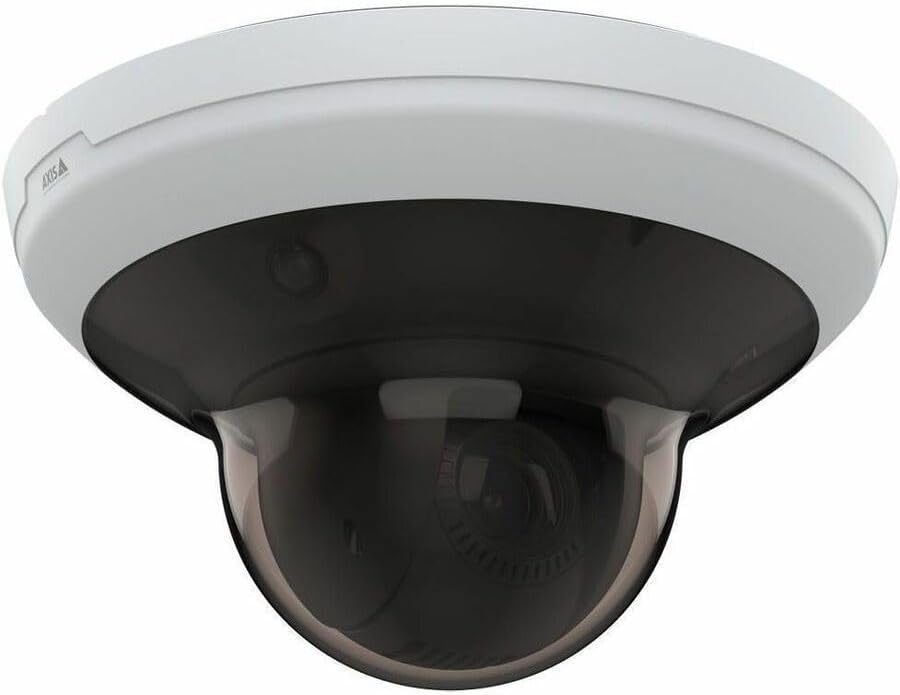
الشكل 4.2: بزاوية view of the AXIS M5000-G Network Camera. This perspective highlights the camera's compact design and the subtle AXIS logo on the side of the white base.

الشكل 4.3: زاوية أخرى view of the AXIS M5000-G Network Camera. Similar to Figure 4.2, this image provides a slightly different angle, emphasizing the smooth contours of the camera's housing.
5. الإعداد والتثبيت
The AXIS M5000-G is designed for wall mount installation and requires a wired connection for network and power.
5.1 تركيب الكاميرا
- اختر الموقع: Select an outdoor location that provides the desired field of view and is within reach of a power source and network connection. Ensure the mounting surface is sturdy enough to support the camera's weight (approximately 5.7 pounds).
- حدد نقاط الحفر: Use the provided mounting template (if applicable) or the camera base to mark the drilling points on the wall.
- ثقوب الحفر: قم بثقب ثقوب توجيهية في النقاط المحددة. أدخل مثبتات الحائط إذا لزم الأمر.
- تأمين القاعدة: Attach the camera's mounting base to the wall using the provided screws.
- Attach Camera Unit: Secure the main camera unit to the mounted base, ensuring it clicks into place or is fastened according to the quick start guide.
5.2 توصيل الطاقة والشبكة
- توصيل الطاقة: Connect the provided power adapter to the camera's power input and then to a suitable electrical outlet. The camera operates on corded electric power.
- إتصال شبكة: Connect an Ethernet cable from your network router or switch to the camera's network port. The camera uses wired connectivity technology.
- التمهيد الأولي: Allow the camera a few minutes to power on and establish a network connection.
6. تشغيل الكاميرا
The AXIS M5000-G camera is controlled primarily through a dedicated application or network video recorder (NVR) software.
6.1 التكوين الأولي
- اكتشف الكاميرا: Use the AXIS IP Utility or your network's device discovery tools to find the camera's IP address on your network.
- وصول Web الواجهة: افتح web استخدم المتصفح وأدخل عنوان IP الخاص بالكاميرا للوصول إليها web واجهة.
- تسجيل الدخول: Enter the default username and password (refer to the quick start guide or manufacturer's documentation for default credentials). Change default credentials immediately for security.
- إعدادات الشبكة: Configure network settings (e.g., static IP, DHCP) as required by your network environment.
- التاريخ والوقت: Set the correct date and time for accurate video timestamps.
6.2 مباشر View والتحكم PTZ
- يعيش View: Access the live video feed through the web interface or a compatible surveillance application. The camera provides 1080p video capture resolution and 5 MP effective still resolution.
- Pan, Tilt, Zoom (PTZ): Utilize the PTZ controls within the application to adjust the camera's viewing angle and zoom level. This feature allows for dynamic monitoring of large areas.
- المواقف المحددة مسبقًا: Configure and save specific PTZ positions for quick navigation to frequently monitored areas.
6.3 اكتشاف الحركة والتنبيهات
- نوع التنبيه عند الحركة فقط: Configure motion detection zones and sensitivity settings within the camera's interface.
- Alert Actions: Set up actions to be triggered upon motion detection, such as recording video, sending email notifications, or uploading images to an FTP server.
7. الصيانة
Regular maintenance ensures optimal performance and longevity of your AXIS M5000-G camera.
- تنظيف العدسة: Gently wipe the camera lens and dome cover with a soft, clean, lint-free cloth. For stubborn dirt, use a mild lens cleaning solution applied to the cloth, not directly to the lens.
- تحديثات البرامج الثابتة: Periodically check the AXIS webموقع لتحديثات البرامج الثابتة. يضمن تحديث البرامج الثابتة الوصول إلى أحدث الميزات والتصحيحات الأمنية.
- فحص الكابلات: Regularly inspect all cables (power and network) for any signs of wear, damage, or corrosion, especially in outdoor installations.
- الفحوصات البيئية: Ensure the camera's environment remains within its specified operating temperature and humidity ranges.
8. استكشاف الأخطاء وإصلاحها
This section addresses common issues you might encounter with the AXIS M5000-G camera.
| مشكلة | السبب المحتمل | حل |
|---|---|---|
| لا يوجد تغذية الفيديو | انقطاع التيار الكهربائي، مشكلة في الشبكة، عنوان IP غير صحيح. | Check power connection. Verify network cable is securely connected. Confirm camera's IP address and network settings. Restart camera. |
| جودة الصورة رديئة | Dirty lens, low light, incorrect resolution settings. | Clean the lens. Ensure adequate lighting. Adjust video resolution settings in the camera's web واجهة. |
| لا تستجيب عناصر التحكم في PTZ | Network latency, software issue, camera malfunction. | Check network connection stability. Restart the camera and the control application. If issue persists, contact support. |
| كشف الحركة لا يعمل | Incorrect sensitivity settings, detection zones not configured. | Review and adjust motion detection sensitivity. Ensure detection zones are properly defined in the camera's settings. |
9. المواصفات
| ميزة | التفاصيل |
|---|---|
| اسم الموديل | M5000-G Network Camera |
| ماركة | محور |
| الاستخدام الداخلي والخارجي | في الهواء الطلق |
| مصدر الطاقة | كهرباء سلكية |
| تكنولوجيا الاتصال | سلكي |
| دقة التقاط الفيديو | 1080 بكسل |
| دقة ثابتة فعالة | 5 ميجا بكسل |
| نوع التركيب | حامل الحائط |
| نوع التنبيه | الحركة فقط |
| أبعاد العنصر (الطول × العرض × الارتفاع) | 11.9 × 12 × 8.4 بوصة |
| وزن العنصر | 5.7 رطل |
| الشركة المصنعة | AXIS COMMUNICATION INC |
10. الضمان والدعم
For warranty information, please refer to the documentation included with your purchase or visit the official AXIS website. AXIS provides support resources, including FAQs, troubleshooting guides, and contact information for technical assistance.
You can typically find more information and support on the AXIS Store on Amazon أو الجهة الرسمية للشركة المصنعة webموقع.


