1. المقدمة
شكرا لك على الشراءasing the Zenwire A10 Mini Portable Projector. This device is designed to provide a versatile and convenient projection experience, allowing you to display content from various sources, including smartphones, tablets, and computers. Please read this manual carefully before using the projector to ensure proper operation and to maximize its lifespan.
2. تعليمات السلامة الهامة
- لا تنظر مباشرة إلى عدسة جهاز العرض عندما يكون الضوءamp هو على.
- تأكد من وجود تهوية مناسبة حول جهاز العرض لمنع ارتفاع درجة حرارته. لا تسد فتحات التهوية.
- استخدم فقط محول الطاقة المرفق مع جهاز العرض.
- أبقِ جهاز العرض بعيدًا عن الماء والرطوبة والمواد القابلة للاشتعال.
- لا تحاول تفكيك جهاز العرض أو إصلاحه بنفسك. اتصل بفنيي الصيانة المؤهلين للحصول على المساعدة.
- ضع جهاز العرض على سطح ثابت ومستوٍ.
- افصل جهاز العرض أثناء العواصف الرعدية أو عند عدم استخدامه لفترات طويلة.
3. محتويات العبوة
يرجى التحقق من محتويات العبوة عند فتحها. في حال وجود أي نقص أو تلف في المنتجات، يرجى الاتصال بالبائع.
- Zenwire A10 Mini Portable Projector
- جهاز التحكم عن بعد
- محول الطاقة
- دليل المستخدم
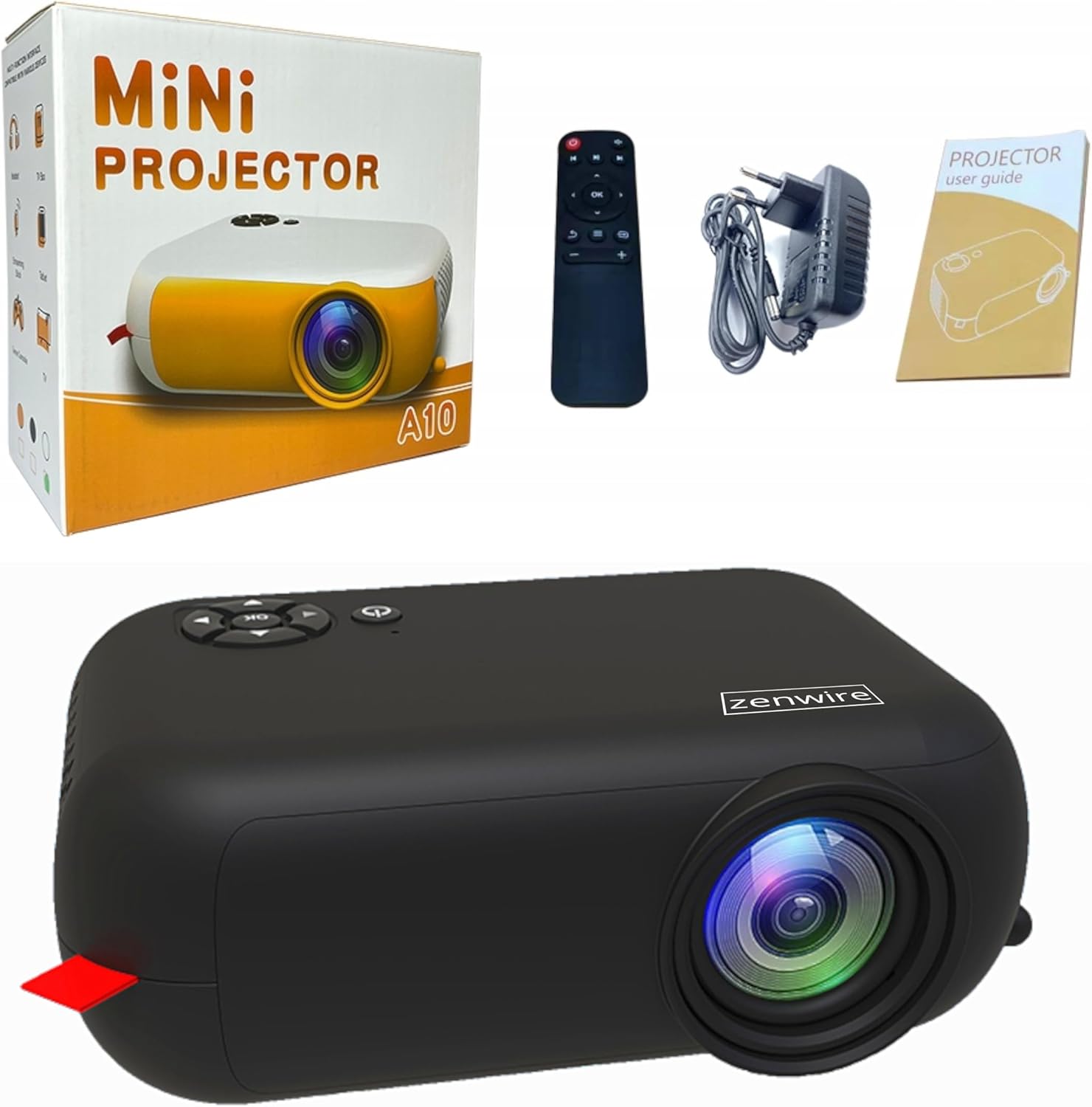
Image: Contents of the Zenwire A10 Mini Projector package, including the projector, remote control, power adapter, and user manual.
4. انتهى المنتجview
4.1 Projector Dimensions and Design
The Zenwire A10 is designed for portability, featuring a compact and lightweight form factor. Its dimensions are approximately 14cm x 10cm x 5.5cm, making it easy to carry and set up in various locations.

Image: The Zenwire A10 Mini Projector held in a hand, illustrating its compact size and portability.
4.2 المنافذ وأدوات التحكم
The projector features a range of input and output ports for versatile connectivity, along with intuitive controls.

Image: Rear panel of the Zenwire A10 Mini Projector, showing the 5V-IN DC power input, IR receiver, USB port, 3.5mm audio jack, HDMI port, and SD card slot.
- 5V-IN DC: مدخل الطاقة لجهاز العرض.
- إير: مستقبل الأشعة تحت الحمراء لجهاز التحكم عن بعد.
- USB: قم بتوصيل أجهزة تخزين USB لتشغيل الوسائط.
- مقبس سماعة الرأس (3.5،XNUMX ملم): قم بتوصيل مكبرات الصوت الخارجية أو سماعات الرأس.
- HDMI: Connect devices such as laptops, gaming consoles, or streaming sticks.
- التنمية المستدامة: قم بإدخال بطاقات Micro SD لتشغيل الوسائط.
- عجلة التركيز: Adjust image sharpness (located on the side).
- لوحة التحكم: Buttons on top for navigation and selection.
5. الإعداد
5.1 توصيل الطاقة
- قم بتوصيل محول الطاقة المرفق بـ 5V-IN DC منفذ على جهاز العرض.
- قم بتوصيل محول الطاقة بمأخذ الحائط.
- اضغط على زر الطاقة الموجود على جهاز العرض أو جهاز التحكم عن بعد لتشغيله.
5.2 Placement and Focus Adjustment
- Place the projector on a stable surface or mount it according to your preference. Ensure the projector lens is facing the projection surface (wall or screen).
- Adjust the distance between the projector and the screen to achieve your desired image size. The projector supports screen sizes up to 100 inches.
- Rotate the focus wheel (typically located near the lens) until the projected image appears clear and sharp.

Image: Diagram illustrating the Zenwire A10 Mini Projector's capability to project various screen sizes, from 13 inches up to 100 inches, depending on the projection distance.
6. تشغيل جهاز العرض
6.1 Wireless Connection (Miracast & Airplay)
The Zenwire A10 supports wireless screen mirroring via 2.4/5GHz WiFi, compatible with Android (Miracast) and iOS (Airplay) devices.
- تأكد من أن جهاز العرض وجهازك المحمول متصلان بنفس شبكة الواي فاي.
- On the projector's main menu, select the 'Screen Mirroring' or 'Wireless Display' option.
- للاندرويد: On your Android phone/tablet, enable 'Wireless Display', 'Screen Mirroring', 'Smart View', or similar function (names may vary by device). Select the projector from the list of available devices.
- للـ iOS: On your iPhone/iPad, open Control Center and tap 'Screen Mirroring'. Select the projector from the list of available devices.
- The content from your mobile device should now be mirrored on the projector screen.
6.2 الاتصالات السلكية
The projector offers multiple wired input options for various devices.

Image: The Zenwire A10 Mini Projector connected to various devices such as smartphones, tablets, laptops, desktop computers, gaming consoles, and media players, highlighting its versatile connectivity.
- HDMI: Connect a laptop, PC, gaming console (e.g., Xbox, PlayStation), or streaming device (e.g., Amazon Fire TV Stick, Google Chromecast) using an HDMI cable. Select the HDMI input source on the projector.
- USB: Insert a USB flash drive or external hard drive into the USB port. The projector's media player will allow you to browse and play supported video, audio, and image files.
- بطاقة مايكرو اس دي: Insert a Micro SD card into the SD card slot. Similar to USB, you can access media files through the projector's interface.
- مخرج الصوت (مقبس 3.5 ملم): Connect external speakers or headphones to enhance the audio experience.
6.3 تصفح القائمة
Use the remote control or the buttons on the projector to navigate through the on-screen menu. Select input sources, adjust picture settings (brightness, contrast, color), sound settings, and other system preferences.
7. الصيانة
- تنظيف العدسات: Use a soft, lint-free cloth specifically designed for optical lenses to gently wipe the projector lens. Avoid using abrasive cleaners or excessive force.
- إزالة الغبار: Regularly clean the projector's exterior with a soft, dry cloth. Use a small brush or compressed air to clear dust from the ventilation openings to ensure proper airflow.
- تخزين: When not in use, store the projector in a cool, dry place, away from direct sunlight and extreme temperatures. Use the original packaging or a protective case to prevent dust accumulation and damage.
8. استكشاف الأخطاء وإصلاحها
If you encounter issues with your Zenwire A10 projector, refer to the following common problems and solutions:
| مشكلة | السبب المحتمل | حل |
|---|---|---|
| لا توجد صورة على الشاشة | Power not connected; Incorrect input source; Device not connected properly. | Check power cable; Select correct input source (HDMI, USB, etc.); Reconnect source device. |
| الصورة ضبابية | لم يتم ضبط التركيز؛ جهاز العرض قريب جدًا/بعيد جدًا عن الشاشة. | Adjust the focus wheel; Adjust projection distance. |
| لا يوجد صوت | مستوى الصوت منخفض جدًا؛ تم كتم الصوت؛ جهاز الصوت الخارجي غير متصل/غير محدد. | Increase volume; Unmute; Check external speaker connection or select internal speaker. |
| مشاكل الاتصال اللاسلكي | Not on same Wi-Fi network; Device not compatible; Interference. | Ensure both devices are on the same Wi-Fi; Verify device compatibility; Try moving closer to Wi-Fi router. |
9. المواصفات
| ميزة | التفاصيل |
|---|---|
| ماركة | زينواير |
| رقم الموديل | أ10 |
| نوع المنتج | Compact and Portable Projector |
| الدقة الأصلية | 480 × 360 بكسل |
| الحد الأقصى لدقة العرض | 1920 × 1080 (دقة عالية كاملة) |
| سطوع | 1800lm / 60 ANSI |
| نسبة التباين | 2000:1 |
| نوع العرض | قاد |
| تكنولوجيا الاتصال | Wi-Fi (2.4/5GHz), HDMI, USB, Micro SD, 3.5mm Audio Jack |
| الميزات اللاسلكية | ميراكاست، إيربلاي |
| الأجهزة المتوافقة | Smartphones (Android, iOS), Tablets, Laptops, PCs, Gaming Consoles |
| الاستخدامات الموصى بها | السينما المنزلية |
| الأبعاد (تقريبًا) | 14سم × 10سم × 5.5سم |
10. الضمان والدعم
The Zenwire A10 Mini Portable Projector comes with a standard manufacturer's warranty. For specific warranty terms and conditions, please refer to the documentation provided at the time of purchase or contact your retailer. For technical support or service inquiries, please reach out to Zenwire customer service through their official webالموقع أو معلومات الاتصال المقدمة مع منتجك.


