1. المقدمة
Thank you for choosing the REOLINK 4K Wi-Fi 6 Security Camera RLC-840WA. This camera is designed to provide advanced surveillance for your outdoor property, featuring 4K Ultra HD resolution, next-gen Wi-Fi 6 connectivity, and robust weather and vandal-proof construction. This manual will guide you through the setup, operation, and maintenance of your new security camera.
2. ماذا يوجد في الصندوق
Upon unpacking your REOLINK RLC-840WA camera, please ensure all the following items are present:
- Camera (RLC-840WA) x1
- محول الطاقة x1
- كابل تمديد كهربائي بطول 4.5 متر عدد 1
- كابل شبكة بطول متر واحد
- دليل البدء السريع x1

3. انتهى المنتجview
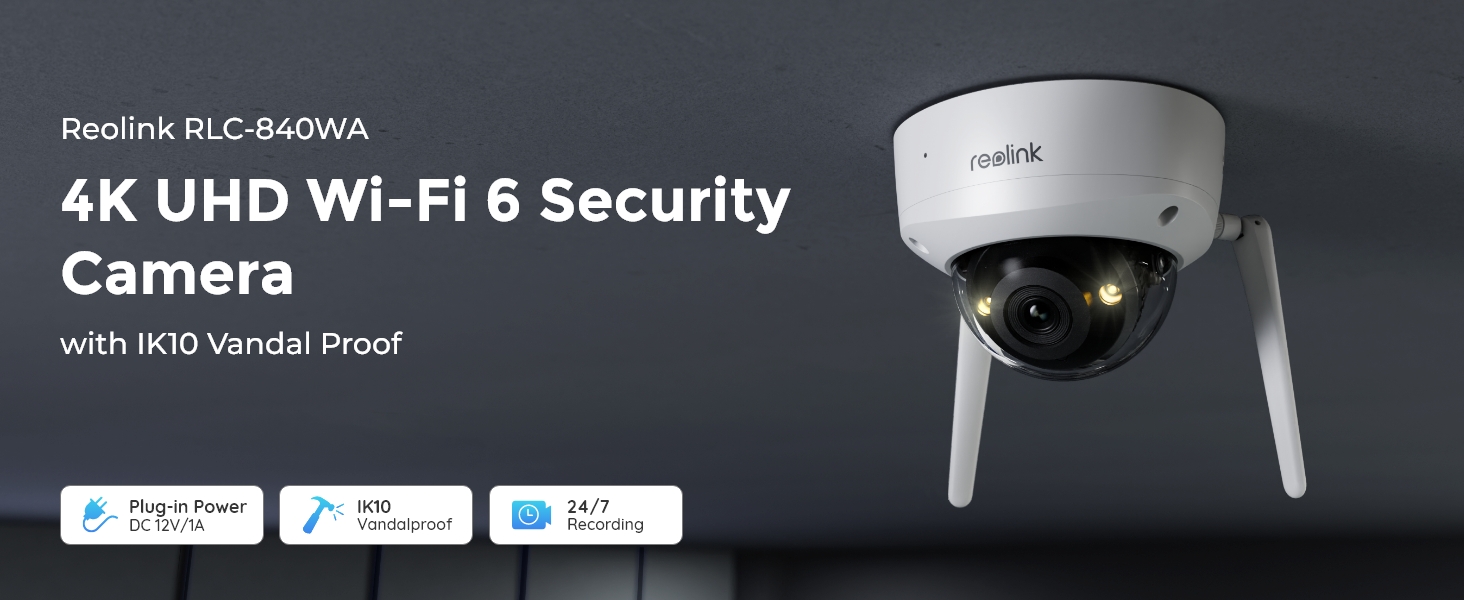
The REOLINK RLC-840WA is a dome-shaped outdoor security camera built with durable metal material. It features a 4K 8MP HD resolution lens, 125-degree viewing angle, and advanced night vision capabilities.

Key hardware features include:
- عدسة: 4K 8MP HD resolution for clear imaging.
- المصابيح IR: Two infrared LEDs for clear night vision up to 100 feet.
- 3000K Warm Spotlight: Provides color night vision and can deter intruders.
- ميكروفون ومكبر صوت مدمجان: يُمكّن الاتصال الصوتي ثنائي الاتجاه.
- حساس لضوء الشمس: يقوم بالتعديل التلقائي بين وضع النهار ووضع الليل.
- منفذ كارت الذاكرة الصغيرة: يدعم ما يصل إلى 512 جيجابايت للتخزين المحلي.
- هوائيات: Dual-band Wi-Fi 6 (2.4/5GHz) for stable and fast connectivity.
- شريحة متزايدة: Designed for wall/ceiling mount with 57° manual adjustment.
4. الإعداد
Follow these steps for initial setup of your REOLINK RLC-840WA camera:
- تشغيل الطاقة: Connect the camera to the DC 12V/1A power adapter.
- الاتصال الأولي بالشبكة: Connect the camera to your router's LAN port using the provided Ethernet cable.
- Network Alignment: Ensure both your camera and the device running the Reolink App (e.g., smartphone) are connected to the same router.
- إعداد التطبيق: Download and open the Reolink App. Follow the on-screen instructions within the app to add and configure your camera.
- افصل كابل الإيثرنت: After successful Wi-Fi setup, you may disconnect the Ethernet cable.
- التركيب: Securely mount the camera using the provided wall/ceiling mount. Adjust the camera's angle using the swivel bracket inside the camera body to achieve the desired 125° viewزاوية جي.
5. تعليمات التشغيل
5.1 مراقبة الفيديو
The RLC-840WA provides crystal-clear 4K Ultra HD video with a wide 125° viewing angle, allowing you to monitor large areas effectively. Access the live view through the Reolink App or Reolink Client software.
5.2 أوضاع الرؤية الليلية
The camera offers two night vision options:
- رؤية ليلية ملونة: Enabled by 3000K warm spotlights, this mode captures vivid, full-color images even in low-light conditions. Spotlight brightness can be adjusted via the app.
- الرؤية الليلية بالأشعة تحت الحمراء: When spotlights are off, infrared LEDs provide clear black-and-white images up to 100 feet for discreet monitoring.


5.3 الكشف الذكي
The camera utilizes advanced smart detection technology to accurately identify persons, vehicles, and animals, significantly reducing false alarms from irrelevant movements. You will receive timely push notifications or emails upon detection.

5.4 الصوت ثنائي الاتجاه
With the built-in microphone and speaker, you can engage in two-way conversations with visitors or deter unwanted guests directly through the Reolink App.

5.5 التسجيل والتخزين
The RLC-840WA supports multiple recording and storage options:
- بطاقة MicroSD: Insert a MicroSD card (up to 512GB, not included) for secure local 24/7 continuous or motion-triggered recording.
- جهاز تسجيل الفيديو الشبكي Reolink: Compatible with Reolink Wi-Fi NVR and PoE NVR systems for centralized recording.
- خادم بروتوكول نقل الملفات: Configure the camera to upload recordings to an FTP server.

5.6 ميزات التطبيق
The Reolink App provides comprehensive control and monitoring features:
- يعيش View: يمكنك الوصول إلى بث الفيديو المباشر من كاميرتك.
- التشغيل: Review تم تسجيل فوtage stored on your MicroSD card or NVR.
- إشعارات: Customize push notifications and email alerts for smart detection events.
- إعدادات: Adjust various camera settings, including night vision modes, detection sensitivity, and recording schedules.

6. الصيانة
The REOLINK RLC-840WA is designed for durability and minimal maintenance:
- مقاومة للطقس: With an IP67 rating, the camera is waterproof and built to withstand various weather conditions.
- Vandal-Proof: The IK10 vandal-proof rating, metal base, and glass shield enhance its durability against physical impact.
- تنظيف: Periodically clean the camera lens with a soft, dry cloth to ensure optimal image clarity.
7. استكشاف الأخطاء وإصلاحها
Here are some common questions and solutions:
- Q: Can this camera be panned or tilted?
A: No, this camera does not support pan or tilt functions. However, you can adjust its angle using the swivel bracket inside the camera body before installation. - Q: How do I set up Wi-Fi Cameras via the Reolink App?
A: (1) Power on the camera using the DC adapter and connect it to your router's LAN port using an Ethernet cable. (2) Ensure both your camera and phone are connected to the same router. (3) Follow the setup steps for your camera. (4) After setup, disconnect the Ethernet cable. - Q: Can I connect this camera to a Reolink NVR?
A: Yes, this Wi-Fi camera is compatible with both Reolink Wi-Fi NVR and PoE NVR systems.
8. المواصفات
| اسم الموديل | RLC-840WA |
| دقة التقاط الفيديو | 8 MP (4K Ultra HD) |
| Viewزاوية جي | 125 درجة |
| تكنولوجيا الاتصالات اللاسلكية | واي فاي 6 + واي فاي بتردد 2.4/5 جيجاهرتز |
| نطاق الرؤية الليلية | 100 أقدام |
| تقنية الإضاءة المنخفضة | Night Color (3000K warm lights) |
| تصنيف الحماية الدولية | IP67 (ماء) |
| مقاومة التخريب | اي كيه10 |
| مادة | معدن |
| مصدر الطاقة | كهرباء سلكية (تيار مستمر 12 فولت/1 أمبير) |
| الحد الأقصى لحجم ذاكرة الفلاش المدعومة | 512 جيجا بايت |
| نوع التنبيه | كشف الأشخاص/المركبات/الحيوانات/الحركة |
9. الضمان والدعم
REOLINK products undergo strict quality testing and come with a ضمان محدود لمدة سنة واحدة on all new REOLINK branded products. If you encounter any quality issues or require technical assistance, please do not hesitate to contact REOLINK support for prompt resolution.


