مقدمة
Thank you for choosing the R-MUSIC KARADUO Complete Karaoke Pack. This manual provides detailed instructions for the safe and efficient use of your new karaoke system, which includes a portable RGB speaker and two wireless microphones. Please read this manual thoroughly before operation and retain it for future reference.
محتويات الحزمة
تأكد من أن جميع العناصر موجودة وفي حالة جيدة عند فك العبوة:
- 1 x R-MUSIC KARADUO Portable RGB Speaker
- 2 × ميكروفون لاسلكي
- كابل شحن 1 x USB-C
- 1 × دليل المستخدم (هذه الوثيقة)

Image: The R-MUSIC KARADUO portable RGB speaker and two wireless microphones, as included in the package.
المنتج انتهىview
مكونات مكبر الصوت وأدوات التحكم

الصورة: أعلى view of the R-MUSIC KARADUO speaker, showing the control buttons.
- LED Animation Button: Press to cycle through 5 different LED light animations.
- زر رفع الصوت / زر الأغنية التالية: اضغط ضغطة قصيرة لزيادة مستوى الصوت. اضغط ضغطة طويلة للانتقال إلى الأغنية التالية.
- ON / OFF / Pause / Play Button: Long press to power the speaker on or off. Short press to play or pause music.
- خفض مستوى الصوت / زر الأغنية السابقة: اضغط ضغطة قصيرة لخفض مستوى الصوت. اضغط ضغطة طويلة للانتقال إلى الأغنية السابقة.
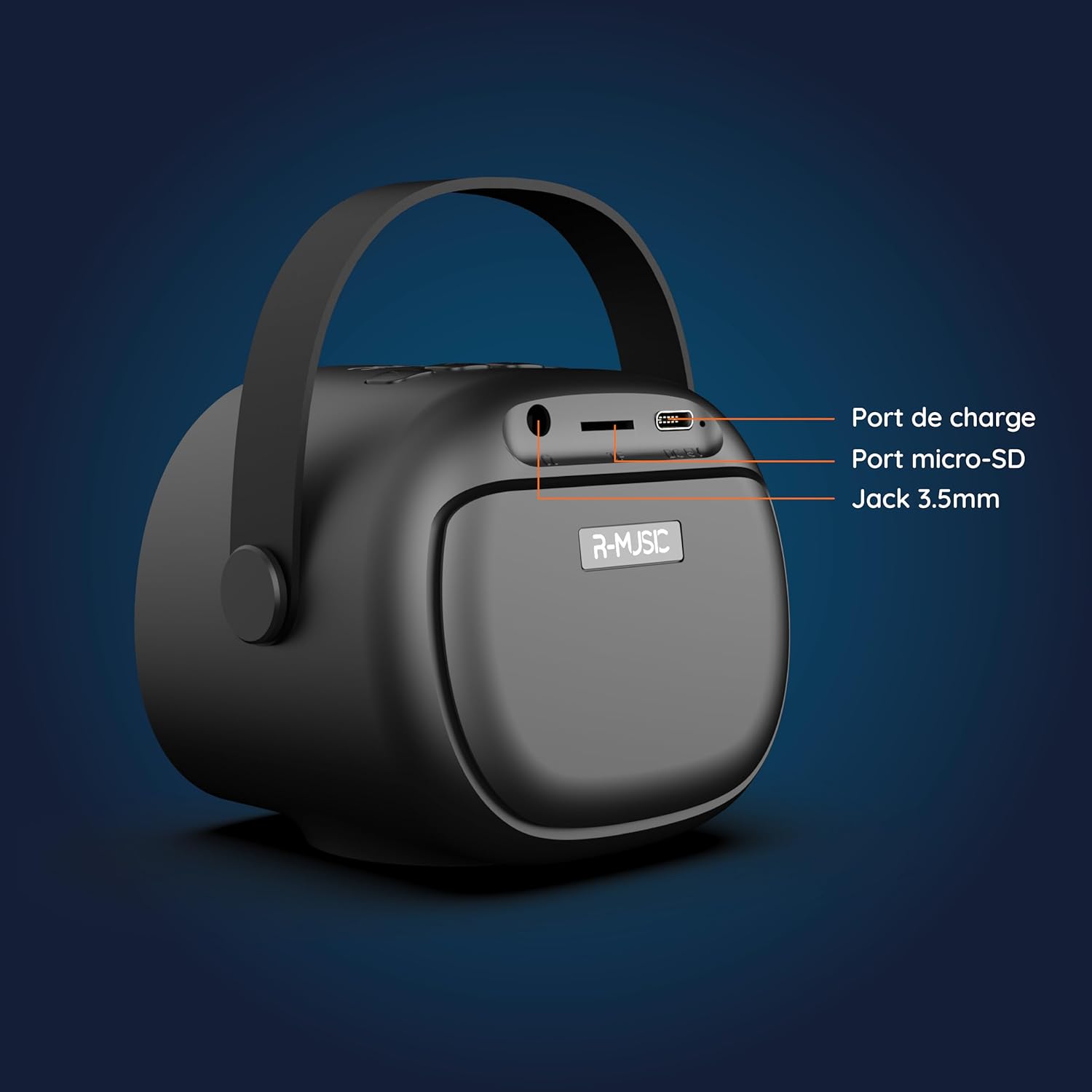
الصورة: الخلف view of the R-MUSIC KARADUO speaker, highlighting the charging port, Micro-SD card slot, and 3.5mm Jack port.
- منفذ الشحن (USB-C): Connect the provided USB-C cable for charging.
- فتحة بطاقة Micro-SD: Insert a Micro-SD card for direct music playback.
- منفذ AUX مقاس 3.5 مم: قم بتوصيل أجهزة الصوت الخارجية باستخدام كابل صوت 3.5 ملم (غير مرفق).
ضوابط الميكروفون

Image: Close-up of the R-MUSIC wireless microphones, illustrating the power, volume, and mode buttons.
- زر الطاقة: Long press to power the microphone on or off.
- الصوت + الزر: زيادة حجم صوت الميكروفون.
- زر التحكم في الصوت: خفض مستوى صوت الميكروفون.
- زر الوضع (M): Short press to cycle through 5 voice deformation effects and 3 karaoke modes.
يثبت
1. Charging the Speaker and Microphones
Before first use, fully charge the speaker and both microphones.
- المتحدث: Connect the provided USB-C charging cable to the speaker's charging port and a compatible USB power adapter (not included). The charging indicator will show the charging status.
- الميكروفونات: Each microphone has its own charging port (usually Micro-USB, check the microphone itself). Connect them to a USB power source using appropriate cables (not included, or check if included with microphones).
A full charge provides approximately 14 hours of speaker playback without LED lights, or 7 hours with LED lights activated.
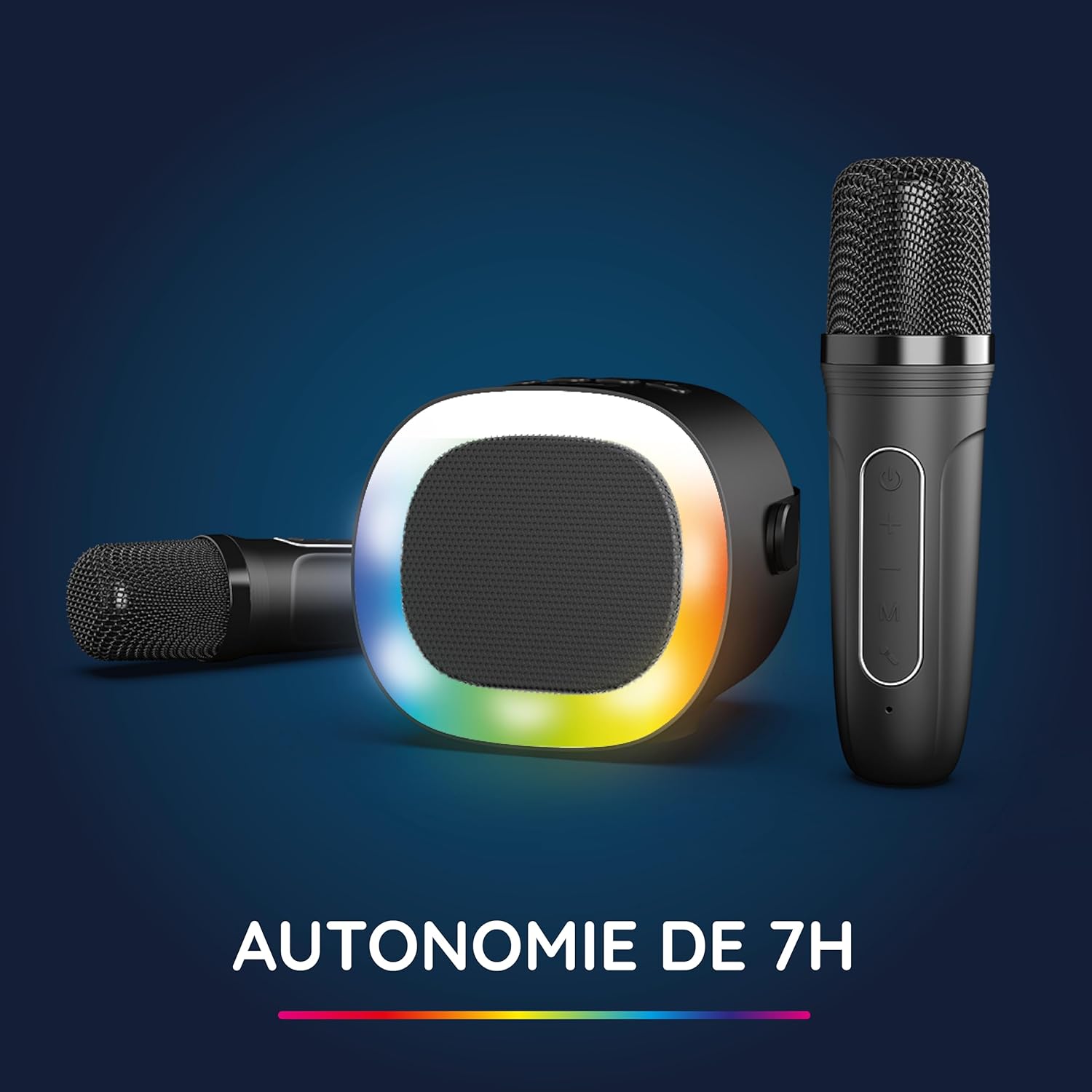
Image: The R-MUSIC speaker and microphones, illustrating the battery life with LED lights active.
2. Powering On and Pairing Microphones
- تشغيل مكبر الصوت: Long press the ON/OFF button on the speaker until it powers on.
- تشغيل الميكروفونات: Long press the Power button on each microphone until they power on.
- The microphones should automatically pair with the speaker. If not, ensure they are within close proximity and try powering them off and on again.
تعليمات التشغيل
1. الاتصال بمصادر الصوت
The KARADUO speaker offers multiple connectivity options:
- بلوتوث شنومكس:
- تأكد من تشغيل مكبر الصوت.
- Activate Bluetooth on your smartphone, tablet, PC, or other compatible device.
- بحث عن "KARADUO" in your device's Bluetooth settings and select it to pair. A confirmation sound will indicate a successful connection.
- The Bluetooth 5.0 technology ensures optimal sound quality and a stable connection up to 10 meters.
- مدخلات AUX:
- Connect a 3.5mm audio cable (not included) from your audio device's headphone jack to the speaker's 3.5mm AUX port.
- سيتم تحويل مكبر الصوت تلقائيًا إلى وضع AUX.
- Micro-SD Card Playback:
- Insert a Micro-SD card containing MP3 audio files into the Micro-SD card slot on the back of the speaker.
- سيكتشف مكبر الصوت البطاقة تلقائيًا ويبدأ تشغيل الموسيقى.
2. Speaker Operation
- تشغيل/إيقاف مؤقت: Short press the ON/OFF/Pause/Play button.
- ضبط مستوى الصوت: Short press the Volume + or Volume - buttons.
- المسار التالي / السابق: Long press the Volume + (next) or Volume - (previous) buttons.
- أوضاع إضاءة LED: Press the LED Animation button to cycle through 5 different LED light animations.

Image: The R-MUSIC speaker showcasing its dynamic LED light animations.
3. تشغيل الميكروفون
- حجم صوت الميكروفون: Use the Volume + and Volume - buttons on the microphone to adjust your vocal volume.
- Voice Deformation Effects: Short press the 'M' (Mode) button on the microphone to cycle through 5 different voice deformation effects.
- أوضاع الكاريوكي: Continue pressing the 'M' button to cycle through 3 distinct karaoke modes.
صيانة
To ensure the longevity and optimal performance of your R-MUSIC KARADUO system, follow these maintenance guidelines:
- تنظيف: Use a soft, dry cloth to clean the speaker and microphones. Do not use abrasive cleaners, solvents, or harsh chemicals.
- تخزين: قم بتخزين الجهاز في مكان بارد وجاف بعيدًا عن أشعة الشمس المباشرة ودرجات الحرارة القصوى عندما لا يكون قيد الاستخدام.
- التعرض للماء: هذا المنتج غير مقاوم للماء. تجنب تعريضه للماء أو الرطوبة الزائدة.
- الشحن: Only use the provided charging cable and a compatible USB power adapter. Do not overcharge the device.
استكشاف الأخطاء وإصلاحها
If you encounter issues with your KARADUO system, please refer to the following common problems and solutions:
| مشكلة | السبب المحتمل | حل |
|---|---|---|
| لا يوجد طاقة | انخفاض مستوى البطارية أو أن الجهاز مطفأ. | Charge the speaker/microphones. Long press the power button to turn on. |
| لا يوجد صوت من السماعة | مستوى الصوت منخفض جدًا، أو وضع الإدخال غير صحيح، أو الجهاز غير متصل. | Increase speaker volume. Ensure correct input (Bluetooth, AUX, Micro-SD). Reconnect Bluetooth or check AUX cable. |
| الميكروفونات لا تعمل | Microphones off, low battery, or not paired. | Ensure microphones are charged and powered on. They should automatically pair with the speaker. If not, power cycle them. |
| فصل بلوتوث | Device out of range, interference, or low battery. | Move the connected device closer to the speaker (within 10m). Ensure no major obstacles. Recharge the speaker. |
If the problem persists after trying these solutions, please contact R-MUSIC customer support.
تحديد
| ميزة | التفاصيل |
|---|---|
| ماركة | موسيقى R-MUSIC |
| رقم الموديل | 484437 رينغيت ماليزي |
| لون | أسود |
| تكنولوجيا الاتصال | بلوتوث 5.0 |
| منافذ التوصيل | 3.5mm Jack, USB Type-C (charging), Micro-SD Card Slot |
| المميزات الخاصة | 2 Wireless Microphones, Universal Connectivity, 5 Voice Deformation Effects, LED Lights |
| الأجهزة المتوافقة | PC, Smartphone, Tablet, TV (via AUX) |
| مصدر الطاقة | تعمل بالبطارية |
| Speaker Battery Life | Up to 14 hours (without LED), 7 hours (with LED) |
| مدى البلوتوث | حتى 10 أمتار |

Image: Technical dimensions of the R-MUSIC KARADUO speaker, showing its height, width, and depth.
الضمان والدعم
Information regarding specific warranty terms and conditions for the R-MUSIC KARADUO Complete Karaoke Pack is not available in this document. Please refer to the product packaging or the retailer's webموقع للحصول على تفاصيل الضمان.
For technical support or further assistance, please contact R-MUSIC customer service through their official webالموقع أو معلومات الاتصال المقدمة مع عملية الشراء.


