1. المقدمة
This manual provides essential information for the safe and efficient operation of your Ulefone Armor Pad 2 Rugged Tablet. Please read this manual thoroughly before using the device to ensure proper functionality and to prevent damage. Keep this manual for future reference.
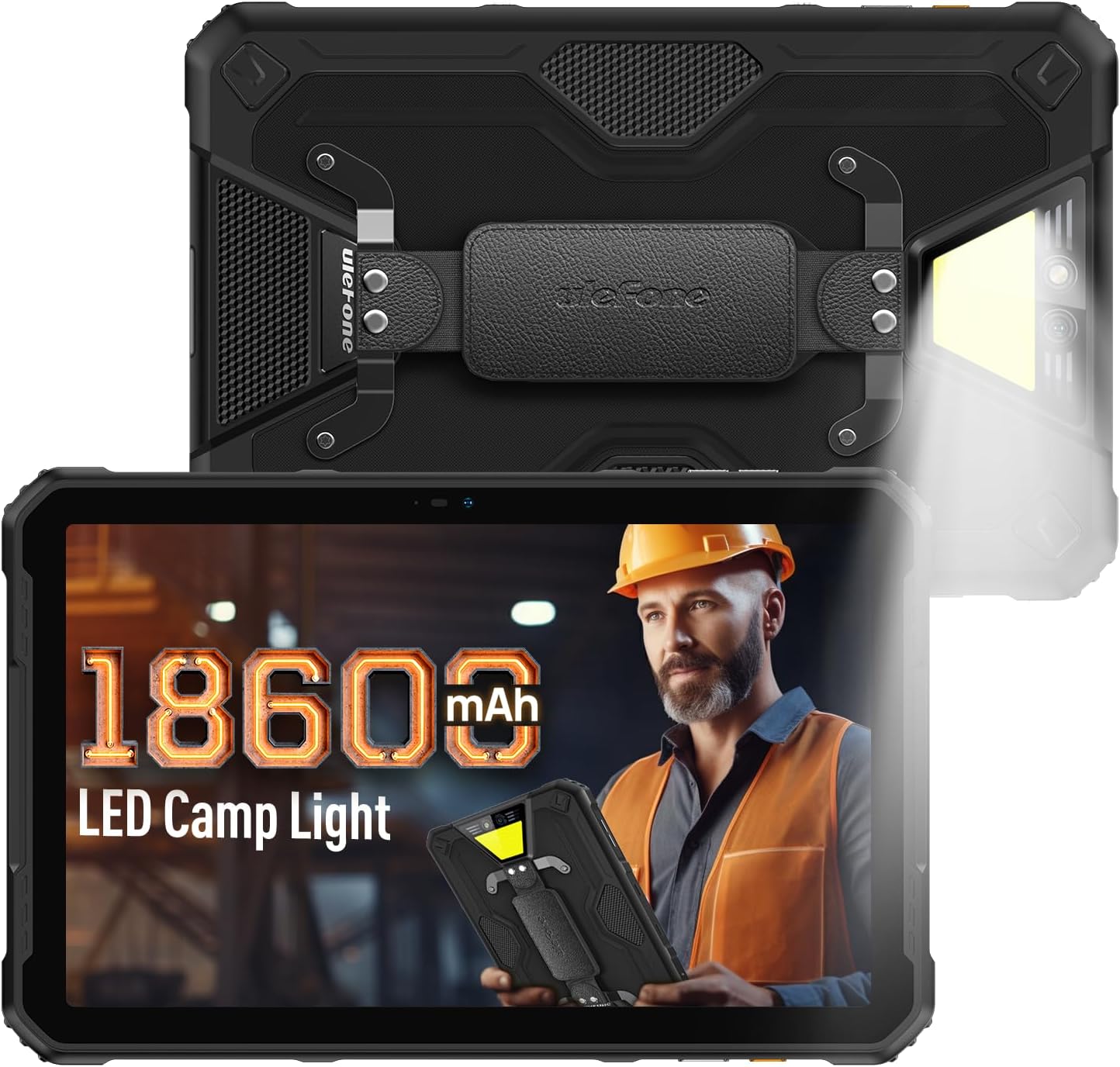
Figure 1: Ulefone Armor Pad 2 Rugged Tablet. This image displays the tablet from both front and back angles, highlighting its robust design and integrated campجي الضوء.
2. محتويات العبوة
تأكد من وجود جميع العناصر في العبوة:
- 1 x Ulefone Armor Pad 2 Tablet
- 1 x AC Power Charger
- 1 x USB Type-C 2.0 Charging Cable
- 1 × حزام اليد
- 1 × مفك براغي
- 8 x Screws (for hand strap attachment)
- 1 x Protective Film (Pre-installed)
- 1 x SIM Needle
- 1 × دليل المستخدم (هذه الوثيقة)
Video 1: Armor Pad 2 Unboxing Video. This video demonstrates the unboxing process and shows all included accessories.
3. تخطيط الجهاز
Familiarize yourself with the physical components and ports of your Armor Pad 2 tablet.

الشكل 2: انتهىview of Ulefone Armor Pad 2 features. This image highlights various components such as the camera, camping light, uSmart connector, and buttons.
- الكاميرا الأمامية: 16MP for video calls and selfies.
- عرض: 11-inch 2K display with Corning Gorilla Glass 5.
- زر الطاقة: Located on the side, typically integrated with the fingerprint sensor.
- أزرار التحكم في الصوت: اضبط مستويات الصوت.
- مفتاح مخصص: Programmable button for quick access to functions (e.g., PTT, flashlight).
- منفذ USB من النوع C: للشحن ونقل البيانات.
- مقبس صوت 3.5 ملم: لسماعات الرأس.
- فتحة بطاقة SIM/TF: Supports dual Nano SIM cards and one TF card.
- الكاميرا الخلفية: كاميرا رئيسية بدقة 48 ميجابكسل.
- Campضوء الإنارة: 750 lumens LED light with multiple modes.
- uSmart Expansion Connector: For connecting compatible external accessories.
- مكبرات صوت ستيريو مزدوجة: Front-facing for clear and balanced audio.
4. الإعداد
4.1 التشغيل المبدئي
- Press and hold the Power Button (usually on the side) until the Ulefone logo appears.
- اتبع الإرشادات التي تظهر على الشاشة لإكمال الإعداد الأولي، بما في ذلك تحديد اللغة، واتصال Wi-Fi، وإعداد حساب Google.
4.2 تركيب بطاقة SIM/TF
- حدد مكان فتحة بطاقة SIM/TF على جانب الجهاز اللوحي.
- Use the provided SIM needle to gently eject the card tray.
- Place your Nano SIM cards and/or TF card into the tray according to the diagram on the tray. Ensure correct orientation.
- Carefully reinsert the card tray into the slot until it clicks into place.
4.3 شحن الجهاز اللوحي
- Connect the USB Type-C cable to the tablet's charging port.
- Connect the other end of the cable to the AC Power Charger.
- Plug the AC Power Charger into a wall outlet.
- سيظهر مؤشر الشحن على الشاشة حالة الشحن.
- For optimal charging, use the provided Ulefone charger and cable.

Figure 3: Battery and Charging Features. This image illustrates the tablet's large 18600mAh battery capacity, 33W fast charging capability, and support for reverse charging.
5. التشغيل الأساسي
5.1 تشغيل/إيقاف التشغيل
- تشغيل الطاقة: Press and hold the Power Button until the device vibrates and the screen lights up.
- إيقاف التشغيل: Press and hold the Power Button for a few seconds, then select "Power off" from the options on the screen.
- إعادة تشغيل: Press and hold the Power Button for a few seconds, then select "Restart" from the options.
5.2 إيماءات شاشة اللمس
Navigate your tablet using standard Android gestures:
- مقبض: Select an item or activate a function.
- اضغط مع الاستمرار: Access contextual menus or drag items.
- انتقاد: قم بالتمرير عبر الشاشات أو القوائم أو المحتوى.
- التكبير والتصغير: تكبير أو تصغير الصور و web الصفحات.
5.3 Custom Key Functions
The custom key on the side of the tablet can be programmed for various shortcuts:
- Access settings to assign single-click, double-click, and long-press actions.
- Common assignments include Push-to-Talk (PTT), flashlight, or quick camera launch.
5.4 وضع القفازات
Activate Glove Mode in settings to enable touchscreen responsiveness while wearing gloves, ideal for outdoor or industrial environments.
6. الميزات الرئيسية
6.1 تصميم متين
The Armor Pad 2 is built to withstand harsh conditions:
- IP68/IP69K Rated: Certified for water and dust resistance.
- معتمد وفقًا لمعيار MIL-STD-810H: Meets military standards for durability against drops, shocks, and extreme temperatures.
- زجاج كورنينج غوريلا 5: Enhanced scratch and drop resistance for the display.

Figure 4: Ruggedness features. This image demonstrates the tablet's water, dust, and drop resistance, highlighting its IP68/IP69K and MIL-STD-810H certifications.
6.2 العرض
Experience clear visuals on the 11-inch 2K display:
- مقاس: 11 بوصة.
- دقة: 2K (2000x1200 pixels).
- سطوع: 500 nits for visibility in various lighting conditions.

Figure 5: 11-inch 2K Display. This image showcases the vibrant display protected by Corning Gorilla Glass 5.
أداء 6.3
The tablet is powered by a MediaTek Helio G99 processor, ensuring smooth operation:
- المعالج: MediaTek Helio G99 (8-core, 2.2GHz, 6nm).
- كبش: Up to 16GB (8GB physical + 8GB virtual).
- التخزين الداخلي: 256 جيجابايت.
- مساحة تخزين قابلة للتوسعة: Up to 2TB via TF card.
- نظام التشغيل: أندرويد 13.

Figure 6: Performance specifications. This image details the MediaTek Helio G99 chipset, RAM, and ROM capabilities of the tablet.
6.4 كاميرات
التقط اللحظات باستخدام الكاميرات المدمجة:
- الكاميرا الخلفية: 48 ميجابكسل.
- الكاميرا الأمامية: 16 ميجابكسل.

Figure 7: Camera capabilities. This image shows examples of photos taken with the 48MP rear and 16MP front cameras.
6.5 الاتصال
Stay connected with a range of communication options:
- خلوي: 4G Dual SIM Dual Standby (Note: Not compatible with AT&T, Cricket).
- واي فاي: Wi-Fi 6 for faster wireless connections.
- بلوتوث: بلوتوث 5.2.
- ملاحة: GPS + GLONASS + Galileo + BeiDou.
- NFC: للدفع بدون تلامس وتبادل البيانات.
6.6 صوت
Enjoy immersive sound with:
- Stereo Dual Speakers: Front-facing for clear and balanced audio.
- مقبس صوت 3.5 ملم: لسماعات الرأس السلكية.
6.7 درجة مئويةampالضوء
The integrated 750 lumens LED camping light provides versatile illumination:
- سطوع: 750 lumens, 383 lighting beads, 5.5 watts.
- الأوضاع: 3 lighting modes (e.g., Lighting, Sharp Light, SOS).
- مستويات السطوع: 3 adjustable levels.
- Activated via a physical button for quick access.

Figure 8: 750LM Camping Light. This image shows the tablet's powerful integrated LED light in use during a campسيناريو ing.
6.8 uSmart Expansion Connector
Ulefone's exclusive uSmart Expansion offers fast and stable connections to professional tools with plug-and-play convenience. Compatible expansion devices (e.g., endoscope, 1000x microscope) require additional purchases.
Video 2: Ulefone Armor Pad 2 Rugged Tablet Overview. This video demonstrates various features including the uSmart Expansion Connector.
7. الصيانة
- تنظيف: استخدمي قطعة قماش ناعمةamp cloth to clean the tablet. Avoid harsh chemicals or abrasive materials. Ensure all port covers are securely closed before cleaning with liquids.
- Water/Dust Protection: Always ensure all port covers (USB, audio jack, SIM slot) are firmly sealed to maintain IP68/IP69K water and dust resistance.
- العناية بالبطارية: Avoid exposing the tablet to extreme temperatures. For long-term storage, charge the battery to approximately 50-70%.
- حماية شاشة: The tablet comes with a pre-installed protective film. For additional protection, consider using a tempered glass screen protector.
8. استكشاف الأخطاء وإصلاحها
| مشكلة | السبب المحتمل | حل |
|---|---|---|
| الجهاز اللوحي لا يعمل. | Low battery or system crash. | Charge the tablet for at least 30 minutes. If still unresponsive, press and hold the Power Button for 10-15 seconds to force restart. |
| شاشة اللمس لا تستجيب. | Software glitch or screen damage. | Restart the tablet. If the issue persists, perform a factory reset (backup data first). If physical damage is suspected, contact support. |
| لا يمكن الاتصال بشبكة Wi-Fi. | Incorrect password, router issue, or tablet Wi-Fi module issue. | Verify Wi-Fi password. Restart router and tablet. Try connecting to other Wi-Fi networks. |
| جودة المكالمة رديئة أو عدم وجود إشارة. | Weak network signal, incorrect SIM installation, or carrier issue. | Move to an area with better signal. Reinstall SIM card. Contact your mobile carrier for network status. |
| Tablet is slow or freezes. | كثرة التطبيقات قيد التشغيل، أو انخفاض مساحة التخزين، أو البرامج القديمة. | Close unnecessary apps. Clear cache. Free up storage. Check for system updates. |
9. المواصفات
| ميزة | التفاصيل |
|---|---|
| نموذج | Ulefone Armor Pad 2 |
| أبعاد | 10.94 × 7 × 0.55 بوصة |
| وزن | 2.24 رطل |
| نظام التشغيل | أندرويد 13 |
| المعالج | MediaTek Helio G99 (8-core, 2.2GHz) |
| كبش | تصل إلى 16 جيجابايت (8 جيجابايت فعلي + 8 جيجابايت افتراضي) |
| التخزين الداخلي | 256 جيجا بايت |
| تخزين قابل للتوسيع | تصل سعتها إلى 2 تيرابايت (بطاقة TF) |
| عرض | 11-inch 2K (1280 x 800 pixels, 500 nits, Corning Gorilla Glass 5) |
| الكاميرا الخلفية | 48 ميجا بكسل |
| الكاميرا الأمامية | 16 ميجا بكسل |
| سعة البطارية | 18600 مللي أمبير |
| الشحن | 33W Fast Charging, Reverse Charging (OTG) |
| متانة | حاصل على شهادة IP68/IP69K، وشهادة MIL-STD-810H |
| الاتصال | 4G Dual SIM, Wi-Fi 6, Bluetooth 5.2, NFC |
| ملاحة | GPS ، GLONASS ، Galileo ، BeiDou |
| المميزات الخاصة | 750LM جamping Light, uSmart Expansion Connector, Custom Key, PTT, Digital Toolbox, Fingerprint Sensor, Glove Mode, Stereo Dual Speakers |
10. الضمان والدعم
Ulefone products come with a standard manufacturer's warranty. For detailed warranty information, technical support, or service inquiries, please visit the official Ulefone webالموقع أو تواصل مع خدمة العملاء مباشرةً. احتفظ بإيصال الشراء كإثبات للشراء في حال وجود أي مطالبات بالضمان.
Official Ulefone Webموقع: www.ulefone.com


