مقدمة
This manual provides detailed instructions for the setup, operation, and maintenance of your Zenwire USB-C Hub 10-in-1 Adapter. Please read this manual thoroughly before using the device to ensure optimal performance and longevity.

Image: The Zenwire USB-C Hub, a compact gray device, is shown connected to various cables and accessories, including HDMI, USB, Ethernet, and SD cards, illustrating its multi-functionality.
المنتج انتهىview
The Zenwire USB-C Hub is a versatile 10-in-1 adapter designed to expand the connectivity of your USB-C enabled devices. It features a durable aluminum alloy shell for efficient heat dissipation.
Key Features and Ports:
- منفذ HDMI 2.1: Supports resolutions up to 8K@30Hz or 4K@120Hz, with backward compatibility for lower resolutions.
- منفذ العرض 1.4: Supports resolutions up to 8K@30Hz or 4K@120Hz, with backward compatibility for lower resolutions.
- USB-C Power Delivery (PD) 100W Port: Allows fast charging of your host device while using the hub, providing up to 100W power.
- منفذان USB 3.0: Offers data transfer speeds up to 5 Gbps, 10 times faster than USB 2.0.
- قارئ بطاقة SD: Supports SD cards up to 2TB.
- قارئ بطاقات MicroSD: Supports MicroSD cards up to 2TB.
- RJ-45 Gigabit Ethernet Port: Provides a stable wired internet connection with speeds up to 1000 Mbps.
- مقبس صوت 3.5 ملم: For connecting headphones, microphones, or external speakers.
- USB-C 3.1 / Thunderbolt 3.0 Host Connection: Connects the hub to your laptop or compatible device.

الصورة: تفصيلية view of the Zenwire USB-C Hub, highlighting its 10 ports including 3.5mm audio, Type-C PD100W, DP1.6, HDMI2.1, Gigabit Ethernet, USB3.0 5Gbps, SD, and MicroSD slots.

Image: A close-up of the Zenwire USB-C Hub, emphasizing its aluminum alloy shell designed for effective heat dissipation, ensuring the device remains cool during operation.
يثبت
- الاتصال بجهاز المضيف: Plug the integrated USB-C cable of the Zenwire Hub into a compatible USB-C or Thunderbolt 3.0/4.0 port on your laptop, tablet, or smartphone. The hub is Plug & Play and typically requires no driver installation.
- توصيل الطاقة (اختياري): If your host device requires charging or if you are connecting power-intensive peripherals, connect your original USB-C power adapter to the USB-C PD 100W port on the hub.
- توصيل الأجهزة الطرفية: Connect your desired devices (monitors, USB drives, Ethernet cable, SD/MicroSD cards, audio devices) to the corresponding ports on the hub.
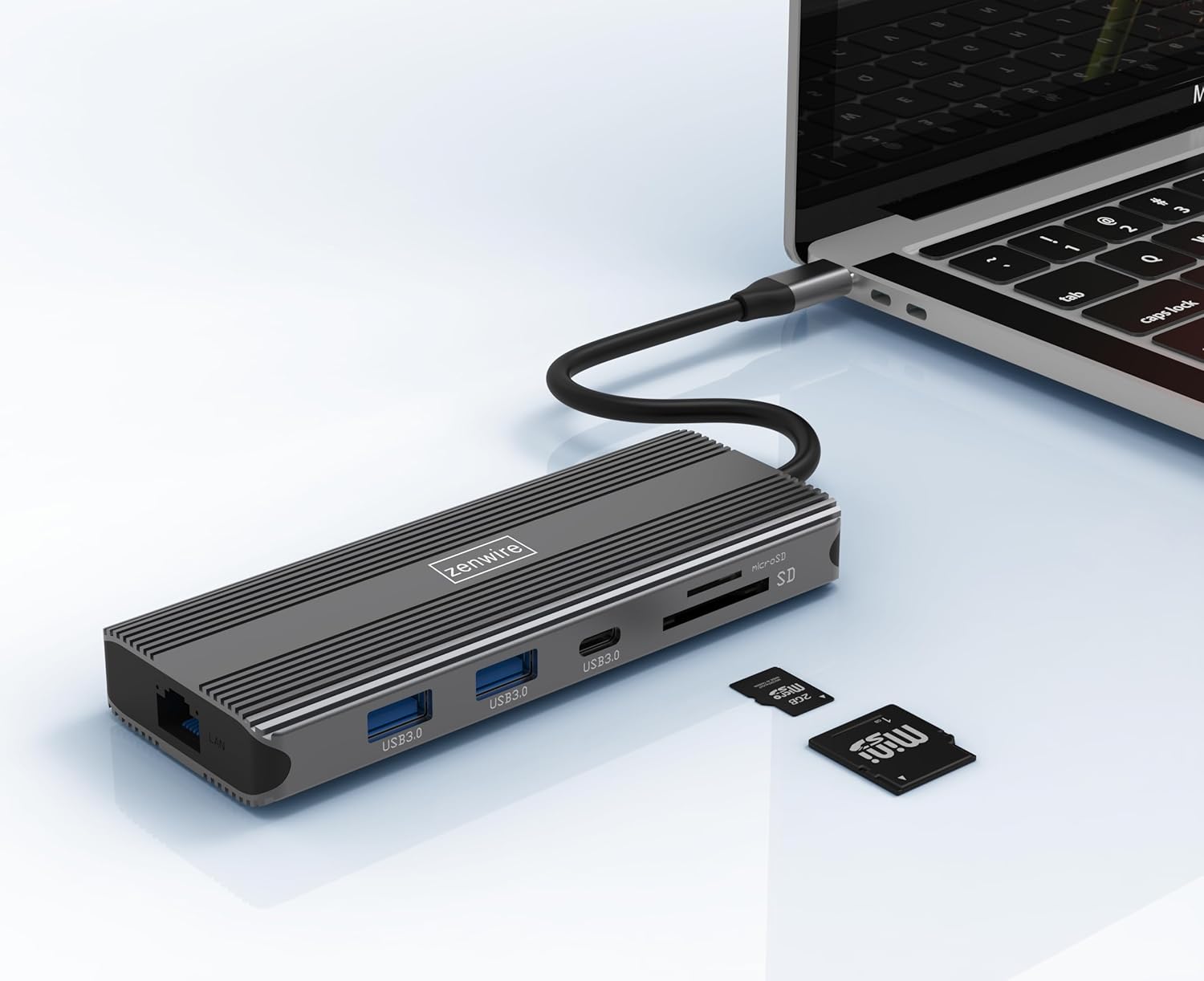
Image: The Zenwire USB-C Hub is shown connected to a laptop via its integrated USB-C cable, with SD and MicroSD cards placed nearby, illustrating a typical setup scenario.
تعليمات التشغيل
اتصال الشاشة:
The hub supports connecting up to two external monitors simultaneously via its HDMI 2.1 and DisplayPort 1.4 interfaces. Both can display video in 4K@60Hz concurrently.
- شاشة واحدة: Connect your monitor to either the HDMI or DisplayPort.
- شاشتان: Connect one monitor to the HDMI port and another to the DisplayPort.

Image: A laptop is displayed connected to two larger external monitors, demonstrating the multi-display capability of the Zenwire USB-C Hub.
Multi-Display Modes (MacOS vs. Windows):
The behavior of multiple external displays can vary between operating systems.
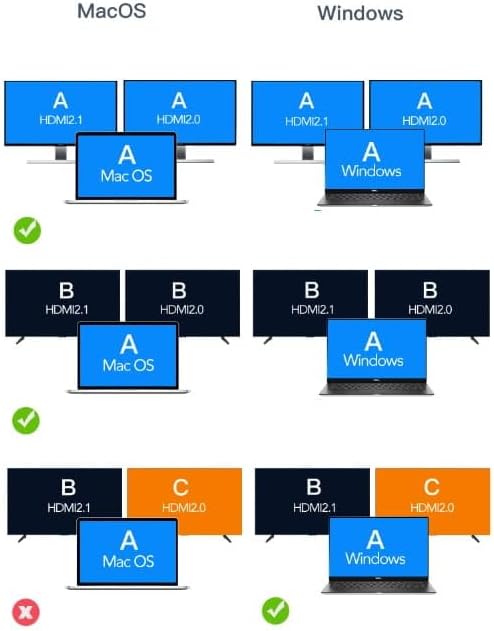
Image: A diagram illustrating different multi-display configurations for MacOS and Windows. It shows that MacOS typically supports extended desktop across two external monitors (A, B) and the laptop screen (A), while Windows can support extended desktop across three screens (A, B, C) or mirrored displays.
- ماك: Typically supports extended desktop across two external monitors (A, B) and the laptop screen (A). Mirroring is also supported.
- الويندوز: Supports extended desktop across three screens (A, B, C) or mirrored displays, offering more flexibility for multi-monitor setups.
HDMI 2.1 and DisplayPort 1.4 Advanced Features:
These ports offer higher refresh rates and advanced features for an enhanced visual experience:
- High Transfer Speeds: Up to 48 Gbps for HDMI 2.1, ensuring high data throughput.
- eARC (قناة إرجاع الصوت المحسنة): For higher audio quality and support for object-based audio formats like Dolby Atmos and DTS-X.
- VRR (معدل التحديث المتغير): Useful for gaming, where refresh rates are not constant.
- ALLM (وضع الكمون المنخفض التلقائي): Automatically detects content like games and switches the device to a low-latency mode.
- نظام إدارة الوسائط السريع (QMS): The image on the screen changes immediately when switching between content.
- QFT (نقل الإطارات السريع): Reduces input lag further.
- HDR الديناميكي: Adjusts the image parameters during content transmission for higher quality visuals. Supports HDR 10 and 10+.
توصيل الصوت:
The 3.5mm audio jack allows connection of various audio devices:
- الميكروفونات
- سماعات الرأس
- Headphones with integrated microphone
- مكبرات صوت خارجية
صيانة
- تنظيف: استخدم قطعة قماش ناعمة وجافة لتنظيف محور العجلة. تجنب استخدام المنظفات السائلة أو المواد الكاشطة.
- تخزين: قم بتخزين المحور في مكان بارد وجاف بعيدًا عن أشعة الشمس المباشرة ودرجات الحرارة القصوى.
- التعامل: تجنب إسقاط الجهاز أو تعريضه لصدمات قوية.
- تبديد الحرارة: The aluminum alloy shell is designed for effective heat dissipation. Ensure the hub is placed in a well-ventilated area during prolonged use.
استكشاف الأخطاء وإصلاحها
- لا يوجد إخراج للعرض:
- تأكد من توصيل كابل USB-C من الموزع بجهازك المضيف بشكل آمن.
- Verify that the HDMI/DisplayPort cable is firmly connected to both the hub and the monitor.
- Check your host device's display settings to ensure the external monitor is detected and configured correctly (e.g., extended, mirrored).
- Try a different HDMI/DisplayPort cable or monitor to rule out cable/monitor issues.
- انقطاع التيار الكهربائي:
- تأكد من توصيل محول الطاقة USB-C بمنفذ PD الخاص بالموزع وأنه يعمل بشكل صحيح.
- تأكد من أن جهاز المضيف الخاص بك يدعم توصيل الطاقة عبر USB-C.
- أجهزة USB غير معترف بها:
- Reconnect the USB device to a different USB 3.0 port on the hub.
- Ensure the USB device is functioning correctly by connecting it directly to your host device.
- Some high-power USB devices may require external power if the hub's PD port is not utilized.
- مشاكل اتصال الإيثرنت:
- Check if the Ethernet cable is securely connected to both the hub and your router/modem.
- التحقق من إعدادات الشبكة على جهاز المضيف الخاص بك.
- Ensure your router/modem is working correctly.
- SD/MicroSD Card Not Detected:
- تأكد من إدخال البطاقة بالكامل في الفتحة الصحيحة.
- Check if the card is formatted correctly and readable by your operating system.
- Try a different card to rule out card issues.
تحديد
| ماركة | زينواير |
| نموذج | Zenwire USB-C Hub |
| الاتصال | USB-C 3.1 / Thunderbolt 3.0 (Host) |
| الموانئ |
|
| سرعة نقل البيانات | USB 3.0: 5 Gbps; Ethernet: 1000 Mbps |
| توصيل الطاقة | حتى 100 وات |
| مادة | سبائك الألومنيوم قذيفة |
| الأبعاد (الطول × العرض × الارتفاع) | 118 × 48 × 15 ملم |
| وزن | 109 جرام |
| طول الكابل | حوالي 15 سم |
| توافق نظام التشغيل | Windows 11/10/8/7, Apple macOS, Linux, Android, iPad Pro iOS (USB-C models) |

الصورة: زاوية view of the Zenwire USB-C Hub, showcasing its compact design and the integrated USB-C host cable.
الضمان والدعم
Zenwire products are designed for reliability and performance. For warranty information and technical support, please refer to the official Zenwire webالموقع أو تواصل مع بائع التجزئة. احتفظ بإيصال الشراء لطلبات الضمان.
For the latest software updates or driver information (if applicable), please visit the Zenwire support page. This device is designed to be Plug & Play, generally not requiring additional drivers.


