1. المقدمة
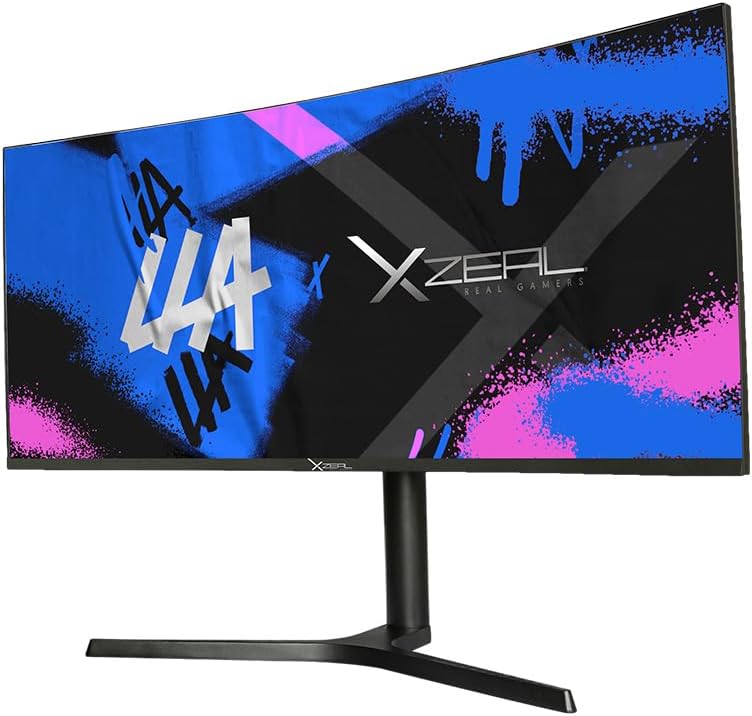
Thank you for choosing the XZEAL XZ-6010 LED 34-inch Quad HD Curved Gaming Monitor (XZMO341B). This high-quality device is designed to provide an immersive visual experience for gaming enthusiasts. Featuring a 1500R curved screen, Flicker-free technology, and a rapid 4 ms response time, this monitor delivers sharp, clear, and fluid visuals, reducing eye strain during extended use. With a maximum resolution of 3440 x 1440 pixels and a 100 Hz refresh rate supported by AMD FreeSync, it ensures detailed and tear-free gameplay. This manual provides essential information for setup, operation, maintenance, and troubleshooting to help you get the most out of your monitor.

أمام view of the XZEAL XZ-6010 34-inch curved gaming monitor, displaying a vibrant graphic.
2. معلومات السلامة
Please read all safety instructions carefully before using this product. Failure to follow these instructions may result in electric shock, fire, or damage to the monitor.
- لا تعرض الشاشة للمطر أو الرطوبة أو درجات الحرارة القصوى.
- Ensure the monitor is placed on a stable, flat surface to prevent it from falling.
- استخدم فقط محول الطاقة والكابلات التي يوفرها المصنع.
- لا تسد فتحات التهوية.
- تجنب وضع أشياء ثقيلة على سلك الطاقة.
- افصل الشاشة عن مأخذ الطاقة أثناء العواصف الرعدية أو عند عدم استخدامها لفترات طويلة.
- لا تحاول صيانة الشاشة بنفسك. أحل جميع أعمال الصيانة إلى فني صيانة مؤهل.
3. محتويات العبوة
Verify that all items are present in your product package. If any items are missing or damaged, please contact your retailer.
- XZEAL XZ-6010 34-inch Curved Gaming Monitor
- Monitor Stand (Neck and Base)
- محول الطاقة وكابل الطاقة
- كابل HDMI
- كابل ديسبلايبورت
- دليل المستخدم
4. الإعداد
4.1 تجميع الحامل
- قم بإزالة الشاشة بعناية من عبوتها، مع الحرص على حمايتها بوضعها على سطح ناعم.
- Attach the stand neck to the stand base, securing it with the provided screw(s).
- قم بمحاذاة الحامل المُجمّع مع فتحة التثبيت الموجودة في الجزء الخلفي من الشاشة.
- Gently push the stand into the slot until it clicks into place or secure it with the provided screw(s).
خلف view of the XZEAL monitor, illustrating the stand assembly process.
4.2 توصيل الشاشة
قبل التوصيل، تأكد من إيقاف تشغيل جميع الأجهزة.
- توصيل الطاقة: قم بتوصيل محول الطاقة بمدخل الطاقة الخاص بالشاشة، ثم قم بتوصيل كابل الطاقة بمأخذ الحائط.
- اتصال الفيديو:
- For optimal performance, connect your computer's graphics card to the monitor using the provided DisplayPort cable.
- Alternatively, use the HDMI cable to connect to devices such as gaming consoles or other computers.
- اتصال الصوت (إن أمكن): If your monitor has an audio output, connect external speakers or headphones.

مؤخرة view of the XZEAL monitor, showing the input ports including HDMI and DisplayPort.
5. تعليمات التشغيل
5.1 تشغيل/إيقاف التشغيل
اضغط على زر التشغيل، الموجود عادةً في الجزء الخلفي أو السفلي من الشاشة، لتشغيلها أو إيقاف تشغيلها. سيضيء مؤشر الطاقة عند تشغيل الشاشة.
5.2 التنقل عبر قائمة العرض على الشاشة (OSD)
The OSD menu allows you to adjust various monitor settings. Typically, buttons on the back or bottom of the monitor are used to access and navigate the OSD.
- Press a designated OSD button to open the menu.
- استخدم أزرار التنقل (أعلى/أسفل/يسار/يمين أو عصا التحكم) للتنقل بين خيارات القائمة.
- اضغط على زر التحديد/الإدخال لتأكيد الاختيار أو للدخول إلى قائمة فرعية.
- Press the exit/back button to return to the previous menu or exit the OSD.
5.3 ضبط الإعدادات
يمكنك تخصيص الإعدادات التالية ضمن قائمة العرض على الشاشة:
- السطوع / التباين: ضبط الإضاءة العامة والتباين للشاشة.
- إعدادات الألوان: تعديل درجة حرارة اللون، وجاما، ومستويات RGB الفردية.
- مصدر الإدخال: اختر يدويًا بين مدخلات HDMI و DisplayPort.
- وضع اللعبة: Activate pre-set display modes optimized for different game genres.
- تقنية AMD FreeSync: Ensure this setting is enabled in the OSD and on your graphics card for tear-free gaming.
- وميض مجاني: This technology is always active to reduce eye strain.
6. الصيانة
6.1 تنظيف الشاشة
- افصل الشاشة دائمًا قبل التنظيف.
- استخدم قطعة قماش ناعمة وخالية من الوبر وامسحها برفق.ampيُنظف بالماء أو بمنظف شاشات خفيف وغير كاشط.
- لا تقم برش المنظف مباشرة على الشاشة.
- Avoid using benzene, thinner, ammonia-based cleaners, or abrasive materials, as they can damage the screen or casing.
6.2 العناية العامة
- احتفظ بالشاشة بعيدًا عن أشعة الشمس المباشرة ومصادر الحرارة.
- تأكد من وجود تهوية كافية حول الشاشة.
- تجنب لمس الشاشة بأشياء حادة.
7. استكشاف الأخطاء وإصلاحها
إذا واجهت مشاكل مع شاشتك، فراجع الجدول أدناه للاطلاع على المشاكل الشائعة وحلولها.
| مشكلة | السبب المحتمل | حل |
|---|---|---|
| لا توجد صورة على الشاشة | تم فصل كابل الطاقة؛ تم فصل كابل الفيديو؛ تم تحديد مصدر إدخال غير صحيح | Check power and video cable connections; Select correct input source via OSD. |
| الصورة ضبابية أو مشوهة | Incorrect resolution; Graphics card driver issue | اضبط دقة العرض على 3440 × 1440؛ وقم بتحديث برامج تشغيل بطاقة الرسومات. |
| الوميض أو التقطيع أثناء اللعب | AMD FreeSync not enabled | Ensure AMD FreeSync is enabled in monitor OSD and graphics card settings. |
| الشاشة لا تعمل | Power cable not connected; Faulty power adapter | Check power cable connection; Test power adapter with another device if possible. |
8. المواصفات
Key technical specifications for the XZEAL XZ-6010 Monitor:
| ميزة | التفاصيل |
|---|---|
| ماركة | XZEAL |
| رقم الموديل | XZMO341B |
| حجم الشاشة | 34 بوصة |
| دقة العرض | 3440 x 1440 pixels (Quad HD) |
| Curvature Rating | 1500ر |
| معدل التحديث | Up to 100 Hz (with AMD FreeSync) |
| وقت الاستجابة | 4 مللي ثانية |
| نوع اللوحة | VA |
| مجموعة الألوان | 16.7 مليون لون |
| مدخلات الفيديو | 1x HDMI، 1x DisplayPort |
| المميزات الخاصة | Flicker-Free Technology, AMD FreeSync, Game Mode |
| أبعاد المنتج | 30 x 1 x 20 cm; 1.2 kg (Monitor only, without stand) |
9. الضمان والدعم
XZEAL products are manufactured to high-quality standards. For information regarding warranty coverage, please refer to the warranty card included with your product or visit the official XZEAL website. For technical support, troubleshooting assistance, or service inquiries, please contact XZEAL customer support through their official channels.


