مقدمة
The Aiwa Smart Band ASB-40 is a versatile fitness tracker designed to help you monitor your health and fitness activities. It features a comfortable silicone strap and a 1.1-inch color AMOLED display for clear visibility. This smart band tracks various health metrics including heart rate, blood pressure, and SpO2 levels, alongside fitness activities such as steps taken, calories burned, and distance traveled. It also offers sleep quality tracking and smart features like notification alerts, music and camera remote control, 'find my phone' function, alarm clock, timer, and stopwatch.
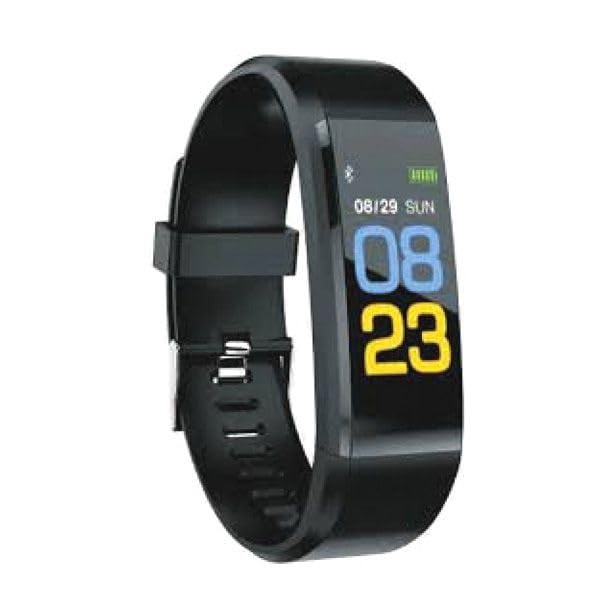
Image: Aiwa Smart Band ASB-40, a sleek black fitness tracker with a clear display.
يثبت
1. unboxing
Carefully remove the Aiwa Smart Band ASB-40 and its accessories from the packaging. The box should contain the smart band and a charging cable.
2. شحن الجهاز
- Connect the charging cable to the charging port on the back of your smart band.
- قم بتوصيل الطرف الآخر من كابل الشحن بمحول طاقة USB (غير مرفق) أو بمنفذ USB في جهاز الكمبيوتر.
- The band's display will show a charging indicator. Allow approximately 2 hours for a full charge before first use.
3. الاقتران بهاتفك الذكي
- Download the official Aiwa Smart Band application from your smartphone's app store (iOS or Android).
- تأكد من تمكين Bluetooth على هاتفك الذكي.
- Open the Aiwa Smart Band application and follow the on-screen instructions to create an account or log in.
- In the app, navigate to the device pairing section and select 'Add Device'.
- The app will search for available devices. Select 'ASB-40' from the list to initiate pairing.
- قم بتأكيد طلب الاقتران على كل من هاتفك الذكي والسوار الذكي إذا طُلب منك ذلك.
4. Wearing the Smart Band
Wear the smart band snugly on your wrist, about one finger's width above your wrist bone. Ensure the sensor on the back of the band is in contact with your skin for accurate heart rate and other health measurements.
تعليمات التشغيل
الملاحة الأساسية
The Aiwa Smart Band ASB-40 features a touch-sensitive 1.1-inch color AMOLED display. Swipe left/right or up/down to navigate through different menus and functions. Tap the screen to select an option or confirm an action.
الميزات والوظائف الرئيسية
- تتبع النشاط: Monitors steps taken, distance traveled, and calories burned throughout the day. View your daily progress directly on the band or in the companion app.
- مراقب معدل ضربات القلب: Continuously tracks your heart rate. Access real-time readings on the band and historical data in the app.
- Blood Pressure & SpO2 Monitoring: Provides estimates of your blood pressure and blood oxygen saturation (SpO2) levels. These measurements are for reference only and should not be used for medical diagnosis.
- تتبع النوم: Automatically monitors your sleep patterns, including deep sleep, light sleep, and awake times. Review تحليل جودة نومك في التطبيق.
- الإخطارات الذكية: Receive alerts for incoming calls, messages, and app notifications directly on your wrist when connected to your smartphone.
- تذكير بالخمول: The band can remind you to move if you have been inactive for an extended period.
- جهاز التحكم عن بعد: Control music playback and trigger your smartphone camera remotely from the smart band.
- العثور على هاتفي: Use this function on the band to make your paired smartphone ring, helping you locate it.
- Alarm Clock, Timer, Stopwatch: Access these utility functions directly from the band's menu.
مقاومة الماء (IP67)
The Aiwa Smart Band ASB-40 is IP67 rated, meaning it is protected against dust ingress and can withstand immersion in water up to 1 meter for up to 30 minutes. It is suitable for daily use, such as washing hands or light rain. However, it is not recommended for swimming, showering with hot water, or diving, as steam and prolonged water exposure can damage the device.
الصيانة والعناية
- تنظيف: Regularly clean the smart band, especially the sensor area and the strap, with a soft, damp قماش. تجنب استخدام الكيماويات القاسية أو المواد الكاشطة.
- الشحن: Use only the provided charging cable. Avoid overcharging the device. Disconnect the charger once the battery is full.
- تخزين: Store the smart band in a cool, dry place when not in use. Avoid extreme temperatures.
- تجنب التأثير: Protect the device from strong impacts or drops, which can damage the screen or internal components.
استكشاف الأخطاء وإصلاحها
الجهاز لا يعمل
- تأكد من شحن الجهاز بالكامل. وصله بالشاحن لمدة 30 دقيقة على الأقل.
- If the issue persists, try performing a soft reset (refer to the app for specific instructions, or hold the touch button/area for 10-15 seconds if available).
تعذر الاقتران بالهاتف الذكي
- Make sure Bluetooth is enabled on your smartphone and the smart band is within range.
- Ensure the Aiwa Smart Band app is installed and updated to the latest version.
- Restart both your smartphone and the smart band.
- إذا سبق إقران الجهاز، فحاول إلغاء إقرانه من إعدادات البلوتوث في هاتفك ثم إعادة إقرانه من خلال التطبيق.
Inaccurate Readings (Heart Rate, Steps)
- Ensure the band is worn snugly on your wrist, with the sensor in full contact with your skin.
- Clean the sensor on the back of the band to remove any dirt or sweat.
- تأكد من إدخال معلوماتك الشخصية (الطول، الوزن، العمر) بدقة في التطبيق المصاحب.
عمر البطارية قصير
- Reduce screen brightness or screen-on time settings in the app.
- قم بتعطيل مراقبة معدل ضربات القلب المستمرة إذا لم تكن هناك حاجة إليها بشكل مستمر.
- Limit the number of notifications received on the band.
تحديد
| رقم الموديل | ايه اس بي-40 |
| ماركة | ايوة |
| عرض | 1.1-inch Color AMOLED |
| الاتصال | بلوتوث V4.0 |
| مادة الحزام | تي بي يو |
| تصنيف مقاومة الماء | IP67 |
| مراقبة الصحة | Heart Rate, Blood Pressure, SpO2 |
| تتبع النشاط | Steps, Calories, Distance, Sleep |
| الميزات الذكية | Notifications, Sedentary Reminder, Music/Camera Control, Find Phone, Alarm, Timer, Stopwatch |
| أبعاد الحزمة | 15 × 8.2 × 3.2 سم |
| وزن العنصر | 60 جرام |
| بلد المنشأ | الصين |
| أول تاريخ متاح | 19 أكتوبر 2023 |
الضمان والدعم
For detailed warranty information, please refer to the warranty card included with your purchase or visit the official Aiwa website. If you encounter any issues not covered in this manual or require further assistance, please contact Aiwa customer support through their official channels.


