1. المقدمة
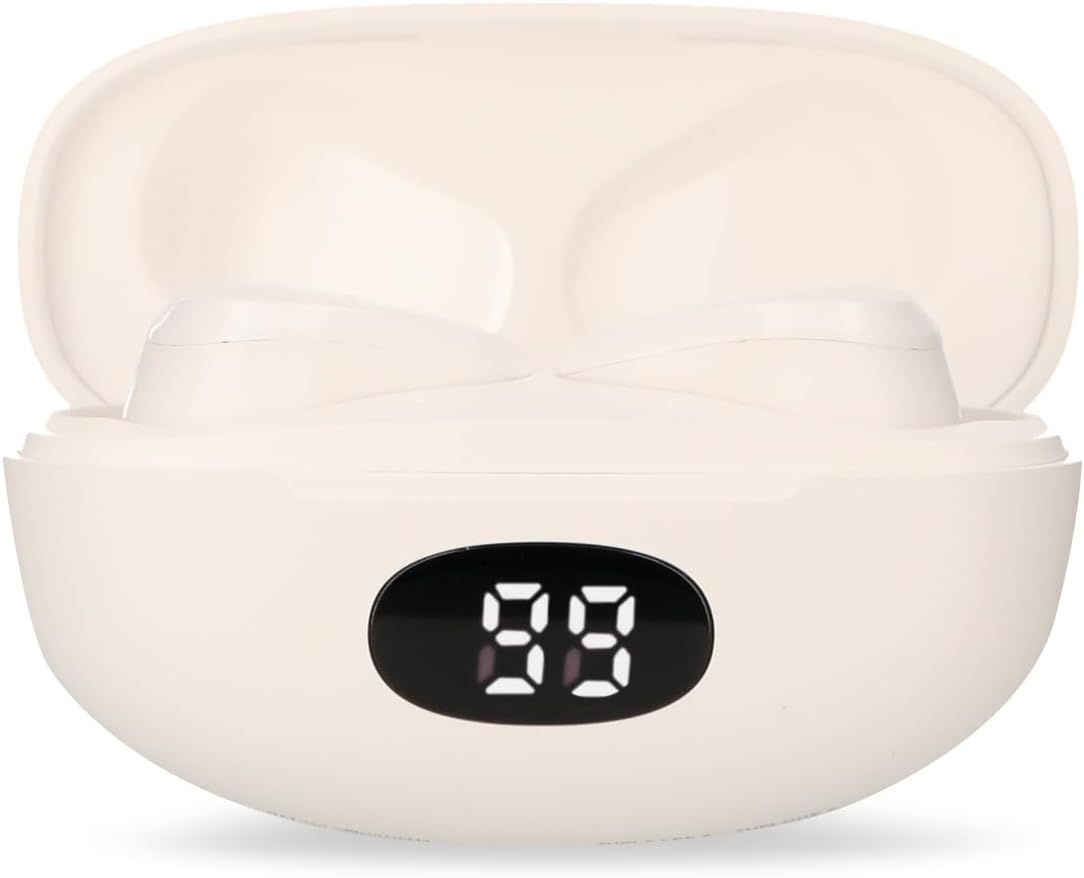
Thank you for choosing the RadioShack TWS Bluetooth Wireless Earbuds, Model 100128651 (Snow). These earbuds are designed to provide a high-quality, wireless audio experience with convenience and comfort. This manual will guide you through the setup, operation, and maintenance of your new earbuds.
2. محتويات العبوة
يرجى التأكد من وجود جميع العناصر في الحزمة الخاصة بك:
- RadioShack TWS Bluetooth Wireless Earbuds (Left and Right)
- حافظة الشحن
- كابل شحن USB من النوع C
- أحجام متعددة من أطراف الأذن

3. انتهى المنتجview
Familiarize yourself with the components of your RadioShack TWS Bluetooth Wireless Earbuds.


4. الإعداد
4.1 شحن سماعات الأذن والعلبة
- التهمة الاولية: قبل الاستخدام الأول، قم بشحن سماعات الأذن وعلبة الشحن بالكامل.
- شحن العلبة: Connect the provided USB Type-C cable to the charging port on the case and the other end to a USB power source (e.g., computer, wall adapter). The LED display on the case will indicate charging status.
- شحن سماعات الأذن: Place the earbuds into the charging case. Ensure they are correctly seated; the earbuds will automatically begin charging. The LED display on the case will show the earbuds' charging status.
- وقت الشحن: A full charge for both the earbuds and case typically takes up to 1.5 hours.
4.2 اقتران بلوتوث
- تشغيل الطاقة: افتح علبة الشحن. سيتم تشغيل سماعات الأذن تلقائيًا والدخول في وضع الاقتران. قد تسمع تنبيهًا صوتيًا.
- تفعيل البلوتوث: On your mobile device (smartphone, tablet, etc.), go to the Bluetooth settings and ensure Bluetooth is enabled.
- اختر جهاز: بحث عن available Bluetooth devices. Select "RadioShack Snow" or a similar name from the list.
- يتصل: Once selected, your device should connect to the earbuds. A confirmation sound or message may indicate successful pairing.
- إعادة الاتصال: بعد الاقتران الأولي، ستتصل سماعات الأذن تلقائيًا بآخر جهاز مقترن عند إخراجها من علبة الشحن وتفعيل البلوتوث على جهازك.
5. تعليمات التشغيل
The RadioShack TWS Earbuds feature a multifunction touch button for easy control.
5.1 تشغيل/إيقاف التشغيل
- تشغيل الطاقة: افتح علبة الشحن، وسيتم تشغيل سماعات الأذن تلقائيًا. أو اضغط مع الاستمرار على منطقة اللمس في كلتا السماعتين لمدة 3 ثوانٍ تقريبًا.
- إيقاف التشغيل: أعد سماعات الأذن إلى علبة الشحن وأغلق الغطاء. ستنطفئ تلقائيًا. أو يمكنك الضغط مع الاستمرار على منطقة اللمس في كلتا السماعتين لمدة 5 ثوانٍ تقريبًا.
5.2 تشغيل الموسيقى
- تشغيل/إيقاف مؤقت: انقر على منطقة اللمس في أي من سماعتي الأذن مرة واحدة.
- المسار التالي: اضغط مرتين على منطقة اللمس الموجودة على سماعة الأذن اليمنى.
- المسار السابق: اضغط مرتين على منطقة اللمس الموجودة على سماعة الأذن اليسرى.
5.3 إدارة المكالمات
- الرد/إنهاء المكالمة: انقر على منطقة اللمس في أي من سماعتي الأذن مرة واحدة.
- رفض المكالمة: اضغط مع الاستمرار على منطقة اللمس في أي من سماعتي الأذن لمدة ثانيتين تقريبًا.
5.4 التحكم في مستوى الصوت
- ارفع على الصوت: اضغط ثلاث مرات على منطقة اللمس في سماعة الأذن اليمنى.
- تقليل الحجم: اضغط ثلاث مرات على منطقة اللمس في سماعة الأذن اليسرى.
5.5 مساعد صوتي
- تنشيط مساعد الصوت: اضغط مع الاستمرار على منطقة اللمس في أي من سماعات الأذن لمدة ثانيتين تقريبًا (عندما لا تكون في مكالمة).
6. الصيانة
لضمان طول عمر سماعات الأذن وأدائها الأمثل، اتبع إرشادات الصيانة التالية:
- تنظيف: استخدم قطعة قماش ناعمة وجافة وخالية من الوبر لتنظيف سماعات الأذن وعلبة الشحن. لا تستخدم المنظفات الكاشطة أو الكحول أو المذيبات الكيميائية.
- نصائح الأذن: قم بإزالة أطراف الأذن وتنظيفها بانتظام باستخدام مزيل البقع.amp القماش. تأكد من جفافها تمامًا قبل إعادة ربطها.
- شحن جهات الاتصال: في حالة حدوث مشكلات أثناء الشحن، قم بتنظيف جهات اتصال الشحن الموجودة على سماعات الأذن وداخل العلبة برفق باستخدام قطعة قطن جافة.
- تخزين: عند عدم استخدام سماعات الأذن، احفظها في علبة الشحن لحمايتها من الغبار والتلف. خزّنها في مكان بارد وجاف.
- تجنب الماء: These earbuds are not waterproof. Avoid exposure to water, moisture, or extreme temperatures.
7. استكشاف الأخطاء وإصلاحها
إذا واجهت أي مشاكل مع سماعات الأذن الخاصة بك، فراجع المشاكل والحلول الشائعة التالية:
| مشكلة | السبب المحتمل | حل |
|---|---|---|
| سماعات الأذن لا تقترن | Earbuds are not in pairing mode or Bluetooth is off on device. | Ensure earbuds are out of the case and Bluetooth is enabled on your device. Forget previous pairings and try again. |
| لا يوجد صوت من سماعات الأذن | Volume too low, earbuds not connected, or media paused. | Increase volume on both earbuds and device. Check Bluetooth connection. Ensure media is playing. |
| سماعة أذن واحدة لا تعمل | Low battery, connection issue, or earbud not properly seated in case. | Place both earbuds back in the case, close, then reopen. Ensure both are charged. Re-pair if necessary. |
| علبة الشحن لا تشحن | Faulty cable, power source, or dirty charging port. | Try a different USB-C cable and power adapter. Clean the charging port. |
| جودة الصوت رديئة | Distance from device, interference, or low battery. | Move closer to your device. Avoid environments with strong Wi-Fi or other Bluetooth signals. Charge earbuds. |
8. المواصفات
Detailed technical specifications for the RadioShack TWS Bluetooth Wireless Earbuds, Model 100128651 (Snow):
- اسم الموديل: الثلج
- رقم الموديل: 100128651
- الاتصال: لاسلكي ، بلوتوث
- إصدار البلوتوث: 5.1
- النطاق اللاسلكي: حتى 10 مترا (33 قدما)
- بطارية ياربود: 3.7V DC, 30 mAh (each)
- علبة شحن البطارية: 3.7V DC ، 250 مللي أمبير
- Charging Input (Earbuds): 5V DC و 30 mA
- Charging Input (Case): 5V DC و 220 mA
- منفذ الشحن: يو إس بي من النوع سي
- وقت الشحن الكامل: حوالي 1.5 ساعات
- وقت تشغيل سماعة الأذن: حتى 4 ساعات (متواصلة)
- Total Playback Time (with case): تصل إلى 12 ساعة
- طريقة التحكم: يلمس
- ميكروفون: Included (for hands-free calls)
- المميزات الخاصة: Voice Assistant support, Ergonomic Design, Passive Noise Cancellation
- التوافق: أجهزة iOS وAndroid
- رمز المنتج العالمي: 7503038212252
- أبعاد الحزمة: 17.7 × 8.5 × 4.7 سم
- وزن الحزمة: 150 جرام
9. الضمان والدعم
RadioShack products are manufactured with quality and reliability in mind. For warranty information, please refer to the documentation provided at the time of purchase or visit the official RadioShack webموقع لمنطقتك.
للحصول على الدعم الفني أو خدمة العملاء، يرجى الاتصال بـ:
- Webموقع: www.radioshack.com.mx
- هاتف: 55 2582 0999
يرجى إحضار رقم الموديل الخاص بك (100128651) وإثبات الشراء عند الاتصال بالدعم.


