1. المقدمة
Thank you for choosing the Takstar MS-189 Table Conference Microphone. This manual provides detailed instructions for the proper setup, operation, and maintenance of your microphone. The MS-189 is a unidirectional condenser microphone designed for clear vocal pickup in conference settings, computer use, and other desktop applications. Please read this manual thoroughly before use to ensure optimal performance and longevity of the product.
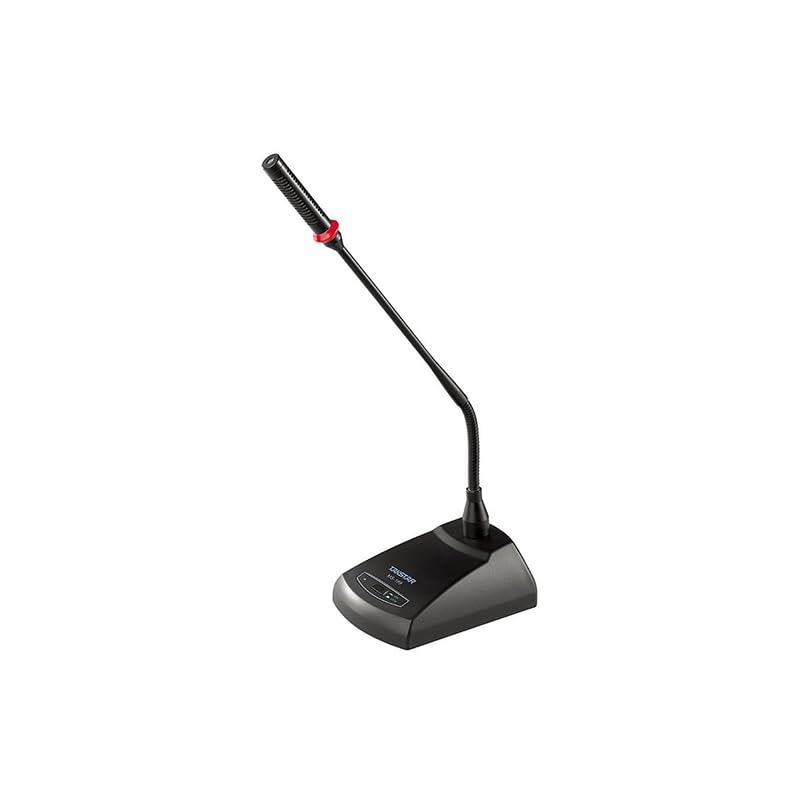
الصورة 1.1: The Takstar MS-189 Table Conference Microphone. This image displays the microphone with its gooseneck design and base unit, ready for desktop placement.
2. مواصفات المنتج
- Back Electret Condenser Transducer: Ensures high-quality audio capture.
- High Sensitivity and Low Noise: Delivers clear and crisp sound reproduction.
- Clear and Bright Vocal Pick-up: Optimized for speech and vocal applications.
- On/Off Button with LED Indicator: Located on both the base and gooseneck for easy control and status indication.
- خيارات الطاقة المرنة: Can be powered by 9-52V phantom power or two 1.5V AA batteries.
- النمط القطبي أحادي الاتجاه: يركز على الصوت من الأمام، مما يقلل من الضوضاء الخلفية.
- Durable Gooseneck Design: Allows for flexible positioning and adjustment.
3. محتويات العبوة
يرجى التحقق من محتويات العبوة عند فتحها للتأكد من وجود جميع العناصر:
- Takstar MS-189 Table Conference Microphone (Gooseneck and Base Unit)
- دليل المستخدم (هذا المستند)
Note: XLR cable and AA batteries are typically sold separately and may not be included.
4. تعليمات الإعداد
4.1 تشغيل الميكروفون
The MS-189 microphone offers two power options:
- Phantom Power (9-52V): If your audio mixer, interface, or computer sound card provides phantom power, connect the microphone using an XLR cable. The microphone will draw power directly from the connected device. Ensure phantom power is enabled on your device.
- AA Batteries (2 x 1.5V): If phantom power is not available, insert two 1.5V AA batteries into the battery compartment located on the underside of the microphone base. Ensure correct polarity (+/-) when inserting batteries.
Note: Do not use both phantom power and batteries simultaneously. The microphone will prioritize phantom power if both are connected.
4.2 الاتصال بجهاز
The MS-189 connects via an XLR connector.
- Locate the XLR output port on the microphone base.
- Connect one end of a standard XLR cable (not included) to the microphone's XLR output.
- Connect the other end of the XLR cable to an available XLR input on your audio mixer, audio interface, or computer sound card. Ensure the input is compatible with a condenser microphone.
4.3 وضع الميكروفون
Place the microphone on a stable, flat surface. Position the gooseneck so the microphone head is approximately 15-30 cm (6-12 inches) from the speaker's mouth, pointing directly towards them for optimal sound capture.
5. تعليمات التشغيل
5.1 تشغيل/إيقاف التشغيل
Press the ON/OFF button located on the microphone base. The LED indicator will illuminate when the microphone is active. Press the button again to turn off the microphone.
5.2 ضبط رقبة الإوزة
Gently bend the flexible gooseneck to adjust the microphone's position and angle. Avoid excessive force to prevent damage.
5.3 Optimal Usage
- For best results, speak directly into the microphone from a consistent distance.
- Minimize background noise in the environment to enhance clarity.
- Monitor audio levels on your connected device to prevent clipping or distortion.
6. الصيانة
- تنظيف: استخدم قطعة قماش ناعمة وجافة لتنظيف الجزء الخارجي من الميكروفون. لا تستخدم المنظفات السائلة أو المذيبات.
- تخزين: When not in use, store the microphone in a dry, dust-free environment. Avoid extreme temperatures and humidity.
- استبدال البطارية: If using battery power, replace AA batteries when the LED indicator dims or audio quality degrades. Remove batteries if the microphone will not be used for an extended period to prevent leakage.
7. استكشاف الأخطاء وإصلاحها
| مشكلة | السبب المحتمل | حل |
|---|---|---|
| لا يوجد مخرج صوت |
|
|
| Poor sound quality (low volume, distortion) |
|
|
| مؤشر LED لا يضيء |
|
|
8. المواصفات
| نموذج | ام اس-189 |
| مبدأ محول | عودة Electret المكثف |
| Directivity Characteristic (Polar Pattern) | أحادي الاتجاه |
| استجابة التردد | 100 هرتز - 16 كيلو هرتز |
| حساسية | -33dB ± 3dB (0dB = 1V / Pa عند 1 كيلو هرتز) |
| معاوقة الخرج | 340Ω ± 30٪ (عند 1 كيلو هرتز) |
| متطلبات الطاقة | 9-52V phantom power or 2 x 1.5V AA battery |
| تكنولوجيا الاتصال | إكس إل آر |
| نوع الموصل | إكس إل آر |
| الأجهزة المتوافقة | كمبيوتر محمول ، كمبيوتر شخصي |
| عامل شكل الميكروفون | Gooseneck, Table Array |
| أبعاد العنصر (الطول × العرض × الارتفاع) | 15 × 15 × 15 سم |
| الوزن الصافي | 500 جرام |
| لون | أسود |
9. الضمان والدعم
For warranty information and technical support, please refer to the warranty card included with your product or visit the official Takstar website. You may also contact your local distributor or retailer for assistance.
Visit the Takstar Store on Amazon لمزيد من المعلومات حول المنتج وموارد الدعم.


