1. المقدمة
This manual provides essential information for the safe and efficient operation of your Promethean UST-P1 DLP Projector. The Promethean UST-P1 is a WXGA Ultra Short Throw (UST) Projector designed for various applications, capable of displaying 3,300 Lumens at its brightest setting with a native resolution of 1280x800. It features DLP technology for higher contrast and reduced pixel visibility, and is 3D capable.
ماذا يوجد في الصندوق
عند تفريغ العبوة، يرجى التأكد من أن جميع العناصر المدرجة أدناه موجودة وفي حالة جيدة:
- Promethean UST-P1 DLP Projector
- كابل HDMI
- جهاز التحكم عن بعد
- سلك الطاقة
- دليل المستخدم (هذا المستند)

Figure 1.1: Promethean UST-P1 Projector with its bundled accessories, including the projector unit, HDMI cable, remote control, and power cord.

الشكل 1.2: الجزء العلوي view of the Promethean UST-P1 Projector, showing the lens assembly and control panel area.
2. الإعداد
2.1 وضع جهاز العرض
The Promethean UST-P1 is an Ultra Short Throw (UST) projector, designed to project a large image from a very short distance. Place the projector on a stable, flat surface directly in front of the projection screen or wall. Ensure there are no obstructions between the projector lens and the projection surface.
2.2 التوصيل بالطاقة
- قم بتوصيل سلك الطاقة المرفق بمنفذ AC IN الموجود في الجزء الخلفي من جهاز العرض.
- قم بتوصيل الطرف الآخر من سلك الطاقة بمأخذ كهربائي مؤرض.
2.3 توصيل مصادر الفيديو
The projector offers multiple connectivity options. Refer to the rear panel diagram for port locations.
- HDMI: Connect an HDMI cable from your video source (e.g., laptop, Blu-ray player) to the HDMI port on the projector. The projector supports HDMI 1.4a.
- VGA: Connect a VGA cable from your computer to one of the VGA In ports (VGA In 1 or VGA In 2).
- فيديو مركب: Use an RCA cable to connect to the Composite Video port for standard definition video sources.
- الشبكة (RJ-45): For network control and monitoring, connect an Ethernet cable to the RJ-45 port.
- RS232 (DB-9pin): For serial control, connect a DB-9pin cable to the RS232 port.
- USB ب: For service or specific control functions.
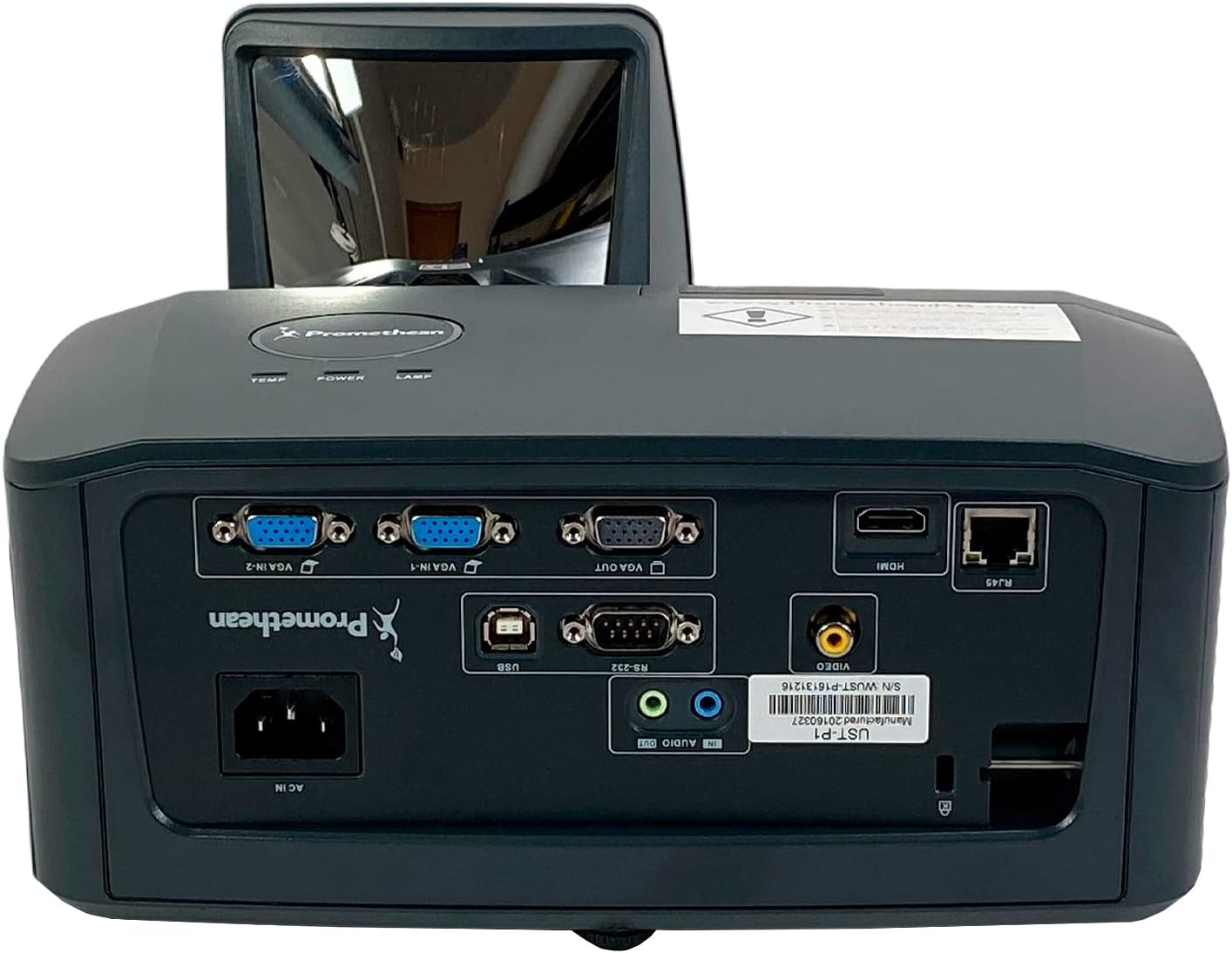
الشكل 2.1: مفصل view of the Promethean UST-P1 projector's rear panel, highlighting the HDMI, VGA, Composite, Network (RJ-45), RS232, and USB B connectivity options.
3. تعليمات التشغيل
3.1 تشغيل/إيقاف التشغيل
- تشغيل الطاقة: اضغط على زر التشغيل الموجود على لوحة تحكم جهاز العرض أو جهاز التحكم عن بعد. سيضيء مؤشر الطاقة.
- إيقاف التشغيل: Press the Power button again. A confirmation message may appear; press Power again to confirm shutdown. Allow the projector to cool down completely before unplugging it.
3.2 اختيار مصدر الإدخال
To switch between connected video sources, use the "Source" or "Input" button on the remote control or the projector's control panel. Cycle through the available inputs (HDMI, VGA1, VGA2, Video) until your desired source is displayed.
3.3 تعديل الصورة
- ركز: اضبط حلقة التركيز على عدسة جهاز العرض حتى تصبح الصورة حادة وواضحة.
- تصحيح الانحراف: If the image appears trapezoidal, use the keystone correction function (usually found in the projector's OSD menu or via dedicated buttons on the remote) to square the image.
- نسبة العرض إلى الارتفاع: The projector has a native aspect ratio of 16:10 (WXGA). You can adjust the aspect ratio settings in the menu to match your content (e.g., 4:3, 16:9) if necessary.
3.4 Supported Video Modes
The Promethean UST-P1 supports various video modes, including 720p, 1080i, 1035i, 575i, 576i, 480p, and 480i.
4. الصيانة
تضمن الصيانة المنتظمة الأداء الأمثل وتطيل عمر جهاز العرض الخاص بك.
4.1 تنظيف جهاز العرض
- الخارج: استخدم قطعة قماش ناعمة وخالية من الوبر وامسحها برفق.ampened with water to clean the projector's casinز. تجنب استخدام المنظفات أو المذيبات الكاشطة.
- عدسة: Gently wipe the projector lens with a lens cleaning cloth or lens paper. Do not use abrasive materials or excessive force, as this can scratch the lens.
- فتحات التهوية: Periodically check and clean the air vents to prevent dust buildup, which can impede airflow and cause overheating. Use a soft brush or compressed air to remove dust.
4.2 لترamp الاستبدال
The Promethean UST-P1 is a lamp-based projector. The lamp has a finite lifespan and will eventually need replacement. The projector will typically display a warning message when the lamp is nearing the end of its life. Refer to the projector's on-screen display (OSD) menu for lamp hour information.
حذر: Lamp replacement should only be performed when the projector is completely cool and unplugged from the power source. Consult a qualified technician if you are unsure about the replacement procedure.
5. استكشاف الأخطاء وإصلاحها
This section addresses common issues you might encounter with your projector. If the problem persists after trying these solutions, please contact customer support.
| مشكلة | السبب المحتمل | حل |
|---|---|---|
| لا توجد صورة على الشاشة |
|
|
| الصورة ضبابية أو غير واضحة |
|
|
| Image is trapezoidal (not square) |
|
|
| جهاز التحكم عن بعد لا يعمل |
|
|
6. المواصفات الفنية
| ميزة | التفاصيل |
|---|---|
| نموذج | أوست-P1 |
| تكنولوجيا العرض | دي إل بي |
| سطوع | شموم شمعة أنسي |
| الدقة الأصلية | 1280x800 (WXGA) |
| نسبة العرض إلى الارتفاع | 16: 10 (أصلية) |
| نسبة التباين | 10,000:1 |
| 3D القدرة | نعم |
| مدخلات الاتصال | HDMI 1.4a, Composite (RCA), Network (RJ-45), RS232 (DB-9pin), VGA In (Dsub-15pin x 2), USB B |
| أوضاع الفيديو المدعومة | 720p, 1080i, 1035i, 575i, 576i, 480p, 480i |
| المميزات الخاصة | غرفة CrestronView™ |
| أبعاد المنتج | 14.5 × 11.4 × 6.3 بوصة |
| وزن العنصر | 10.6 رطل |
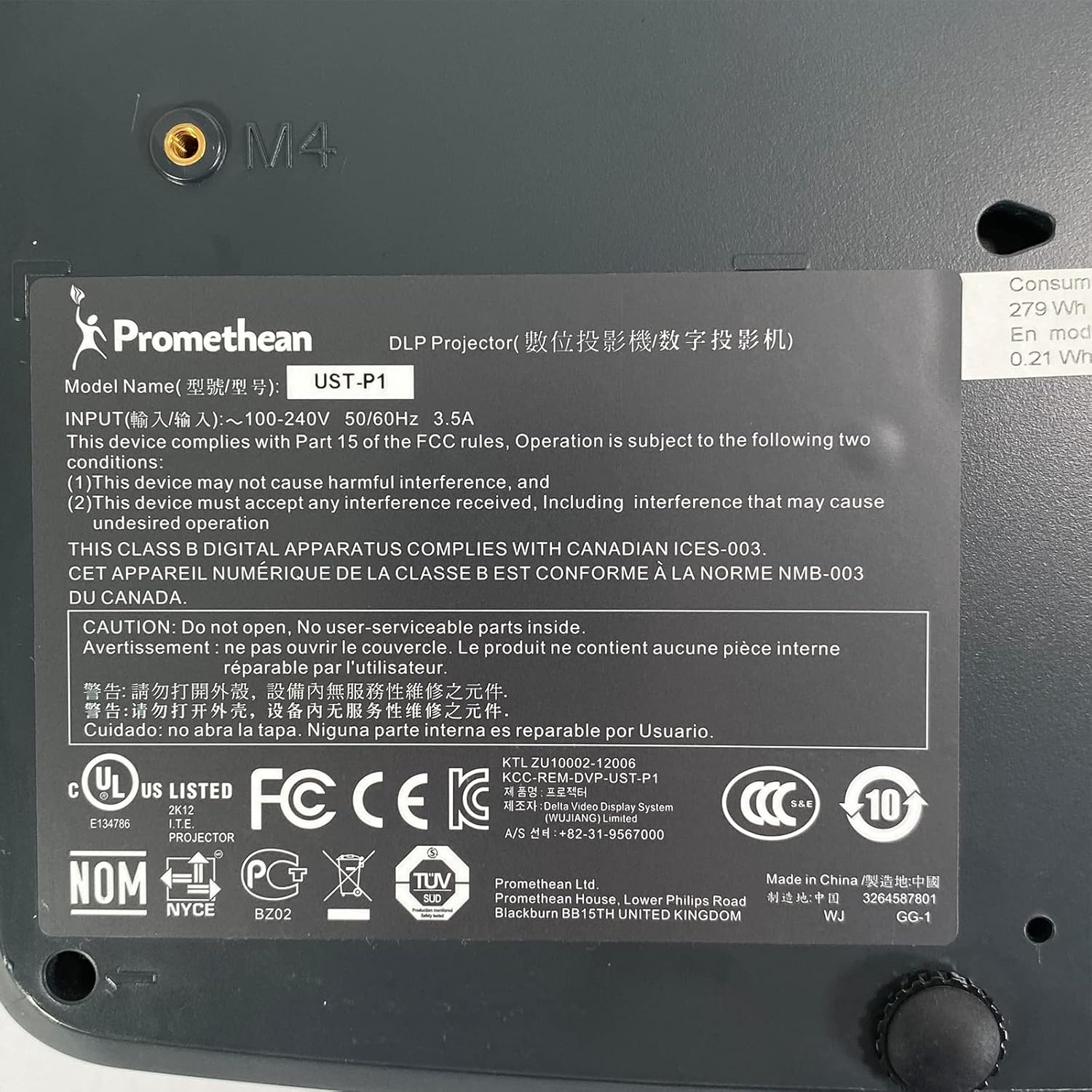
Figure 6.1: The bottom label of the Promethean UST-P1 projector, displaying the model number, input power requirements, and various regulatory compliance marks.
7. الضمان والدعم
For specific warranty information regarding your Promethean UST-P1 DLP Projector, please refer to the documentation provided at the time of purchase or contact the seller directly. Warranty terms and conditions may vary.
For technical support, troubleshooting assistance beyond this manual, or inquiries about replacement parts (such as lamps), please contact the seller, Tekswamp, or the official Promethean support channels.
يمكنك زيارة تيكسوamp متجر على أمازون للحصول على مزيد من المعلومات أو للتواصل مع فريق الدعم الخاص بهم.


