1. المقدمة
This manual provides essential information for the safe and efficient installation, operation, and maintenance of your KOLINK Regulator Series 850W Power Supply Unit (PSU). Please read this manual thoroughly before installation and retain it for future reference. This PSU is designed to provide stable and reliable power to your computer system, adhering to ATX 3.0 and PCIe 5.0 standards.
معلومات السلامة
- افصل دائمًا سلك الطاقة من مأخذ الحائط قبل تثبيت أو إزالة أو تنظيف وحدة إمداد الطاقة.
- لا تفتح وحدة التزويد بالطاقةasinز. حجم الصوت العاليtagتوجد مواد كيميائية في الداخل، مما قد يسبب صدمة كهربائية.
- تأكد من تركيب وحدة تزويد الطاقة في منطقة جيدة التهوية.
- Use only the modular cables provided with this PSU. Using incompatible cables may damage your system.
- تم تصميم هذا المنتج للاستخدام الداخلي فقط.
2. محتويات العبوة
تأكد من وجود جميع العناصر المدرجة أدناه في عبوة المنتج:
- KOLINK Regulator Series 850W Power Supply Unit
- Modular Cable Set (including 24-pin ATX, 4+4 pin CPU, 6+2 pin PCIe, 12VHPWR, SATA, and Peripheral cables)
- سلك الطاقة المتردد
- مسامير التثبيت
- دليل المستخدم (هذا المستند)
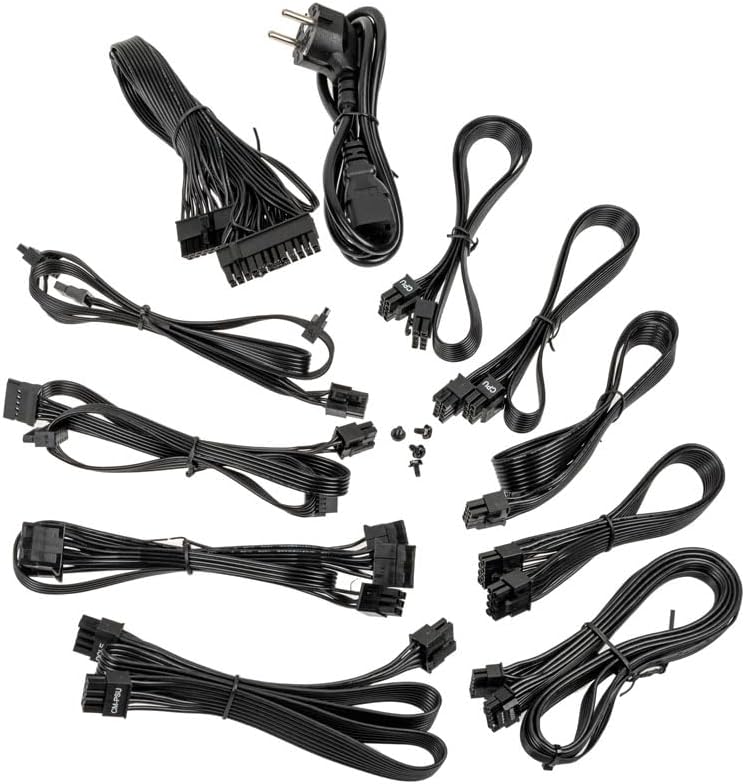
Image: A collection of all modular cables supplied with the Kolink Regulator PSU, including 24-pin ATX, CPU, PCIe, 12VHPWR, and SATA power cables.
3. الميزات الرئيسية
The KOLINK Regulator Series 850W PSU incorporates advanced features for optimal performance and reliability:
- جاهز لتقنية ATX 3.0 و PCIe 5.0: Designed to meet the latest ATX 3.0 standard with native PCIe 5.0 support, including a 12VHPWR 600W cable for modern graphics cards.
- شهادة 80 بلس الذهبية: Achieves up to 90% efficiency at half load, reducing energy consumption and heat generation.
- تصميم وحدات بالكامل: Allows for custom cable management by connecting only the necessary cables, improving airflow and aesthetics.
- المكثفات اليابانية 100٪: Utilizes high-quality Japanese capacitors for enhanced durability, stability, and long-term reliability.
- Switchable Semi-Fanless Mode: Features a 120mm Fluid Dynamic Bearing (FDB) fan that can operate in a semi-fanless mode, reducing fan speeds or stopping the fan entirely at lower loads for quieter operation.
- Multi-Protection Circuitry: Integrated safeguards protect your components from over-voltagه ، تحت المجلدtage, over-power, short-circuit, and over-temperature conditions.
- عامل الشكل المضغوط: Designed to fit a wide range of PC cases with its optimized dimensions.

Image: A close-up of the fully modular cable connection ports on the Kolink Regulator PSU, labeled for Motherboard, SATA, CPU/PCIe, and 12VHPWR.

الصورة: تفصيلية view of the 120mm Fluid Dynamic Bearing fan within the Kolink Regulator PSU, highlighting its switchable semi-fanless operation for quieter performance at low loads.

Image: An internal perspective of the Kolink Regulator PSU, emphasizing the high-quality 100% Japanese capacitors used for enhanced reliability and performance.

Image: The Kolink Regulator PSU, illustrating its robust multi-protection circuitry designed to safeguard connected components.
4. الإعداد والتثبيت
قائمة التحقق قبل التثبيت
- تأكد من أن علبة الكمبيوتر الخاصة بك متوافقة مع وحدات تزويد الطاقة ATX.
- تأكد من أن اللوحة الأم والمكونات الأخرى لديك تتطلب طاقة تبلغ 850 وات أو أقل.
- Gather necessary tools: screwdriver, zip ties (for cable management).
خطوات التثبيت
- حضّر نظامك: Disconnect the computer from the power outlet. Open your computer case to access the PSU mounting area. If replacing an old PSU, remove it first.
- قم بتثبيت وحدة PSU: Carefully slide the KOLINK Regulator PSU into the designated PSU bay in your computer case. Ensure the fan is oriented correctly (typically facing downwards or inwards, depending on case design). Secure the PSU with the provided mounting screws from the rear of the case.
- توصيل الكابلات المعيارية: Identify the necessary cables for your components. Connect the modular cables to the corresponding ports on the PSU first, then route them to your components. Refer to the labels on the PSU for correct port identification.
- طاقة اللوحة الأم: قم بتوصيل كابل ATX ذو 24 سنًا باللوحة الأم.
- طاقة وحدة المعالجة المركزية: Connect the 4+4 pin CPU cable(s) to your motherboard's CPU power connector(s).
- طاقة PCIe: For graphics cards, use the 6+2 pin PCIe cables. For modern GPUs requiring 12VHPWR, use the dedicated 12VHPWR 600W cable. Ensure all connectors are fully seated.
- طاقة SATA: قم بتوصيل كابلات الطاقة SATA بمحركات الأقراص SSD ومحركات الأقراص الصلبة ومحركات الأقراص الضوئية.
- الطاقة الطرفية: Use peripheral (Molex) cables for any other components requiring them.
- إدارة الكابلات: Route cables neatly to improve airflow and aesthetics. Use zip ties or cable straps to secure them.
- إغلاق القضية: بمجرد التأكد من أن جميع الاتصالات آمنة ومؤكدة، أغلق غطاء جهاز الكمبيوتر الخاص بك.

الصورة: زاوية view of the Kolink Regulator 850W Power Supply Unit, showcasinج أسودasing and fan grille, ready for installation.
5. تعليمات التشغيل
- توصيل طاقة التيار المتردد: Plug the provided AC power cord into the PSU's power inlet and then into a wall outlet or surge protector.
- تشغيل وحدة تزويد الطاقة: Locate the power switch on the rear of the PSU (next to the AC inlet) and flip it to the 'I' (On) position.
- تشغيل الكمبيوتر: اضغط على زر الطاقة الموجود على علبة الكمبيوتر لتشغيل النظام.
Semi-Fanless Mode Operation
The KOLINK Regulator PSU features a semi-fanless mode. This means the 120mm FDB fan will remain off or spin at very low RPMs during low system loads to minimize noise. As the system load increases and the internal temperature rises, the fan will automatically activate and adjust its speed to maintain optimal cooling. This operation is normal and contributes to a quieter computing experience.
6. الصيانة
تضمن الصيانة المناسبة طول عمر وحدة تزويد الطاقة وأدائها الأمثل.
- حافظ على فتحات التهوية نظيفة: Ensure that the PSU's intake and exhaust vents are not obstructed by dust, cables, or other objects. Good airflow is crucial for cooling.
- تنظيف الغبار: Periodically clean dust from the PSU's exterior and fan grille using compressed air. لا تفتح وحدة التزويد بالطاقةasing.
- الظروف البيئية: Operate the PSU within recommended temperature and humidity ranges. Avoid extreme conditions.
7. استكشاف الأخطاء وإصلاحها
If you encounter issues with your KOLINK Regulator PSU, refer to the following common problems and solutions:
| مشكلة | السبب المحتمل | حل |
|---|---|---|
| لا يتم تشغيل النظام. | PSU power switch off, AC cable loose, faulty wall outlet. | Ensure PSU switch is 'On'. Check AC power cable connection. Test wall outlet with another device. Verify all modular cables are securely connected. |
| System powers on but shuts down unexpectedly. | Overload, overheating, loose connections, component fault. | تأكد من إجمالي استهلاك الطاقة للنظامtage does not exceed 850W. Check for proper airflow. Verify all modular cables are fully seated. If problem persists, test components individually. |
| مروحة PSU لا تدور. | Semi-fanless mode active, low system load. | This is normal operation in semi-fanless mode. The fan will activate under higher loads. If the fan never spins even under heavy load, contact support. |
| ضوضاء غير عادية من وحدة تزويد الطاقة. | Loose screws, fan obstruction, coil whine. | Check PSU mounting screws. Ensure no cables or debris are obstructing the fan. Minor coil whine can be normal; if excessive, contact support. |
If troubleshooting steps do not resolve the issue, please contact KOLINK customer support.
8. المواصفات
Detailed technical specifications for the KOLINK Regulator Series 850W PSU:
| ميزة | مواصفة |
|---|---|
| رقم الموديل | KL-R850FG |
| انتاج واتtage | 850 واط |
| تقييم الكفاءة | 80 PLUS ذهب |
| عامل الشكل | ايه تي اكس |
| تصميم مزود الطاقة | وحدات كاملة |
| طريقة التبريد | Air (120mm FDB fan with semi-fanless mode) |
| المكثفات | مكثفات يابانية 100% |
| نوع الموصل | 12VHPWR, 24-pin ATX, 4+4 pin CPU, 6+2 pin PCIe, SATA, Peripheral |
| أبعاد المنتج (الطول × العرض × الارتفاع) | 11.61 × 8.46 × 4.33 بوصة |
| وزن العنصر | 5.5 رطل |
| الأجهزة المتوافقة | Gaming PC with ATX motherboard and high-end graphics card |

Image: The rear panel of the Kolink Regulator PSU, displaying the electrical specifications label, power input, and on/off switch.
9. الضمان والدعم
معلومات الضمان
KOLINK products are manufactured to the highest quality standards. This PSU is covered by a manufacturer's warranty against defects in materials and workmanship. The specific warranty period may vary by region and retailer. Please retain your proof of purchase for warranty claims.
دعم العملاء
For technical assistance, warranty inquiries, or further information, please visit the official KOLINK website or contact your local retailer. You can often find support resources, FAQs, and contact details on the manufacturer's webموقع: www.kolink.eu


