مقدمة
Thank you for choosing the Sharp Digital Alarm Clock. This manual provides detailed instructions for setting up, operating, and maintaining your new alarm clock. Designed for clarity and convenience, this clock features an easy-to-read LCD display with an optional always-on backlight, dual alarm settings, and a USB charging port for your devices. Please read this manual thoroughly before use to ensure optimal performance and longevity of your product.

أمام view of the Sharp Digital Alarm Clock, displaying time, month, date, day, and temperature on its colorful LCD screen.
معلومات السلامة
Please observe the following safety precautions to prevent damage to the unit or personal injury:
- لا تعرض الجهاز لدرجات حرارة قصوى أو لأشعة الشمس المباشرة أو الرطوبة العالية.
- تجنب إسقاط الوحدة أو تعريضها لصدمات قوية.
- لا تخلط بين البطاريات القديمة والجديدة أو أنواع مختلفة من البطاريات.
- قم بإزالة البطاريات إذا لم يتم استخدام الوحدة لفترة طويلة لمنع التسرب.
- احتفظ بالوحدة بعيدًا عن الماء والسوائل الأخرى.
- لا تحاول تفكيك أو إصلاح الجهاز بنفسك. أسند جميع أعمال الصيانة إلى فنيين مؤهلين.
محتويات الحزمة
تأكد من وجود جميع العناصر في العبوة:
- Sharp Digital Alarm Clock (Model SPC5028AMZ)
- دليل المستخدم (هذا المستند)
ملاحظة: يلزم استخدام بطاريتين AAA، وهما غير مرفقتين.
المنتج انتهىview
الشاشة الأمامية

Diagram illustrating key features of the alarm clock, including atomic accuracy, 1.5-inch tall time display, on/off display nightlight, indoor temperature display, calendar display, bright color display, wall mountable or tabletop viewing, and battery operation (3x AAA batteries).
The front of the clock features a clear LCD display that shows the time, month, date, day of the week, and indoor temperature. The main time display is approximately 1.5 inches tall for easy readability.
اللوحة الخلفية وأدوات التحكم

مفصل view of the clock's rear panel, showing the location of the battery compartment, various control buttons (Calendar, Time, Alarm, 12/24, Up, °C/°F, Down, Wave), the ON/OFF switch for the nightlight, and the backstand for tabletop viewing. Dimensions (6.45"W x 5"H) are also indicated.
- CALENDAR Set Button: Used to set the date and year.
- TIME Set Button: Used to set the time manually.
- ALARM Set & ON/OFF Button: Used to set and activate/deactivate alarms.
- زر 12/24: يُبدّل بين تنسيقات الوقت 12 ساعة و 24 ساعة.
- زر لأعلى: Adjusts settings upwards.
- زر ° C / ° F: يُبدّل عرض درجة الحرارة بين درجة مئوية وفهرنهايت.
- زر لأسفل: Adjusts settings downwards.
- WAVE (Atomic Search) Button: Initiates a manual search for the atomic time signal.
- ON/OFF Switch (Nightlight): Controls the always-on backlight feature.
- حجرة البطارية: Holds 3 x AAA batteries.
- Backstand: For tabletop viewعمل.
- فتحة تثبيت على الحائط: لتعليق الساعة على الحائط.
يثبت
تركيب البطارية
- Open the battery compartment cover on the rear of the clock.
- أدخل بطاريتين جديدتين من نوع AAA، مع التأكد من صحة القطبية (+ و -).
- أغلق غطاء حجرة البطارية جيدًا.
التشغيل الأولي
Upon battery installation, the clock will power on and attempt to synchronize with the atomic time signal.
مزامنة الوقت الذري (WWVB)
The Sharp Digital Alarm Clock is designed to automatically synchronize with the WWVB atomic time signal broadcast from Fort Collins, Colorado, ensuring precise timekeeping.

Map of the United States showing the WWVB radio broadcast signal originating from Fort Collins, Colorado, which the atomic clock uses for synchronization.
- The clock will automatically attempt to receive the signal daily, typically overnight when electronic interference is minimal.
- For optimal reception, place the clock near a window and orient its front or rear panel towards Fort Collins, Colorado.
- A signal strength indicator (antenna icon) on the display will show the reception status.
- To manually initiate a signal search, press the موجة زر على اللوحة الخلفية.

Graphic depicting a full moon, with text 'LESS ELECTRONIC INTERFERENCE AT NIGHT SET BY MORNING', indicating optimal atomic clock synchronization occurs during nighttime hours.
Setting Time Zone
Even with atomic synchronization, you must manually select your local time zone for the correct hourly time display.
- اضغط مع الاستمرار على وقت button until the time zone indicator flashes.
- استخدم UP or تحت buttons to select your desired time zone (e.g., PST, MST, CST, EST).
- اضغط على وقت زر مرة أخرى للتأكيد والخروج.
ضبط الوقت والتاريخ يدوياً
If atomic synchronization is not desired or available, you can set the time and date manually.
- لضبط الوقت: اضغط مع الاستمرار على وقت button until the hour flashes. Use UP/تحت to adjust. Press وقت to move to minutes, then adjust. Press وقت مرة أخرى للحفظ.
- لتعيين التاريخ: اضغط مع الاستمرار على التقويم button until the year flashes. Use UP/تحت to adjust. Press التقويم to move to month, then day, adjusting each. Press التقويم مرة أخرى للحفظ.
- تنسيق 12/24 ساعة: اضغط على 12/24 زر للتبديل بين تنسيق 12 ساعة (مع مؤشر صباحًا/مساءً) وتنسيق 24 ساعة.
تعليمات التشغيل
Adjusting Display Brightness and Backlight
The clock features an optional always-on backlight with adjustable brightness for optimal viewفي ظروف الإضاءة المختلفة.
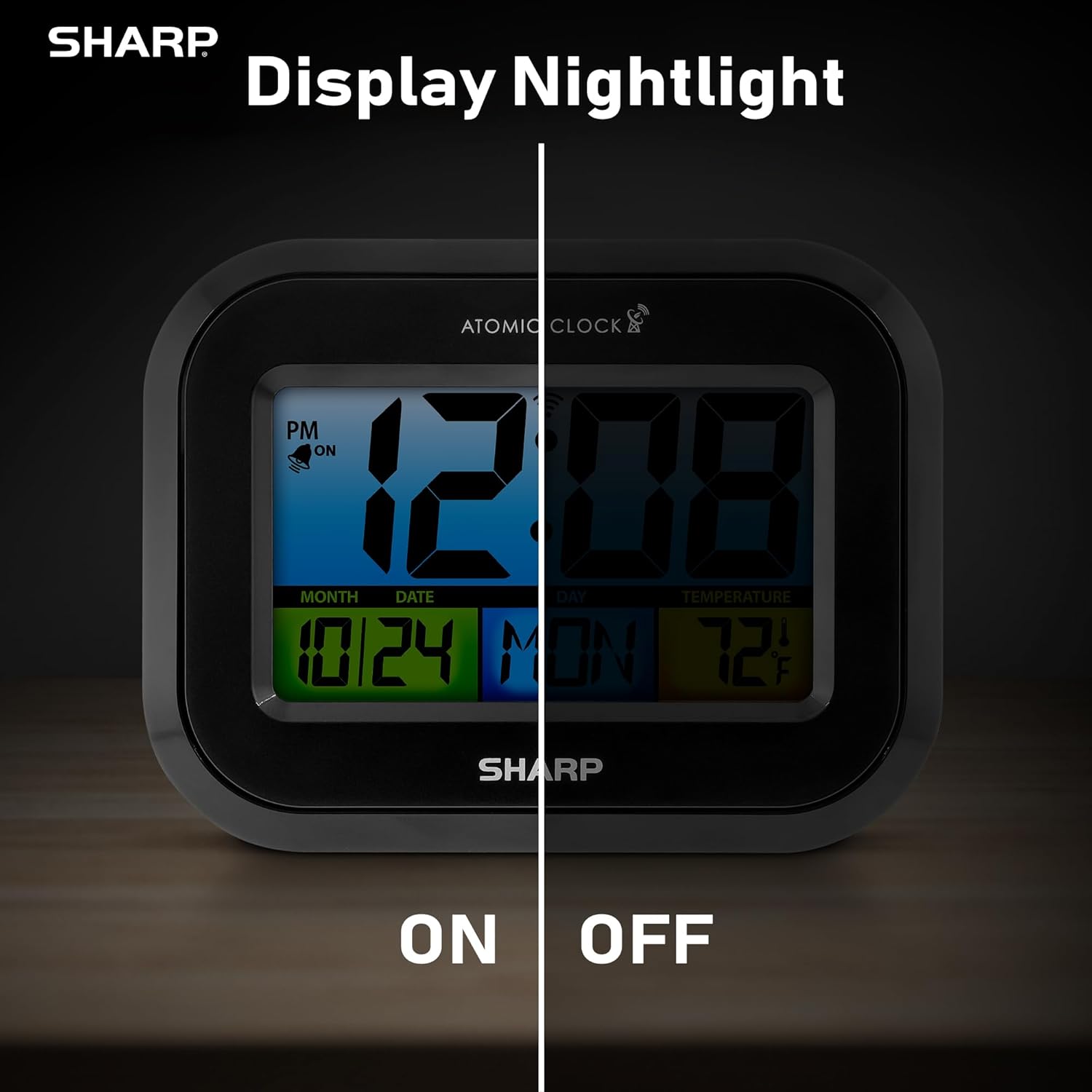
Comparison image showing the clock's display with the nightlight off (dim) and on (illuminated) in both day and night settings.
- Always-On Backlight: استخدم مفتاح التشغيل/الإيقاف on the rear panel to activate or deactivate the continuous backlight. When ON, the display will have a soft glow.
- الإضاءة الخلفية حسب الطلب: Even if the always-on backlight is OFF, you can momentarily illuminate the display by pressing the الإضاءة الخلفية button (usually located on the top edge, though not explicitly labeled in the provided image, it's a common feature). This provides a brighter illumination for a few seconds.

Image highlighting the physical ON/OFF switch on the rear of the clock for controlling the display nightlight, indicating its function for soft glowing backlight in the dark.
ضبط منبهين
The clock supports two independent alarm settings.
- اضغط على إنذار button once to select Alarm 1. Press again for Alarm 2.
- أثناء عرض وقت التنبيه، اضغط مع الاستمرار على إنذار اضغط على الزر حتى تومض الساعة.
- استخدم UP or تحت الأزرار لضبط الساعة. اضغط إنذار للانتقال إلى الدقائق، ثم التعديل.
- يضعط إنذار again to save the alarm time.
- لتفعيل/إلغاء تفعيل جهاز الإنذار، اضغط على إنذار button repeatedly until the alarm icon (bell) appears/disappears for the desired alarm.
استخدام منفذ شحن USB
The clock includes a USB charging port for convenient charging of small electronic devices. Locate the USB port on the side or rear of the unit (specific location not detailed in provided images, but implied by feature bullets). Connect your device's USB cable to this port to begin charging.
Temperature Display (°C/°F)
The clock displays the indoor temperature. To switch between Celsius and Fahrenheit, press the ° C / ° F زر على اللوحة الخلفية.
Viewing Angle Optimization
Like most LCD screens, this display is best viewed from the front or slightly above. Visibility may appear reduced at sharp side or low angles. For the best viewing experience, use the built-in kickstand to position the clock to face you.

Illustration demonstrating the optimal viewing angle for the LCD display, showing that the clock is best viewed from above or straight on, with a built-in kickstand to position it.
Wall Mounting and Tabletop Use
The clock is designed for versatile placement. Use the integrated backstand for tabletop viewing or the wall mount hole on the rear for hanging it on a wall.

The Sharp Digital Alarm Clock displayed in a home office setting, showing its versatility for both wall mounting and tabletop placement.
صيانة
تنظيف
امسح الساعة بقطعة قماش ناعمة وجافة. لا تستخدم المنظفات الكاشطة أو المذيبات، لأنها قد تتلف السطح.
استبدال البطارية
When the display becomes dim or the clock stops functioning, it's time to replace the batteries. Follow the battery installation steps in the Setup section. It is recommended to replace all three AAA batteries at the same time with new ones.
استكشاف الأخطاء وإصلاحها
| مشكلة | الحل المحتمل |
|---|---|
| العرض باهت أو فارغ. | Check battery polarity and ensure batteries are fresh. Replace all 3 AAA batteries. Ensure the backlight ON/OFF switch is in the 'ON' position if continuous illumination is desired. |
| Atomic time not synchronizing. | Ensure the clock is placed near a window and oriented towards Fort Collins, Colorado. Avoid placing near electronic devices that may cause interference. Try initiating a manual search by pressing the WAVE button. Synchronization is often best overnight. |
| Time or date is incorrect after battery change. | Manually set the time zone. Allow time for atomic synchronization, or manually set the time and date using the TIME and CALENDAR buttons. |
| Display is hard to read from certain angles. | This is a characteristic of LCD technology. Adjust the clock's position using the kickstand to ensure it is viewed straight-on or from slightly above eye level. |
| لا يصدر صوت الإنذار. | Ensure the alarm is set and activated (bell icon visible). Check battery level. |
تحديد
| ملكية | قيمة |
|---|---|
| ماركة | حاد |
| رقم الموديل | SPC5028AMZ |
| نوع العرض | شاشة الكريستال السائل |
| لون | أسود |
| أبعاد المنتج | 6.45 بوصة عرض × 5 بوصة ارتفاع |
| وزن العنصر | 10.8 أونصة (0.31 كجم) |
| مصدر الطاقة | يعمل بالبطارية (3 × AAA، غير مرفقة) |
| وضع التشغيل | الذري |
| المميزات الخاصة | Cordless, Dual Alarm, USB Charging Port, Indoor Temperature Display, Always-On Backlight |
| نوع التركيب | جدار جبل، منضدية |
| مادة الإطار | بلاستيك |
الضمان والدعم
Sharp products are manufactured to the highest quality standards. For warranty information or technical support, please refer to the documentation included with your purchase or visit the official Sharp webالموقع. احتفظ بإيصال الشراء الخاص بك كإثبات للشراء في حالة مطالبات الضمان.

Sharp Time Solutions


