مقدمة
This manual provides detailed instructions for the operation and maintenance of your Sharp Alarm Clock. Please read this manual thoroughly before using the product to ensure proper function and longevity. This alarm clock is designed for ease of use and features convenient charging options for your devices.
الميزات الرئيسية
- Super Fast USB-C Charging: Equipped with a USB Type-C port for rapid charging of compatible smartphones, including the latest models.
- سريع 2 Amp الشحن عبر منفذ USB-A: Includes a standard USB Type-A port delivering 2 Amps for efficient charging of various devices.
- إنذارات مزدوجة: اضبط منبهين مستقلين لأوقات استيقاظ مختلفة.
- قيلولة بعد الظهر لمدة 9 دقائق: Provides a convenient snooze function for extra rest.
- 3-Step Dimmer: Adjustable display brightness with three levels to suit your preference.
- Easy-to-Read Green LED Display: Clear 0.7-inch green LED numbers for visibility day or night.
- بطارية احتياطية اختيارية: يحتفظ بالوقت وإعدادات المنبه أثناء انقطاع التيار الكهربائيtages (يتطلب بطاريتين AAA، غير مرفقتين).
المنتج انتهىview
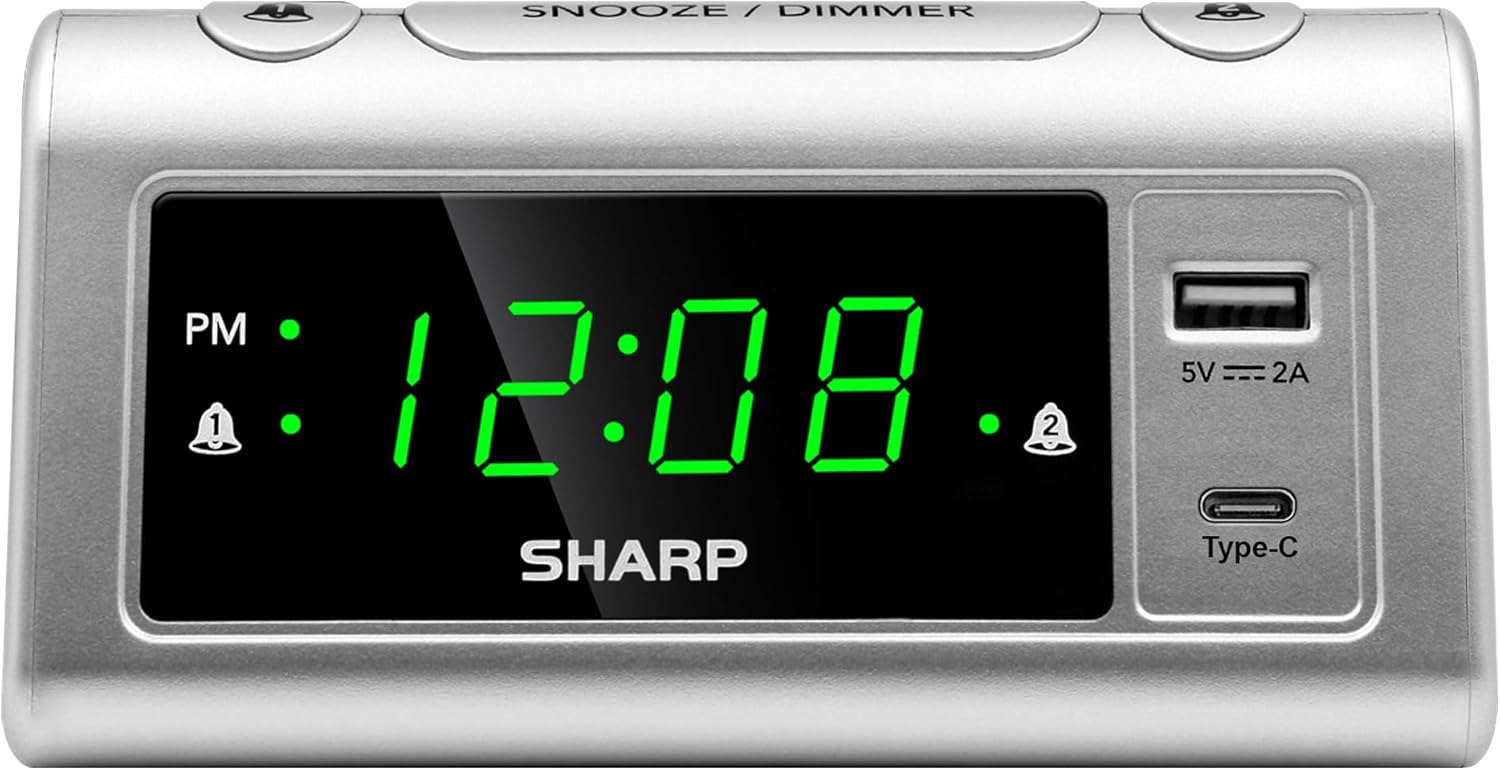
أمام view of the Sharp Alarm Clock, showcasing the large green LED time display, PM indicator, alarm indicators, and the integrated USB-A and USB-C charging ports on the right side.

من أعلى إلى أسفل view of the alarm clock with labels indicating the 'Time Set', 'Time Advancing', 'Time Receding', 'Alarm 1 Set ON/OFF', 'Alarm 2 Set ON/OFF', 'Snooze/Dimmer Control (3-Levels of Brightness)', 'Super Fast Charging USB-C', and 'Fast Charging 2 Amp USB'. Dimensions are also shown as 5.65 inches wide and 2.95 inches high.
يثبت
1. توصيل الطاقة
Plug the AC power cord into a standard 120V AC wall outlet. The clock display will illuminate, and the time will default to 12:00 AM.
2. تركيب البطارية الاحتياطية
For optional battery backup, insert 2 x AAA batteries (not included) into the battery compartment located on the bottom of the unit. This feature ensures that time and alarm settings are retained during a power interruption. The display will not be lit during battery backup, but the alarm will still sound.

The bottom of the alarm clock, revealing the battery compartment for 2 AAA batteries (not included) to provide backup power for settings.
تعليمات التشغيل
1. ضبط الوقت
- اضغط مع الاستمرار على الوقت المحدد اضغط على الزر. ستبدأ أرقام الساعة بالوميض.
- بينما يحمل الوقت المحدداضغط على ساعة اضغط على الزر بشكل متكرر لضبط الساعة. راقب مؤشر الفترة المسائية للتأكد من ضبط الفترة الصباحية/المسائية بشكل صحيح.
- بينما يحمل الوقت المحدداضغط على دقيقة اضغط على الزر بشكل متكرر لضبط الدقائق.
- أطلق سراح الوقت المحدد زر لتأكيد الوقت.
2. ضبط المنبهات (منبهات مزدوجة)
This clock features two independent alarms (Alarm 1 and Alarm 2).
- اضغط مع الاستمرار على مجموعة الإنذار 1 button. The hour digits for Alarm 1 will flash.
- بينما يحمل مجموعة الإنذار 1اضغط على ساعة زر لتعيين ساعة التنبيه المطلوبة.
- بينما يحمل مجموعة الإنذار 1اضغط على دقيقة زر لضبط دقائق التنبيه المطلوبة.
- أطلق سراح مجموعة الإنذار 1 زر للتأكيد.
- To activate Alarm 1, press the المنبه 1 تشغيل/إيقاف button until the alarm indicator (bell icon) appears next to 'AL1' on the display.
- كرر الخطوات من 1 إلى 5 مجموعة الإنذار 2 و المنبه 2 تشغيل/إيقاف to set and activate the second alarm.
3. وظيفة الغفوة
عند سماع صوت الإنذار، اضغط على الزر الكبير غفوة / باهتة button on top of the clock. The alarm will pause for 9 minutes and then sound again.
4. مُخفِّض إضاءة الشاشة
لضبط سطوع شاشة LED، اضغط بشكل متكرر على غفوة / باهتة button when the alarm is not sounding. Cycle through the three brightness levels (High, Medium, Low) and an Off setting.

The Sharp Alarm Clock displaying the time, with a hand adjusting the dimmer function on the top of the unit. This allows for comfortable viewفي ظروف الإضاءة المختلفة.
5. منافذ شحن USB
The alarm clock features both a USB Type-C port and a standard USB Type-A port for charging your electronic devices. Simply connect your device's charging cable to the appropriate port on the right side of the clock.
- USB نوع-C: Provides super-fast charging for compatible devices like the iPhone 15 or Galaxy smartphones.
- USB من النوع A: يسلم 2 Amps of fast charging power for other USB-powered devices.

The Sharp Alarm Clock with a smartphone connected to its USB-C port, indicating active charging. The clock also features a USB-A port for additional device charging.
صيانة
- تنظيف: امسح الساعة بقطعة قماش ناعمة وجافة. لا تستخدم المنظفات الكاشطة أو المذيبات.
- سلك الطاقة: افحص سلك الطاقة بانتظام للتأكد من خلوه من أي تلف. في حال وجود أي تلف، توقف عن الاستخدام واتصل بخدمة العملاء.
- استبدال البطارية: Replace AAA backup batteries annually or when the clock's settings are no longer retained during power outagإِسْ
استكشاف الأخطاء وإصلاحها
| مشكلة | حل |
|---|---|
| شاشة الساعة فارغة. | Ensure the AC power cord is securely plugged into a working outlet. Check if the dimmer is set to 'Off'. |
| لا يصدر صوت الإنذار. | Verify that the alarm is set and activated (bell icon visible). Check the alarm time is correct (AM/PM). |
| منافذ USB لا تشحن. | Ensure the clock is powered via AC. Check the charging cable and device compatibility. |
| الوقت/الإعدادات المفقودة بعد انقطاع الطاقةtage. | Install fresh AAA batteries for the backup function. |
تحديد
- ماركة: حاد
- نموذج: B0CHXR25FJ
- لون: فضي
- نوع العرض: LED (أخضر)
- أبعاد المنتج: 5.56 بوصة عرض × 2.67 بوصة ارتفاع
- مصدر الطاقة: كهرباء سلكية
- البطارية النسخ الاحتياطي: بطاريتان AAA (غير متضمنتان)
- مخرج USB-C: شحن فائق السرعة
- إخراج USB-A: 2 Amps Fast Charging
- المميزات الخاصة: Charging Port, Corded, Dual Alarms, 3-Step Dimmer, Snooze
فيديو المنتج الرسمي
An official video from Sharp, titled 'Sharp Clocks - Keeps the Rhythm of Your Day', showcasing the features and design of Sharp alarm clocks, including this model.
الضمان والدعم
For warranty information or technical support, please refer to the documentation included with your product or visit the official Sharp webالموقع. احتفظ بإيصال الشراء الخاص بك كإثبات للشراء في حالة وجود أي مطالبات بالضمان.


