1. المقدمة
Thank you for choosing the ATuMan Digital Thermometer Hygrometer. This device is designed to provide accurate and real-time monitoring of indoor temperature and humidity, helping you maintain a comfortable and healthy living environment. It also features a large digital display for time and date, making it a versatile addition to your home, office, greenhouse, or warehouse.
2. انتهى المنتجview
The ATuMan Digital Thermometer Hygrometer features a clear LCD display and a compact design, allowing for easy placement and readability.
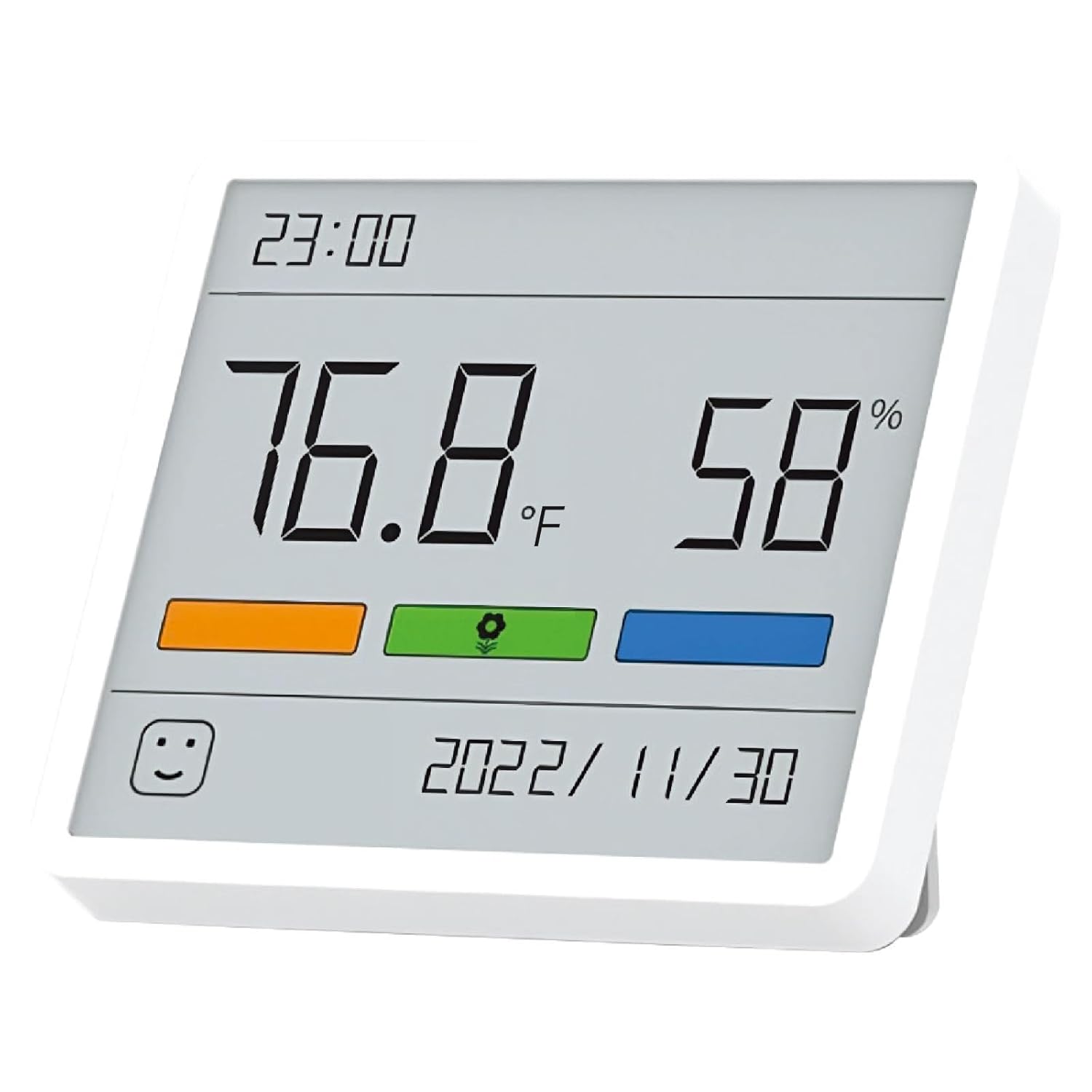
الشكل 2.1: الجبهة view of the ATuMan Digital Thermometer Hygrometer, showing the large digital display with temperature, humidity, time, and date. The comfort indicator is visible at the bottom.

الشكل 2.2: انتهىview of key features including thermometer, hygrometer, comfort indicator, alarm clock (implied by time display), and Celsius/Fahrenheit switching capability.

Figure 2.3: Diagram illustrating the dimensions of the 3.67-inch LCD display, highlighting its large digits for easy viewعمل.
3. المميزات
- High Accuracy & Faster Refresh: Refreshes every 30 seconds for updated and accurate readings. Measures temperature from 14°F-140°F (-9.9°C-60°C) and relative humidity from 10%-99%. Temperature accuracy: ±2°C; relative humidity accuracy: ±5%RH.
- مؤشر راحة الهواء: Displays dry, comfortable, or humid conditions at a glance, helping you adjust your environment.
- 3.67-inch LCD Display & Easy to Read: Large digits provide real-time temperature and humidity readings. Portable, lightweight, and compact.
- الوحدات القابلة للتبديل: Easily switch between Celsius and Fahrenheit by pressing the '+' button. Select 12h/24h time format by pressing the '-' button.
- Minimalist Design with 2 Mounting Options: Can be placed on a desktop using its stand or adhered to a wall with the nano-adhesive sticker.
- Battery Powered & Long Battery Life: Powered by 2 x CR2032 button cell batteries (included), providing approximately 20 months of battery life.
- وظيفة ذاكرة انقطاع التيار الكهربائي: Retains settings after power-off, requiring only a single setup.
4. محتويات العبوة
- 1 x ATuMan Digital Thermometer Hygrometer
- 2 x CR2032 Button Cell Batteries (pre-installed or included separately)
- 1 x Nano-adhesive Sticker for wall mounting
- 1 × دليل المستخدم (هذه الوثيقة)
5. الإعداد
5.1 تركيب البطارية
- حدد مكان حجرة البطارية في الجزء الخلفي من الجهاز.
- If batteries are not pre-installed, insert the 2 x CR2032 button cell batteries, ensuring the correct polarity (+/-) as indicated inside the compartment.
- أغلق غطاء حجرة البطارية جيدًا.
5.2 التشغيل الأولي
Once batteries are installed, the device will automatically power on and display the current temperature, humidity, time, and date. Allow a few minutes for the readings to stabilize after initial power-on or relocation.
6. تعليمات التشغيل
6.1 عرض أكثرview
تعرض شاشة LCD الكبيرة المعلومات التالية:
- قمة: Current time (HH:MM)
- منتصف اليسار: Temperature reading (e.g., 76.8°F or 24.9°C)
- Middle Right: Humidity reading (e.g., 58%)
- قاع: Current date (YYYY/MM/DD)
- أسفل اليسار: Comfort Indicator icon (smiley face, neutral face, sad face)
6.2 وحدات درجة حرارة التبديل (°م/°ف)
To switch between Celsius (°C) and Fahrenheit (°F), locate the '+' button on the back or side of the device and press it once. The display will immediately update to the selected unit.
6.3 Switching Time Format (12h/24h)
To switch between 12-hour and 24-hour time formats, locate the '-' button on the back or side of the device and press it once. The time display will adjust accordingly.
6.4 Understanding the Air Comfort Indicator
The comfort indicator provides a quick visual cue about the current indoor air conditions:
- مريح: Indicates optimal temperature and humidity levels.
- جاف: Indicates low humidity, potentially requiring a humidifier.
- رطب: Indicates high humidity, potentially requiring a dehumidifier.

Figure 6.1: The comfort indicator icon changes to reflect dry, comfortable, or humid conditions, reminding you to adjust your home environment for optimal well-being.
6.5 Placement Methods
The device offers two convenient placement options:
- حامل سطح المكتب: Utilize the integrated kickstand on the back of the device to place it upright on any flat surface such as a table, desk, or shelf.
- التثبيت على الحائط: Use the provided nano-adhesive sticker. Clean the desired wall surface, apply the sticker to the back of the device, and then firmly press the device onto the wall.

Figure 6.2: Visual representation of the two placement methods: using the tabletop stand or mounting on a wall with the nano-adhesive sticker.
For accurate readings, place the device away from direct sunlight, heat sources, or drafts.
7. الصيانة
7.1 التنظيف
امسح الجهاز برفق بقطعة قماش ناعمة وجافة. لا تستخدم المنظفات الكاشطة أو المذيبات، ولا تغمر الجهاز في الماء.
7.2 استبدال البطارية
When the display dims or readings become inconsistent, it may be time to replace the batteries. Follow the steps in Section 5.1 to replace the 2 x CR2032 button cell batteries. Dispose of old batteries responsibly according to local regulations.
8. استكشاف الأخطاء وإصلاحها
| مشكلة | السبب المحتمل | حل |
|---|---|---|
| لا يوجد عرض أو عرض باهت | البطاريات فارغة أو تم تركيبها بشكل غير صحيح. | Replace batteries (2 x CR2032) and ensure correct polarity. |
| قراءات غير دقيقة | Device placed near heat sources, direct sunlight, or drafts. Sensor blocked. | Relocate the device to a stable environment. Ensure the back inlet hole is clear. |
| شاشة العرض متجمدة أو غير مستجيبة | خلل مؤقت في البرنامج. | Remove batteries for 10 seconds, then reinsert to reset the device. |
9. المواصفات
| نموذج: | atuman-th1-clock |
| نطاق درجة الحرارة: | 14°F - 140°F (-9.9°C - 60°C) |
| دقة درجة الحرارة: | ±2 درجة مئوية |
| نطاق الرطوبة: | رطوبة نسبية من 10% إلى 99% |
| دقة الرطوبة: | ±5% رطوبة نسبية |
| معدل التحديث: | كل 30 ثواني |
| عرض: | شاشة LCD مقاس 3.67 بوصة |
| مصدر الطاقة: | 2 x CR2032 Button Cell Batteries (included) |
| عمر البطارية: | حوالي 20 أشهر |
| أبعاد المنتج: | 6.86 x 7.87 x 1.78 cm; 60 g (or 6.9W x 1.8H Centimetres) |
| خيارات التركيب: | سطح الطاولة، مثبت على الحائط |
10. الضمان والدعم
For warranty information or technical support, please refer to the product packaging or contact ATuMan customer service through the retailer where the product was purchased. Please have your model number (atuman-th1-clock) and purchase details ready when contacting support.


