1. المقدمة
This manual provides detailed instructions for the setup, operation, maintenance, and troubleshooting of your CUPEISI YQ10S MAX Android 15 Tablet. Please read this manual thoroughly before using your device to ensure proper functionality and to maximize your user experience. Keep this manual for future reference.

Image 1.1: CUPEISI YQ10S MAX Android 15 Tablet with included accessories (keyboard, mouse, stylus, and protective case).
2. محتويات العبوة
تأكد من وجود جميع العناصر المدرجة أدناه في عبوة المنتج الخاص بك:
- CUPEISI YQ10S MAX Android 15 Tablet
- لوحة المفاتيح اللاسلكية
- ماوس البلوتوث
- Foldable Protective Cover
- قلم
- كابل من النوع C
- شاحن
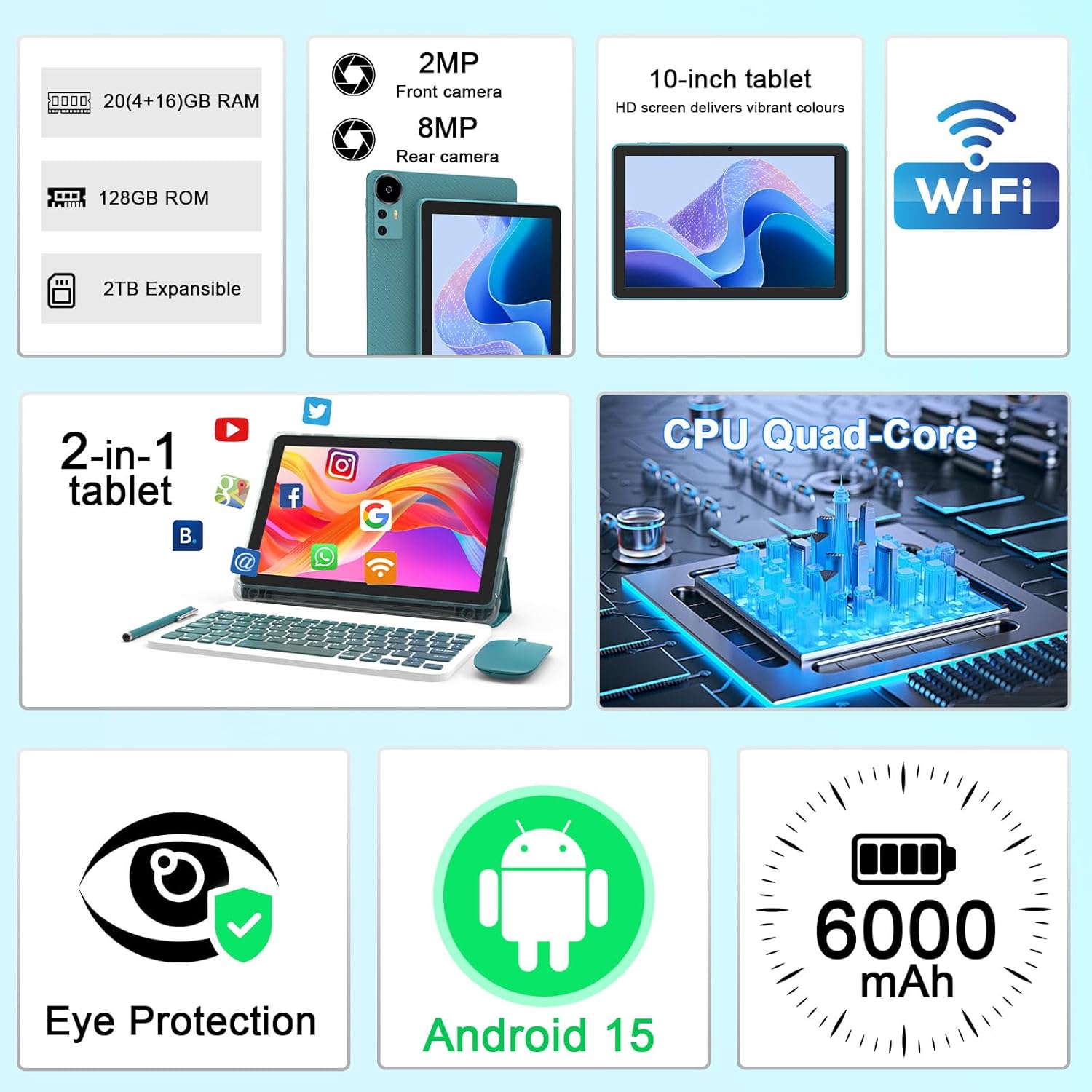
الصورة 2.1: انتهىview of key features and included components.
3. الإعداد الأولي
3.1 تشغيل/إيقاف التشغيل
- لتشغيل: اضغط مع الاستمرار على زر الطاقة الموجود على جانب الجهاز اللوحي حتى تضيء الشاشة.
- لإيقاف التشغيل: اضغط مع الاستمرار على زر الطاقة، ثم حدد "إيقاف التشغيل" من الخيارات التي تظهر على الشاشة.
- لإعادة التشغيل: Press and hold the power button, then select 'Restart' from the options.
3.2 شحن الجهاز اللوحي
Before first use, fully charge the tablet. Use the provided Type-C cable and charger.
- Connect the Type-C cable to the tablet's charging port.
- قم بتوصيل الطرف الآخر للكابل بمحول الطاقة.
- قم بتوصيل محول الطاقة بمأخذ الحائط.
- The battery icon on the screen will indicate charging status. A full charge typically takes several hours.

Image 3.1: Battery and charging information.
3.3 Connecting Accessories (Keyboard, Mouse, Stylus)
The tablet supports Bluetooth connectivity for the included keyboard and mouse.
- تمكين البلوتوث: اذهب الى إعدادات > الأجهزة المتصلة > بلوتوث وتشغيله.
- إقران لوحة المفاتيح/الماوس: Put the keyboard or mouse into pairing mode (refer to their individual instructions if needed). Select the device name from the list of available Bluetooth devices on your tablet to pair.
- القلم: The included stylus is typically passive and does not require pairing. It can be used directly on the screen for navigation or drawing.
3.4 اتصال واي فاي
قم بتوصيل جهازك اللوحي بشبكة Wi-Fi للوصول إلى الإنترنت.
- اذهب الى إعدادات > الشبكات والانترنت > واي فاي.
- قم بتشغيل الواي فاي. سيقوم الجهاز اللوحي بالبحث عن الشبكات المتاحة.
- حدد الشبكة المطلوبة من القائمة.
- إذا طُلب منك ذلك، أدخل كلمة مرور الشبكة وانقر يتصل.
4. التشغيل الأساسي
4.1 التنقل في نظام Android 15
Your tablet runs on Android 15, offering an intuitive user interface. Swipe gestures, tap actions, and the navigation bar (Back, Home, Recents) are standard for interaction. The Google Mobile Services (GMS) certification ensures access to the Google Play Store and other Google applications.

Image 4.1: Android 15 operating system features.
4.2 إعدادات العرض
The 10.1-inch IPS display with 1280x800 resolution provides clear visuals. You can adjust display settings to suit your preferences:
- سطوع: Adjust screen brightness from the quick settings panel or in إعدادات > عرض.
- وضع القراءة: Enable 'Reading Mode' in display settings to reduce blue light emission, which can enhance comfort during extended reading sessions.
- حجم الخط: قم بتخصيص حجم النص لتحسين سهولة القراءة.

Image 4.2: Details of the 10.1-inch HD screen display.
4.3 إدارة التخزين
The tablet features 128GB of internal storage and 20GB RAM (4GB physical + 16GB virtual expansion). Storage can be expanded up to 2TB using a microSD card (not included).
- التحقق من التخزين: اذهب الى إعدادات > تخزين ل view internal and external storage usage.
- أدخل بطاقة MicroSD: Locate the microSD card slot on the tablet, insert the card gently until it clicks into place.

Image 4.3: Storage and RAM configuration.
4.4 استخدام الكاميرا
الجهاز اللوحي مزود بكاميرا خلفية بدقة 8 ميجابكسل وكاميرا أمامية بدقة 2 ميجابكسل.
- افتح تطبيق الكاميرا: انقر على أيقونة الكاميرا في شاشتك الرئيسية أو في قائمة التطبيقات.
- تبديل الكاميرات: استخدم أيقونة تبديل الكاميرا للتبديل بين الكاميرا الأمامية والخلفية.
- التقاط الصور/الفيديوهات: اضغط على زر الغالق لالتقاط صورة أو بدء/إيقاف تسجيل الفيديو.

Image 4.4: Camera specifications and modes.
4.5 تشغيل الوسائط المتعددة
The tablet supports Widevine L1, enabling high-definition streaming from platforms like Netflix, Hulu, YouTube, and Prime Video.
- تأكد من وجود اتصال إنترنت مستقر للحصول على جودة بث مثالية.
- Download streaming apps from the Google Play Store.

Image 4.5: Widevine L1 support for multimedia streaming.
4.6 تعدد المهام
Android 15 enhances multitasking capabilities. Use the 'Recents' button to switch between open applications or utilize split-screen mode for running two apps simultaneously.
- تقسيم الشاشة: From the 'Recents' view, tap the app icon at the top of an app's card and select 'Split screen'. Choose a second app to open alongside it.
- The included keyboard and mouse facilitate a laptop-like experience for productivity tasks.

Image 4.6: Tablet used in 2-in-1 mode with keyboard and mouse.
5. الرعاية والصيانة
5.1 التنظيف
- استخدم قطعة قماش ناعمة وخالية من الوبر لتنظيف الشاشة وجسم الجهاز اللوحي.
- تجنب استخدام المواد الكيميائية القاسية، أو المنظفات الكاشطة، أو البخاخات الهوائية.
- تأكد من إيقاف تشغيل الجهاز اللوحي وفصله عن الكهرباء قبل التنظيف.
5.2 العناية بالبطارية
- تجنب تعريض الجهاز اللوحي لدرجات حرارة قصوى (ساخنة أو باردة).
- Do not leave the tablet fully discharged for extended periods.
- Use only the provided charger and cable to prevent damage to the battery.
5.3 تحديثات البرامج
- قم بالتحقق من تحديثات البرامج وتثبيتها بانتظام لضمان الأداء الأمثل والأمان والوصول إلى الميزات الجديدة.
- اذهب الى إعدادات > نظام > تحديث النظام للتحقق من التحديثات المتاحة.
6. استكشاف الأخطاء وإصلاحها
إذا واجهت مشاكل مع جهازك اللوحي، فراجع المشاكل والحلول الشائعة التالية:
6.1 مشاكل الطاقة
- الجهاز اللوحي لا يعمل: تأكد من شحن البطارية. وصّل الشاحن وانتظر بضع دقائق قبل إعادة تشغيل الجهاز.
- Tablet freezes: اضغط مع الاستمرار على زر الطاقة لمدة 10-15 ثانية لفرض إعادة التشغيل.
6.2 مشاكل الاتصال
- عدم الاتصال بشبكة Wi-Fi: Check if Wi-Fi is enabled in settings. Restart your router and the tablet. Ensure you are entering the correct password.
- جهاز البلوتوث غير مقترن: Ensure the Bluetooth accessory is in pairing mode and within range. Restart Bluetooth on the tablet and try pairing again.
6.3 Performance Lags
- الأداء البطيء: Close unused applications running in the background. Clear cache data for frequently used apps. Consider adding a microSD card for additional storage if internal storage is nearly full.
- تعطل التطبيقات: Ensure apps are updated to their latest versions. Clear the app's cache and data (إعدادات > التطبيقات > [اسم التطبيق] > تخزين).
7. مواصفات المنتج
| ميزة | مواصفة |
|---|---|
| ماركة | كوبيسي |
| اسم الموديل | CP31M (Item model number: YQ10S MAX) |
| نظام التشغيل | أندرويد 15 |
| حجم الشاشة | 10.1 بوصة |
| دقة الشاشة | 1280 × 800 بكسل (عالي الدقة) |
| المعالج | معالج رباعي النواة بسرعة 2.0 جيجاهرتز |
| كبش | 20 جيجابايت (4 جيجابايت فعلي + 16 جيجابايت للتوسيع) |
| التخزين الداخلي | 128 جيجا بايت |
| تخزين قابل للتوسيع | Up to 2TB with microSD card (not included) |
| نوع لاسلكي | 802.11ax (Wi-Fi 6.0, 2.4G/5G) |
| بلوتوث | بي تي 5.0 |
| الكاميرا الخلفية | 8 ميجا بكسل |
| الكاميرا الأمامية | 2 ميجا بكسل |
| سعة البطارية | 6000 مللي أمبير |
| متوسط عمر البطارية | 6-8 Hours (usage dependent) |
| الأبعاد (الطول × العرض × الارتفاع) | 9.7 × 6.5 × 0.3 بوصة |
| وزن العنصر | 0.176 أونصات |
| لون | NavyBlue |
8. الضمان والدعم
For warranty information, please refer to the warranty card included in your product packaging or contact CUPEISI customer support directly. If you require technical assistance or have questions not covered in this manual, please reach out to our support team through the contact information provided with your purchase.


